
1. Einleitung
This manual provides detailed instructions for the Kactoily 4-in-1 Freshwater Aquarium Monitor. This device is designed to measure four critical water parameters simultaneously: pH, Total Dissolved Solids (TDS), Electrical Conductivity (EC), and Temperature. It features a split design with a separate probe unit and display unit, utilizing 2.4GHz technology for data transmission, allowing for convenient real-time monitoring of your aquarium's water quality.

Figure 1: Kactoily 4-in-1 Freshwater Aquarium Monitor
2. Packungsinhalt
Bitte überprüfen Sie, ob alle unten aufgeführten Artikel in Ihrem Paket enthalten sind:
- Kactoily Wireless Monitor (Display Unit) x1
- Probe Unit x1
- Calibration Powder x6
- USB-Ladekabel x2
- Saugnapf x2
- Acrylic Stand x1
- Plastic Screw x2
- Benutzerhandbuch x1
- Charger Plug (Optional) x2
- Paste (Optional) x1

Abbildung 2: Enthaltene Komponenten
3. Produktüberschreitungview und Funktionen
The Kactoily 4-in-1 Aquarium Monitor offers advanced features for comprehensive water quality assessment:
- 4-in-1-Messung: Measures pH, TDS, EC, and Temperature simultaneously.
- Echtzeitüberwachung: Provides continuous data display on a clear LCD screen.
- Geteiltes Design: Probe and main unit are separate, connected via 2.4GHz technology for flexible placement and observation.
- High-Precision Probes: Equipped with platinum probes for enhanced longevity and accurate measurements. Probes are easily replaceable.
- IP67 Wasserdicht: The probe unit is designed to be waterproof for reliable underwater operation.
- Multiple Fixation Methods: Includes an acrylic stand and suction cups to suit various aquarium setups.
- Benutzerfreundliche Anzeige: Features a 1.6-inch color LCD screen for high-resolution and clear data visibility.
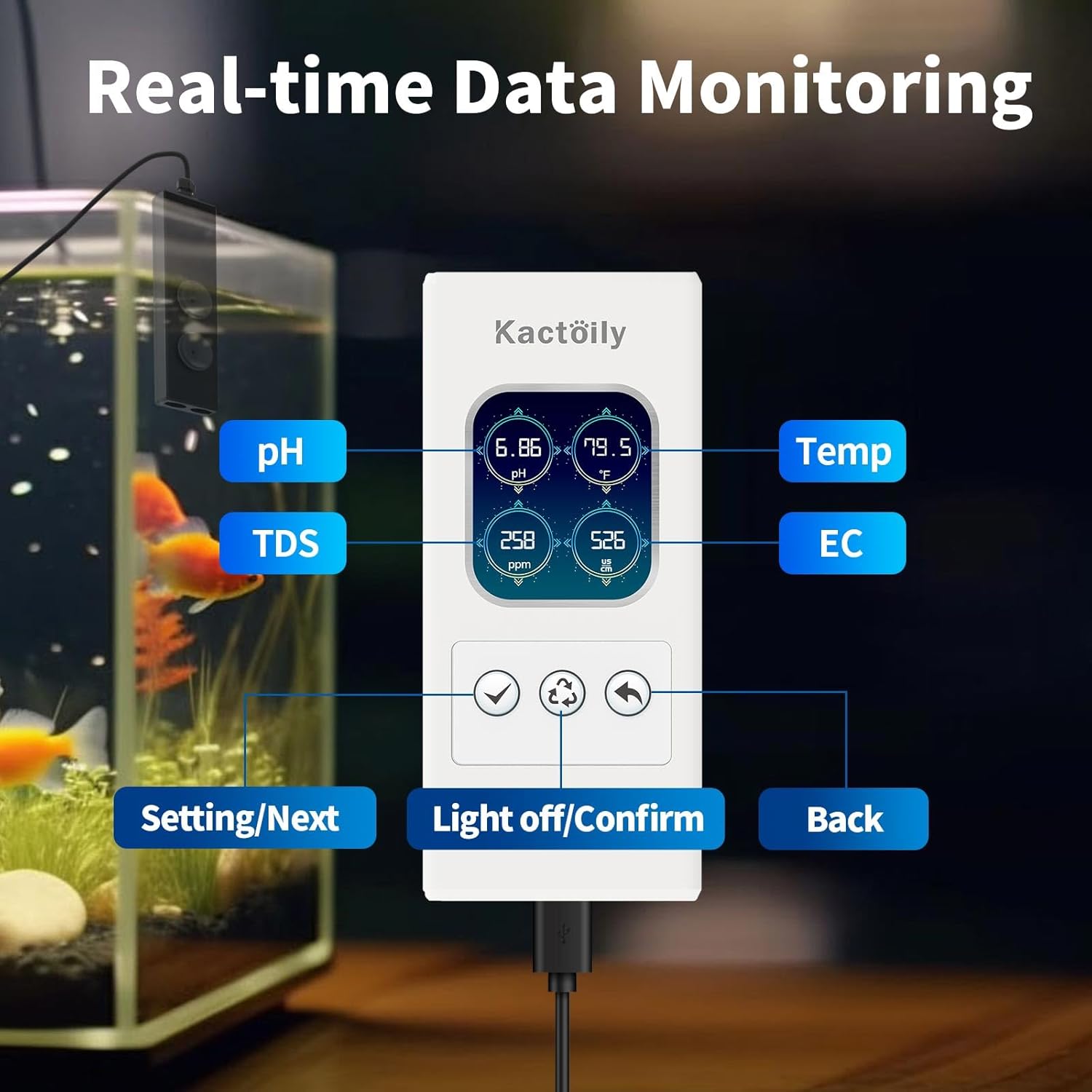
Figure 3: Real-time Data Monitoring Display

Figure 4: High-Precision Probe Design
4. Einrichtungsanweisungen
- Komponenten auspacken: Nehmen Sie alle Artikel vorsichtig aus der Verpackung und überprüfen Sie sie anhand der Packungsinhaltsliste.
- Bereiten Sie die Sonde vor: Unscrew the probe protection cap clockwise. The cap contains protection fluid; this can be replenished with pure water if needed.
- Attach Suction Cups/Stand: Snap the provided suction cups into the sensor unit or attach the acrylic stand as desired. The device supports various fixation methods to suit different fish tank styles.
- Positionieren Sie die Sonde: Place the probe unit into the aquarium water, ensuring it is submerged to the appropriate level (between the 'Min level' and 'Max level' markings on the probe unit).
- Strom anschließen: Plug the data cable from the probe unit into the display unit, and then connect the display unit to a power source using the USB charging cable and adapter. The display will illuminate and begin showing readings.

Figure 5: Probe Installation with Suction Cups and Acrylic Stand

Figure 6: Product Dimensions for Placement Consideration
5. Bedienungsanleitung
5.1. Echtzeitüberwachung
Once powered on, the monitor will automatically display real-time readings for pH, TDS, EC, and Temperature on its LCD screen. The display is backlit for clear visibility.
5.2. Manual Calibration and Adjustment
To ensure accurate measurements, periodic calibration is necessary. The monitor allows for manual calibration of pH, EC, and temperature settings.
5.2.1. pH-Kalibrierung
- Access the settings menu on the display unit.
- Navigate to the 'pH-set' option.
- Follow the on-screen prompts to perform 2-point or 3-point calibration using standard pH buffer solutions (e.g., pH 4.01, pH 7.00, pH 9.18).
- Adjust the pH value if necessary using the 'pH-Adj' option.

Figure 7: pH Calibration Process
5.2.2. EC Calibration
- Greifen Sie auf das Einstellungsmenü zu.
- Navigate to the 'EC-set' option.
- Perform calibration using a standard EC solution (e.g., 1413 µS/cm).
- Adjust the EC or TDS value if necessary using the 'EC-Adj' or 'TDS-Adj' option.

Figure 8: EC Calibration Process
5.2.3. Temperatureinstellung
- Greifen Sie auf das Einstellungsmenü zu.
- Navigate to the 'Temp-set' option.
- Select your preferred unit (Celsius or Fahrenheit) and set any necessary temperature compensation values.

Figure 9: Temperature Unit and Compensation Setting
6. Wartung
- Sondenreinigung: Regularly clean the probe tips to prevent buildup that can affect accuracy. Use distilled water or a mild cleaning solution specifically designed for pH/EC probes.
- Sondenaufbewahrung: When not in use, ensure the probe protection cap is securely in place and contains the appropriate storage solution (or pure water) to keep the probe hydrated.
- Neukalibrierung: Calibrate the device regularly, especially if readings appear inconsistent or after cleaning the probes, to maintain accuracy.
- Stromversorgung: Stellen Sie sicher, dass das Gerät an eine stabile Stromquelle angeschlossen ist.
7. Fehlerbehebung
- Ungenaue Messwerte:
- Stellen Sie sicher, dass die Sonden sauber und frei von Verunreinigungen sind.
- Perform a full calibration for pH and EC as described in Section 5.2.
- Check if the probe protection fluid needs replenishment.
- pH Value Does Not Change During Calibration:
- Go to the calibration page and select the 'Reset' option to restore factory settings. This will delete all calibration data, requiring a full recalibration.

Figure 10: Factory Reset Option
- Kein Display/Stromanschluss:
- Verify that the USB charging cable is securely connected to both the display unit and the power adapter, and that the adapter is plugged into a working power outlet.
- Ensure the data cable connecting the probe unit to the display unit is properly inserted.
- Connectivity Issues (Probe to Display):
- Ensure the probe unit and display unit are within the specified operating range (6.5 feet).
- Check for any obstructions that might interfere with the 2.4GHz signal.
8. Spezifikationen
| Parameter | Reichweite | Auflösung | Genauigkeit |
|---|---|---|---|
| pH | 0-14 | 0.01 | ±0.05 |
| Temperatur | 0–60 °C (32–140 °F) | 0.1 °C / 0.5 °F | ± 0.1 ° C / ± 0.1 ° F |
| Gesamtgehalt an gelösten Feststoffen (TDS) | 0-999 ppm / 1-200 ppt | 1ppm / 1ppt | ± 5% FS |
| Elektrische Leitfähigkeit (EC) | 0-999µs/cm / 1-400ms/cm | 1µs/cm / 1ms/cm | ± 5% FS |
| Salzgehalt | 0.01 % – 25 % | / | ±0.1% (0.01%-5%) / ±1% (5.1%-25%) |
| Spezifisches Gewicht | 1-1.222 | / | / |
Table 1: Measurement Specifications

Figure 11: Detailed Specifications Chart
Allgemeine Spezifikationen:
- Marke: kactoily
- Modellnummer: 4-in-1
- Paketabmessungen: 11.81 x 3.74 x 2.44 Zoll
- Artikelgewicht: 1.65 Pfund
- Montageart: Wall Mount (with included accessories)
- Batterie: Keine Batterien erforderlich (Stromversorgung über USB)
9. Garantie und Kundendienst
Kactoily is committed to the quality of this digital pH meter and provides a warranty or refund for the product. If you encounter any questions or issues regarding your purchase or the operation of the device, please do not hesitate to contact our customer service team. We aim to resolve your problem within 24 hours.
For support, please refer to the contact information provided with your purchase documentation or visit the official kactoily webWebsite.