
1. Sicherheitshinweise
Please read all safety instructions carefully before assembly and operation to prevent injury or damage to the product.
- Stellen Sie sicher, dass der Schreibtisch auf einer ebenen, stabilen Oberfläche aufgebaut wird.
- Do not exceed the maximum load capacity of 80 kg (dynamic).
- Halten Sie Kinder und Haustiere während der Höhenverstellung vom Schreibtisch fern.
- Achten Sie beim Verstellen der Höhe des Schreibtisches darauf, dass sich keine Hindernisse oberhalb oder unterhalb des Schreibtisches befinden.
- Setzen oder stehen Sie nicht auf dem Schreibtischrahmen.
- Only use the power adapter provided with the desk.
- Überprüfen Sie regelmäßig alle Schrauben und Bolzen, um sicherzustellen, dass sie fest angezogen sind.
2. Produktüberschreitungview
The FLEXISPOT Electric Standing Desk frame is designed for ergonomic versatility, allowing seamless transitions between sitting and standing positions. It features a robust steel construction and a digital control panel for easy height adjustments and memory presets.
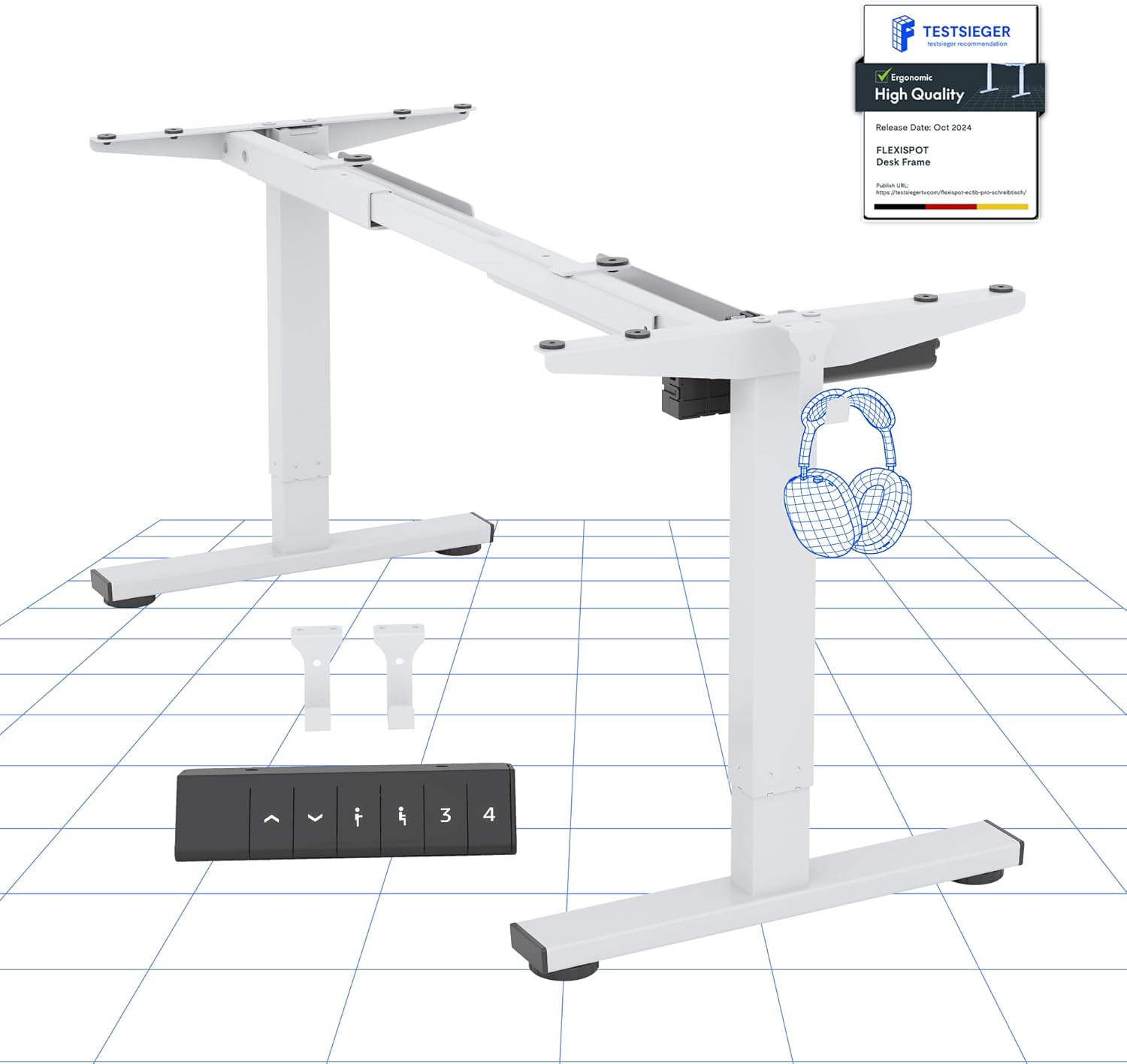
Bild 2.1: Überview of the FLEXISPOT Electric Standing Desk Frame and its digital control panel.
Schlüsselkomponenten:
- Verstellbare Beine: Zwei-stage lifting columns for smooth height transitions.
- Querlatte: Connects the legs and supports the desktop.
- Füße: Provide stability and include anti-slip pads.
- Digitales Bedienfeld: For height adjustment and memory functions.
- Motor: Powers the height adjustment mechanism.
- Kontrollkasten: Houses the electronic components.
3. Einrichtungsanweisungen
Follow these steps to assemble your FLEXISPOT Electric Standing Desk frame. A desktop (not included) is required for full functionality.
3.1 Desktop-Kompatibilität
The desk frame is designed to accommodate desktops with the following dimensions:
- Länge: 100 cm bis 160 cm (39.4 Zoll bis 63 Zoll)
- Breite: 50 cm bis 80 cm (19.7 Zoll bis 31.5 Zoll)

Image 3.1: Illustration of the adaptable desktop size range for the desk frame.
3.2 Montageschritte
- Komponenten auspacken: Carefully remove all parts from the packaging and verify against the parts list (refer to your included physical manual for a detailed list).
- Assemble Feet: Attach the feet to the bottom of each lifting column using the provided screws.
- Querträger verbinden: Extend the crossbar to the desired width for your desktop. Securely attach the crossbar to the lifting columns.
- Schaltkasten und Motor einbauen: Mount the control box and motor according to the instructions in your physical manual, ensuring all cables are connected correctly.
- Bedienfeld anhängen: Secure the digital control panel to the underside of your chosen desktop in an accessible location.
- Desktop einbinden: Carefully place your desktop onto the assembled frame. Align the pre-drilled holes (if any) or mark and drill new pilot holes. Secure the desktop to the frame using appropriate screws.
- Kabelmanagement: Organize and secure all cables to prevent tangling and ensure safe operation.
- Erstes Einschalten: Stecken Sie den Netzadapter in die Steuereinheit und anschließend in eine Wandsteckdose.
4. Bedienungsanleitung
Your FLEXISPOT Electric Standing Desk is equipped with a user-friendly digital control panel for effortless height adjustment.
4.1 Digital Control Panel Functions

Abbildung 4.1: Detailansicht view des digitalen Bedienfelds.
- Auf-/Ab-Tasten (▲ / ▼): Press and hold to manually adjust the desk height up or down. The current height is displayed on the LED screen.
- Speichervoreinstellungen (1, 2, 3, 4): Mithilfe dieser Tasten können Sie bis zu vier bevorzugte Höheneinstellungen speichern und wieder aufrufen.
- 'M' Button (or 'Set' button, if present): Used to save a height into a memory preset.
4.2 Einstellen von Speichervoreinstellungen
- Stellen Sie den Schreibtisch mithilfe der Auf-/Ab-Tasten auf die gewünschte Höhe ein.
- Press the 'M' button (or 'Set' button). The LED display will show 'S-'.
- Within 3 seconds, press one of the number buttons (1, 2, 3, or 4) to save the current height to that preset. The display will show the number you pressed, confirming the setting.
4.3 Antikollisionssystem
The desk is equipped with an advanced anti-collision system. If the desk encounters an obstacle during height adjustment, it will automatically stop and reverse slightly to prevent damage or injury. This feature enhances safety during operation.

Image 4.2: Visual representation of the anti-collision system and other features.
5. Wartung
Durch sachgemäße Wartung wird die Langlebigkeit und optimale Leistung Ihres Stehtisches sichergestellt.
- Reinigung: Wischen Sie das Tischgestell und das Bedienfeld mit einem weichen, fusselfreien Tuch ab.amp Mit einem Tuch abwischen. Vermeiden Sie scheuernde Reiniger oder Lösungsmittel.
- Kabelmanagement: Periodically check that all cables are securely fastened and not pinched or damaged.
- Befestigungsmaterial: Stellen Sie sicher, dass alle Schrauben und Bolzen fest angezogen sind. Ziehen Sie sie gegebenenfalls nach.
- Anti-Rutsch-Pads: Verify that the anti-slip pads on the feet are intact and providing stable contact with the floor.
6. Fehlerbehebung
Sollten Sie Probleme mit Ihrem Schreibtisch haben, beachten Sie bitte die folgenden häufig auftretenden Probleme und Lösungen:
| Problem | Mögliche Ursache | Lösung |
|---|---|---|
| Der Schreibtisch bewegt sich nicht. | Stromkabel nicht angeschlossen, Motorkabel lose, Überlastung. | Check all cable connections. Reduce weight on the desk. Perform a reset (see below). |
| Der Schreibtisch wackelt ungleichmäßig. | Ungleichmäßige Belastung, lose Verbindungen. | Distribute weight evenly. Check all connections. Perform a reset. |
| Fehlercode angezeigt. | Spezifischer Systemfehler. | Refer to your physical manual for specific error code meanings. Often, a reset can resolve temporary errors. |
| Das Antikollisionssystem löst häufig aus. | Sensitivity too high, minor obstructions. | Ensure clear path for desk movement. Some models allow sensitivity adjustment (refer to physical manual). |
6.1 Reset-Vorgang
A reset can often resolve minor operational issues. The exact procedure may vary slightly; refer to your physical manual for precise steps. A common reset method involves:
- Press and hold the Down (▼) button until the desk reaches its lowest position and then slightly rises or makes a sound.
- Release the button, then press and hold it again until the desk moves down slightly, then up, and stops. This indicates a successful reset.
If problems persist after troubleshooting, please contact customer support.
7. Spezifikationen
Detailed technical specifications for the FLEXISPOT Electric Standing Desk frame:

Image 7.1: Detailed desk dimensions and performance metrics.
| Besonderheit | Detail |
|---|---|
| Marke | FLEXISPOT |
| Modell | B0D3Q89YP2 |
| Höhenverstellbereich | 71.5 cm - 116 cm (28.1 Zoll - 45.7 Zoll) |
| Maximale Tragfähigkeit | 80 kg |
| Adaptable Desktop Length | 100 cm - 160 cm (39.4 Zoll - 63 Zoll) |
| Adaptable Desktop Width | 50 cm - 80 cm (19.7 Zoll - 31.5 Zoll) |
| Material | Legierter Stahl |
| Bedienfeld | Digital with 6 buttons and 4 memory presets |
| Standby-Stromverbrauch | < 0.5 W |
| Antikollisionssystem | Ja |
| Zertifizierungen | CE/BIFMA/ROHS |
8. Garantie und Support
FLEXISPOT hat sich der Bereitstellung qualitativ hochwertiger Produkte und der Kundenzufriedenheit verschrieben.
8.1 Garantieinformationen
- Rahmengarantie: 5 Jahre
- Motorgarantie: 3 Jahre
Diese Garantien decken Herstellungsfehler und Funktionsstörungen bei normalem Gebrauch ab. Bitte bewahren Sie Ihren Kaufbeleg für Garantieansprüche auf.
8.2 Technischer Support
FLEXISPOT offers free lifetime technical support for your product. If you have any questions, require assistance with assembly, operation, or troubleshooting, please contact our support team.
For further assistance, please visit the official FLEXISPOT store or contact customer service through your purchase platform.
FLEXISPOT Store: Visit FLEXISPOT on Amazon