
ExpertPower IVV48V10KW-3
ExpertPower 10KW 48V Hybrid Solar Inverter User Manual
Model: IVV48V10KW-3
1. Einleitung
This manual provides essential information for the safe and efficient operation of your ExpertPower 10KW 48V Hybrid Solar Inverter. This inverter is designed for both off-grid and grid-tied residential or commercial applications, offering robust power conversion and management capabilities for solar energy systems.
It features a built-in MPPT solar charger, dual PV inputs, and supports various battery types. The inverter is capable of parallel operation for increased capacity and includes advanced connectivity for remote monitoring.
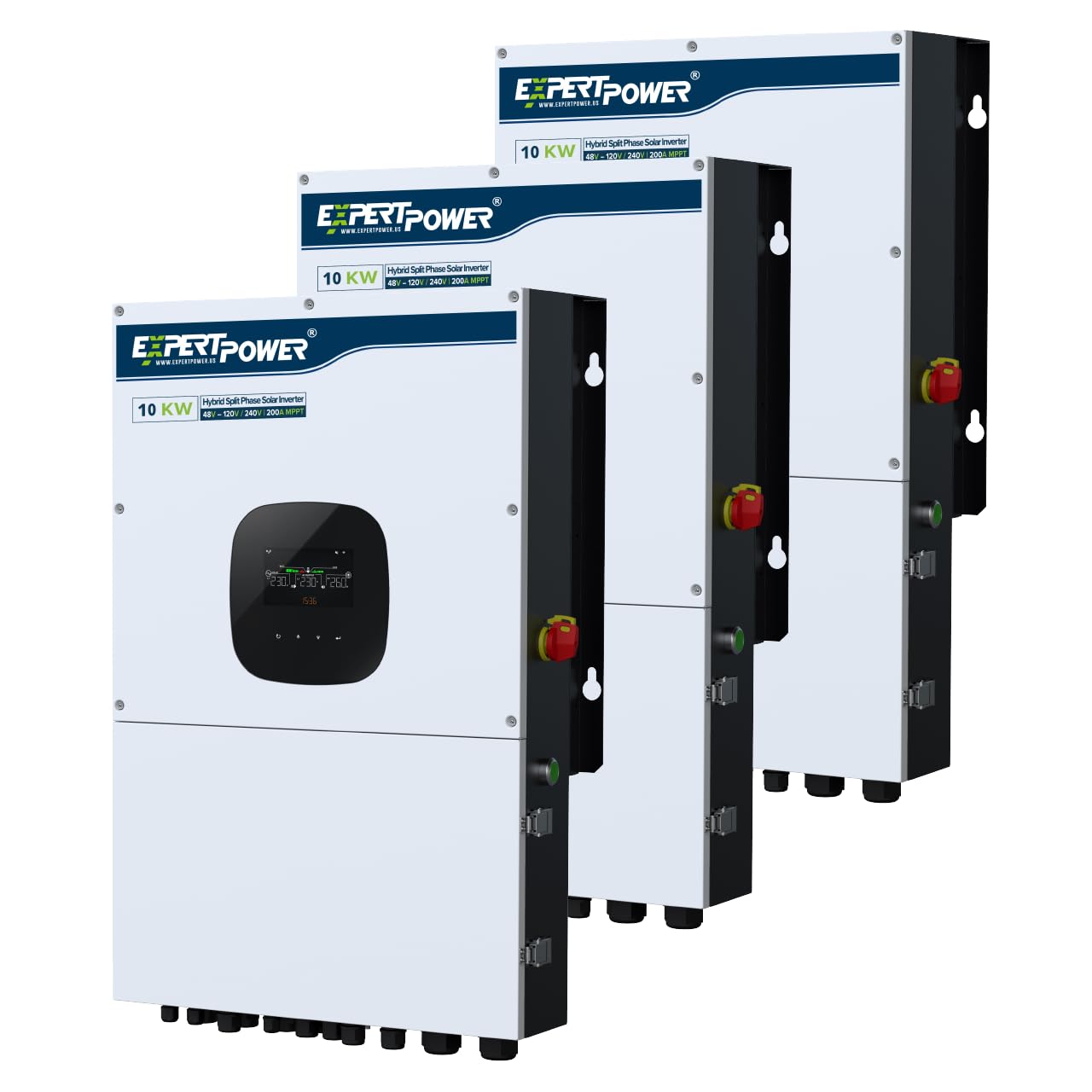
Figure 1: ExpertPower 10KW Hybrid Solar Inverter main unit.
2. Sicherheitshinweise
Read all instructions and warnings carefully before installation and operation. Failure to follow these instructions may result in electric shock, fire, serious injury, or death. Keep this manual for future reference.
- Die Installation muss von qualifiziertem Fachpersonal gemäß allen lokalen und nationalen Elektrovorschriften durchgeführt werden.
- The inverter is heavy (approximately 108 lbs). Ensure adequate lifting support during installation to prevent injury.
- Der Wechselrichter darf nicht zerlegt werden. Er enthält keine vom Benutzer wartbaren Teile. Alle Wartungsarbeiten dürfen nur von qualifiziertem Fachpersonal durchgeführt werden.
- Stellen Sie sicher, dass alle Verbindungen sicher und ordnungsgemäß isoliert sind, um Kurzschlüsse zu vermeiden.
- Überprüfen Sie die korrekte Voltage and polarity before connecting to batteries or solar panels.
- The inverter is IP65 waterproof, but proper installation and sealing of connections are crucial for maintaining this rating.

Figure 2: Inverter protection features for safe operation.

Figure 3: Key safety features of the inverter.
3. Einrichtung und Installation
3.1 Auspacken und Prüfen
Carefully unpack the inverter and inspect it for any shipping damage. Report any damage to your supplier immediately. Ensure all components listed in the packing list are present.
3.2 Wechselrichter montieren
Select a suitable mounting location that is well-ventilated, protected from direct sunlight and moisture, and capable of supporting the inverter's weight (approximately 108 lbs). Ensure sufficient clearance around the unit for proper airflow and access to connections.
3.3 Elektrische Anschlüsse
Refer to the wiring diagram for detailed connection instructions. All wiring must comply with local and national electrical codes.
- PV-Eingang: The inverter supports two 6000W PV inputs, each handling up to 600V open circuit voltage. Connect solar panel arrays to the designated PV terminals.
- Batterieanschluss: Connect your battery bank (SLA, AGM, GEL, or Lithium LiFePO4) to the battery terminals. Observe correct polarity.
- Wechselstromnetzanschluss: For grid-tied operation, connect the AC grid input to the appropriate terminals.
- AC Output (Load Connection): Connect your loads (appliances, HVAC systems) to the AC output terminals. The inverter provides 120V and 240V split-phase output.
- Generatoreingang: If using a generator as an auxiliary power source, connect it to the generator input.

Figure 4: Inverter connection diagram and physical layout.
3.4 Parallelbetrieb
Up to six units can be connected in parallel to achieve a maximum system capacity of 60KW. This allows for single-phase, split-phase, or 3-phase configurations to meet diverse energy requirements.

Figure 5: Parallel connection setup for multiple inverters.
4. Bedienungsanleitung
4.1 Erstes Einschalten
After all connections are verified, switch on the battery breaker, then the PV switch, and finally the AC input breaker (if applicable). The inverter will initiate its startup sequence. The detachable LCD control module will display operational status and settings.
4.2 System Preferences and Settings
The inverter allows customization of various operational parameters through the LCD display or the mobile application. Key settings include:
- Ladepriorität: Configure how the battery bank is charged from solar, AC input, or a combination.
- Load Priority: Determine the power source for your loads (PV, battery, or AC grid).
- Grid-Tie/Off-Grid Modes: Select the appropriate operating mode for your system.
- Ladeprofifiles: Adjust settings for different battery types.
- AC Charging/Discharging Time Intervals: Optimize energy usage based on time-of-use rates.

Figure 6: Charging and Load Priority settings.

Figure 7: Grid-tie with Backup system preferences.

Figure 8: Off-Grid system preferences.
4.3 WLAN-Überwachung
The inverter includes built-in Wi-Fi for remote monitoring and management via a dedicated app on iOS or Android devices. Registration may be required to access these features. This allows you to monitor system performance and adjust settings from anywhere.

Figure 9: Remote monitoring via Wi-Fi.
5. Wartung
Regular maintenance ensures optimal performance and longevity of your inverter. Always disconnect all power sources (PV, battery, AC grid) before performing any maintenance.
- Reinigung: Keep the inverter's exterior clean and free of dust and debris. Ensure ventilation openings are not obstructed.
- Verbindungsprüfungen: Überprüfen Sie regelmäßig alle elektrischen Verbindungen auf festen Sitz und Anzeichen von Korrosion.
- Firmware-Updates: Überprüfen Sie die Angaben des Herstellers webBesuchen Sie die Website oder App, um verfügbare Firmware-Updates zu erhalten und sicherzustellen, dass Ihr Wechselrichter über die neuesten Funktionen und Fehlerbehebungen verfügt.
- Batteriezustand: Monitor your battery bank's health and charge levels regularly, especially for lead-acid batteries.
6. Fehlerbehebung
This section provides guidance for common issues. For complex problems, contact ExpertPower technical support.
| Problem | Mögliche Ursache | Lösung |
|---|---|---|
| Wechselrichter schaltet sich nicht ein | No power from battery or PV; main breaker tripped. | Batterieanschlüsse und Lautstärke prüfentage. Verify PV input. Reset main breakers. |
| Geringe Leistungsabgabe | Insufficient solar input; battery low; overload. | Check solar panel performance. Charge batteries. Reduce load. |
| Fehlermeldung auf dem LCD-Bildschirm | Internal fault; incorrect settings; external issue. | Note the error code and consult the full manual or contact support. Review Systemeinstellungen. |
| Probleme mit der Wi-Fi-Konnektivität | Weak signal; incorrect network settings; app issues. | Ensure inverter is within Wi-Fi range. Reconfigure network settings in the app. Restart inverter and router. |
| Issues with CT settings (Current Transformers) | Incorrect installation or configuration of CTs. | Verify CT wiring and orientation. Consult with technical support for proper configuration, as these settings can be complex. |
7. Spezifikationen
| Besonderheit | Detail |
|---|---|
| Modellnummer | IVV48V10KW-3 |
| Nennleistung | 10000 Watt (10 kW) |
| Spitzenleistung | 20000 Watts (20KW surge) |
| Eingangslautstärketage | 48 Volt (DC) |
| Ausgangsvolumentage | 120 Volts, 240 Volts (AC) |
| Electrical Output Waveform | Rein Sinus |
| Maximale Solareinspeisung | 12KW (two 6000W PV inputs, up to 600V open circuit voltage jeder) |
| MPPT-Laderegler | Dual 100A |
| Ladegerät für Universalbatterien | 200 A |
| Parallele Fähigkeit | Up to 6 units (Max. 60KW) |
| Batteriekompatibilität | SLA, AGM, GEL, Lithium LiFePO4 |
| Anzeigetyp | LCD (detachable control module) |
| Konnektivität | Built-in Wi-Fi, RS485, CAN-BUS, RS232 |
| Produktabmessungen (L x B x H) | 20.3" x 20.3" x 31.4" |
| Gewicht | 108.03 Pfund |
| Zertifizierungen | UL1741, IEEE1547 |
| Farbe | Schwarz |

Figure 10: Inverter certifications for grid interconnection.
8. Gewährleistung
The ExpertPower 10KW 48V Hybrid Solar Inverter comes with a 2 Jahr Garantie. Please retain your proof of purchase for warranty claims. For detailed warranty terms and conditions, refer to the official ExpertPower webWebsite oder wenden Sie sich an den Kundendienst.
9. Unterstützung
For technical assistance, troubleshooting, or warranty inquiries, please contact ExpertPower customer support. They are available to help with setup, configuration, and any operational questions you may have.
You can also visit the official ExpertPower Store for additional resources and product information: ExpertPower Store
Ask a question about this manual
Ask about setup, troubleshooting, compatibility, parts, safety, or missing instructions. Manuals+ will review the question and use this page’s manual context to help answer it.