
Einführung
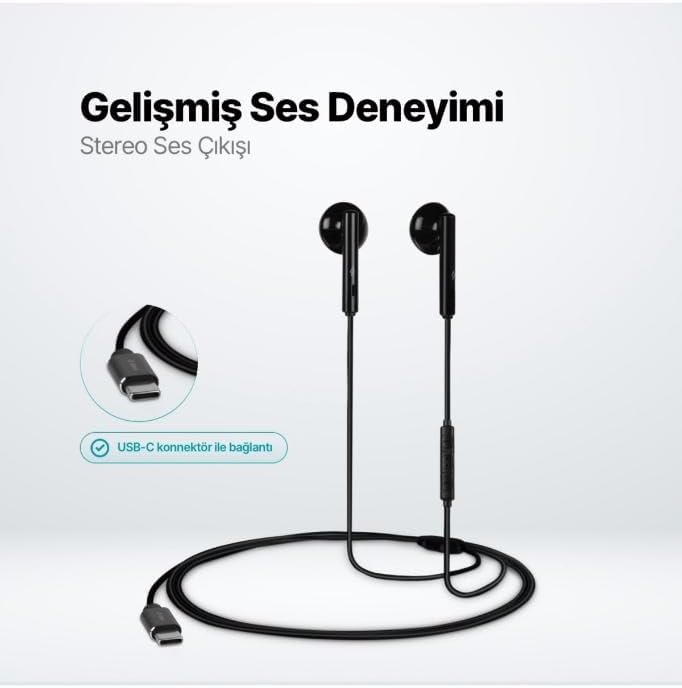
The TTEC Rio 2 Stereo USB-C Headset with Microphone is designed to provide a high-quality audio experience for music and calls. Its comfortable, lightweight design ensures a perfect fit and effective ambient noise isolation, allowing for hands-free communication and entertainment.
Hauptmerkmale:
- Advanced stereo sound output for an immersive audio experience.
- Integrated microphone for clear phone calls.
- Smart inline controller for easy management of volume, calls, and music playback.
- Lightweight and ergonomic design for extended comfort.
- Universal USB-C connection.
Aufstellen
To begin using your TTEC Rio 2 headset, follow these simple steps:
- Schließen Sie das Headset an: Locate the USB-C port on your device (smartphone, tablet, laptop, etc.). Insert the USB-C connector of the TTEC Rio 2 headset firmly into the device's USB-C port.
- Geräteerkennung: Your device should automatically recognize the headset. If prompted, select the TTEC Rio 2 as the audio output and input device.
- Passform anpassen: Place the earbuds comfortably in your ears. The ergonomic design ensures a snug fit for optimal sound quality and noise isolation.
Bedienungsanleitung
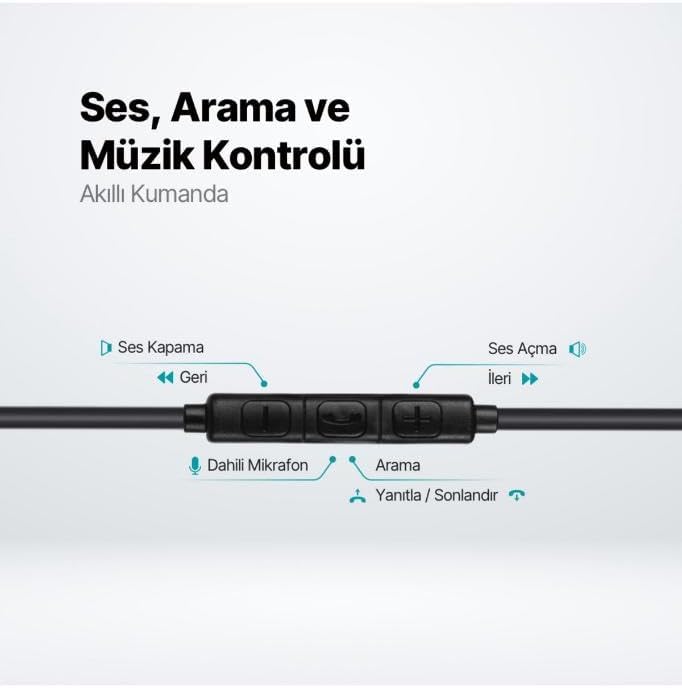
The TTEC Rio 2 headset features an inline smart controller for convenient management of your audio and calls.
Inline Controller Functions:
- Lauter (+): Drücken Sie diese Taste, um die Lautstärke zu erhöhen.
- Lautstärke runter (-): Drücken Sie diese Taste, um die Lautstärke zu verringern.
- Play/Pause/Answer/End Call (Center Button):
- Einmaliges Drücken zum Abspielen oder Pausieren der Musik.
- Einmaliges Drücken zum Annehmen eines eingehenden Anrufs.
- Einmaliges Drücken beendet einen aktiven Anruf.
- Lange drücken, um einen eingehenden Anruf abzulehnen.
- Next Track (Forward Button): Drücken Sie diese Taste, um zum nächsten Lied zu springen.
- Previous Track (Backward Button): Press to go back to the beginning of the current song or to the previous song.
- Eingebautes Mikrofon: Located on the inline controller, it captures your voice for calls and voice commands.
Wartung
Proper care will extend the life and performance of your TTEC Rio 2 headset.
- Reinigung: Wischen Sie die Ohrhörer und das Kabel vorsichtig mit einem weichen, trockenen Tuch ab. Verwenden Sie keine scharfen Chemikalien oder Scheuermittel.
- Lagerung: When not in use, store the headset in a clean, dry place. Avoid extreme temperatures. The included cable organizer clip can help prevent tangling.
- Feuchtigkeit vermeiden: Das Headset darf weder Wasser noch übermäßiger Feuchtigkeit ausgesetzt werden.
- Vorsichtig handhaben: Avoid pulling on the cable or applying excessive force to the connectors.

Fehlerbehebung
If you encounter issues with your TTEC Rio 2 headset, refer to the following common solutions:
| Problem | Mögliche Lösung |
|---|---|
| Kein Ton vom Headset. |
|
| Mikrofon funktioniert nicht. |
|
| Die Tonqualität ist schlecht oder verzerrt. |
|
| Zischendes oder statisches Rauschen. |
|
Technische Daten
| Besonderheit | Detail |
|---|---|
| Marke | TTEC |
| Modellnummer | 2KMM14S |
| Konnektivität | USB-C |
| Kopfhörer-Formfaktor | In-Ear |
| Platzierung des Ohrs | In-Ear |
| Mikrofon | Eingebaut |
| Verpackungsabmessungen | 19.8 x 8.5 x 3.1 cm |
| Artikelgewicht | 40 Gramm |
| ASIN | B0D3XJ5SP7 |
Garantie und Support
For warranty information and customer support, please refer to the documentation included with your purchase or visit the official TTEC webBewahren Sie Ihren Kaufbeleg für eventuelle Garantieansprüche auf.