
MELONARE PM-1
MELONARE PM-1 Drahtloses In-Ear-Monitorsystem – Benutzerhandbuch
Modell: PM-1
1. Einleitung
The MELONARE PM-1 Wireless in-Ear Monitor System provides high-definition audio monitoring for live performances, studio recording, and band rehearsals. Utilizing UHF 500MHz frequency hopping technology, it ensures a stable, interference-resistant connection with minimal latency. This system offers flexible mono/stereo selection and supports one-to-many connectivity, allowing a single transmitter to connect to multiple receivers.
This manual provides detailed instructions for setting up, operating, and maintaining your PM-1 system to ensure optimal performance and longevity.
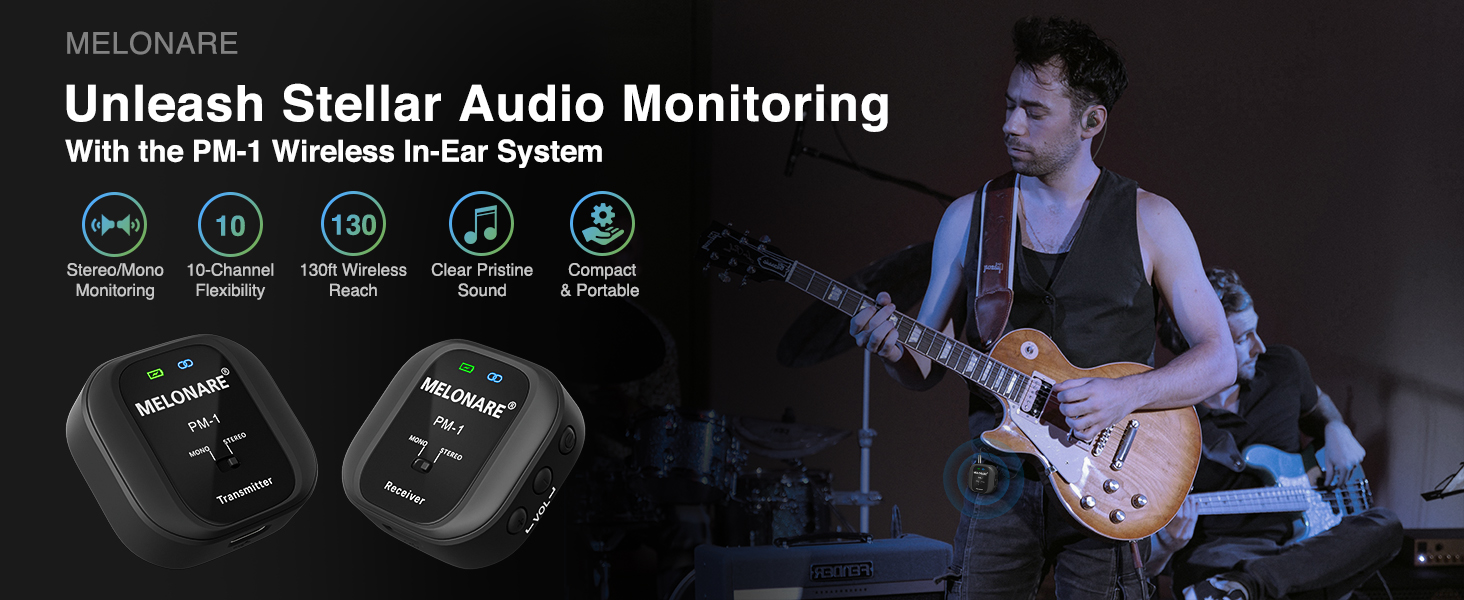
The MELONARE PM-1 Wireless In-Ear Monitor System, designed for compact audio excellence.
2. Inhalt der Box
Bitte überprüfen Sie, ob alle unten aufgeführten Artikel in Ihrem Paket enthalten sind:
- 1 x Funksender
- 1 x Kabelloser Empfänger
- 1 x Dual USB Type-C Cable (for simultaneous charging)
- 1 x 3.5-mm-Audiokabel.
- 1 x 6.35mm TS Male to 3.5mm Female Adapter (for mono connections)
- 1 x 6.35mm TRS Male to 3.5mm Female Adapter (for stereo connections)
- 1 x 3.5mm Audio Splitter Cable (for two-person monitoring)
- 1 x Benutzerhandbuch

Image showing the complete set of accessories included with the PM-1 system.

Visual representation of all items you will receive with your PM-1 system.
3. Produktüberschreitungview und Funktionen
The MELONARE PM-1 system consists of a compact transmitter and receiver, each equipped with essential controls and indicators.
Senderfunktionen:
- Netzschalter: Schaltet das Gerät ein/aus.
- Kanalschalter: Selects from 10 available frequencies.
- Audioeingang: 3.5mm jack for connecting to audio sources.
- Audioausgang: 3.5mm jack for monitoring audio directly from the transmitter.
- Batterieanzeige: LED shows battery level (Green: 100%-75%, Yellow: 74%-50%, Orange: 49%-25%, Red: 24%-1%).
- HF-Anzeige: Blue LED indicates successful pairing and signal synchronization.
- MONO/STEREO-Schalter: Schaltet zwischen Mono- und Stereomodus um.
- USB-Ladeanschluss Typ C: Zum Laden des Senders.
Empfängerfunktionen:
- Netzschalter: Schaltet das Gerät ein/aus.
- Lautstärkeregelung: Regelt die Lautstärke des Kopfhörerausgangs.
- Audioausgang: 3.5-mm-Klinke zum Anschluss von Kopfhörern.
- Batterieanzeige: LED shows battery level (Green: 100%-75%, Yellow: 74%-50%, Orange: 49%-25%, Red: 24%-1%).
- HF-Anzeige: Blue LED indicates successful pairing and signal synchronization.
- MONO/STEREO-Schalter: Schaltet zwischen Mono- und Stereomodus um.
- USB-Ladeanschluss Typ C: Zum Laden des Empfängers.

Detailed diagram of the transmitter and receiver components.
Key System Features:
- UHF 500MHz Frequency Hopping Technology: Provides a stable, interference-resistant connection superior to 2.4GHz systems.
- Automatische Kopplung: Eliminates manual channel selection for quick setup.
- Verlängerte Akkulaufzeit: 400mAh rechargeable battery offers up to 5 hours of continuous use.
- Eins-zu-Viele-Verbindungen: A single transmitter can connect to multiple receivers across 10 selectable frequencies, with a reliable range of up to 130 ft.
- Geringe Latenz: Less than 6ms for real-time audio monitoring.
- Hochwertiges Audio: 24-Bit/48-kHz-Syntheseampling rate, 20Hz-20kHz frequency response, and 109 dB signal-to-noise ratio for clear, rich sound.
- Compact Clip-on Design: Portable and easy to attach to clothing or pockets.

The system utilizes UHF 500MHz for robust wireless performance.

Enjoy reliable performance and freedom of movement with a 130ft range.

Battery indicators show charge levels, and the 400mAh battery provides up to 5 hours of use.

The compact clip-on design allows for secure attachment to pockets or clothing.
4. Installationsanleitung
Follow these steps to set up your MELONARE PM-1 Wireless in-Ear Monitor System:
- Laden Sie die Geräte auf: Before first use, fully charge both the transmitter and receiver using the included Dual USB Type-C cable. The battery indicator LEDs will show charging status and turn green when fully charged.
- Einschalten: Long press the Power Button on both the transmitter and receiver to turn them on. They will automatically pair up, indicated by a steady blue RF indicator.
- Connect the Transmitter to Audio Source:
- For mono connections (e.g., single instrument, microphone), use the 3.5mm audio cable with the 6.35mm TS adapter if needed, and connect it to the Audio Input of the transmitter.
- For stereo connections (e.g., mixer stereo output), use the 3.5mm audio cable with the 6.35mm TRS adapter if needed, and connect it to the Audio Input of the transmitter.

The PM-1 system is compatible with a wide range of professional audio equipment.
- Kopfhörer an den Empfänger anschließen: Plug your 3.5mm headphones or in-ear monitors into the Audio Output jack of the receiver.
- Select Mono/Stereo Mode: Use the MONO/STEREO switch on both the transmitter and receiver to select your desired audio mode. Ensure both devices are set to the same mode for proper operation.

The system features automatic pairing for quick and easy setup.
5. Bedienungsanleitung
Grundlegende Bedienung:
- Lautstärkeregelung: Use the Volume Control buttons on the receiver to adjust your monitoring volume.
- Kanalauswahl: If you experience interference, tap the Channel Switch button on the transmitter to cycle through the 10 available frequencies until a clear signal is found. The receiver will automatically follow the transmitter's channel.
- Monitoring from Transmitter: The transmitter includes a 3.5mm audio output, allowing sound engineers to monitor the input signal directly, even when console output is limited.
Mono/Stereo Modes:
The PM-1 system supports both mono and stereo audio modes:
- Mono-Modus: Provides identical audio to both earpieces for precise tonal feedback. Ideal for monitoring a single instrument or vocal track.
- Stereomodus: Delivers separate audio to the left and right earpieces for enhanced spatial awareness and a more immersive listening experience. Ideal for full band mixes.

Choose between Mono for precise feedback or Stereo for enhanced spatial awareness.
Eins-zu-Viele-Verbindungen:
The PM-1 transmitter can broadcast to multiple receivers simultaneously. This feature is ideal for band rehearsals, live performances, and situations requiring multiple individuals to monitor the same audio source.
- To add more receivers, simply power on additional PM-1 receivers within range of the transmitter. They will automatically pair.
- Ensure all paired receivers are set to the same MONO/STEREO mode as the transmitter.

A single transmitter can broadcast audio to multiple receivers, enabling seamless team coordination.
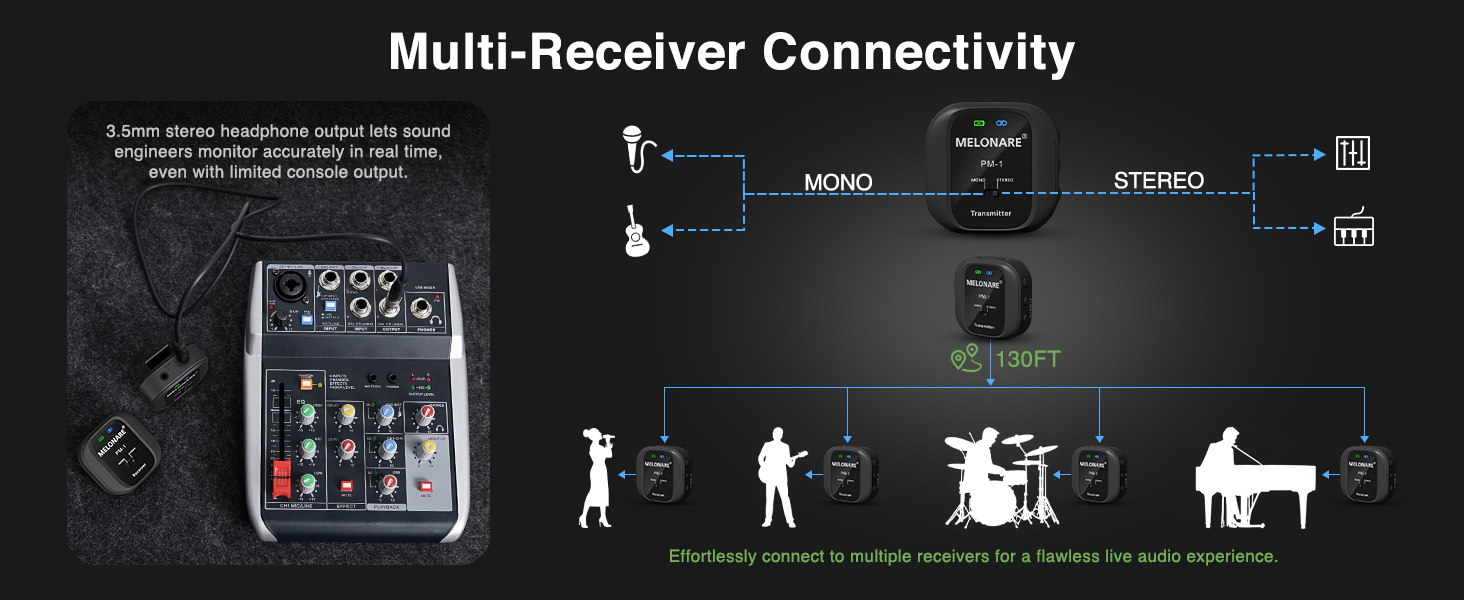
Effortlessly connect to multiple receivers for a flawless live audio experience.
Offizielles Produktvideo:
This official video from Melonare Audio provides an overview of the PM-1 Wireless in-Ear Monitor System, showcasing seine Funktionen und Anwendungen.
6. Wartung
To ensure the longevity and optimal performance of your MELONARE PM-1 system, follow these maintenance guidelines:
- Reinigung: Reinigen Sie die Geräte mit einem weichen, trockenen Tuch. Verwenden Sie keine flüssigen Reiniger oder Sprays.
- Lagerung: Lagern Sie das System an einem kühlen, trockenen Ort, geschützt vor direkter Sonneneinstrahlung und extremen Temperaturen.
- Batteriepflege: To preserve battery life, avoid fully discharging the devices frequently. If storing for an extended period, charge them to about 50% every few months.
- Vorsichtig handhaben: The devices are compact but should be handled gently to avoid damage to ports or internal components.
7. Fehlerbehebung
If you encounter issues with your MELONARE PM-1 system, refer to the following common problems and solutions:
| Problem | Mögliche Ursache | Lösung |
|---|---|---|
| Kein Ton | Device not powered on; Low battery; Incorrect connection; Transmitter/Receiver not paired. | Ensure both devices are powered on and charged. Verify all cables are securely connected. Check RF indicator for successful pairing (steady blue). |
| Sound in only one ear (Mono mode selected) | Mono mode is active. | Toggle the MONO/STEREO switch on both the transmitter and receiver to STEREO mode. |
| Intermittent signal/dropouts | Interference from other wireless devices; Out of range. | Tap the Channel Switch button on the transmitter to change frequency. Reduce distance between transmitter and receiver (within 130 ft). |
| Poor audio quality (noise, distortion) | Input signal too high/low; Interference; Damaged cable. | Adjust input volume from the source. Change frequency. Try a different audio cable. |
| Gerät lädt nicht | Defektes Kabel/Ladegerät; Problem mit dem Ladeanschluss. | Ensure the USB-C cable and power adapter are functional. Try a different charging port. |
8. Spezifikationen
Detailed technical specifications for the MELONARE PM-1 Wireless in-Ear Monitor System:
| Spezifikation | Wert |
|---|---|
| Drahtlose Frequenz | UHF 500 MHz |
| Latenz | < 6 ms |
| Anzahl der Frequenzen | 10 |
| Effektive Entfernung | Bis zu 130 Fuß (Sichtlinie) |
| Mono / Stereo-Modus | Wählbar |
| Sampling-Rate | 48 kHz/24 Bit |
| Frequenzgang | 20 Hz – 20 kHz |
| Signal-Rausch-Verhältnis (SNR) | 109 dB |
| Audio-Dynamikbereich | 103 dB |
| Batteriekapazität | 400mAh (each unit) |
| Betriebsdauer | Bis zu 5 Stunden |
| Ladeanschluss | USB Typ C |
| Material | Plastik |
| Artikelgewicht | 5.3 ounces (total for system) |
| Technische Daten | 4.25 x 4.25 x 5.35 Zoll |

Key specifications of the PM-1 system for quick reference.

The PM-1 delivers exceptional audio fidelity with low latency and a wide frequency response.
9. Garantie und Support
MELONARE provides a 365-day warranty for all its products, including the PM-1 Wireless in-Ear Monitor System. This warranty covers manufacturing defects and ensures that the product performs as described under normal use.
If you experience any issues or have questions regarding your PM-1 system, please contact MELONARE customer support. For the quickest assistance, it is recommended to reach out through the Amazon message center or directly via the contact information provided in your product packaging.
Bitte bewahren Sie Ihren Kaufbeleg als Kaufnachweis für Garantieansprüche auf.
Zugehörige Dokumente - PM-1
 |
Beyerdynamic TG 1000 Digital Wireless System Quick Start Guide Quick start guide for the Beyerdynamic TG 1000 digital wireless system, covering receiver, handheld transmitter, beltpack transmitter, and Chameleon software setup. Includes setup instructions, connections, and operation details. |
 |
beyerdynamic TG 1000 Digitales Drahtlossystem: Bedienungsanleitung Entdecken Sie das digitale Drahtlossystem beyerdynamic TG 1000 mit dieser ausführlichen Bedienungsanleitung. Erfahren Sie mehr über die erweiterten Funktionen, die Einrichtung und die Komponenten für professionelle Audioanwendungen. |
 |
Benutzerhandbuch für drahtloses UHF-Mikrofon User manual for the UHF Wireless Microphone system, including setup, operation, battery replacement, and technical specifications. |
 |
Benutzerhandbuch für drahtloses UHF-Mikrofon Comprehensive user manual for the UHF Wireless Microphone system, covering safety, setup, operation, and technical specifications for the receiver, handheld, and beltpack transmitters. |
 |
Phenyx Pro PTM-10 Drahtloses In-Ear-Monitorsystem – Benutzerhandbuch Ausführliches Benutzerhandbuch für das Phenyx Pro PTM-10 Stereo- und Mono-Modus Professionelles UHF-Funk-In-Ear-Monitorsystem, das das System umfassend abdecktviewFunktionen, Teile, Bedienungsanleitung, Fehlerbehebung, Spezifikationen und Garantieinformationen. |
 |
beyerdynamic TG 1000 Digitales Drahtlossystem: Bedienungsanleitung Comprehensive operating instructions for the beyerdynamic TG 1000 Digital UHF Wireless System, covering receiver, handheld transmitter, beltpack transmitter, and software setup for professional audio applications. |
Ask a question about this manual
Ask about setup, troubleshooting, compatibility, parts, safety, or missing instructions. Manuals+ will review the question and use this page’s manual context to help answer it.