Einführung
This manual provides comprehensive instructions for the W26 Pro Max Smart Watch with Bluetooth Earphones. It covers setup, operation, maintenance, and troubleshooting to ensure optimal use of your device. The W26 Pro Max is a versatile 2-in-1 device, combining a smartwatch with integrated wireless Bluetooth earphones, designed to keep you connected and active.
Packungsinhalt
Bitte überprüfen Sie nach dem Öffnen der Verpackung, ob alle Komponenten vorhanden sind:
- W26 Pro Max Smart Watch
- Integrated Wireless Bluetooth Earphones
- Ladekabel
- Benutzerhandbuch (dieses Dokument)
- Additional Watch Strap (if included as a free gift)

Image: The W26 Pro Max Smart Watch and its accompanying Bluetooth earphones, along with an extra watch strap, are neatly arranged within their retail packaging. The watch face is visible, and the earphones are housed in their charging case.

Bild: Eine Draufsicht view of the W26 Pro Max Smart Watch and Bluetooth Earphones within their packaging. The watch, earphones, and an additional strap are clearly visible, indicating the complete product set.
Installationshandbuch
1. Erstes Aufladen
Before first use, fully charge both the smartwatch and the integrated earphones. Connect the provided charging cable to the watch and a compatible USB power source. The watch display will indicate charging status. Ensure the earphones are properly seated in their charging case within the watch.
2. Ein-/Ausschalten
- Einschalten: Press and hold the side button on the smartwatch until the screen illuminates.
- Ausschalten: Halten Sie die seitliche Taste gedrückt und wählen Sie dann die Option „Ausschalten“ auf dem Bildschirm aus.
3. Koppeln mit Ihrem Smartphone
To unlock full functionality, pair your W26 Pro Max with your smartphone via Bluetooth.
- Stellen Sie sicher, dass Bluetooth auf Ihrem Smartphone aktiviert ist.
- On the W26 Pro Max, navigate to the Bluetooth settings.
- On your smartphone, search for available Bluetooth devices and select "W26 Pro Max" from the list.
- Bestätigen Sie die Kopplungsanfrage auf beiden Geräten, falls Sie dazu aufgefordert werden.
- For optimal performance, download and install the recommended companion application (e.g., "FitPro app" as mentioned in product description) from your smartphone's app store.
4. Earphone Pairing
The integrated earphones automatically pair with the smartwatch when removed from their charging slots. To pair them with another device (e.g., directly with your phone):
- Remove the earphones from the smartwatch.
- Aktivieren Sie Bluetooth auf dem Gerät, mit dem Sie eine Kopplung durchführen möchten.
- Suchen nach "W26 Pro Max Earphones" (or similar name) in the Bluetooth device list and select to connect.
Bedienungsanleitung
Navigating the Smartwatch
- Touch-Screen: Durch Wischen nach links/rechts oder oben/unten navigieren Sie durch Menüs und Funktionen. Zum Auswählen tippen.
- Seitentaste: Press to return to the home screen or wake the device. Long press for power options or voice assistant.
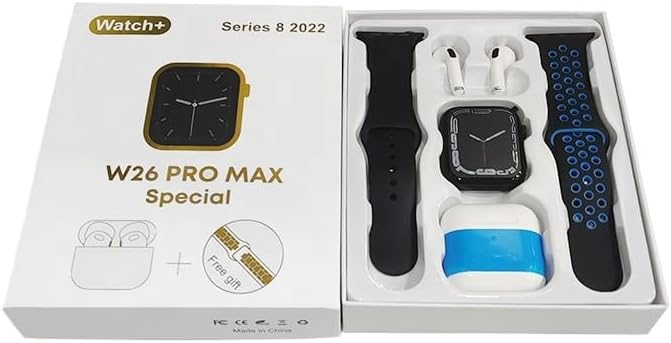
Image: The W26 Pro Max Smart Watch screen shows a voice assistant interface, with text bubbles indicating "Call Linda!" and "What's the weather like today?". This illustrates the voice command functionality.
Hauptmerkmale
Fitness- und Gesundheitstracking
The W26 Pro Max is equipped with sensors to monitor various health metrics.
- Herzfrequenz-Überwachung: The optical heart rate sensor continuously tracks your heart rate. View real-time data on the watch or in the companion app.
- Schrittzähler: Erfasst Ihre täglichen Schritte, die zurückgelegte Strecke und den Kalorienverbrauch.
- Schlaf-Tracking: Überwacht Ihre Schlafmuster, einschließlich Tiefschlaf, Leichtschlaf und Wachzeiten.

Image: The W26 Pro Max Smart Watch screen displays heart rate information, showing a graph of heart rate over time, current beats per minute (bpm), and blood pressure readings. This demonstrates the health monitoring capabilities.
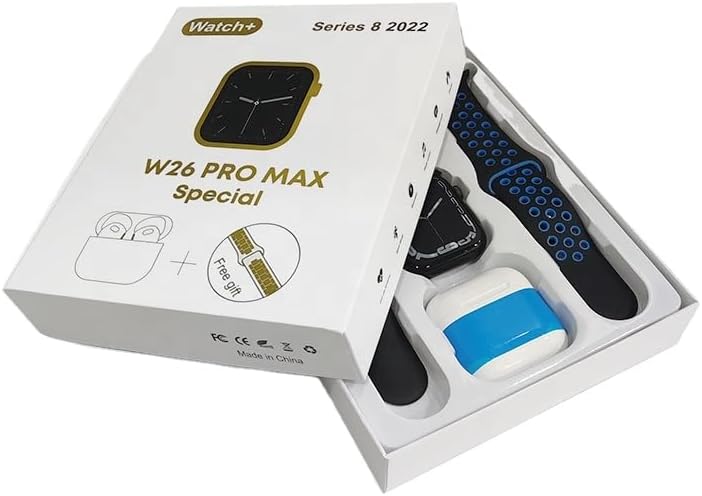
Bild: Eine detaillierte view of the W26 Pro Max Smart Watch screen showing heart rate and blood pressure monitoring. The text explains that an optical heart rate sensor is used for precise calculation and data can be viewed on the watch or via the FitPro app.
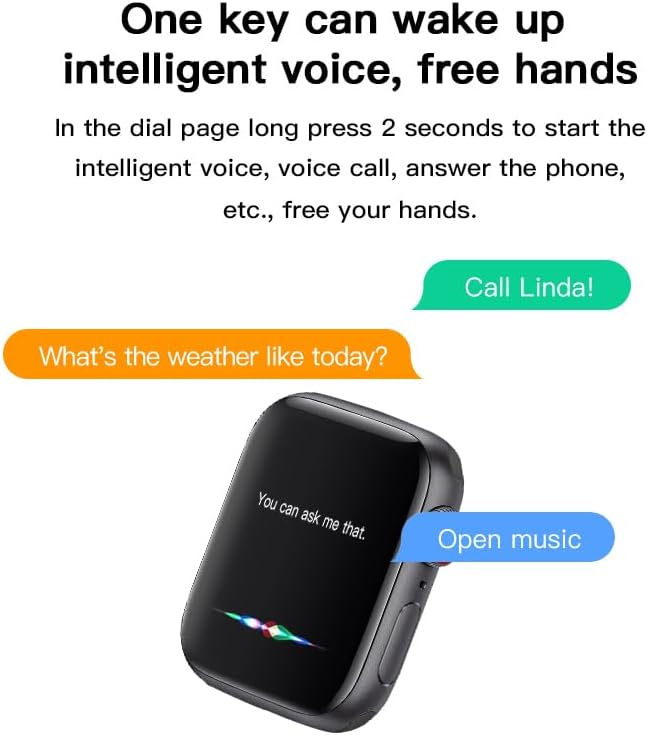
Image: The W26 Pro Max Smart Watch screen displays sleep monitoring data, showing sleep quality (Excellent), percentages of deep sleep, light sleep, and awake time, along with total sleep duration. This highlights the sleep tracking feature.
Kommunikation und Medien
- Bluetooth-Anrufe: Make and receive calls directly from your smartwatch using the integrated microphone and speaker.
- Benachrichtigungen: Erhalten Sie Benachrichtigungen für Anrufe, Nachrichten und App-Benachrichtigungen von Ihrem gekoppelten Smartphone.
- Musikwiedergabe: Control music playing on your smartphone or listen directly via the integrated earphones.

Image: The W26 Pro Max Smart Watch screen shows music playback controls, including play/pause and skip track buttons, along with a visualizer. This indicates the watch's capability to control audio.
Sprachassistent
Long press the side button to activate the intelligent voice assistant. Use voice commands for calls, weather inquiries, music control, and more, providing hands-free operation.
Wartung und Pflege
- Reinigung: Wipe the watch and earphones with a soft, dry, lint-free cloth. For stubborn dirt, slightly dampBefeuchten Sie das Tuch mit Wasser. Vermeiden Sie aggressive Chemikalien oder scheuernde Materialien.
- Wasserbeständigkeit: The W26 Pro Max has an IP68 rating, meaning it is resistant to dust and can withstand immersion in water up to 1.5 meters for 30 minutes. However, it is not suitable for diving, hot showers, or saunas. Always dry the device thoroughly after exposure to water.
- Batteriepflege: Um die Akkulaufzeit zu verlängern, vermeiden Sie häufiges vollständiges Entladen des Geräts. Laden Sie es regelmäßig auf und bewahren Sie es bei längerer Nichtbenutzung an einem kühlen, trockenen Ort auf.
- Lagerung: Lagern Sie das Gerät an einem kühlen, trockenen Ort, geschützt vor direkter Sonneneinstrahlung und extremen Temperaturen.
Fehlerbehebung
| Problem | Mögliche Ursache | Lösung |
|---|---|---|
| Gerät lässt sich nicht einschalten. | Schwache Batterie. | Laden Sie das Gerät mindestens 30 Minuten lang auf, bevor Sie versuchen, es erneut einzuschalten. |
| Kopplung mit Smartphone nicht möglich. | Bluetooth is off on phone/watch; device not in pairing mode; interference. | Ensure Bluetooth is enabled on both devices. Restart both devices. Move closer to the phone. Forget previous pairings and try again. |
| Earphones not connecting. | Earphones not properly seated; low earphone battery. | Ensure earphones are fully seated in their charging slots within the watch. Charge the watch to ensure earphones are charging. |
| Ungenaue Gesundheitsdaten. | Unsachgemäße Passform; Sensorblockierung. | Achten Sie darauf, dass die Uhr eng am Handgelenk sitzt, weder zu eng noch zu locker. Reinigen Sie den Sensor auf der Rückseite der Uhr. |
| Kurze Akkulaufzeit. | Häufige Nutzung energieintensiver Funktionen; alter Akku. | Reduce screen brightness, limit notifications, disable unnecessary features. Ensure full charge cycles. |
Technische Daten
| Besonderheit | Detail |
|---|---|
| Modellnummer | W26 Pro Max |
| Anzeige | 1.78" AMOLED Touchscreen |
| Betriebssystem | Tragen Sie OS |
| Konnektivität | Bluetooth |
| Batteriekapazität | 280mAh (watch) |
| Akkulaufzeit | Bis zu 3 Tage (bei typischer Anwendung) |
| Wasserbeständigkeit | IP68 |
| Besondere Merkmale | Integrated Bluetooth Earphones, Heart Rate Sensor, Pedometer, Sleep Tracker, Microphone, Speaker, Voice Assistant |
| Speicherkapazität | 16 MB |
| Verpackungsabmessungen | 16.8 x 12.8 x 3 cm |
| Gewicht | 170 g |
Garantie und Support
For information regarding warranty coverage and customer support, please refer to the documentation provided with your purchase or contact the retailer where the product was acquired. As this product is manufactured by "Generic", specific warranty details may vary by region and seller.
For technical assistance or further inquiries, please reach out to the customer service channels provided by your point of purchase.


