
Einführung
The Sonodyne Antara is a 40W wireless portable Bluetooth speaker designed to deliver high-quality stereo sound. It features a robust design with IP65 water and dust resistance, making it suitable for various environments. This manual provides essential information for setting up, operating, maintaining, and troubleshooting your Antara speaker.
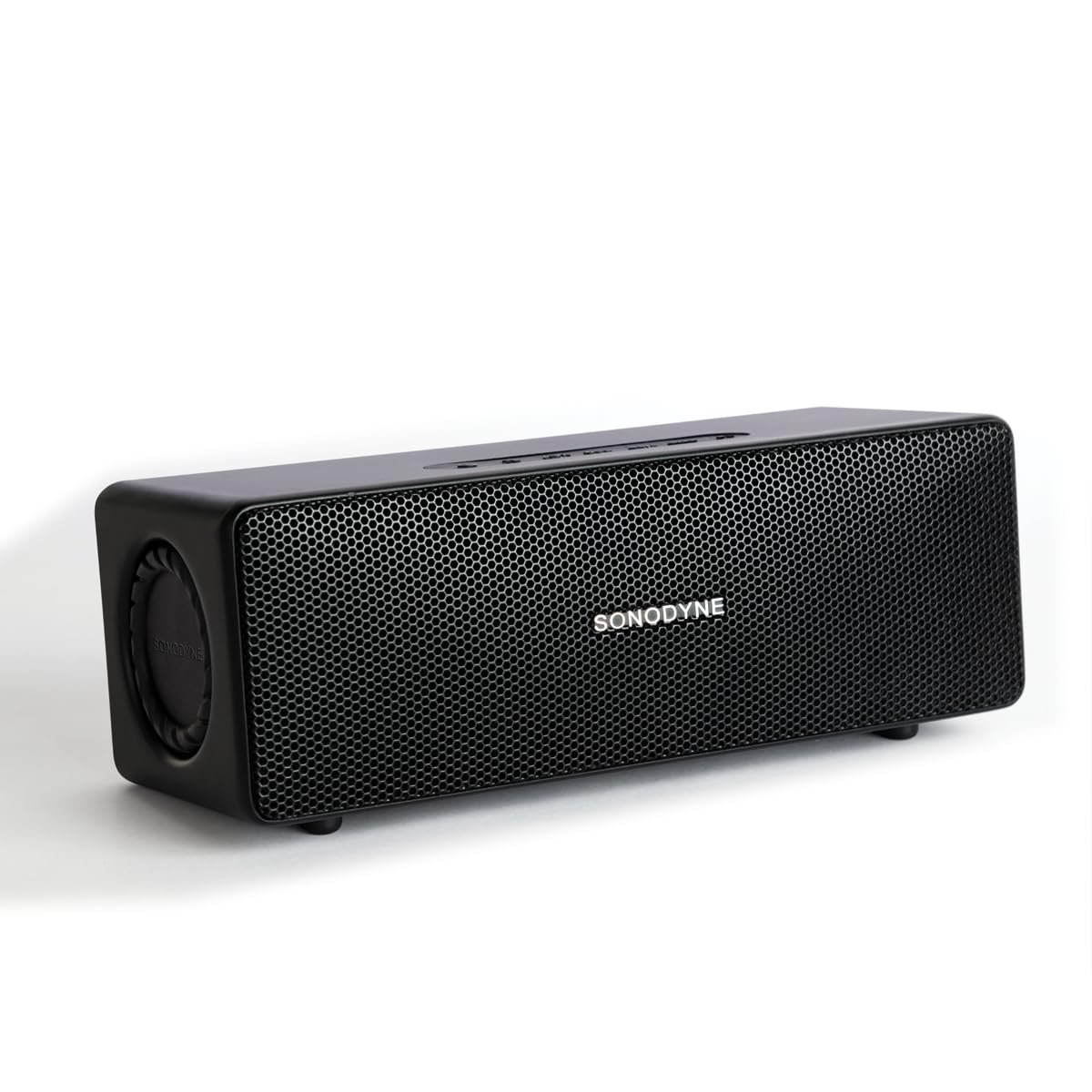
Figure 1: Sonodyne Antara Speaker - Front View
Video 1: Sonodyne Antara Bluetooth Speaker Overview. This video provides a general introduction to the speaker's features and design.
Lieferumfang
Carefully unpack your Sonodyne Antara speaker and ensure all items are present:
- Sonodyne Antara Speaker
- Typ C Ladekabel
- High Current Charger
- Benutzerhandbuch (dieses Dokument)
Produkt überview
Bedienelemente und Anzeigen

Abbildung 2: Bedienelemente der Oberseite
The top panel features soft-touch controls for easy operation:
- Netzschalter: Zum Ein-/Ausschalten gedrückt halten.
- Lautstärke erhöhen/verringern: Passen Sie die Wiedergabelautstärke an.
- Wiedergabe-/Pause-Taste: Steuern Sie die Medienwiedergabe.
- Bluetooth-Pairing-Taste: Bluetooth-Kopplungsmodus aktivieren.
- Modus-Taste: Switch between input sources (Bluetooth, Aux-in, USB).
Anschlüsse auf der Rückseite

Abbildung 3: Anschlüsse auf der Rückseite
Die Rückseite bietet verschiedene Anschlussmöglichkeiten:
- USB-Anschluss: Zum Abspielen von Audio files von einem USB-Laufwerk.
- PRE-OUT: Audio output for connecting to a powered subwoofer.
- AUX-IN: 3.5mm analog line input for wired connections.
- DC-EINGANG 5V: Typ-C-Ladeanschluss.
Aufstellen
Aufladen des Lautsprechers
- Connect the provided Type-C charging cable to the DC IN 5V port on the speaker's rear panel.
- Connect the other end of the cable to the Sonodyne high current USB charger.
- Stecken Sie das Ladegerät in eine Steckdose.
- The charging indicator will illuminate. The speaker is fully charged when the indicator changes color or turns off (refer to specific indicator behavior in the quick start guide). A full charge takes approximately 4.5 hours and provides up to 12 hours of playtime.
Ein-/Ausschalten
- So schalten Sie das Gerät ein: Press and hold the Power button on the top panel until the indicator light illuminates.
- So schalten Sie das Gerät aus: Drücken und halten Sie den Ein-/Ausschalter erneut, bis die Kontrollleuchte erlischt.
Bluetooth-Kopplung

Abbildung 4: Konnektivitätsmerkmale
- Stellen Sie sicher, dass der Lautsprecher eingeschaltet ist.
- Press the Bluetooth Pairing button on the top panel. The Bluetooth indicator will flash, indicating it's in pairing mode.
- Gehen Sie auf Ihrem Smartphone oder einem anderen Bluetooth-fähigen Gerät zu den Bluetooth-Einstellungen und suchen Sie nach verfügbaren Geräten.
- Select "Sonodyne Antara" from the list.
- Sobald die Verbindung hergestellt ist, hört die Bluetooth-Anzeige am Lautsprecher auf zu blinken und leuchtet dauerhaft.
Aux-In-Anschluss
- Connect a 3.5mm audio cable (not included) from your audio source to the AUX IN port on the speaker's rear panel.
- Press the Mode button on the top panel to switch to Aux-in mode.
USB-Wiedergabe
- Schließen Sie einen USB-Stick mit Audiodateien an. files into the USB port on the speaker's rear panel.
- Press the Mode button on the top panel to switch to USB mode. The speaker will automatically begin playing audio files vom Laufwerk.
Duet Mode (True Stereo Pairing)

Figure 5: Duet Mode Feature
To pair two Antara speakers for a true stereo experience:
- Ensure both Antara speakers are powered on and not connected to any Bluetooth device.
- On one speaker (this will be the primary speaker), press and hold the Bluetooth Pairing button until you hear a confirmation tone.
- Wiederholen Sie den gleichen Schritt beim zweiten Lautsprecher (sekundären Lautsprecher).
- The speakers will automatically search and connect to each other. Once connected, the primary speaker's Bluetooth indicator will flash slowly, and the secondary speaker's indicator will be solid.
- Now, connect your device to the primary speaker via Bluetooth as described in the "Bluetooth Pairing" section. Audio will play in true stereo across both speakers.
Bedienungsanleitung
Grundlegende Wiedergabesteuerungen
- Abspielen/Pause: Drücken Sie einmal die Play/Pause-Taste.
- Lautstärke erhöhen: Drücken Sie die Lauter-Taste.
- Lautstärke runter: Drücken Sie die Leiser-Taste.
- Nächster Titel: Press and hold the Volume Up button (or double-press, refer to quick start guide for exact behavior).
- Vorheriges Lied: Press and hold the Volume Down button (or triple-press, refer to quick start guide for exact behavior).
Call Management (when connected via Bluetooth)
- Anruf annehmen: Drücken Sie einmal die Play/Pause-Taste.
- Anruf beenden: Drücken Sie während eines Anrufs einmal die Wiedergabe-/Pause-Taste.
- Anruf ablehnen: Halten Sie die Play/Pause-Taste gedrückt.
Wartung
Reinigung
- Wischen Sie den Lautsprecher mit einem weichen, trockenen, fusselfreien Tuch ab.
- Verwenden Sie keine Scheuermittel, Alkohol, Benzol oder andere chemische Lösungsmittel, da diese die Oberfläche beschädigen können.
Lagerung
- Bewahren Sie den Lautsprecher an einem kühlen, trockenen Ort fern von direkter Sonneneinstrahlung und extremen Temperaturen auf.
- Bei längerer Lagerung sollte der Akku alle paar Monate auf etwa 50 % aufgeladen werden, um die Lebensdauer des Akkus zu verlängern.
Wasser- und Staubbeständigkeit (IP65)
The Sonodyne Antara speaker is rated IP65, meaning it is protected against dust ingress and low-pressure water jets from any direction. This makes it suitable for outdoor use in light rain or dusty conditions.
- Tauchen Sie den Lautsprecher nicht in Wasser.
- Avoid exposing the speaker to powerful water jets.
- Stellen Sie sicher, dass alle Anschlussabdeckungen fest verschlossen sind, bevor Sie den Lautsprecher Wasser oder Staub aussetzen.
- If the speaker gets wet, wipe it dry with a soft cloth before charging or using it again.
Fehlerbehebung
| Problem | Mögliche Ursache | Lösung |
|---|---|---|
| Der Lautsprecher lässt sich nicht einschalten. | Schwache Batterie. | Charge the speaker using the provided charger and Type-C cable. |
| Kopplung via Bluetooth nicht möglich. | Lautsprecher nicht im Kopplungsmodus; Gerät zu weit entfernt; zuvor gekoppeltes Gerät verbunden. | Ensure speaker is in pairing mode (flashing indicator). Move device closer. Disconnect from other devices or reset speaker's Bluetooth. |
| Kein Ton. | Lautstärke zu niedrig; falsche Eingangsquelle; Gerät gibt keine Wiedergabe wieder. | Increase speaker and device volume. Press Mode button to select correct input (Bluetooth, Aux, USB). Ensure audio is playing on your source device. |
| Schlechte Klangqualität/Verzerrungen. | Source audio quality; speaker too far from source (Bluetooth); interference. | Try a different audio source. Move Bluetooth device closer to the speaker. Avoid obstacles between speaker and device. |
| Duet Mode not working. | Speakers not properly paired in Duet Mode. | Ensure both speakers are disconnected from other devices before initiating Duet Mode pairing. Follow Duet Mode instructions carefully. |
Technische Daten
| Besonderheit | Detail |
|---|---|
| Marke | Sonodyne |
| Modellname | Antara |
| Lautsprechertyp | Stereo, Portable Bluetooth Speaker |
| Maximale Lautsprecherausgangsleistung | 40 Watt |
| Audioausgabemodus | Stereo (2.0 Channels) |
| Konnektivitätstechnologie | Bluetooth 5.4, Aux-in (3.5mm), USB |
| Audiotreibertyp | Dynamic Driver (4 transducers, 2 passive radiators) |
| Woofer Driver Diameter | 2.5 Zoll |
| Tweeter Driver Diameter | 0.5 Zoll |
| Signal-Rausch-Verhältnis | 85 dB |
| Frequenzgang | Up to 20 KHz (typical range for full-range speakers) |
| Stromquelle | Batteriebetrieben (1 Lithium-Ionen-Akku im Lieferumfang enthalten) |
| Batteriekapazität | 3350 mAh |
| Durchschnittliche Batterielebensdauer | Bis zu 12 Stunden |
| Akkuladezeit | 4.5 Stunden |
| Kontrollmethode | Touch-Steuerung |
| Wasserbeständigkeit | IP65 (Water Resistant, Dustproof) |
| Gehäusematerial | Acrylnitril-Butadien-Styrol (ABS) |
| Artikelabmessungen (T x B x H) | 9.8 cm (T) x 25 cm (B) x 8.6 cm (H) |
| Artikelgewicht | 1.5 Kilogramm |
Garantie und Support
Herstellergarantie
The Sonodyne Antara speaker comes with a 2 Jahr eingeschränkte HerstellergarantieDiese Garantie deckt Material- und Verarbeitungsfehler bei normalem Gebrauch ab. Bitte bewahren Sie Ihren Kaufbeleg für Garantieansprüche auf.
Kundenservice
For technical assistance, warranty claims, or any other inquiries, please contact Sonodyne customer support:
- Kontaktdaten des Herstellers: Sonodyne Technologies Pvt. Ltd. 98 NB Block E New Alipore, Kolkata 700053
- Refer to the official Sonodyne website or your purchase documentation for the most current contact details and support options.