
1. Einleitung
Thank you for choosing the XIAOVV 4G LTE Solar Outdoor Security Camera. This manual provides essential information for the proper installation, operation, and maintenance of your device. Please read it carefully before use and retain it for future reference. This camera is designed for outdoor surveillance, offering reliable monitoring with 4G LTE connectivity and solar power.
2. Produktüberschreitungview
The XIAOVV P5plus is a robust outdoor security camera featuring a solar panel for continuous power and 4G LTE connectivity for remote access without relying on Wi-Fi. It offers high-definition imaging, advanced night vision, and intelligent security functions.
Hauptmerkmale:
- 4G LTE-Konnektivität: Supports 4G bands B1/B3/B5/B38/B39/B40/B41 for remote access in areas without Wi-Fi.
- Solarbetrieben: Integrated solar panel provides continuous power, ensuring 365 days of uninterrupted monitoring.
- 5MP HD Imaging & 1080p Video: Captures clear 5-megapixel still images and records 1080p high-definition video.
- Farbnachtsicht: Advanced Starlight color night vision ensures clear, detailed footage auch bei schlechten Lichtverhältnissen.
- 360° Monitoring: Dual-lens design allows for comprehensive 360-degree coverage without blind spots, with PTZ (Pan-Tilt-Zoom) capabilities.
- Smart Security Functions: AI-based person detection, dual PIR and radar alarms, automatic motion detection, and two-way audio communication.
- Lokaler und Cloud-Speicher: Supports up to 128GB Micro SDHC card for local storage and optional cloud storage.
- H.265-Komprimierung: Efficient video compression for longer storage times and stable recordings.
- Wetterfestes Design: IP66 rated for outdoor use, protecting against dust and powerful water jets.
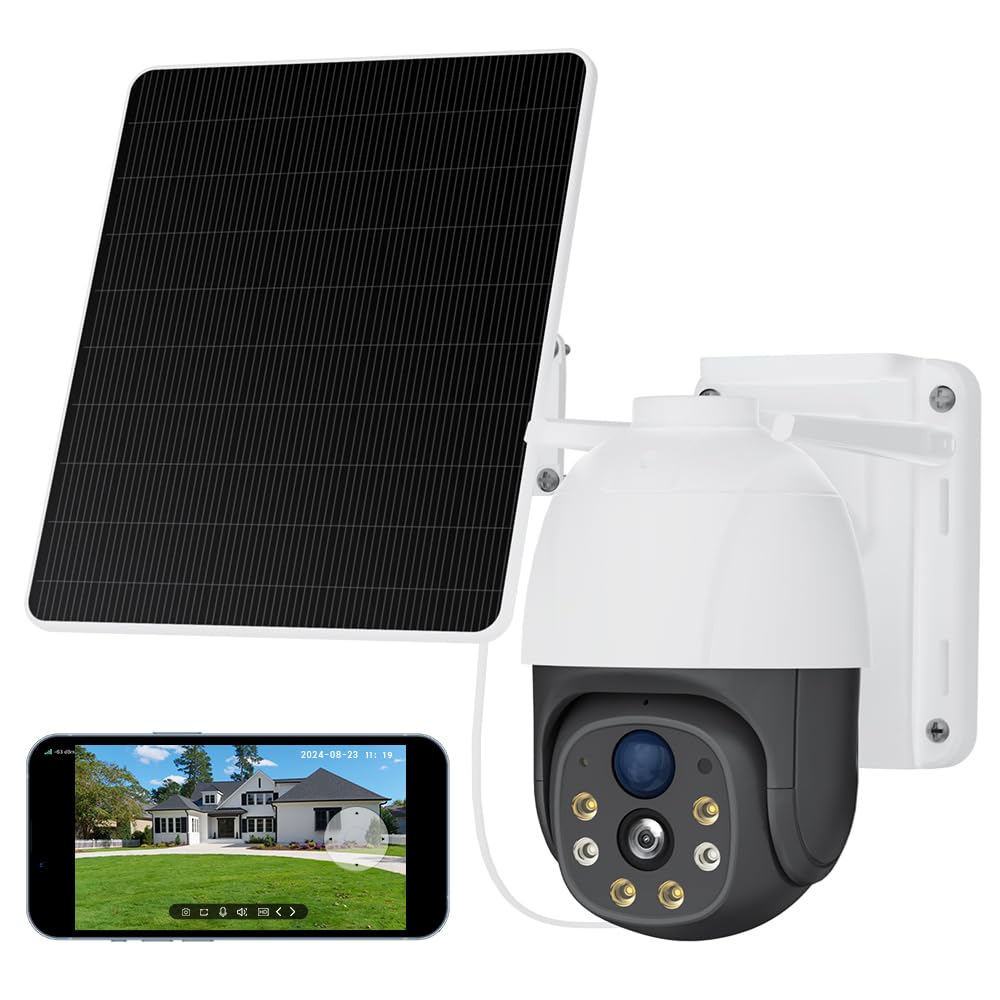
Image 2.1: The XIAOVV 4G LTE Solar Outdoor Security Camera, showcasing its solar panel and various features like 4G LTE signal, full color night vision, AI intelligence, IP65 waterproof rating, device sharing, 2-way audio, HD 1080P, siren, PIR motion detection, and 8000mAh battery capacity.

Image 2.2: A visual representation of the camera's 2K Starlight Color Night Vision, showing a building at night with clear, illuminated details, contrasting with a standard black and white night vision view.
3. Einrichtung
3.1 Packungsinhalt
- XIAOVV Solar Camera (1)
- Montagehalterung und Schrauben
- Bedienungsanleitung
3.2 Einlegen der SIM-Karte und der Micro-SD-Karte
- Locate the SIM card and Micro SD card slot on the camera, usually protected by a rubber cover.
- Öffnen Sie den Deckel vorsichtig.
- Insert a valid 4G LTE SIM card (not included) into the SIM card slot with the correct orientation. Ensure it clicks into place.
- Insert a Micro SDHC card (up to 128GB, not included) into the Micro SD card slot with the correct orientation.
- Close the rubber cover firmly to ensure IP66 weatherproofing.
3.3 Kameramontage
- Choose a suitable outdoor location with good 4G signal reception and direct sunlight exposure for the solar panel.
- Verwenden Sie die mitgelieferte Montagehalterung und Schrauben, um die Kamera sicher an einer Wand oder einem Mast zu befestigen.
- Passen Sie den Winkel des Solarpanels an, um die Sonneneinstrahlung über den Tag hinweg zu maximieren.
- Stellen Sie sicher, dass die Kamera eine freie Sichtlinie auf den Bereich hat, den Sie überwachen möchten.

Image 3.1: The XIAOVV camera with its solar panel, shown installed in diverse outdoor settings such as a pasture, fish pond, orchard, construction site, and backyard, illustrating its versatility for different surveillance needs.
3.4 App-Download und Kopplung
- Download the XIAOVV app from your smartphone's app store (iOS or Android).
- Registrieren Sie sich für ein neues Konto oder melden Sie sich an, falls Sie bereits eines besitzen.
- Folgen Sie den Anweisungen in der App, um Ihre neue Kamera hinzuzufügen. Dies erfordert in der Regel das Scannen eines QR-Codes auf der Kamera oder die manuelle Eingabe der Geräte-ID.
- Ensure the camera is powered on and the 4G SIM card is active during the pairing process.
4. Bedienungsanleitung
4.1 Live View
Öffnen Sie die XIAOVV-App und wählen Sie Ihre Kamera aus der Geräteliste aus, um auf den Live-Videostream zuzugreifen. Sie können view Echtzeit footage from your monitored area.
4.2 PTZ-Steuerung
Utilize the on-screen controls in the live view to pan (rotate horizontally), tilt (rotate vertically), and digitally zoom the camera to adjust your viewing angle and focus on specific areas.
4.3 Zwei-Wege-Audio
Tap the microphone icon in the app to speak through the camera's speaker, and listen to audio from the camera's microphone. This allows for real-time communication with visitors or to deter intruders.
4.4 Aufnahme und Wiedergabe
- Manuelle Aufnahme: Tippe im Live-Stream auf die Aufnahmetaste. view to start or stop manual video recording.
- Ereignisaufzeichnung: The camera automatically records when motion is detected, based on your settings.
- Wiedergabe: Auf aufgezeichnetes Foo zugreifentage via the 'Playback' or 'History' section in the app. You can filter by date and event.
4.5 Bewegungserkennung und Benachrichtigungen
Configure motion detection sensitivity, detection zones, and alert preferences (e.g., push notifications, siren activation) within the app settings. The camera uses AI-based person detection, PIR, and radar for accurate alerts.

Image 4.1: A visual representation of the AI Automatic Tracking feature, showing a father and child playing in a park with a tracking box following their movement, indicating the camera's ability to automatically follow targets.
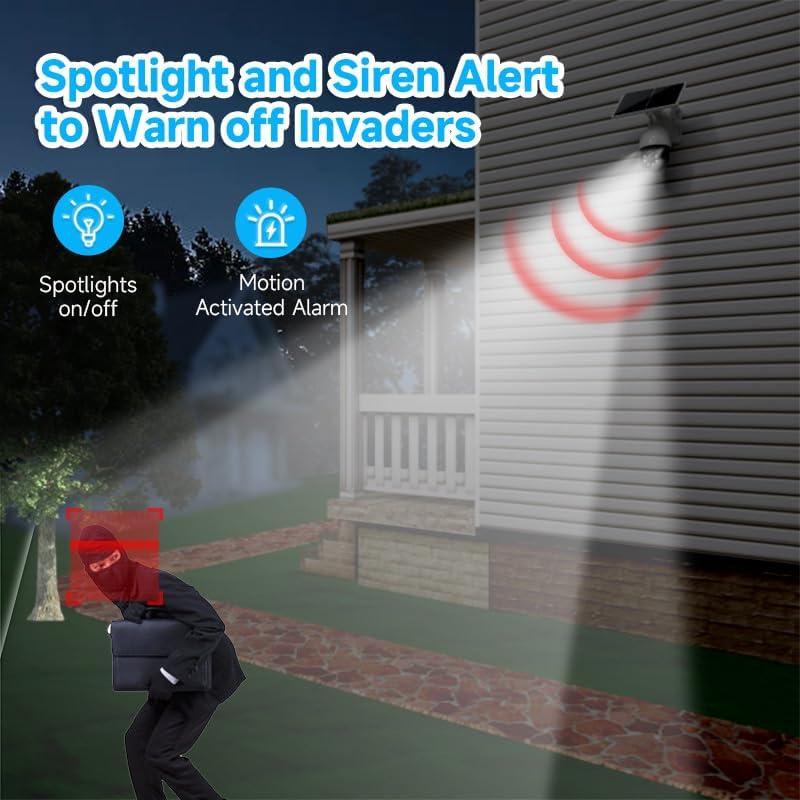
Image 4.2: The camera's spotlight and siren alert system activated at night, illuminating a detected intruder and emitting a warning sound, demonstrating its active deterrence capabilities.
5. Wartung
5.1 Reinigung
- Reinigen Sie das Kameraobjektiv und das Solarpanel regelmäßig mit einem weichen Tuch.amp Für optimale Ergebnisse mit einem Tuch abwischen. Scheuermittel vermeiden.
- Ensure the solar panel is free from dirt, dust, leaves, or snow to maintain efficient charging.
5.2 Firmware-Updates
Check the XIAOVV app periodically for available firmware updates. Keeping your camera's firmware up-to-date ensures optimal performance, security, and access to new features.
5.3 Speicherverwaltung
Bei Verwendung einer Micro-SD-Karte regelmäßig neu ladenview und wichtige Lebensmittel sicherntage. You can configure the camera to overwrite older footage automatically when the card is full. For cloud storage, manage your subscription and stored data through the app.

Image 5.1: A graph illustrating the benefits of H.265 Video Coding Technology compared to H.264, showing significant savings in storage space and broadband usage, leading to faster loading and smoother playback of videos.
6. Fehlerbehebung
6.1 Camera Not Connecting to 4G
- Stellen Sie sicher, dass die SIM-Karte korrekt eingelegt und mit einem Datentarif aktiviert ist.
- Check 4G signal strength at the camera's location using your smartphone.
- Restart the camera by pressing the reset button or power cycling it.
- Verify that the camera's 4G bands are compatible with your network provider.
6.2 Schlechte Bildqualität
- Reinigen Sie die Kameralinse, um Schmutz oder Flecken zu entfernen.
- Stellen Sie sicher, dass sich keine Hindernisse vor der Linse befinden.
- Check your 4G signal strength; a weak signal can affect streaming quality.
6.3 Akku wird nicht geladen
- Stellen Sie sicher, dass das Solarpanel sauber ist und täglich mehrere Stunden direktes Sonnenlicht erhält.
- Überprüfen Sie die Verbindung zwischen dem Solarpanel und der Kamera.
- Verify that the camera is placed in an area with sufficient sunlight.
6.4 Bewegungserkennung funktioniert nicht
- Check motion detection settings in the app; ensure it's enabled and sensitivity is adjusted.
- Verify that the detection zones are correctly configured.
- Stellen Sie sicher, dass keine physischen Hindernisse die Sicht der Kamera blockieren. view or PIR sensor.
7. Spezifikationen
| Besonderheit | Spezifikation |
|---|---|
| Modellname | XIAOVV-P5PLUS-EU4G |
| Konnektivität | 4G LTE (B1/B3/B5/B38/B39/B40/B41) |
| Stromversorgung | Solar Powered (Integrated Solar Panel) |
| Bildauflösung | 5 MP (Stills) |
| Videoauflösung | 1080p (AVI-Format) |
| Nachtsicht | Starlight Color Night Vision, 15 Meters Range |
| Viewing-Winkel | 360 Grad (PTZ) |
| Besondere Merkmale | Two-way audio, Local recording, AI Person Detection, PIR/Radar Alarms, HD Resolution, PTZ Technology |
| Lagerung | Micro SDHC (up to 128 GB), Optional Cloud Storage |
| Kompression | H.265 |
| Wetterfeste Bewertung | IP66 |
| Kontrollmethode | Smartphone App (XIAOVV App) |
| Maße | 20 x 20 x 22 cm |
8. Garantie und Support
This XIAOVV product comes with a standard manufacturer's warranty. Please refer to the warranty card included in your package or visit the official XIAOVV webAuf der Webseite finden Sie die detaillierten Garantiebedingungen.
For technical support, troubleshooting assistance, or any product-related inquiries, please contact XIAOVV customer service through the contact information provided on their official website or within the XIAOVV app.