Einführung
This manual provides instructions for the operation and maintenance of your Generic replacement remote control. This remote is designed to be compatible with specific AC Air Conditioner models, including Tesla TTMY-09CHW, TTMY-12CHW, Klarstein Grandbreeze Eco 12K, and TCL TAC-07CPB/RS. Please ensure your original remote matches the appearance of this replacement remote for full compatibility.
Important Note: This is a replacement remote control and is not a universal remote. While it is designed to function with the listed models, some advanced or less common functions present on the original remote may not be available. No setup or coding is required; simply insert batteries for operation.
Sicherheitshinweise
- Bewahren Sie Batterien außerhalb der Reichweite von Kindern auf.
- Mischen Sie keine alten und neuen Batterien oder verschiedene Batterietypen.
- Remove batteries if the remote control will not be used for an extended period.
- Avoid exposing the remote control to direct sunlight, heat sources, or moisture.
Produkt überview
The remote control features a straightforward button layout for easy operation of your air conditioner. Below is an illustration of the remote's front panel and a description of its primary functions.

Abbildung 1: Front view of the remote control, showing all buttons. The remote is black with clearly labeled icons for power, mode, temperature adjustment, fan speed, timer, and Celsius/Fahrenheit toggle.
Tastenfunktionen:
- Netzschalter (): Schaltet die Klimaanlage ein oder aus.
- Modustaste (): Durchläuft verschiedene Betriebsmodi (z. B. Kühlen, Heizen, Lüfter, Entfeuchten, Automatik).
- Temperatur-Auf-/Ab-Tasten (): Stellt die gewünschte Temperatur ein.
- Taste für die Lüftergeschwindigkeit (): Regelt die Lüftergeschwindigkeit (z. B. Niedrig, Mittel, Hoch, Auto).
- Swing-Taste (): Aktiviert oder deaktiviert die Luftschwingfunktion.
- Timer-Taste (): Aktiviert oder deaktiviert die Timerfunktion.
- C/F-Taste (): Toggles the temperature display between Celsius and Fahrenheit. Note: This remote may be Celsius only depending on the specific AC unit's capabilities.
Einrichtung: Batterieinstallation
Für die Fernbedienung werden zwei AAA-Batterien benötigt (nicht im Lieferumfang enthalten). Gehen Sie zum Einlegen der Batterien wie folgt vor:
- Suchen Sie das Batteriefach auf der Rückseite der Fernbedienung.
- Schieben Sie den Deckel des Batteriefachs nach unten oder außen, um es zu öffnen.
- Legen Sie zwei AAA-Batterien ein und achten Sie darauf, dass die Plus- (+) und Minus- (-) Anschlüsse mit den Markierungen im Inneren des Batteriefachs übereinstimmen.
- Schieben Sie den Batteriefachdeckel wieder an seinen Platz, bis er sicher einrastet.

Abbildung 2: Zurück view der Fernbedienung, die den Batteriefachdeckel zeigt.
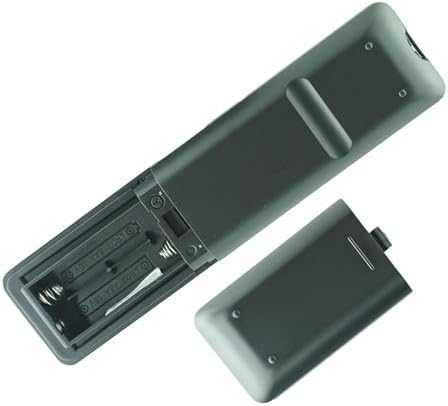
Abbildung 3: Remote control with the battery cover removed, illustrating the correct orientation for AAA battery insertion.
The remote control is now ready for use. No further setup or programming is required.
Bedienungsanleitung
Richten Sie die Fernbedienung beim Betrieb direkt auf den Empfänger der Klimaanlage. Stellen Sie sicher, dass sich keine Hindernisse zwischen Fernbedienung und Gerät befinden.
- Ein-/Ausschalten: Drücken Sie die Leistung button once to turn the unit on, and again to turn it off.
- Modus auswählen: Drücken Sie die Modus button repeatedly to cycle through available operating modes (e.g., Cool, Heat, Fan, Dry, Auto). The current mode will typically be displayed on the air conditioner unit.
- Temperatur einstellen: Verwenden Sie die Temperatur steigt () Und Temperatur runter () buttons to set your desired room temperature.
- Lüftergeschwindigkeit einstellen: Drücken Sie die Lüftergeschwindigkeit button to adjust the fan's intensity. Options usually include Low, Medium, High, and Auto.
- Activating Swing: Drücken Sie die Swing button to start or stop the automatic louver movement, which helps distribute air evenly.
- Verwendung des Timers: Drücken Sie die Timer button to access timer settings. Refer to your air conditioner's main manual for specific timer programming details, as this remote provides the interface but the AC unit handles the logic.
- Temperatureinheit ändern: Drücken Sie die C / F. button to switch the temperature display between Celsius and Fahrenheit. If your AC unit only supports one unit, this button may not function.
Wartung
Batteriewechsel:
Replace batteries when the remote control's range decreases or if the air conditioner does not respond to commands. Follow the battery installation steps outlined in the Setup section.
Reinigung:
Wipe the remote control with a soft, dry cloth. Do not use liquid cleaners, abrasive cleaners, or chemical solvents, as these can damage the remote's surface or internal components.
Fehlerbehebung
- Fernbedienung reagiert nicht:
- Prüfen Sie, ob die Batterien korrekt und mit der richtigen Polarität eingelegt sind.
- Ersetzen Sie die alten Batterien durch neue AAA-Batterien.
- Stellen Sie sicher, dass sich keine Hindernisse zwischen der Fernbedienung und dem Empfänger der Klimaanlage befinden.
- Vergewissern Sie sich, dass die Fernbedienung direkt auf die Klimaanlage gerichtet ist.
- Bestimmte Funktionen funktionieren nicht:
- This replacement remote may not support all functions of your original remote. Refer to the Product Overview section for supported functions.
- Ensure your air conditioner model is listed as compatible.
- Temperature unit (C/F) not changing:
- Some air conditioner models may only support one temperature unit (e.g., Celsius only). The remote sends the command, but the AC unit dictates the display.
Technische Daten
| Produkttyp | Ersatzfernbedienung |
| Kompatible Geräte | AC Air Conditioners (Tesla TTMY-09CHW, TTMY-12CHW, Klarstein Grandbreeze Eco 12K, TCL TAC-07CPB/RS) |
| Stromquelle | 2 x AAA-Batterien (nicht enthalten) |
| Farbe | Schwarz |
| Besondere Merkmale | Infrared (IR) communication, Cooling & Heating functions, Celsius/Fahrenheit toggle (unit dependent) |
Garantie und Support
For any issues or questions regarding this replacement remote control, please contact the seller or retailer from whom you purchased the product. Specific warranty details, if any, are provided by the seller at the time of purchase.


