
Walfront PM6508
PM6508 Digital Humidity and Temperature Meter User Manual
Model: PM6508 | Brand: Walfront
Einführung
This user manual provides detailed instructions for the operation and maintenance of the Walfront PM6508 Digital Humidity and Temperature Meter. This device is designed for accurate measurement of ambient temperature, humidity, dew point temperature, and wet bulb temperature. Please read this manual thoroughly before use to ensure proper operation and to prevent damage.
Sicherheitshinweise
- Versuchen Sie nicht, das Messgerät zu zerlegen oder zu modifizieren.
- Keep the device away from water and high humidity environments unless specified for such use.
- Avoid exposing the sensor to direct sunlight or extreme temperatures.
- Wenn das Gerät längere Zeit nicht verwendet wird, entfernen Sie die Batterien, um ein Auslaufen zu verhindern.
- Batterien und Gerät sind gemäß den örtlichen Vorschriften zu entsorgen.
Produkt überview
The PM6508 is an ergonomic, handheld digital meter featuring a clear LCD backlight display and intuitive button controls.

This image displays the front of the PM6508 meter, highlighting its orange protective casing, the black control panel, and the LCD screen. The screen shows current humidity and temperature readings. Below the screen are the power button, backlight button, unit conversion button (°C/°F), memory button (MEM), data hold button (H), dew point/wet bulb button (DP/WB), MIN/MAX button, and READ button. The sensor probe is visible at the top.
Komponenten:
- LCD Anzeige: Shows humidity, temperature, and other indicators.
- Humidity/Temperature Sensor: Located at the top of the device, protected by a cover.
- Bedientasten:
- Netzschalter: Schaltet das Gerät ein/aus.
- Taste für Hintergrundbeleuchtung: Aktiviert/deaktiviert die Display-Hintergrundbeleuchtung.
- °C/°F-Taste: Schaltet zwischen Celsius und Fahrenheit als Temperatureinheiten um.
- MEM-Taste: Greift auf gespeicherte Datensätze zu.
- H-Taste: Datenhaltefunktion.
- DP/WB Button: Switches between Dew Point and Wet Bulb temperature display.
- MIN/MAX-Taste: Zeigt die minimalen und maximalen aufgezeichneten Werte an.
- LESEN-Schaltfläche: Used for reading stored data.
- Batteriefach: Befindet sich auf der Rückseite des Geräts.
Aufstellen
Einlegen der Batterie:
- Locate the battery compartment cover on the back of the PM6508 meter.
- Schieben Sie den Deckel nach unten, um das Fach zu öffnen.
- Insert four (4) AAA dry batteries (24A, LR03) into the compartment, ensuring correct polarity (+/-).
- Schließen Sie den Batteriefachdeckel, indem Sie ihn nach oben schieben, bis er einrastet.
Notiz: Batteries are not included with the device. A low battery indicator will appear on the display when battery power is low.

This image provides a dual view of the PM6508 meter, displaying both its front and back. The back view clearly shows the battery compartment cover and a "Q.C. PASSED" sticker, indicating quality control. This view is useful for understanding how to access and install batteries.
Bedienungsanleitung
Ein-/Ausschalten:
- Drücken Sie die Netzschalter um das Messgerät einzuschalten.
- Halten Sie die Netzschalter for approximately 2 seconds to turn the meter off.
- The device has an automatic shutdown function to conserve battery life.
Messungen durchführen:
- Once powered on, the meter will immediately begin displaying ambient humidity and temperature readings.
- Ensure the sensor probe at the top of the device is exposed to the environment you wish to measure.
- Allow a few moments for the readings to stabilize, especially when moving between environments with different conditions. The update rate is approximately 400ms.
Umstellung der Temperatureinheiten (°C/°F):
- Drücken Sie die °C/°F-Taste Um die Temperaturanzeige zwischen Celsius (°C) und Fahrenheit (°F) umzuschalten.
Dew Point and Wet Bulb Temperature:
- Drücken Sie die DP/WB Button to cycle through the display modes: Ambient Temperature, Dew Point Temperature, and Wet Bulb Temperature.
Datenhaltung (H):
- Drücken Sie die H-Taste to freeze the current readings on the display. The "H" icon will appear.
- Drücken Sie die H-Taste Um die Datensperre erneut aufzuheben und die Live-Messungen fortzusetzen.
Minimum/Maximum Readings (MIN/MAX):
- Drücken Sie die MIN/MAX-Taste once to display the maximum recorded values (MAX icon).
- Drücken Sie die MIN/MAX-Taste again to display the minimum recorded values (MIN icon).
- Drücken Sie die MIN/MAX-Taste a third time to exit MIN/MAX mode and return to live readings.
Memory Storage (MEM) and Recall:
- The meter has a capacity to store up to 99 records.
- To save a current reading, press and hold the MEM-Taste.
- Um gespeicherte Daten abzurufen, drücken Sie die Taste MEM-Taste briefly. Use the READ Button or arrow keys (if available, not explicitly shown but implied by "READ") to navigate through the stored records.
Hintergrundbeleuchtungsfunktion:
- Drücken Sie die Taste für Hintergrundbeleuchtung to illuminate the LCD display for better visibility in low-light conditions.
- Drücken Sie die Taste für Hintergrundbeleuchtung erneut, um die Hintergrundbeleuchtung auszuschalten.
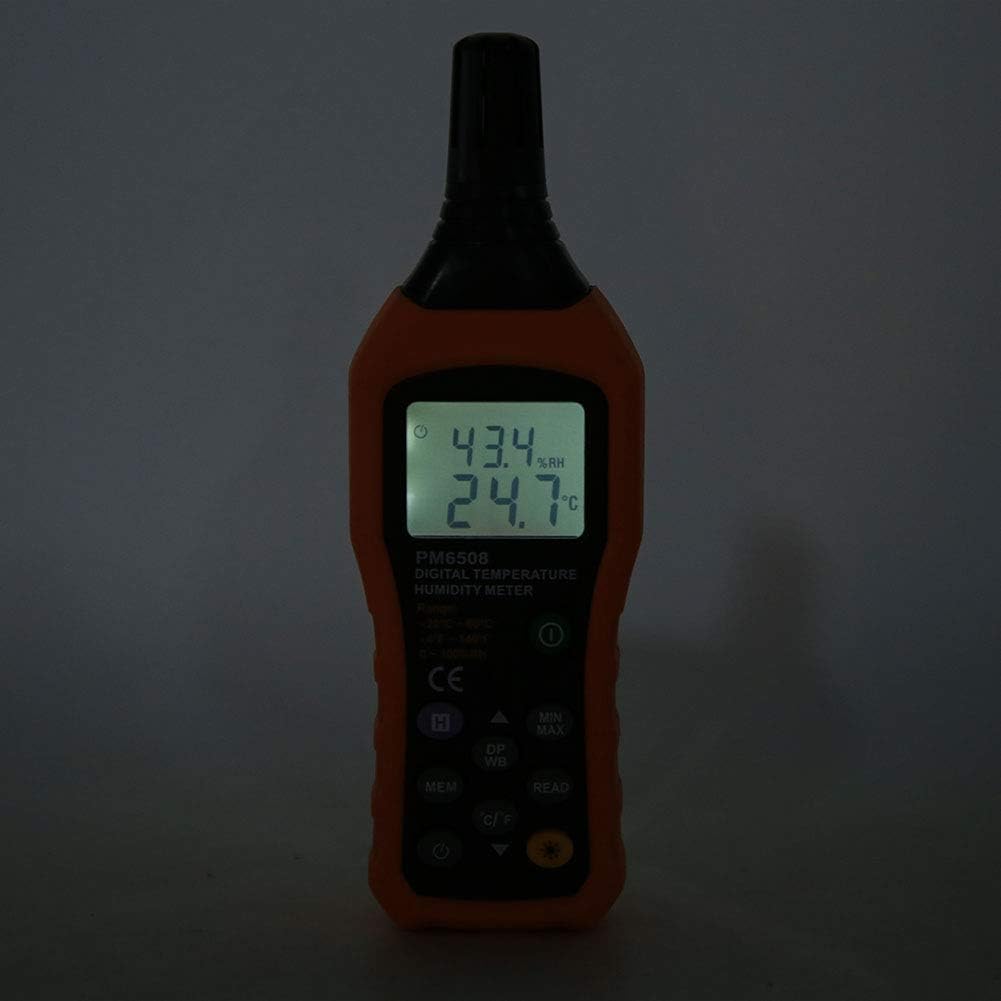
This image shows the PM6508 meter in a dark environment with its LCD backlight turned on. The illuminated display clearly shows the humidity and temperature readings, demonstrating the effectiveness of the backlight feature for use in low-light conditions.
Wartung
Reinigung:
- Wischen Sie die Oberfläche des Zählers ab.asing mit einem weichen, damp Tuch. Keine Scheuer- oder Lösungsmittel verwenden.
- Keep the sensor area clean and free from dust or debris. Do not insert objects into the sensor opening.
Lagerung:
- Bewahren Sie das Messgerät an einem kühlen, trockenen Ort auf, geschützt vor direkter Sonneneinstrahlung und extremen Temperaturen.
- If storing for an extended period, remove the batteries to prevent leakage and potential damage to the device.
- Utilize the provided protective holster/bag for storage to prevent physical damage.
Fehlerbehebung
| Problem | Mögliche Ursache | Lösung |
|---|---|---|
| Das Messgerät lässt sich nicht einschalten. | Defekte oder falsch eingesetzte Batterien. | Batteriepolung prüfen. Durch neue AAA-Batterien ersetzen. |
| Ungenaue Messwerte. | Sensor obstructed or dirty; rapid environmental changes; device not calibrated. | Clean the sensor. Allow time for readings to stabilize. Ensure sensor is exposed to the correct environment. If issues persist, contact support. |
| Das Display ist dunkel oder flackert. | Schwache Batterie. | Batterien ersetzen. |
| Cannot recall stored data. | No data saved; incorrect button sequence. | Ensure data was saved. Refer to "Memory Storage" section for correct recall procedure. |
Technische Daten
| Parameter | Wert |
|---|---|
| Modell | PM6508 (Item model number: WALFRONTinpedoqgs5) |
| Umgebungstemperaturbereich | -20 bis 60 °C (-4 bis 140 °F) |
| Genauigkeit der Umgebungstemperatur | ±1.0 °C (0 bis 45 °C), ±1.5 °C (-20 bis 0 °C, 45 bis 60 °C) |
| Auflösung der Umgebungstemperatur | 0.1 °C/°F |
| RH-Bereich | 0-100 % relative Luftfeuchtigkeit |
| RH-Genauigkeit | ±3.0 % RH (20 % bis 80 %), ±4.0 % RH (0 % bis 20 %, 80 % bis 100 %) |
| RH-Auflösung | 0.1 % |
| Feuchtkugeltemperaturbereich | -20 bis 60 °C (-4 bis 140 °F) |
| Genauigkeit der Feuchtkugeltemperatur | ±1 °C (0 bis 45 °C), ±1.5 °C (-20 bis 0 °C, 45 bis 60 °C) |
| Auflösung der Feuchtkugeltemperatur | 0.1 °C/°F |
| Dew-point Temperature Range | -50 bis 60 °C (-58 bis 140 °F) |
| Dew-point Temperature Accuracy | ±1 °C (0 bis 45 °C), ±1.5 °C (-50 bis 0 °C, 45 bis 60 °C) |
| Dew-point Temperature Resolution | 0.1 °C/°F |
| Aktualisierungsrate | 400 ms |
| Number of Storage Records | 99 |
| Stromversorgung | 4 * AAA dry Batteries (not included) |
| Akkulaufzeit | 200 Stunden |
| Gewicht | Ca. 261 g |
| Maße | Ca. 184 * 60 * 29 mm / 7.2 * 2.4 * 1.1 Zoll |
| Hersteller | WALFRONT |
| Ursprungsland | China |
Garantie und Support
For product support, technical assistance, or warranty inquiries, please contact Walfront customer service through the retailer where the product was purchased or visit the official Walfront store page on Amazon: Walfront Amazon Store.
Bitte bewahren Sie Ihren Kaufbeleg als Kaufnachweis für eventuelle Garantieansprüche auf.
Ask a question about this manual
Ask about setup, troubleshooting, compatibility, parts, safety, or missing instructions. Manuals+ will review the question and use this page’s manual context to help answer it.