
Wichtige Sicherheitsinformationen
Bitte lesen Sie vor der Montage und Inbetriebnahme alle Anweisungen sorgfältig durch. Bewahren Sie diese Anleitung zum späteren Nachschlagen auf.
- This product has a maximum weight recommendation of 350 Pfund (158 kg). Do not exceed this weight limit.
- Improper assembly or use may lead to instability or malfunction, potentially causing injury.
- To avoid health issues associated with prolonged sitting, take regular breaks and adjust your posture during extended use.
- Ensure all screws and connections are tightened securely before use and periodically check for looseness.
Packungsinhalt
Bitte prüfen Sie vor Beginn der Montage, ob alle Komponenten vorhanden sind. Sollten Teile fehlen oder beschädigt sein, wenden Sie sich bitte an unseren Kundendienst.
- Armlehnen (2)
- Rollen (5)
- Gasdruckfeder (1)
- Kopfstütze (1)
- Benutzerhandbuch (1)
- Assembly Tools (1 set)
- Chair Base (1)
- Sitzkissen (1)
- Rückenlehne (1)

Abbildung 1: Example of a caster wheel, part of the chair's base assembly.
Einrichtung und Montage
The FLEXISPOT OC4 Lite chair is designed for straightforward assembly. A detailed user manual with step-by-step instructions and all necessary tools are included in the package. Assembly can typically be completed in approximately 30 minutes.
- Komponenten auspacken: Nehmen Sie alle Teile vorsichtig aus der Verpackung und legen Sie sie auf eine saubere, ebene Fläche.
- Rollen an der Basis befestigen: Insert the five caster wheels into the holes on the chair base until they click securely into place.
- Gaslift einsetzen: Setzen Sie den Gasdruckfederzylinder in die mittlere Öffnung des Stuhlgestells ein.
- Sitz und Rückenlehne montieren: Follow the specific instructions in the included user guide to attach the backrest to the seat cushion and then to the chair mechanism.
- Kopfstütze anbringen: Secure the headrest to the top of the backrest.
- Connect to Gas Lift: Setzen Sie den montierten Sitz und die Rückenlehne vorsichtig auf den Gasdruckfederzylinder.
- Letzte Kontrollen: Vor der Benutzung sicherstellen, dass alle Verbindungen fest sitzen und der Stuhl stabil steht.
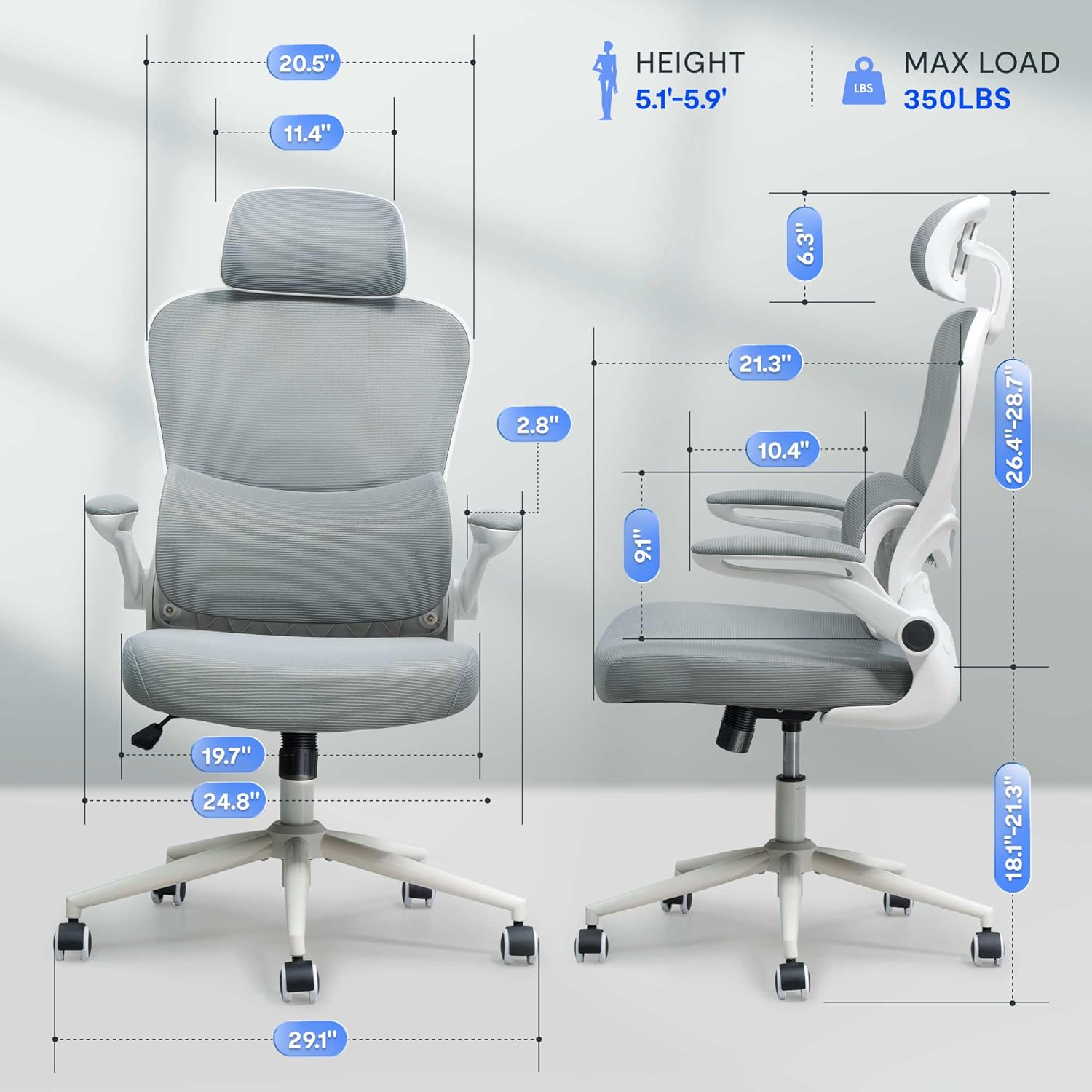
Abbildung 2: Assembled chair with key dimensions for reference.
Bedienungsanleitung
The FLEXISPOT OC4 Lite chair offers multiple adjustment points to customize your seating experience for optimal comfort and support.
1. Sitzhöhenverstellung
To adjust the seat height, locate the lever on the right side beneath the seat. Pull the lever up while seated to lower the seat, or pull it up while standing to raise the seat. Release the lever at the desired height.
2. Tilt Function and Tension Control
The chair features a tilt function allowing the backrest and seat to recline together. Use the lever on the left side beneath the seat to lock or unlock the tilt. The tilt tension knob, located at the front center beneath the seat, can be rotated to adjust the resistance of the tilt mechanism.

Abbildung 3: Adjusting the chair's tilt angle and tension.
3. Verstellbare Lendenwirbelstütze
The chair includes adjustable lumbar support that adapts to your waist movement, providing dynamic support. The lumbar support can be adjusted vertically by sliding it up or down along the backrest frame to align with the natural curve of your spine.
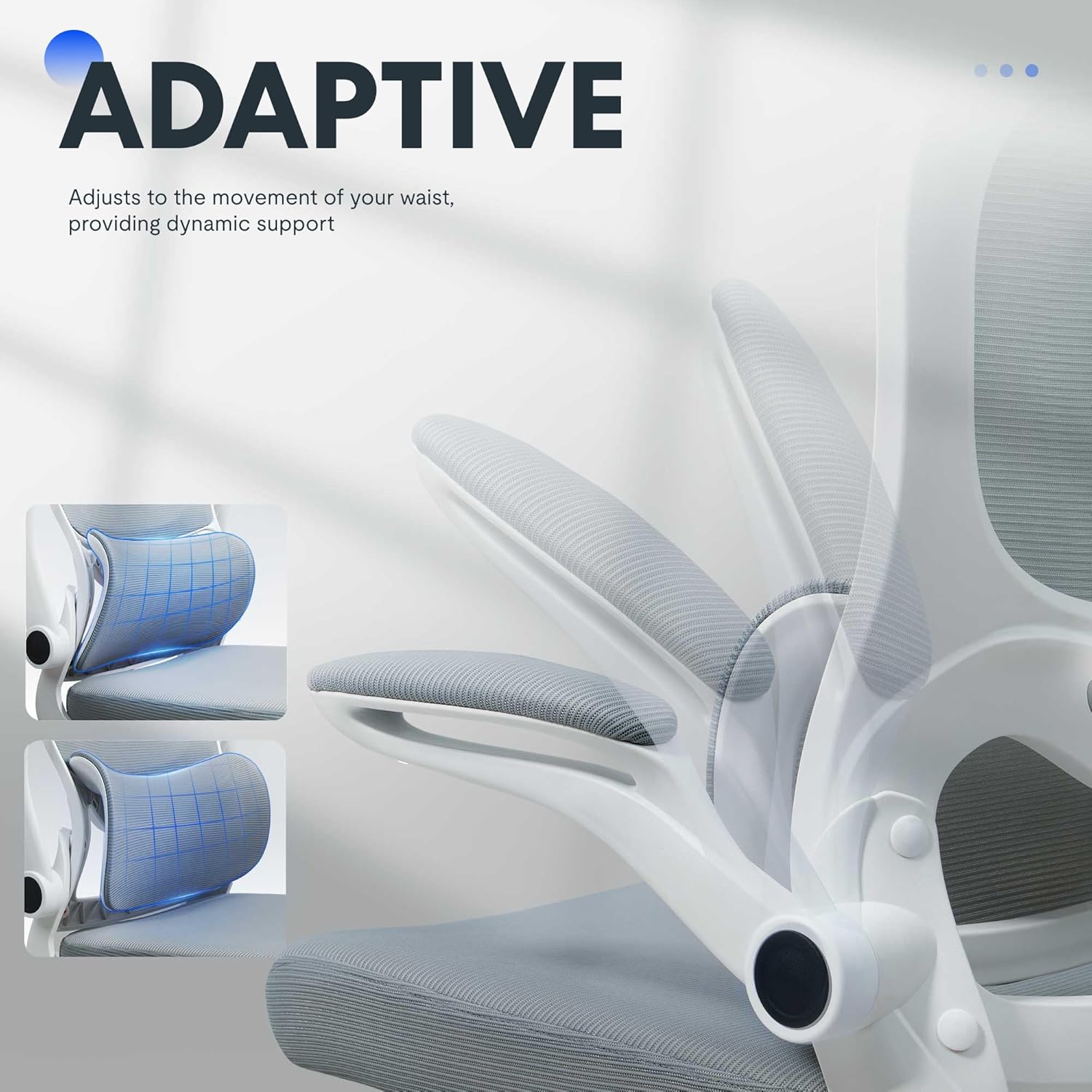
Abbildung 4: Adaptive lumbar support for personalized comfort.
4. Verstellbare Kopfstütze
The headrest can be adjusted for height and angle to provide optimal neck and head support. Gently push or pull the headrest to move it to your preferred position.
5. Hochklappbare Armlehnen
The armrests can be flipped up to allow the chair to be pushed closer to a desk, saving space. To flip them up, lift the armrests until they lock into the vertical position. To return them, gently pull them down.

Abbildung 5: Chair with armrests flipped up for space-saving storage.
Wartung
Die richtige Pflege verlängert die Lebensdauer und erhält das Aussehen Ihres Bürostuhls.
- Reinigung: Zur allgemeinen Reinigung Oberflächen mit einem Tuch abwischenamp cloth. For fabric areas, dry clean or wipe clean as needed. Avoid harsh chemical cleaners that may damage the material.
- Inspektion: Überprüfen Sie regelmäßig alle Schrauben und Bolzen auf festen Sitz. Ziehen Sie diese gegebenenfalls nach, um Stabilität und Sicherheit zu gewährleisten.
- Pflege des Casters: Um eine reibungslose Bewegung zu gewährleisten, sollten die Rollen frei von Haaren und Schmutz sein.
Fehlerbehebung
Sollten Sie Probleme mit Ihrem Stuhl haben, beachten Sie bitte die unten aufgeführten häufigen Probleme und Lösungen.
| Problem | Mögliche Ursache | Lösung |
|---|---|---|
| Der Stuhl ist nicht höhenverstellbar. | Gasliftfunktion defekt oder Hebel nicht eingerastet. | Stellen Sie sicher, dass der Höhenverstellhebel vollständig eingerastet ist. Sollte das Problem weiterhin bestehen, muss die Gasdruckfeder möglicherweise ausgetauscht werden. Wenden Sie sich in diesem Fall bitte an den Kundendienst. |
| Stuhl wackelt oder fühlt sich instabil an | Lose Schrauben oder unebener Boden. | Prüfen und ziehen Sie alle Montageschrauben fest. Stellen Sie sicher, dass der Stuhl auf einer ebenen Fläche steht. |
| Die Rollen rollen nicht reibungslos | Fremdkörper in den Rollen oder beschädigte Rollen. | Entfernen Sie Haare und Schmutz von den Lenkrollen. Beschädigte Lenkrollen müssen gegebenenfalls ausgetauscht werden. |
| Die Rückenlehne lässt sich weder neigen noch arretieren. | Neigungsmechanismus blockiert oder Spannung zu hoch. | Stellen Sie sicher, dass der Neigungssperrhebel gelöst ist. Stellen Sie den Neigungsspannungsknopf auf eine niedrigere Position ein. |
Produktspezifikationen
| Marke | FLEXISPOT |
| Modellname | OC4-V2 |
| Farbe | Weiß |
| Material | Alloy Steel, Mesh, Nylon |
| Produktabmessungen (T x B x H) | 29.1" x 29.1" x 50" (73.9 cm x 73.9 cm x 127 cm) |
| Artikelgewicht | 32 Pfund (14.5 kg) |
| Maximalgewichtsempfehlung | 350 Pfund (158 kg) |
| Sitztiefe | 21.3 Zoll (54.1 cm) |
| Breite der Stuhlrückenlehne | 20.5 Zoll (52.1 cm) |
| Zurück Stil | Netzrücken |
| Armstil | Flip-up arms |
| Bewegung der Möbelbasis | Schwenken |
| Erforderliche Montage | Ja |
| Zertifizierungen | BIFMA, SGS |
Garantie und Support
The FLEXISPOT OC4 Lite Ergonomic Office Chair is rigorously tested and certified by BIFMA and SGS, ensuring durability and safety. The reinforced nylon base is capable of supporting significant weight, and the resilient mesh fabric is designed to maintain its shape over time.
For any questions, concerns, or assistance with assembly, operation, or troubleshooting, please contact our professional customer service team. Refer to the contact information provided with your purchase or visit the official FLEXISPOT webWebsite für Supportdetails.