
Einführung
This manual provides comprehensive instructions for the setup, operation, maintenance, and troubleshooting of your QRD Spark N5 Wireless Controller. Please read this manual carefully before using the product to ensure optimal performance and longevity.
Produkt überview
The QRD Spark N5 Wireless Controller is designed for a versatile gaming experience across multiple platforms. It features advanced Hall Effect technology for precise control, customizable macro functions, and immersive vibration feedback.

Abbildung 1: Front view of the QRD Spark N5 Wireless Controller, showcasing its ergonomic design and illuminated buttons.
Hauptmerkmale:
- Hall Effect Joysticks & Analog Triggers: Provides drift-free and highly accurate control with less than 0.1mm accuracy.
- Multifunktions-Touchpad: Supports touch control for PS4 and acts as a mouse on other compatible platforms.
- 6-Axis Gyroscope & Motion Sensor: Integrated for immersive gaming experiences and precise motion control.
- Doppelte Vibrationsmotoren: Adjustable vibration levels (0%, 30%, 70%, 100%) for realistic feedback.
- Macro Back Paddles (N1 & N2): Customizable for assigning complex shortcuts and executing multiple actions.
- Turbofunktion: Adjustable turbo speed with auto and manual modes for various buttons.
- 3.5mm Audio Port, Speaker & Mic: Enables audio output and communication during gameplay.
- Wired & Wireless Compatibility: Supports Bluetooth 5.3 for wireless connection and USB-C for wired connection (D-input default, X-input available).
Einrichtung und Anschluss
Laden des Controllers:
Laden Sie den Controller vor der ersten Verwendung vollständig mit dem mitgelieferten USB-C-Kabel auf. Verbinden Sie das USB-C-Ende mit dem Controller und das USB-A-Ende mit einer kompatiblen Stromquelle (z. B. Konsole, PC, USB-Netzteil).
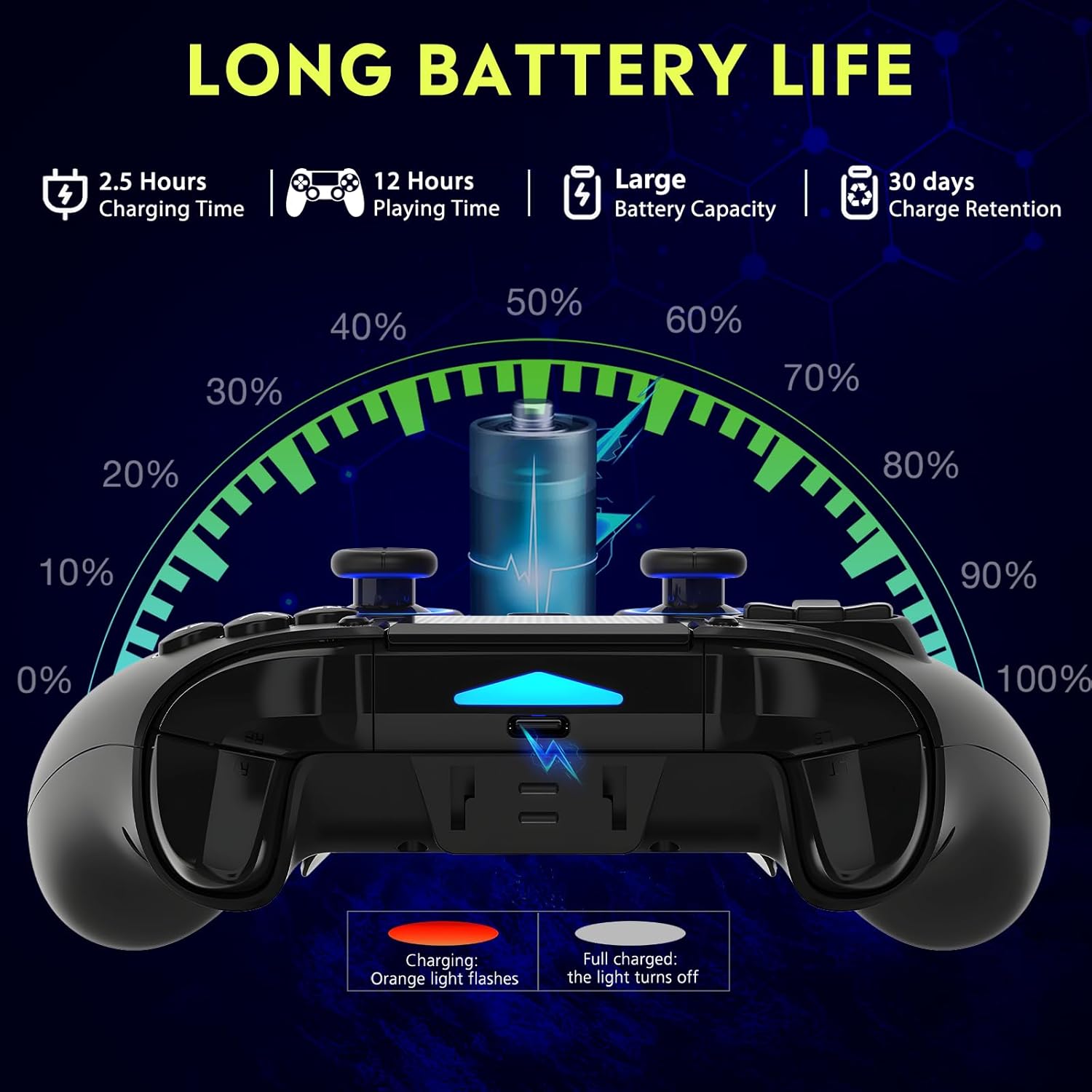
Abbildung 2: Battery life illustration. The orange light flashes during charging and turns off when fully charged. A full charge takes approximately 2.5 hours and provides up to 12 hours of playing time.
Drahtlose Verbindung (Bluetooth 5.3):
The controller supports wireless connection via Bluetooth 5.3 for PS4, PS3, PS2, Steam Deck, PC (Windows/macOS), iOS, and Android TV Box/phones. For PS5 compatibility, a separate QRD Wireless Converter is required.

Abbildung 3: Kompatibilität vorbeiview showing the controller connecting to Windows, PS4, Steam, Mobile, PS3.
- Stellen Sie sicher, dass der Controller aufgeladen ist.
- Turn on the controller by pressing the "Q" (Home) button.
- On your device, navigate to Bluetooth settings.
- Select "Spark N5" or similar from the list of available devices to pair.
- Nach erfolgreicher Kopplung stabilisieren sich die Kontrollleuchten am Controller.
Notiz: For PS5 games, an additional QRD Wireless Converter is necessary. This converter allows the Spark N5 controller to function with PS5 titles, expanding your gaming options.
Video 1: This video demonstrates the QRD Spark N5 Wireless Controller's compatibility with various game devices, including setup and initial connection steps.
Kabelgebundene Verbindung (USB-C):
Connect the controller directly to your PC or console using the provided USB-C cable. The controller will operate in D-input mode by default. X-input mode is available for PC connections only.
Bedienungsanleitung
Grundlegende Steuerelemente:
The controller features standard gamepad buttons, joysticks, and triggers. Familiarize yourself with the layout for optimal gameplay.

Abbildung 4: The multi-function touchpad on the controller, which can be used for navigation and specific game interactions.
Hall-Effekt-Joysticks und -Trigger:
The Hall Effect technology ensures precise, drift-free input for both joysticks and triggers. This provides enhanced accuracy and responsiveness in games.

Abbildung 5: Explodierte view of the Hall Effect Joystick, illustrating its magnetic sensing mechanism for drift-free operation.

Abbildung 6: Illustration of the Hall Sensing Analog Triggers, highlighting their sub-millimeter accuracy for precise control.
Macro Back Paddles (N1 & N2):
The N1 and N2 back paddles can be programmed to execute complex actions or button combinations with a single press. This feature is useful for competitive gaming or simplifying repetitive tasks.

Abbildung 7: Hinteren view of the controller showing the N1 and N2 macro back paddles, which can be assigned to perform complex combos.
Refer to the controller's quick start guide or the official QRD website for detailed instructions on programming macro functions.
Turbofunktion:
The Turbo function allows for rapid, continuous input of a button press. You can set three different turbo speeds for most buttons (excluding macro paddles) and choose between auto and manual turbo modes.
Consult the quick start guide for specific button combinations to activate and adjust turbo settings.
Einstellbare Vibration:
The dual vibration motors provide haptic feedback. You can adjust the intensity to your preference: 0% (off), 30%, 70% (default), or 100%.

Abbildung 8: Visual representation of the dual vibration shock feature and its adjustable intensity levels.
Instructions for adjusting vibration intensity are typically found in the quick start guide or by holding specific button combinations.
6-Axis Gyroscope & Motion Sensor:
The integrated 6-axis gyroscope and motion sensor enable precise motion control in supported games, enhancing immersion and aiming accuracy.

Abbildung 9: Depiction of the 6-axis gyroscope and motion control, showing how controller movements translate into in-game actions.
Audio-Features:
The controller includes a 3.5mm audio port for headphones, a built-in speaker, and a microphone. This allows for in-game audio, voice chat, and immersive sound effects.
Video 2: This video demonstrates the smartphone connection and gaming experience with the QRD Spark N5 Wireless Controller, including audio functionality.
Wartung
- Reinigung: Reinigen Sie den Controller mit einem weichen, trockenen Tuch. Bei hartnäckigem Schmutz kann ein leicht feuchtes Tuch hilfreich sein.amp Ein Tuch kann verwendet werden, achten Sie aber darauf, dass keine Feuchtigkeit in die Öffnungen oder Spalten eindringt.
- Lagerung: Bewahren Sie den Controller an einem kühlen, trockenen Ort fern von direkter Sonneneinstrahlung und extremen Temperaturen auf.
- Batteriepflege: Um die Batterielebensdauer zu verlängern, vermeiden Sie häufiges vollständiges Entladen des Controllers. Laden Sie ihn regelmäßig auf, auch wenn er nicht ständig in Gebrauch ist.
- Auswirkungen vermeiden: Der Controller darf nicht fallen gelassen oder starken Stößen ausgesetzt werden, da dies zu Schäden an den internen Bauteilen führen kann.
Fehlerbehebung
| Problem | Mögliche Ursache | Lösung |
|---|---|---|
| Der Controller lässt sich nicht einschalten. | Schwacher Akku oder keine Ladung. | Laden Sie den Controller mit dem mitgelieferten USB-C-Kabel auf. |
| Drahtlose Verbindung nicht möglich. | Bluetooth ist auf dem Gerät nicht aktiviert; Controller befindet sich nicht im Kopplungsmodus; Störungen. | Ensure Bluetooth is on. Press and hold the "Q" button to enter pairing mode. Move closer to the device. Restart both controller and device. |
| Eingabeverzögerung oder nicht reagierende Tasten. | Low battery; wireless interference; outdated firmware. | Charge the controller. Reduce wireless interference. Check QRD website for firmware updates. Try wired connection. |
| Joysticks or triggers drifting. | Calibration issue; rare hardware defect. | The Hall Effect technology minimizes drift. If persistent, try recalibrating (refer to quick start guide) or contact customer support. |
| Keine Vibrationsrückmeldung. | Vibration setting is off (0%); game does not support vibration. | Adjust vibration intensity to 30%, 70%, or 100%. Ensure the game supports vibration. |
Technische Daten
- Modell: Spark N5
- Konnektivität: Bluetooth 5.3 (Wireless), USB-C (Wired)
- Kompatibilität: PS4, PS4 Slim, PS4 Pro, PS3, PS2, Steam Deck, PC (Windows, macOS), iOS, Android TV Box, Phone. (PS5 via separate converter)
- Joysticks/Trigger: Hall-Effekt
- Bewegungssensor: 6-Achsen-Gyroskop
- Vibration: Dual Motors, Adjustable (0%, 30%, 70%, 100%)
- Audio: 3.5mm Audio Port, Built-in Speaker, Microphone
- Besondere Merkmale: Multi-function Touchpad, Macro Back Paddles (N1, N2), Turbo Function
- Batterie: 1 Lithium-Polymer-Akku (im Lieferumfang enthalten)
- Ladezeit: Ungefähr 2.5 Stunden
- Spielzeit: Bis zu 12 Stunden
- Abmessungen: 6.38 x 4.06 x 2.56 Zoll
- Gewicht: 13.7 Unzen
Garantie und Support
QRD products are designed for durability and performance. For warranty information and technical support, please refer to the official QRD webWebsite oder wenden Sie sich direkt an den Kundendienst.
- Offiziell WebWebsite: QRD Store on Amazon
- Kundendienst: Contact information may be available on the product packaging or the official webWebsite.
Bitte bewahren Sie Ihren Kaufbeleg für eventuelle Garantieansprüche auf.