
Jufodrca 4 Core 2G RAM 32G ROM
Jufodrca Car Radio Stereo User Manual
Für Honda Accord 7. Generation (2003-2007)
Einführung
This manual provides detailed instructions for the installation, operation, and maintenance of your Jufodrca 10-inch Car Radio Stereo. Designed specifically for the Honda Accord 7th Generation (2003-2007), this unit integrates advanced features such as Wireless CarPlay, Android Auto, Bluetooth 5.0, 5G WiFi, GPS Navigation, and Rear Camera support to enhance your driving experience.
Fahrzeugkompatibilität
This car radio stereo is compatible with Honda Accord 7th Generation models from 2003, 2004, 2005, 2006, and 2007. It is designed for vehicles with a 2+32G configuration and offers seamless integration of advanced features.

Figure 1: Before and After Installation in Honda Accord 7th Gen (2003-2007)

Figure 2: AC Connection Details for Single and Dual AC Systems
Notiz: This unit is only suitable for manual AC. Ensure correct connection of the 2 connectors into the decoder port (A & B) for AC functionality. For dual AC, use original AC plugs to ports A & B; the green AC wire from the package is not needed.
Aufstellen
The Jufodrca car radio stereo comes with all necessary wiring for installation. Professional installation is recommended. Refer to the included wiring diagram for specific connections. Ensure the vehicle's power is disconnected before beginning installation.
Lieferumfang
- Head Unit
- canbus
- Kamera
- Stromkabel
- RCA-Kabel
- Umkehrleitung
- Radio Antenne
- 2 * USB-Kabel
- Brecheisen
- GPS-Antenne
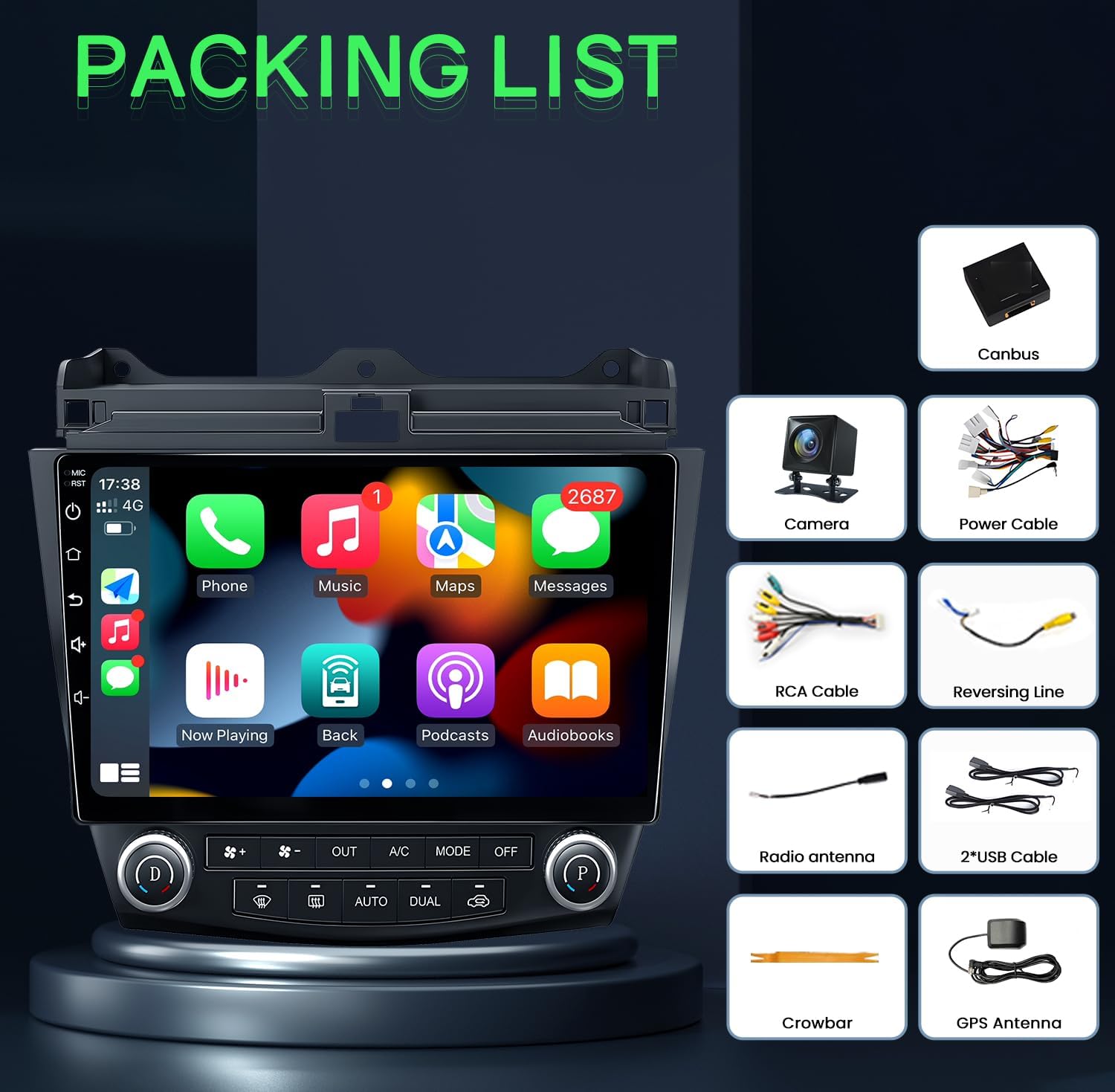
Abbildung 3: Lieferumfang (Packliste)
Bedienungsanleitung
Kabelloses CarPlay und Android Auto
Connect your iOS or Android smartphone wirelessly to access navigation, music, messages, and voice control features directly on the car stereo display. This allows for hands-free operation and reduces distractions while driving.
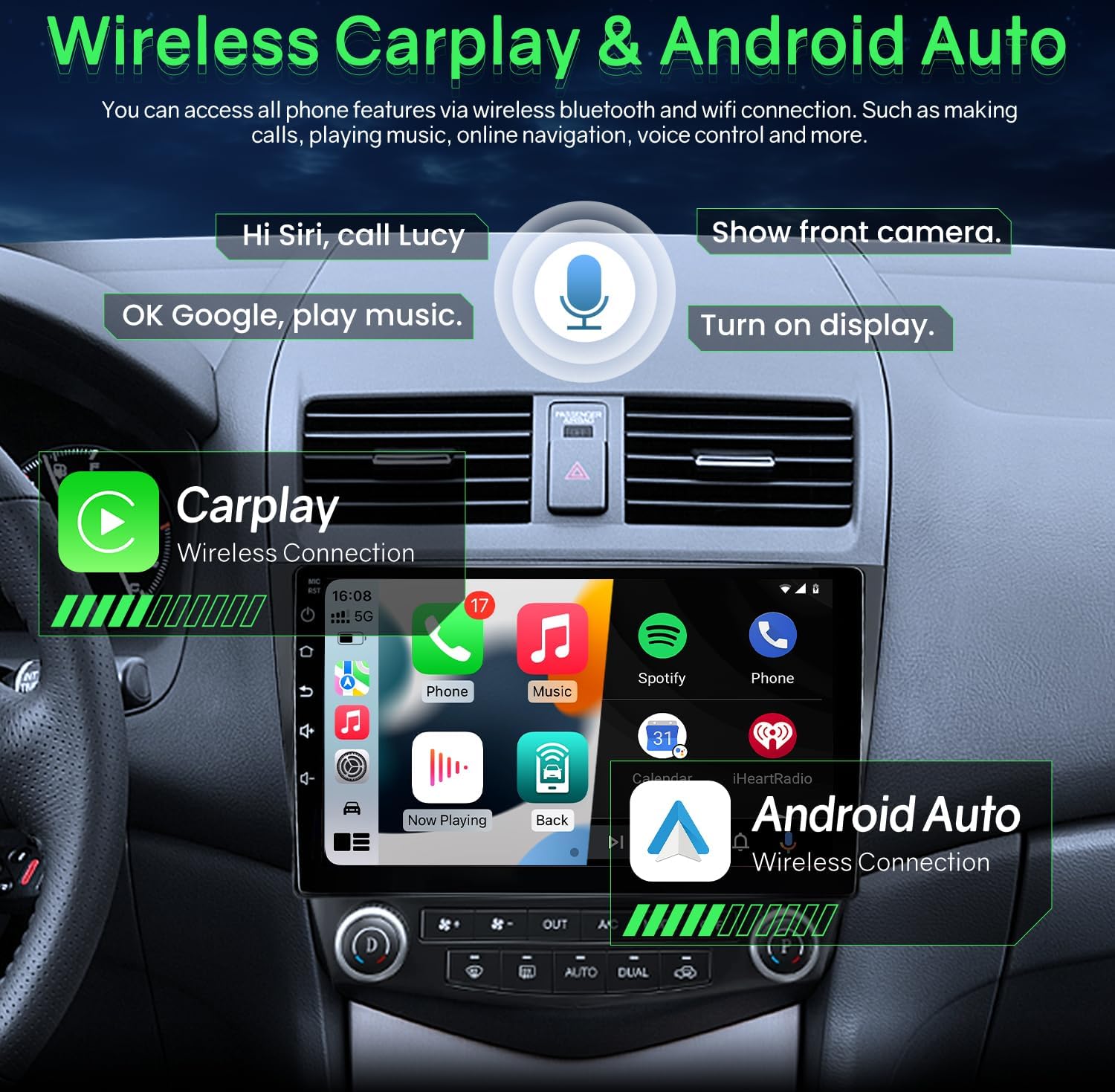
Abbildung 4: Drahtlose CarPlay- und Android Auto-Schnittstelle
Bluetooth 5.0 & FM/RDS Audio
The unit features Bluetooth 5.0 for stable and fast connections, enabling hands-free calls and audio streaming. The FM radio includes RDS (Radio Data System) and can store multiple stations. A 15-band EQ option allows for personalized audio tuning.

Figure 5: Bluetooth Music and FM Radio Interface
HD Display & 5G WiFi
Experience clear visuals on the 1280x800 resolution 2.5D tempered glass display. Integrated 5G WiFi supports quick downloads for offline maps and fast online access.

Abbildung 6: 5-GHz-WLAN-Konnektivität

Figure 7: Full HD 1280x800 IPS Screen Quality

Figure 8: 5G WiFi vs 2.4G WiFi Performance
GPS-Navigation
The integrated GPS provides accurate directions and real-time traffic updates. It supports both online and offline navigation applications, ensuring efficient travel to your destination.
Lenkradbedienung (SWC)
Control essential stereo functions such as answering calls, adjusting volume, and changing music or videos directly from your steering wheel buttons. This feature promotes safer driving by keeping your hands on the wheel.
Rückfahrkamera
The system includes a 1080P rear view camera that automatically activates when the vehicle is in reverse gear. It provides a wider, clearer field of view with parking lines, assisting with safe maneuvering and reducing blind spots.

Abbildung 9: Rückseite View Kamera-Anzeige
Built-in DSP Settings
Customize your audio experience with the built-in Digital Sound Processor (DSP). Adjust equalizer settings, surround sound, and subwoofer levels to achieve optimal sound quality.
Split-Screen-Modus
Utilize the split screen function to run two applications simultaneously, such as GPS navigation and video playback, for enhanced multitasking.
Offizielle Produktvideos
Produkt überview for Honda Accord 7th Gen
Video 1: Dieses Video bietet einen allgemeinen Überblickview of the Jufodrca car radio stereo features and compatibility with the Honda Accord 7th Generation (2003-2007).
Operation for Honda Accord Radio
Video 2: This video demonstrates the operational aspects of the Honda Accord radio, including navigating the main interface, using various applications, and accessing settings.
Android System for Accord Radio
Video 3: This video showcases the Android operating system interface and features specific to the Accord radio, including app management and system settings.
Wartung
- Bildschirmreinigung: Verwenden Sie ein weiches, fusselfreies Tuch, um den Bildschirm vorsichtig abzuwischen. Bei hartnäckigen Flecken leicht andrücken.ampReinigen Sie das Tuch mit Wasser oder einem für Bildschirme geeigneten Reiniger. Vermeiden Sie aggressive Chemikalien.
- Software-Updates: Periodically check for software updates to ensure optimal performance and access to new features. Refer to the device settings or manufacturer's webWebsite für Aktualisierungsanweisungen.
- Kabelverbindungen: Ensure all cables are securely connected to prevent intermittent issues with power, audio, or data transfer.
- Umgebungsbedingungen: Avoid exposing the unit to extreme temperatures or direct sunlight for prolonged periods, as this can affect performance and longevity.
Fehlerbehebung
- Kein Strom:
- Überprüfen Sie alle Stromanschlüsse und Sicherungen.
- Stellen Sie sicher, dass die Zündung des Fahrzeugs eingeschaltet ist.
- Kein Ton:
- Prüfen Sie, ob die Lautstärke nicht stummgeschaltet oder zu niedrig eingestellt ist.
- Überprüfen Sie die Lautsprecherkabelanschlüsse.
- Stellen Sie sicher, dass die richtige Audioquelle ausgewählt ist.
- GPS funktioniert nicht:
- Stellen Sie sicher, dass die GPS-Antenne ordnungsgemäß installiert ist und eine freie Sicht hat. view des Himmels.
- Überprüfen Sie die GPS-Einstellungen im Gerät.
- Verify map data is installed and up to date.
- Probleme mit der Bluetooth-Konnektivität:
- Stellen Sie sicher, dass Bluetooth sowohl auf der Stereoanlage als auch auf Ihrem Gerät aktiviert ist.
- Vorherige Kopplungen löschen und das Gerät erneut koppeln.
- Move the device closer to the stereo.
- CarPlay/Android Auto verbindet sich nicht:
- Stellen Sie sicher, dass das Betriebssystem Ihres Telefons auf dem neuesten Stand ist.
- Check the USB cable connection if using wired CarPlay/Android Auto.
- For wireless, ensure Wi-Fi and Bluetooth are enabled on your phone and the stereo.
Technische Daten
| Besonderheit | Detail |
|---|---|
| Artikelgewicht | 4.4 Pfund |
| Verpackungsabmessungen | 12.32 x 11.97 x 5.51 Zoll |
| Anzeigegröße | 10 Zoll |
| Bildschirmauflösung | 1280 x 800 |
| Prozessor | 4 Kern |
| RAM | 2 GB |
| ROM | 32 GB |
| Konnektivitätstechnologie | Bluetooth 5.0, 5-GHz-WLAN |
| Besondere Merkmale | Wireless/wired CarPlay & Android Auto & Mirroring, Airplay, Secondary Video Window, 1080P Backup Camera, Support SWC (Steering wheel Control), APK install, FM/RDS Radio |
| Kartentyp | North America (supports online/offline navigation) |
| Audioausgabemodus | Stereo |
| Montagetyp | Dashboard-Halterung |

Figure 10: Upgraded Smart Chip Details
Garantie und Support
The Jufodrca Car Radio Stereo comes with a 2 Jahr Garantie. For technical support, troubleshooting assistance, or warranty claims, please contact Jufodrca customer service through the retailer where the product was purchased. Keep your purchase receipt as proof of purchase for warranty validation.