
groov e GVEB16
Digital Buds - Wired in-Ear Earphones User Manual
Model: GVEB16
Brand: groov e
Einführung
Thank you for choosing the groov e Digital Buds. These USB-C earphones are designed to provide a high-quality audio experience for music playback and hands-free calls. This manual will guide you through the setup, operation, and maintenance of your new earphones to ensure optimal performance and longevity.
Packungsinhalt
- Digital Buds USB-C Earphones
- Earbuds (3X Sizes) - Note: The product description mentions "Includes Earbuds (3X Sizes)", but "whats_in_the_box" only lists "Earphones". Assuming the different sizes are pre-attached or included as accessories with the main earphones.
Produkt überview
Familiarize yourself with the components of your Digital Buds.
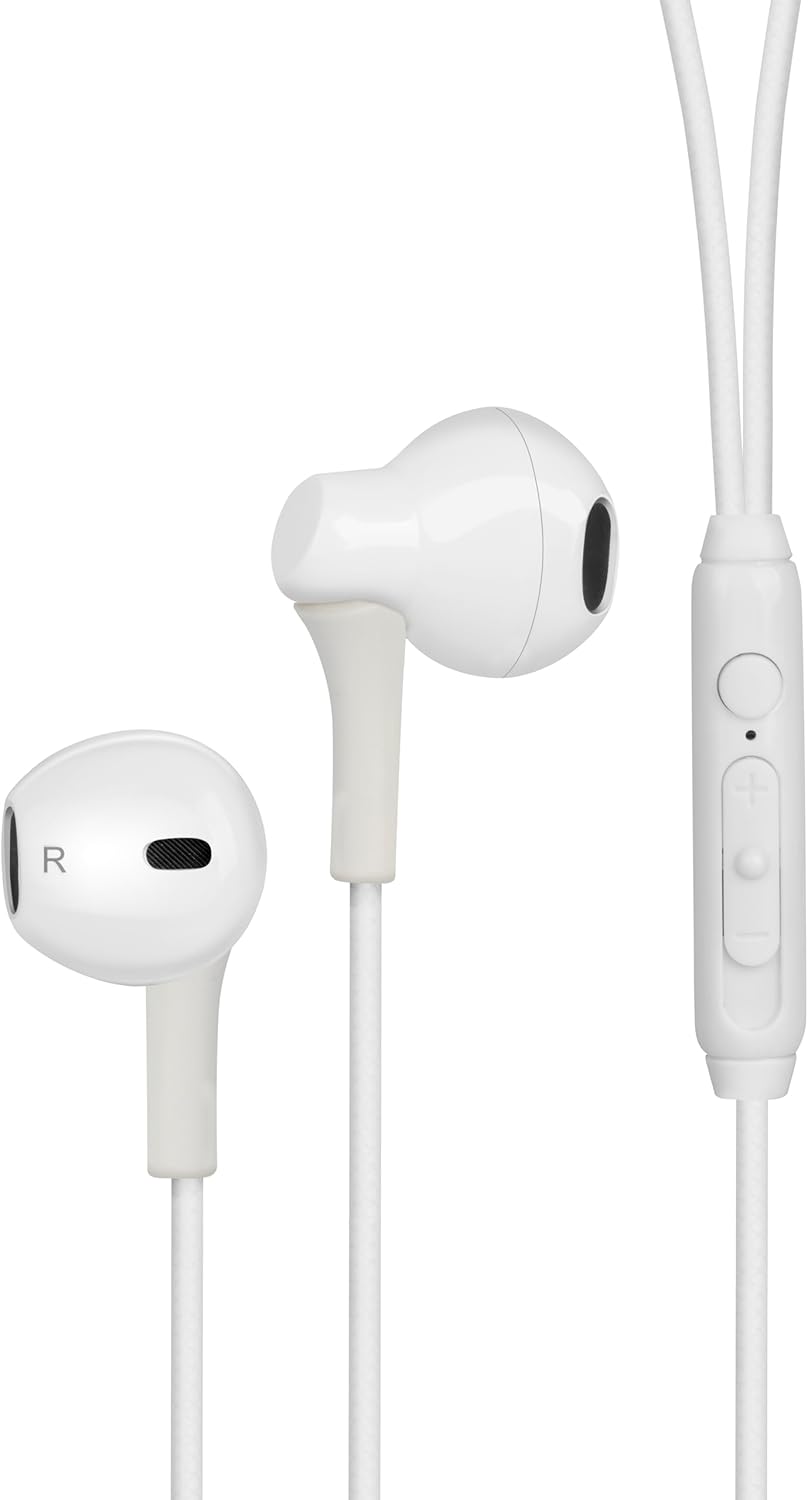
Figure 1: Digital Buds Earphones. This image shows both the left and right earbuds connected by their cable.

Figure 2: In-Line Remote and Microphone. The remote features volume up (+), volume down (-), and a multi-function button for calls and music control. The microphone is integrated into this unit.

Figure 3: USB-C Connector. This connector is used to plug the earphones into compatible devices such as smartphones, tablets, and laptops.
Aufstellen
- Mit Gerät verbinden: Locate the USB-C port on your smartphone, tablet, or laptop. Insert the USB-C connector of the Digital Buds firmly into the device's USB-C port.
- Platzierung der Ohrhörer: Gently insert the earbuds into your ears. The earbud marked 'L' is for the left ear, and 'R' is for the right ear. Adjust them for a comfortable and secure fit. If necessary, try the different sized ear tips included to find the best fit for optimal sound quality and comfort.
- Erste Erkennung: Ihr Gerät sollte die Kopfhörer automatisch erkennen. Möglicherweise müssen Sie sie in den Toneinstellungen Ihres Geräts als Audioausgabegerät auswählen.
Bedienungsanleitung
Die Inline-Fernbedienung ermöglicht die bequeme Steuerung von Audio und Anrufen.
Musikwiedergabe
- Abspielen/Pause: Drücken Sie einmal die Multifunktionstaste.
- Nächster Titel: Drücken Sie die Multifunktionstaste zweimal schnell hintereinander.
- Vorheriges Lied: Drücken Sie dreimal schnell hintereinander die Multifunktionstaste.
- Lautstärke erhöhen: Drücken Sie die Taste „+“.
- Lautstärke runter: Drücken Sie die Taste „-“.
Anruf-Management
- Anruf annehmen/beenden: Drücken Sie während eines eingehenden oder aktiven Anrufs einmal die Multifunktionstaste.
- Anruf ablehnen: Halten Sie die Multifunktionstaste während eines eingehenden Anrufs etwa 2 Sekunden lang gedrückt.
Sprachassistent
- Sprachassistenten aktivieren: Press and hold the multi-function button for approximately 2 seconds when not on a call or playing music. This will activate your device's default voice assistant (e.g., Google Assistant, Siri).
Wartung
Proper care will extend the life of your Digital Buds.
- Reinigung: Use a soft, dry, lint-free cloth to wipe the earbuds and cable. For stubborn dirt, slightly dampBefeuchten Sie das Tuch mit Wasser. Verwenden Sie keine scharfen Chemikalien oder Scheuermittel.
- Lagerung: When not in use, store the earphones in a clean, dry place, preferably in a small pouch or case to prevent tangling and damage.
- Feuchtigkeit vermeiden: Do not expose the earphones to excessive moisture, rain, or liquids.
- Vorsichtig handhaben: Avoid pulling on the cable excessively or bending the USB-C connector at sharp angles.
Fehlerbehebung
Sollten Sie auf Probleme stoßen, konsultieren Sie bitte die folgenden häufigen Probleme und Lösungen.
| Problem | Lösung |
|---|---|
| Kein Ton aus den Kopfhörern. |
|
| Das Mikrofon funktioniert während Anrufen nicht. |
|
| Die Tasten der Fernbedienung reagieren nicht. |
|
Technische Daten
| Besonderheit | Detail |
|---|---|
| Marke | groov e |
| Modellname | Groove Digital Buds - White |
| Artikelmodellnummer | GVEB16 |
| Konnektivitätstechnologie | Kabelgebunden (USB-C) |
| Platzierung des Ohrs | Im Ohr |
| Formfaktor | Im Ohr |
| Kontrollmethode | Fernbedienung (Inline) |
| Im Lieferumfang enthaltene Komponenten | Kopfhörer |
| Material | Silikon, Kunststoff |
| Artikelgewicht | 1.06 Unzen |
| Verpackungsabmessungen | 6.61 x 2.36 x 1.26 Zoll |
| Kompatible Geräte | Tablets, Mobile phones, Laptops, Desktops |
| Spezifische Verwendungen für das Produkt | Unterhaltung |
Garantie und Support
groov e products are manufactured to high standards and undergo rigorous quality checks. For information regarding warranty coverage, technical support, or customer service, please refer to the warranty card included with your purchase or visit the official groov e webWebsite.
Bitte bewahren Sie Ihren Kaufbeleg für eventuelle Garantieansprüche auf.
Ask a question about this manual
Ask about setup, troubleshooting, compatibility, parts, safety, or missing instructions. Manuals+ will review the question and use this page’s manual context to help answer it.