Einführung
This manual provides detailed instructions for the safe and efficient operation of your Generic Portable Type-C Rechargeable Fan. Please read this manual thoroughly before use and retain it for future reference.
Produkteigenschaften
- Tragbar und leicht: Designed for easy transport and use in various locations.
- Typ C wiederaufladbar: Bequemes Aufladen über USB-C-Anschluss.
- Leistungsanzeige: Integrated display shows current battery level.
- Extrem leiser Betrieb: Operates at approximately 10 dB, minimizing noise disturbance.
- Einstellbarer Luftstrom: Three-speed settings for personalized cooling.
- 360-Grad-Drehung: Fan head can be manually adjusted for optimal airflow direction.
- Bürstenlosen Motor: Ensures high-speed operation and durability.
Packungsinhalt
- 1 x Generic Portable Type-C Rechargeable Fan
- 1 x USB-Ladekabel (Typ C)
- 1 x Benutzerhandbuch
Sicherheitshinweise
Um einen sicheren Betrieb zu gewährleisten, beachten Sie bitte die folgenden Vorsichtsmaßnahmen:
- Finger oder andere Gegenstände dürfen nicht in das Lüftergitter eingeführt werden.
- Halten Sie den Ventilator von Wasser und Feuchtigkeit fern. Nicht in feuchten Umgebungen verwenden.
- Do not disassemble, repair, or modify the fan yourself. Contact qualified service personnel.
- Außerhalb der Reichweite von Kindern und Haustieren aufbewahren.
- Use only the provided USB cable or a certified Type-C cable for charging.
- Avoid placing the fan near heat sources or in direct sunlight for extended periods.
- Stellen Sie sicher, dass der Ventilator auf einer stabilen, ebenen Fläche steht, um ein Umkippen zu verhindern.
Aufstellen
- Auspacken: Nehmen Sie den Ventilator und sämtliches Zubehör vorsichtig aus der Verpackung.
- Platzierung: Stellen Sie den Ventilator auf eine stabile, ebene Fläche, wo ein Luftstrom gewünscht ist.
- Grundgebühr: Before first use, fully charge the fan using the provided Type-C USB cable.

Image: The white portable fan showing its compact design and digital power display. The fan can rotate 360 degrees for versatile positioning.
Bedienungsanleitung
- Ein-/Ausschalten: Press the power button located on the front of the fan to turn it on. Press again to cycle through speeds and turn off.
- Lüftergeschwindigkeit anpassen:
- Press the power button once for First Gear (Soft Breeze).
- Press the power button a second time for Second Gear (Natural Wind).
- Press the power button a third time for Third Gear (Strong Wind).
- Drücken Sie die Einschalttaste ein viertes Mal, um den Lüfter auszuschalten.
- Einstellen des Lüfterwinkels: Manually tilt the fan head up or down to adjust the airflow direction. The fan supports 360-degree vertical rotation.

Image: Illustration of the three adjustable wind speeds, demonstrating the airflow intensity for each setting.

Image: The fan demonstrating its 360-degree adjustable angle, allowing users to direct airflow as needed.
Laden
The fan is equipped with a built-in rechargeable battery and a Type-C charging port.
- Connect the provided Type-C USB cable to the fan's charging port.
- Connect the other end of the USB cable to a compatible USB power source (e.g., computer, power bank, AC adapter).
- Das digitale Display zeigt den Ladestatus und den Akkustand in Prozent an.tage.
- A full charge can provide over 8 hours of operation, depending on the selected fan speed.
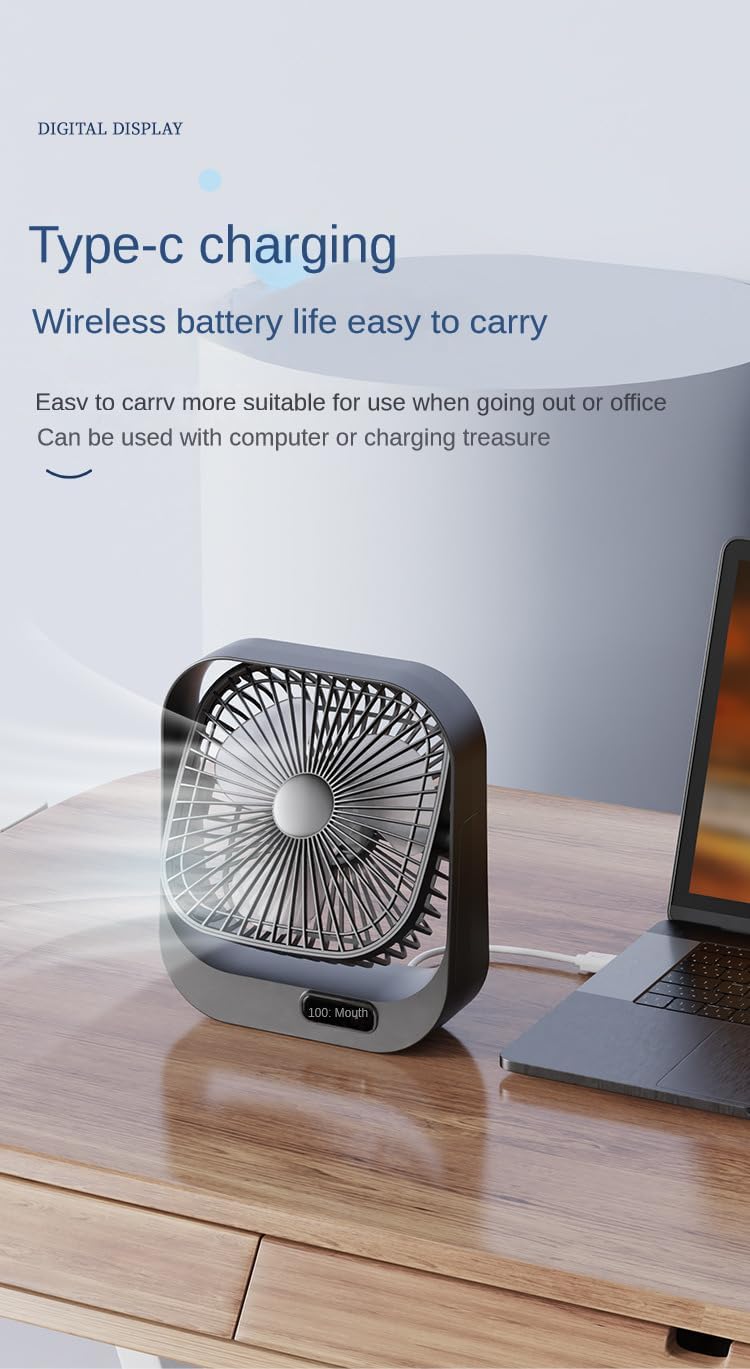
Image: The fan being charged via its Type-C port, connected to a laptop, highlighting its wireless battery life and portability.
Wartung
- Reinigung: Use a soft, dry cloth to wipe the exterior of the fan. Do not use abrasive cleaners or immerse the fan in water.
- Lagerung: Bei längerer Nichtbenutzung sollte der Ventilator an einem kühlen, trockenen Ort und vor direkter Sonneneinstrahlung geschützt aufbewahrt werden.
Fehlerbehebung
| Problem | Mögliche Ursache | Lösung |
|---|---|---|
| Der Ventilator schaltet sich nicht ein. | Batterie ist leer. | Charge the fan using the Type-C USB cable. |
| Fan runs weakly. | Niedriger Batteriestand. | Laden Sie den Ventilator auf. |
| Der Ventilator macht ungewöhnliche Geräusche. | Verstopfung der Lüfterflügel. | Turn off and unplug the fan. Carefully check for and remove any obstructions. |
| Das Laden funktioniert nicht. | Defektes Kabel oder fehlerhafte Stromquelle. | Try a different Type-C USB cable or a different USB power adapter. |
Technische Daten
| Marke | Generisch |
| Modellnummer | B0D6VRXS6G |
| Farbe | Weiß |
| Elektrisches Ventilatordesign | Tischventilator |
| Stromquelle | Stromversorgung über USB |
| Technische Daten | 5"T x 8"B x 10"H |
| Geräuschpegel | 10 Dezibel |
| Wastage | 5 Watt |
| Anzahl der Klingen | 4 |
| Kontrollmethode | Tastensteuerung (Touch) |
| Anzahl der Leistungsstufen | 3 |
| Motortyp | Bürstenlos |
| Artikelgewicht | 1 Pfund |

Image: An illustration of the fan's brushless motor, highlighting its high-speed and concentrated airflow capabilities.
Garantie und Support
This product comes with a standard manufacturer's warranty. For specific warranty details, please refer to the product packaging or contact the retailer where the product was purchased.
For technical support or customer service inquiries, please contact your retailer or the manufacturer directly using the contact information provided with your purchase.