
eppfun 710421187463
eppfun USB Bluetooth-Adapter – Benutzerhandbuch
Modell: 710421187463
1. Einleitung
The eppfun USB Bluetooth Adapter is a compact and versatile audio transmitter designed to provide high-quality wireless audio for various devices. Featuring Bluetooth 5.2 technology and support for advanced audio codecs like aptX Low Latency and aptX-Adaptive, it ensures synchronized audio and video experiences with minimal delay. This adapter allows you to connect your favorite Bluetooth headphones or speakers to gaming consoles, PCs, and other compatible systems.
Hauptmerkmale:
- Mini USB Dongle: Niedrigprofile design allows it to remain plugged into your device without obstructing other ports.
- Breite Kompatibilität: Driver-free plug-and-play operation with Windows XP/7/8/10, Linux, PS4, PS5, Nintendo Switch, and Android.
- Unterstützung für zwei Kopfhörer: Connect two Bluetooth headsets or speakers simultaneously.
- APTX-Adaptive Technology: Minimizes audio delay to approximately 60ms for perfectly synchronized audio and video.
- Multiple Audio Codec Support: Supports APTX, APTX LL, SBC, APTX HD, and APTX-Adaptive, with corresponding LED indicators for active codec status. Note: Your headphones must also support the same codec for optimal performance.
2. Packungsinhalt
Bitte überprüfen Sie, ob alle Artikel in Ihrem Paket vorhanden sind:
- 1 x eppfun USB Bluetooth Adapter
- 1 x Bedienungsanleitung (evtl. nicht in deutscher Sprache).

Image: The eppfun USB Bluetooth Adapter, a compact black dongle with a blue LED indicator, shown alongside a 3.5mm audio jack, highlighting its small size and primary function.
3. Einrichtung und Installation
The eppfun USB Bluetooth Adapter is designed for plug-and-play functionality, requiring no driver installation for most compatible operating systems and devices.
Schritt-für-Schritt-Installation:
- Schließen Sie den Adapter an: Plug the eppfun USB Bluetooth Adapter into an available USB 2.0 or USB 3.0 port on your device (e.g., PS5, PC, Nintendo Switch).
- Erster Kopplungsmodus: Upon first connection, the LED indicator on the adapter will flash white quickly, indicating it has automatically entered pairing mode.
- Prepare Your Audio Device: Put your Bluetooth headphones or speaker into pairing mode. Refer to your audio device's manual for specific instructions on how to enter pairing mode.
- Paarung: The adapter will automatically search for and connect to your Bluetooth audio device. Once successfully paired, the LED indicator on the adapter will remain steadily lit.

Image: The eppfun USB Bluetooth Adapter plugged into a desktop PC, with a pair of wireless headphones nearby, illustrating a typical setup for computer audio.

Image: Two individuals wearing headphones while playing a video game on a PlayStation 5, with the eppfun USB Bluetooth Adapter visibly connected to the console, demonstrating dual headphone connectivity for gaming.
4. Bedienungsanleitung
Verbinden mehrerer Geräte:
The eppfun adapter supports connecting two Bluetooth audio devices simultaneously. After pairing the first device, put the second device into pairing mode. The adapter will attempt to connect to the second device. Once both are connected, audio will be transmitted to both.
Switching Audio Codecs:
The adapter supports various audio codecs to optimize sound quality and latency. You can cycle through the supported codecs by pressing the button on the adapter. The order of switching is typically aptX Adaptive → aptX LL → aptX HD → aptX → SBC.

Image: A diagram illustrating a finger pressing the button on the eppfun adapter to switch audio playback codecs. It also shows a legend for the LED indicator colors and their corresponding codecs: Blue for aptX Adaptive, Green for aptX HD, Yellow for aptX LL, Purple for aptX, and Red for SBC.
LED-Anzeigestatus:
- Weiß blinkend: Pairing mode (first time use or searching for device).
- Solides Weiss: Successfully paired and connected.
- Blaues Licht: aptX Adaptive codec active.
- Grünes Licht: aptX HD codec active.
- Gelbes Licht: aptX LL (Low Latency) codec active.
- Lila Licht: aptX codec active.
- Rotlicht: SBC-Codec aktiv.
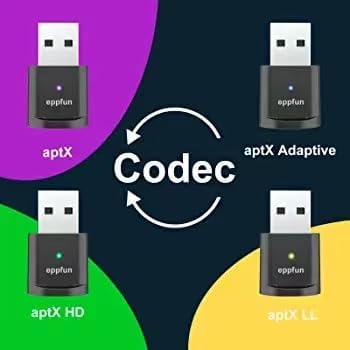
Image: A visual representation showing four eppfun adapters, each with a different colored LED (blue, green, yellow, purple), indicating the active audio codec: aptX Adaptive, aptX HD, aptX LL, and aptX, with a central "Codec" arrow suggesting the ability to switch between them.
5. Kompatibilität
The eppfun USB Bluetooth Adapter offers broad compatibility with various operating systems and audio devices:
- Betriebssysteme: Windows XP, Windows 7, Windows 8, Windows 10, Linux, macOS.
- Spielkonsolen: PlayStation 4 (PS4), PlayStation 5 (PS5), Nintendo Switch (NS).
- Andere Geräte: Android devices, PCs, Laptops.
- Audiogeräte: Bluetooth Headphones, Bluetooth Speakers, Earbuds.
Wichtiger Hinweis: For optimal performance and to utilize specific audio codecs (e.g., aptX Low Latency, aptX HD, aptX-Adaptive), your connected Bluetooth headphones or speakers must also support the same codec standard.
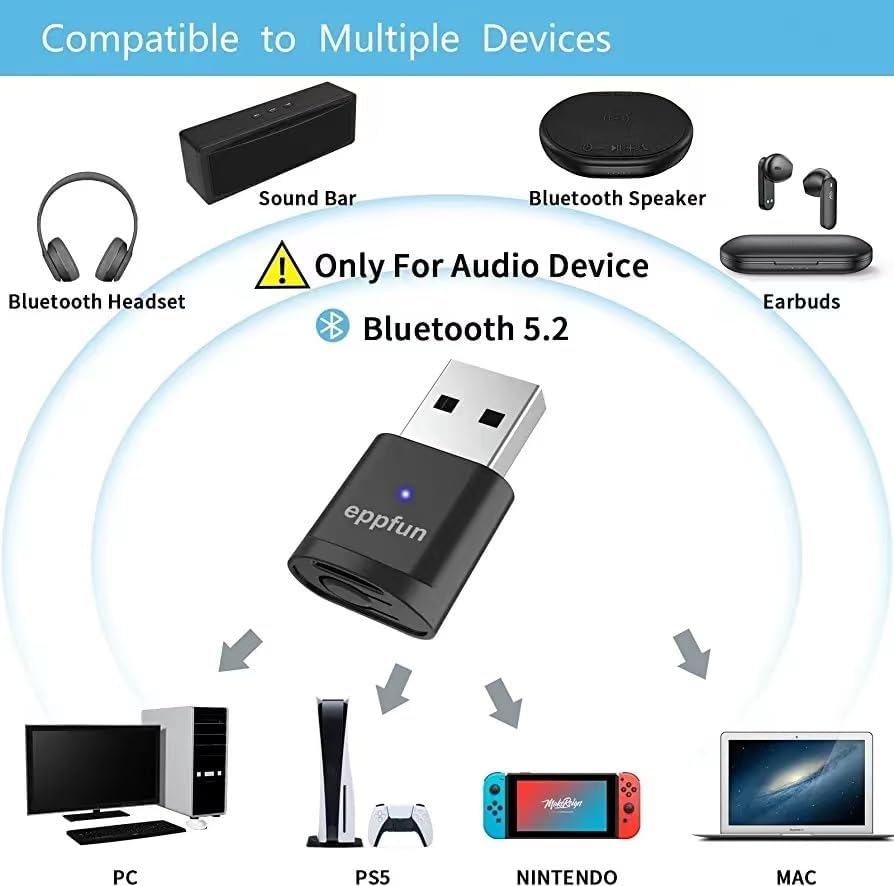
Image: A diagram illustrating the eppfun USB Bluetooth Adapter's compatibility with various devices, including Bluetooth headsets, soundbars, speakers, and earbuds, and source devices like PC, PS5, Nintendo Switch, and Mac, emphasizing it's for audio devices only and uses Bluetooth 5.2.

Image: The eppfun AK3040PLUS adapter shown with labels indicating compatibility with PS4, PS5, PC/Mac, and Nintendo Switch, along with icons for Bluetooth 5.2, Qualcomm aptX, and various audio codecs (aptX, aptX-LL, aptX-HD, aptX-Adaptive).

Image: A comparison table highlighting the features of the eppfun adapter (labeled 'FETURES') against 'OTHERS'. It shows the eppfun adapter supports Windows 11/10/8/7/XP/MAC, PS5/Nintendo Switch, Bluetooth 5.2, and all listed aptX codecs (Adaptive, HD, LL, aptX) and SBC, while 'OTHERS' have limited support.
6. Fehlerbehebung
If you encounter issues with your eppfun USB Bluetooth Adapter, please refer to the following common troubleshooting steps:
- Keine Audio-/Verbindungsprobleme:
- Stellen Sie sicher, dass der Adapter vollständig in den USB-Anschluss eingesteckt ist.
- Confirm your Bluetooth audio device is in pairing mode and within range.
- Try unplugging and re-plugging the adapter.
- Restart your host device (PC, console).
- If connecting to a PC, ensure the audio output is set to the Bluetooth device in your sound settings.
- Audioverzögerung/Schlechte Qualität:
- Verify that both the adapter and your audio device support the same low-latency codecs (e.g., aptX LL, aptX-Adaptive).
- Try switching the audio codec on the adapter by pressing its button (refer to Section 4).
- Reduce the distance between the adapter and your audio device.
- Minimieren Sie Störungen durch andere drahtlose Geräte (Wi-Fi-Router, andere Bluetooth-Geräte).
- Adapter nicht erkannt:
- Versuchen Sie einen anderen USB-Anschluss an Ihrem Gerät.
- Ensure your operating system is listed as compatible (Windows XP/7/8/10, Linux, macOS).
7. Spezifikationen
| Besonderheit | Spezifikation |
|---|---|
| Modellnummer | 710421187463 |
| Technische Daten | 1.26 x 0.7 x 0.2 Zoll |
| Artikelgewicht | 1.44 Unzen |
| Bluetooth-Version | Bluetooth 5.2 |
| Unterstützte Audio-Codecs | APTX, APTX LL, SBC, APTX HD, APTX-Adaptive |
| Steckertyp | Mini-USB |
| Farbe | Schwarz |
| Kompatible Geräte | Gaming Consoles (PS4, PS5, Nintendo Switch), Headphones, Speakers |
| Kompatible Betriebssysteme | Windows XP/7/8/10, Linux, macOS, Android |
| Hersteller | Abonnieren |
8. Wartung
To ensure the longevity and optimal performance of your eppfun USB Bluetooth Adapter, please follow these maintenance guidelines:
- Reinigung: Reinigen Sie den Adapter mit einem weichen, trockenen Tuch. Verwenden Sie keine flüssigen Reiniger oder Sprays.
- Lagerung: Bewahren Sie den Adapter an einem kühlen, trockenen Ort fern von direkter Sonneneinstrahlung und extremen Temperaturen auf.
- Handhabung: Vermeiden Sie es, den Adapter fallen zu lassen oder starken Stößen auszusetzen. Versuchen Sie nicht, das Gerät zu zerlegen.
- Feuchtigkeit: Halten Sie den Adapter von Wasser und hoher Luftfeuchtigkeit fern.
9. Garantie und Support
eppfun products are designed for reliability and performance. For information regarding warranty coverage, technical support, or service inquiries, please refer to the warranty card included with your product or visit the official eppfun webWebsite.
For further assistance, you may contact eppfun customer support through their official channels. Please have your product model number (710421187463) and purchase details ready when contacting support.
eppfun Official Store: Besuchen Sie den eppfun Store auf Amazon