
1. Sicherheitshinweise
Before using the PEAKMETER PM8248S Digital Multimeter, please read and understand all safety warnings and operating instructions. Failure to do so may result in electric shock, injury, or damage to the meter or equipment under test.
- Always ensure the meter is in good working condition and free from damage before use.
- Nicht anwenden voltage or current that exceeds the maximum specified limits for the meter. The meter has overload protection for resistance and frequency measurements.
- The safety rating for this device is EN61010-1, EN61010-2-033, EN61326, CAT. III 600V. Adhere to these ratings.
- Seien Sie vorsichtig beim Arbeiten mit VolumentagEs liegt über 30 V AC RMS, 42 V Spitze oder 60 V DC. Diese SpannungentagEs besteht die Gefahr eines Stromschlags.
- Schließen Sie immer zuerst die gemeinsame (COM) Messleitung an und trennen Sie sie zuletzt.
- Ensure test leads are fully seated into the correct input terminals for the desired measurement.
- Tauschen Sie die Batterien umgehend aus, sobald die Anzeige für niedrigen Batteriestand erscheint, um genaue Messwerte zu gewährleisten.
- Das Messgerät darf nicht in explosionsgefährdeten Bereichen (Gase, Dämpfe, Staub) betrieben werden.
2. Produktüberschreitungview
The PEAKMETER PM8248S is a smart, auto-ranging digital multimeter designed for professional and general electrical measurements. It features a 6000-count display with an analog bar graph, providing clear and precise readings. This multi-functional device can measure AC/DC voltage, AC/DC current, resistance, capacitance, frequency, and temperature. It also includes Non-Contact Voltage (NCV) detection, continuity testing, live wire detection, data hold, and a backlight for improved visibility in various conditions.
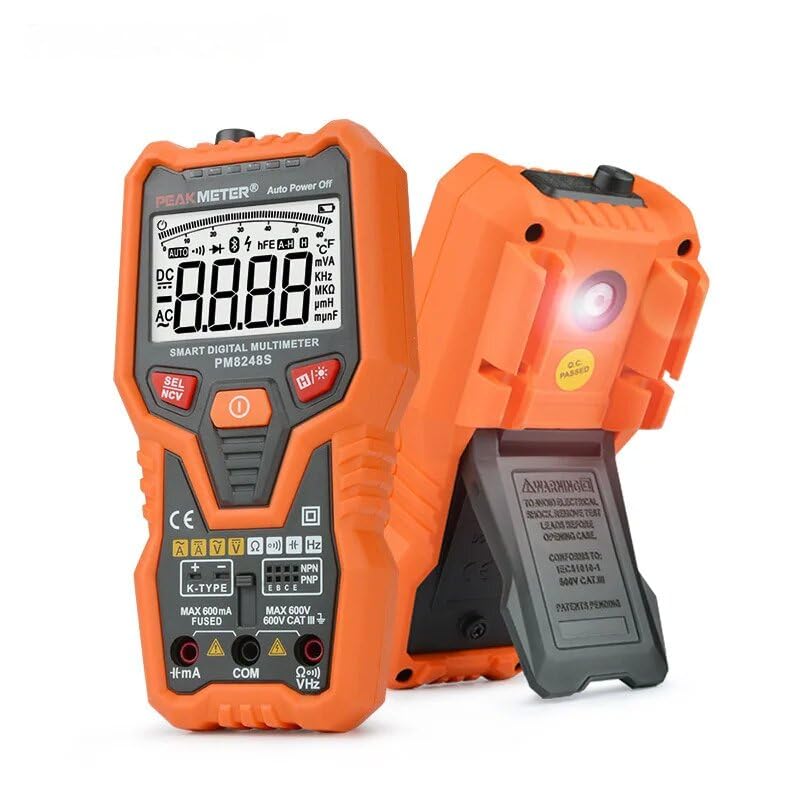
Abbildung 2.1: Vorderseite view of the PEAKMETER PM8248S Digital Multimeter, showcasing its display, function buttons, and input terminals.
2.1 Hauptmerkmale
- Smart Auto-Range: Wählt automatisch den richtigen Messbereich aus.
- 6000 Zählungen Anzeige: High-resolution digital display with an analog bar graph.
- Messfunktionen: AC/DC-Voltage, AC/DC Current, Resistance, Capacitance, Frequency, Temperature.
- Spezialfunktionen: Kontaktloses Volumentage (NCV) detection, Continuity Test, Live Test, Transistor Test.
- Komfortfunktionen: Data Hold, Backlight, Auto Power Off, Flashlight.
- Überlastschutz: PTC protection circuit for resistance and frequency measurements.
2.2 Komponentenidentifikation

Figure 2.2: Labeled diagram of the PM8248S, indicating the NCV sensor, LED alarm, clear LCD, SEL/NCV button, Data hold/Backlight button, ON/OFF button, soft cover, and input terminals.
- NCV-Sensor: Erkennt berührungslose Lautstärketage.
- LED-Alarm: Visual indicator for NCV and other alerts.
- Clear LCD: Digitalanzeige für Messwerte.
- SEL/NCV-Taste: Selects functions or activates NCV mode.
- EIN/AUS-Taste: Schaltet das Multimeter ein oder aus.
- Datenhalte-/Hintergrundbeleuchtungstaste: Freezes the current reading or activates the display backlight.
- Eingangsklemmen: Sockets for connecting test leads (VΩHz, COM, mA).
- Weiche Hülle: Bietet Schutz vor Stößen.
3. Einrichtung
3.1 Einlegen der Batterie
The PM8248S multimeter requires 3 x 1.5V AAA batteries for operation. Batteries are typically not included and must be purchased separately.
- Stellen Sie sicher, dass das Multimeter ausgeschaltet ist.
- Suchen Sie den Batteriefachdeckel auf der Rückseite des Messgeräts.
- Verwenden Sie einen Schraubendreher, um die Schraube(n) zu lösen, mit der/denen die Batterieabdeckung befestigt ist/sind.
- Nehmen Sie die Abdeckung ab.
- Insert 3 x 1.5V AAA batteries, observing the correct polarity (+ and -) as indicated inside the compartment.
- Bringen Sie die Batterieabdeckung wieder an und befestigen Sie sie mit der/den Schraube(n).
3.2 Anschließen der Testleitungen
Always ensure test leads are properly connected before taking any measurements.
- Legen Sie den Schwarz Testleitung in die COM (Gemeinsamer) Anschluss.
- Für die meisten Messungen (Vol)tage, Resistance, Capacitance, Frequency, Temperature, NCV), insert the Rot Testleitung in die VΩHz Terminal.
- For current measurements (mA), insert the Rot Testleitung in die mA Terminal.
4. Bedienungsanleitung
The PM8248S features a fully automatic cruise test system, simplifying operation as it intelligently detects the measurement type without requiring manual function selection for most common tasks.

Figure 4.1: The PM8248S multimeter actively measuring voltage from a power outlet, demonstrating its practical application.
4.1 Ein-/Ausschalten
- Drücken Sie die EIN/AUS button to power on the multimeter.
- Drücken Sie die EIN/AUS button again to power off the multimeter.
- Das Messgerät schaltet sich nach 10 Minuten Inaktivität automatisch ab, um die Batterielebensdauer zu verlängern.
4.2 Automatischer Messmodus
In its default state after powering on, the PM8248S operates in a smart automatic measurement mode. It will automatically identify and measure AC/DC voltage, resistance, and continuity when test leads are applied.
4.3 Manual Function Selection (SEL/NCV Button)
While the meter is smart, some specific functions may require manual selection using the SEL/NCV Taste.
- NCV (Kontaktlose Voltage) Erkennung: Halten Sie die SEL/NCV button to activate NCV mode. Bring the NCV sensor near an AC voltage source to detect its presence. The LED alarm and audible beeps will indicate detection.
- Function Cycling: In certain modes (e.g., when measuring voltage), pressing the SEL/NCV button may cycle between AC and DC measurements if the auto-detection needs refinement, or between different sub-functions like diode test or capacitance.
4.4 Datenspeicherung und Hintergrundbeleuchtung
- Datenaufnahme: Drücken Sie die Datenspeicherung/Hintergrundbeleuchtung button briefly to freeze the current reading on the display. Press it again to release the hold.
- Hintergrundbeleuchtung: Halten Sie die Datenspeicherung/Hintergrundbeleuchtung Taste zum Ein- und Ausschalten der Display-Hintergrundbeleuchtung.
4.5 Spezifische Messverfahren
Always ensure the test leads are connected to the correct terminals and the meter is set to the appropriate function (if not in auto-mode).
- Bandtage Messung (AC/DC): Connect red lead to VΩHz, black lead to COM. Connect probes in parallel to the circuit or component. The meter will automatically detect AC or DC.
- Strommessung (AC/DC): Connect red lead to mA, black lead to COM. Connect probes in series with the circuit. Ensure the circuit is de-energized before connecting.
- Widerstandsmessung: Connect red lead to VΩHz, black lead to COM. Connect probes across the component. Ensure the circuit is de-energized.
- Durchgangsprüfung: Connect red lead to VΩHz, black lead to COM. Touch probes across the circuit. An audible beep indicates continuity.
- Kapazitätsmessung: Connect red lead to VΩHz, black lead to COM. Connect probes across the capacitor. Ensure the capacitor is discharged before testing.
- Frequenzmessung: Connect red lead to VΩHz, black lead to COM. Connect probes to the signal source.
- Temperatur messung: Use the included K-type thermocouple. Insert the thermocouple into the designated K-TYPE ports (positive to +, negative to -).
- Transistortest: Use the dedicated transistor test socket (NPN/PNP) on the meter.
5. Wartung
5.1 Reinigung
Um das Multimeter zu reinigen, wischen Sie das Gehäuse mit einem feuchten Tuch ab.amp Verwenden Sie ein Tuch und ein mildes Reinigungsmittel. Scheuermittel oder Lösungsmittel sind nicht geeignet. Stellen Sie sicher, dass das Messgerät vor Gebrauch vollständig trocken ist.
5.2 Batteriewechsel
When the low battery indicator appears on the display, replace the batteries as soon as possible to ensure accurate readings. Refer to Section 3.1 for battery installation instructions.
5.3 Sicherungswechsel
The current input terminals (mA) are fused for protection. If the meter fails to measure current, the fuse may need replacement. Refer to the markings on the meter for the correct fuse rating (e.g., MAX 600mA FUSED). Fuse replacement should only be performed by qualified personnel.
- Stellen Sie sicher, dass das Multimeter ausgeschaltet ist und alle Messleitungen abgeklemmt sind.
- Öffnen Sie die Abdeckung des Batteriefachs (siehe Abschnitt 3.1).
- Suchen Sie die Sicherung(en) im Inneren des Sicherungsfachs.
- Die alte Sicherung vorsichtig entfernen und durch eine neue Sicherung vom gleichen Typ und mit der gleichen Nennleistung ersetzen.
- Bringen Sie die Batterieabdeckung wieder an und sichern Sie sie.
6. Fehlerbehebung
- Das Messgerät lässt sich nicht einschalten: Überprüfen Sie den Batterieeinbau und stellen Sie sicher, dass die Batterien nicht entladen sind. Tauschen Sie sie gegebenenfalls aus.
- No display or incorrect readings: Ensure test leads are correctly inserted into the appropriate terminals. Check for damaged test leads. Verify the battery level.
- Der Zähler schaltet sich automatisch ab: This is a normal function (Auto Power Off) after 10 minutes of inactivity. Press any button to reactivate.
- Strommessung funktioniert nicht: Check the fuse for the current input terminal. Replace if blown (refer to Section 5.3).
- NCV erkennt nicht: Ensure the NCV sensor is positioned correctly near the AC source. The NCV function is for detection, not precise measurement.
7. Spezifikationen

Figure 7.1: Dimensions of the PM8248S multimeter, showing a height of 169mm and width of 83mm.
| Parameter | Reichweite | Genauigkeit |
|---|---|---|
| DC-Voltage | 6 V/60 V/600 V | ± (0.8 % + 3) |
| AC-Lautstärketage | 6 V/60 V/600 V | ± (1.2 % + 3) |
| Gleichstrom | 600 mA | ± (1.0 % + 3) |
| Wechselstrom | 600 mA | ± (1.5 % + 3) |
| Widerstand | 6kΩ/60kΩ/600kΩ | ± (1.0 % + 3) |
| 6 MΩ/10 MΩ | ± (1.2 % + 5) | |
| Kapazität | 60nF/600nF/6µF/60µF/600µF/6mF | ± (4.0 % + 5) |
| Frequenz | 30~1000 Hz | ± (0.5 % + 2) |
| Temperatur (℃) | -20℃~1300℃ | ± (1.0 % + 3) |
| Temperatur (℉) | -4 ~ 2372 ℉ | ± (1.0 % + 3) |
7.1 Allgemeine Spezifikationen
- Anzeige: 6000 counts LCD with Analog Bar Display
- Automatischer Bereich: Ja
- Automatisches Ausschalten: Ja (nach 10 Minuten Inaktivität)
- Datenaufnahme: Ja
- Hintergrundbeleuchtung: Ja
- NW: Ja
- Durchgangsprüfung: Ja
- Live-Test: Ja
- Transistortest: Ja
- Stromversorgung: 3 x 1.5 V AAA-Batterien
- Abmessungen: 165 mm x 82 mm x 51 mm (ca. 16.5 x 8.2 x 5.1 cm)
- Nettogewicht: Ca. 247g (ohne Batterien)
- Sicherheitsbewertung: EN61010-1, EN61010-2-033, EN61326, Kat. III 600 V
- Material: Acrylnitril-Butadien-Styrol (ABS)
- Betriebstemperatur: Upper temperature rating 60 Degrees Celsius
- Zertifizierungen: CE, RoHS, UL
8. Garantie und Support
Informationen zur Garantie oder technische Unterstützung erhalten Sie bei Ihrem Händler oder direkt beim Hersteller. Bewahren Sie Ihren Kaufbeleg als Kaufnachweis auf.