
FLEXISPOT OC4-PRO
FLEXISPOT OC4-PRO Office Chair User Manual
Model: OC4-PRO
1. Einleitung
Thank you for choosing the FLEXISPOT OC4-PRO Office Chair. This ergonomic chair is designed to provide maximum comfort and support for extended periods, featuring multiple adjustment points including headrest, lumbar support, armrests, and seat height. This manual provides essential information for assembly, operation, maintenance, and troubleshooting to ensure optimal use and longevity of your chair.
2. Sicherheitshinweise
- Lesen Sie alle Anweisungen vor dem Zusammenbau und der Verwendung sorgfältig durch.
- Vor der Benutzung des Stuhls stellen Sie sicher, dass alle Komponenten fest montiert sind.
- Stellen Sie sich nicht auf den Stuhl und benutzen Sie ihn nicht als Trittschemel.
- Die maximale Tragfähigkeit von 400 LBS (181.44 kg) darf nicht überschritten werden.
- Halten Sie Kinder und Haustiere während der Montage vom Stuhl fern.
- Stellen Sie den Stuhl auf eine ebene, stabile Fläche.
- Setzen Sie den Stuhl weder direkter Sonneneinstrahlung noch extremen Temperaturen aus.
3. Packungsinhalt
Bitte prüfen Sie vor Beginn der Montage, ob alle Komponenten vorhanden sind. Sollten Teile fehlen oder beschädigt sein, wenden Sie sich bitte an unseren Kundendienst.
- Armlehnen
- Lordosenstütze
- Rollen
- Gasdruckfeder
- Kopfstütze
- Benutzerhandbuch (dieses Handbuch)
- Montagewerkzeuge
- Stuhlbasis
- Sitzkissen
- Rückenlehne
4. Montageanleitung
Assembly of the FLEXISPOT OC4-PRO chair is designed to be straightforward and can typically be completed within 30 minutes. A detailed user manual with step-by-step diagrams and all necessary assembly tools are included in the package. Please follow the specific instructions provided in the separate assembly guide for your model.
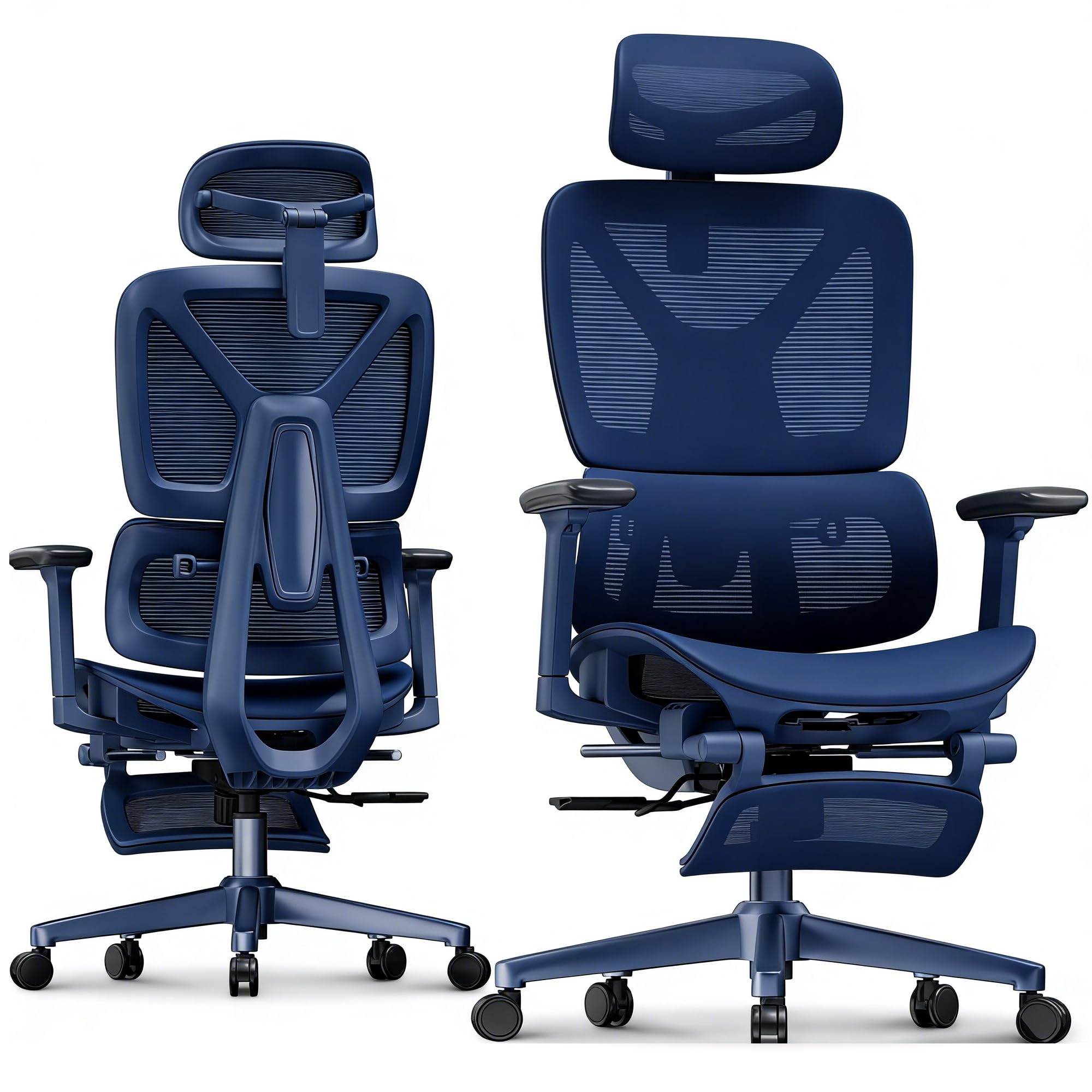
Image: FLEXISPOT OC4-PRO Office Chair. This image shows the fully assembled chair, highlighting its ergonomic design and mesh backrest.
5. Bedienungsanleitung
The FLEXISPOT OC4-PRO chair offers multiple adjustment features to customize your seating experience.
5.1. Sitzhöhenverstellung
Locate the lever on the right side beneath the seat. To raise the seat, lift the lever while taking your weight off the chair. To lower the seat, lift the lever while seated. Release the lever at the desired height.
5.2. Verstellung von Rückenlehne und Neigung
The chair features an adjustable back angle and tilt tension. Use the lever on the left side to lock or unlock the recline function. Rotate the knob located beneath the seat, usually at the front, to adjust the tilt tension. Turn clockwise to increase tension (making it harder to recline) and counter-clockwise to decrease tension (making it easier to recline).
5.3. Einstellung der Lordosenstütze
The multi-functional lumbar support system can be adjusted vertically and horizontally to fit the curve of your lower back. Locate the adjustment controls on the backrest to position the lumbar support for optimal comfort.
5.4. Armlehnenverstellung
The 3D armrests can be adjusted in three dimensions: height, forward/backward, and pivot (inward/outward). Use the buttons or levers on the armrests to unlock and adjust them to your preferred position. Ensure they are locked securely after adjustment.
5.5. Einstellung der Kopfstütze
The headrest can be adjusted for height and angle. Gently push or pull the headrest to move it up or down, and tilt it to find the most comfortable position for your neck and head.
5.6. 360° Rotation and Casters
The chair is equipped with a 360° swivel mechanism and smooth-rolling casters for easy movement. Ensure the casters are clean and free of debris for optimal performance on hard floors.
6. Wartung
- Reinigung: For general cleaning, wipe the chair with a damp cloth. For mesh and fabric areas, dry clean as needed. Avoid harsh chemical cleaners that may damage the material.
- Inspektion: Überprüfen Sie regelmäßig alle Schrauben und Bolzen auf festen Sitz. Ziehen Sie sie gegebenenfalls nach.
- Pflege des Casters: Um eine reibungslose Bewegung zu gewährleisten, sollten die Rollen frei von Haaren und Schmutz sein.
- Lagerung: Store the chair in a cool, dry place away from direct sunlight when not in use for extended periods.
7. Fehlerbehebung
| Problem | Mögliche Ursache | Lösung |
|---|---|---|
| Der Stuhl ist nicht höhenverstellbar. | Gasliftfunktion defekt oder Hebel nicht eingerastet. | Stellen Sie sicher, dass der Höhenverstellhebel vollständig eingerastet ist. Sollte das Problem weiterhin bestehen, muss die Gasdruckfeder möglicherweise ausgetauscht werden. Wenden Sie sich in diesem Fall bitte an den Kundendienst. |
| Der Stuhl quietscht oder wackelt | Lose Schrauben oder Bauteile. | Check and tighten all screws and bolts, especially those connecting the seat, backrest, and base. |
| Die Rollen rollen nicht reibungslos | In den Rollen verfangene Fremdkörper oder beschädigte Rollen. | Entfernen Sie Haare und Schmutz von den Lenkrollen. Beschädigte Lenkrollen müssen gegebenenfalls ausgetauscht werden. |
| Die Rückenlehne lässt sich weder verstellen noch arretieren. | Recline mechanism locked or tilt tension too high. | Ensure the recline lock lever is disengaged. Adjust the tilt tension knob counter-clockwise to reduce tension. |
8. Spezifikationen
| Marke | FLEXISPOT |
| Modellname | OC4-PRO (Ergonomic office chair) |
| Farbe | Schwarz |
| Material | Mesh & Nylon & Steel (Fill Material: Memory Foam) |
| Produktabmessungen (T x B x H) | 73.9 cm (T) x 73.9 cm (B) x 133.1 cm (H) |
| Artikelgewicht | 40 Pfund (18.14 kg) |
| Maximalgewichtsempfehlung | 400 kg (181.44 Pfund) |
| Besondere Merkmale | Ergonomic, Adjustable Headrest, 3D Arm Rest, Adjustable Lumbar, Tilt, Back Support, Adjustable Recliner, Adjustable Height, Tilt Tension Control |
| Montage erforderlich | Ja |
| Zertifizierungen | BIFMA, SGS |
9. Garantie und Support
FLEXISPOT stands behind the quality of its products. For warranty information, technical support, or assistance with parts, please contact FLEXISPOT customer service. Refer to the official FLEXISPOT webDie genauen Garantiebedingungen und Kontaktdaten finden Sie auf der Website oder in Ihren Kaufunterlagen.
Kundendienst: For any questions or concerns, please reach out to FLEXISPOT's professional customer service team.
Ask a question about this manual
Ask about setup, troubleshooting, compatibility, parts, safety, or missing instructions. Manuals+ will review the question and use this page’s manual context to help answer it.