
Active Pixel AP-4G-SY4.0MP-DUAL CAM-V-4MM-BW1
Active Pixel 4G SIM PTZ Security Camera User Manual
Model: AP-4G-SY4.0MP-DUAL CAM-V-4MM-BW1
1. Produktüberschreitungview
The Active Pixel 4G SIM PTZ Security Camera is an outdoor surveillance device designed for locations without traditional Wi-Fi or wired internet access. It operates using a 4G SIM card, providing remote monitoring capabilities. The camera features a dual-lens system for comprehensive coverage and detailed imaging, pan-tilt-zoom functionality, motion tracking, color night vision, and two-way audio communication.
1.1 Hauptmerkmale
- 4G SIM Connectivity: Operates independently using a 4G SIM card (Vi & Airtel Sim Supported), suitable for remote areas without Wi-Fi.
- Dual Lens (4MP + 4MP = 8MP Total): Provides both a wide-angle view and a detailed close-up view simultaneously for enhanced monitoring.
- 360° Schwenk-Neige-Zoom (PTZ): Allows remote control of camera direction and zoom, with automatic human motion tracking.
- Farbnachtsicht: Equipped with bright spotlight LEDs and IR lights for clear, full-color footage bei schlechten Lichtverhältnissen.
- Zweiwege-Audio: Enables real-time communication through the camera via a mobile application.
- Outdoor Ready (IP65): Weatherproof design ensures durability against rain and dust for outdoor installation.
- Intelligente Bewegungsverfolgung: Folgt automatisch erkannten menschlichen Bewegungen.
1.2 Packungsinhalt
Überprüfen Sie, ob alle Artikel im Paket vorhanden sind:
- 1x Active Pixel 4G SIM PTZ Security Camera
- 1x Montageständer
- 1x Netzteil
- 1x Benutzerhandbuch (dieses Dokument)
- 1x Screw Kit for installation
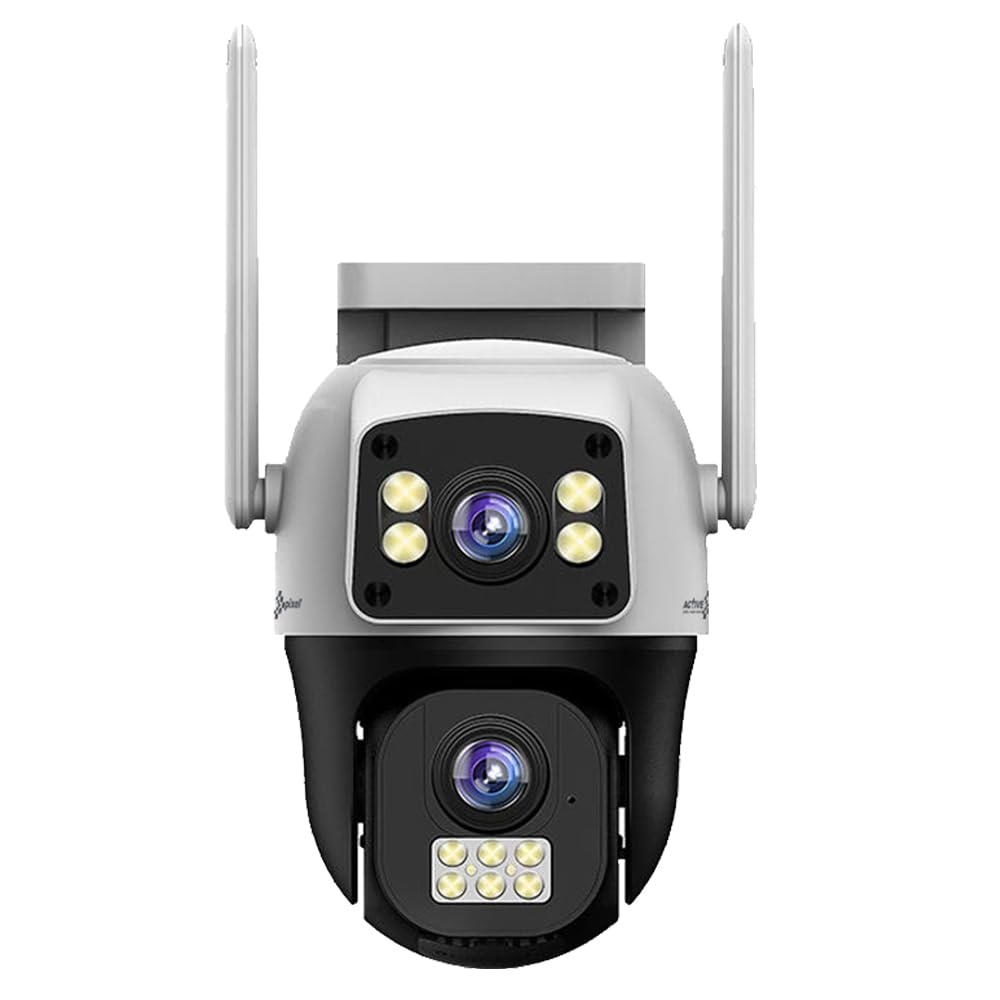
Figure 1: Active Pixel 4G SIM PTZ Security Camera (Front View)
2. Sicherheitshinweise
- Stellen Sie sicher, dass die Kamera an einem stabilen Ort installiert ist, um ein Herunterfallen zu verhindern.
- Use only the provided power adapter to avoid damage or fire hazards.
- Setzen Sie die Kamera keinen extremen Temperaturen außerhalb ihres Betriebstemperaturbereichs aus.
- Halten Sie die Kamera von starken Magnetfeldern fern.
- Vermeiden Sie es, die Linse über längere Zeiträume direkt starken Lichtquellen auszusetzen.
- Versuchen Sie nicht, die Kamera selbst zu zerlegen oder zu reparieren. Wenden Sie sich an den Kundendienst.
- Ensure proper sealing of all connections to maintain the IP65 water resistance rating.
3. Einrichtung
3.1 Einlegen der SIM-Karte
- Locate the SIM card slot on the camera. This is typically protected by a waterproof cover.
- Carefully open the cover using a small screwdriver if necessary.
- Insert a activated 4G SIM card (Vi or Airtel recommended) into the slot with the metal contacts facing down and the notched corner aligned correctly.
- Ensure the SIM card clicks into place.
- Schließen Sie die wasserdichte Abdeckung sorgfältig, um das Eindringen von Wasser zu verhindern.
Note: The camera does not require Wi-Fi. Ensure the 4G SIM card has an active data plan.
3.2 Stromanschluss
- Schließen Sie das mitgelieferte Netzteil an den Stromeingang der Kamera an.
- Stecken Sie das Netzteil in eine geeignete Steckdose.
- The camera will power on and initiate its self-test sequence.
3.3 App-Installation und -Kopplung
- Download the official Active Pixel security camera application from your mobile device's app store (e.g., Google Play Store for Android).
- Registrieren Sie sich für ein neues Konto oder melden Sie sich an, falls Sie bereits eines besitzen.
- Follow the in-app instructions to add a new device. This typically involves scanning a QR code on the camera or manually entering its device ID.
- Sobald die Kopplung hergestellt ist, können Sie view den Live-Feed und steuern Sie die Kamera.
3.4 Montage der Kamera
The camera is designed for wall-mounted installation.
- Wählen Sie einen geeigneten Standort im Freien, der die gewünschten Bedingungen bietet. viewing angle and is within reach of a power source.
- Use the included mounting stand as a template to mark drilling points on the wall.
- Bohren Sie gegebenenfalls Vorbohrungen und setzen Sie Wandanker ein.
- Secure the mounting stand to the wall using the provided screws.
- Attach the camera to the mounting stand, ensuring it is firmly secured.
- Adjust the camera's initial angle as needed before final tightening.
Abbildung 2: Bspample of camera mounting (Image not available, refer to physical manual for illustration).
4. Bedienungsanleitung
4.1 Live View und PTZ-Steuerung
- Open the Active Pixel app on your smartphone.
- Select your camera from the device list to access the live video feed.
- Use the on-screen controls to pan (move horizontally), tilt (move vertically), and zoom the camera.
4.2 Bewegungserkennung und -verfolgung
- Navigieren Sie in der App zu den Kameraeinstellungen.
- Enable "Motion Detection" and configure sensitivity levels as desired.
- Activate "Smart Motion Tracking" to allow the camera to automatically follow detected human movement.
- You will receive instant alerts on your mobile device when motion is detected.
4.3 Zwei-Wege-Audio
- Während im Leben viewTippen Sie in der App auf das Mikrofonsymbol, um über den Lautsprecher der Kamera zu sprechen.
- Tippen Sie auf das Lautsprechersymbol, um den Ton vom Mikrofon der Kamera zu hören.
4.4 Nachtsicht
The camera automatically switches to night vision mode in low-light conditions. The powerful LEDs provide full-color night vision, while IR lights assist in darker environments.
4.5 Aufzeichnung und Speicherung
The camera supports local storage via a MicroSD card (not included) and may offer cloud storage options (check app for details). Recordings are triggered by motion detection or can be initiated manually.
- Insert a MicroSD card (up to 128GB, Class 10 recommended) into the designated slot (usually near the SIM card slot).
- Format the MicroSD card via the app settings before first use.
- Auf aufgezeichnetes Foo zugreifentage through the playback feature in the app.
5. Wartung
- Reinigung: Wischen Sie die Kameralinse und das Kameragehäuse vorsichtig mit einem weichen, fusselfreien Tuch ab.amp Tuch. Verwenden Sie keine scharfen Chemikalien oder Scheuermittel.
- Firmware-Updates: Regularly check the app for available firmware updates to ensure optimal performance and security. Follow in-app instructions for updating.
- Wetterschutz: Periodically inspect the waterproof covers and seals for any signs of wear or damage, especially after extreme weather conditions. Ensure they are securely closed.
- Stromversorgung: Vergewissern Sie sich, dass Netzteil und Kabel unbeschädigt sind.
6. Fehlerbehebung
| Problem | Mögliche Ursache | Lösung |
|---|---|---|
| Kamera lässt sich nicht einschalten | Kein Strom, defekter Adapter, lose Verbindung. | Überprüfen Sie die Steckdose, stellen Sie sicher, dass der Adapter fest angeschlossen ist, und versuchen Sie es mit einer anderen Steckdose. |
| Kein Live-Videostream | No 4G signal, inactive SIM card, incorrect app pairing. | Check 4G signal strength, ensure SIM card is active and has data, re-pair camera with app. |
| Bewegungserkennung funktioniert nicht | Motion detection disabled, sensitivity too low, incorrect detection zone. | Enable motion detection in app, increase sensitivity, adjust detection zones. |
| Probleme mit der Zwei-Wege-Audiofunktion | Microphone/speaker disabled in app, poor network connection. | Ensure audio features are enabled in app, check 4G signal strength. |
| Schlechte Videoqualität bei Nacht | Obstruction of IR/spotlight LEDs, dirty lens. | Clear any obstructions, clean the camera lens. |
7. Spezifikationen
| Besonderheit | Detail |
|---|---|
| Modellnummer | AP-4G-SY4.0MP-DUAL CAM-V-4MM-BW1 |
| Marke | Active Pixel |
| Konnektivitätstechnologie | Wireless (4G Cellular) |
| Auflösung der Videoaufnahme | 1536P (Dual 4MP lenses for 8MP total clarity) |
| Besonderheit | Dual Lens, 360° PTZ, Smart Motion Tracking, Color Night Vision, Two-Way Audio |
| Verwendung im Innen- und Außenbereich | Im Freien |
| Stromquelle | DC |
| Kontrollmethode | App (Android-kompatibel) |
| Material | Acrylnitril-Butadien-Styrol (ABS) |
| Artikelabmessungen (LxBxH) | 15 x 10 x 8 Zentimeter |
| Wasserbeständigkeit | IP65 (wasserbeständig) |
| Low-Light-Technologie | Nachtfarbe |
| Alarmtyp | Nur Bewegung |
| Fotosensor-Technologie | CMOS |
| Installationstyp | Wandmontage |
| Im Lieferumfang enthaltene Komponenten | Camera, Stand, Adapter, Manual, Screw Kit |
8. Garantie und Support
8.1 Garantieinformationen
This Active Pixel product comes with a 1 Jahr Garantie Ab Kaufdatum. Bitte bewahren Sie Ihren Kaufbeleg als Garantienachweis auf.
The warranty covers manufacturing defects. It does not cover damage caused by misuse, accidents, unauthorized modifications, or improper installation.
8.2 Kundendienst
For technical assistance, troubleshooting, or warranty claims, please contact Active Pixel customer care:
- Kundenbetreuungsnummer: 9321367328
- Hersteller: Glorious Digital Solution Pvt Ltd, Mumbai, India.
Please have your product model number (AP-4G-SY4.0MP-DUAL CAM-V-4MM-BW1) and purchase details ready when contacting support.
Ask a question about this manual
Ask about setup, troubleshooting, compatibility, parts, safety, or missing instructions. Manuals+ will review the question and use this page’s manual context to help answer it.