
1. Einleitung
Welcome to your MZZYG Dash Cam user manual. This guide provides essential information for the safe and effective operation of your new dash camera. Please read it thoroughly before use to ensure proper installation and functionality.
2. Sicherheitshinweise
- Stellen Sie sicher, dass die Dashcam sicher installiert ist und die Sicht des Fahrers nicht behindert. view oder die Auslösung des Airbags beeinträchtigen.
- Do not operate the device or adjust settings while driving. Always pull over to a safe location before making any adjustments.
- Use only the provided power adapter and accessories. Using unauthorized accessories may damage the device and void the warranty.
- Vermeiden Sie es, das Gerät über längere Zeit extremen Temperaturen (unter -20 °C oder über 70 °C) oder direkter Sonneneinstrahlung auszusetzen.
- Halten Sie das Gerät von Wasser und Feuchtigkeit fern.
3. Packungsinhalt
Das Paket enthält die folgenden Artikel:
- MZZYG Dash Cam Unit
- Autoladegerät
- Camera Link Cable (for rear camera, if included)
- Saugnapfhalterung
4. Produktüberschreitungview
The MZZYG Dash Cam is designed to provide comprehensive vehicle surveillance with its multi-camera recording capabilities and advanced features.
Hauptmerkmale:
- Hochauflösende Nachtsicht: Records in 1080P high definition, ensuring clear images even in low-light conditions.
- Dual/Triple Camera Recording: Supports recording from multiple angles (front, interior, and optional rear camera) with various screen display modes (picture-in-picture, split-screen, full-screen).
- Weitwinkel View: Features a 170-degree front lens, 120-degree interior lens, and 140-degree rear lens for extensive coverage without blind spots.
- Loop-Aufnahme: Es werden fortlaufend Aufzeichnungen erstellt und die ältesten überschrieben. files, wenn die Speicherkarte voll ist, um eine unterbrechungsfreie Aufnahme zu gewährleisten.
- Bewegungserkennung: Automatically starts recording if motion is detected while the vehicle is parked.
- G-Sensor: Erkennt plötzliche Stöße oder Kollisionen und sperrt automatisch das aktuelle Video. file um ein Überschreiben zu verhindern.
- Parkmonitor: Records automatically if a collision or impact is detected while the vehicle is parked and turned off.
- Rückfahrkamerafunktion: Automatically switches to display the rear view when reversing, providing a clearer image for parking.
Produktkomponenten und Views:


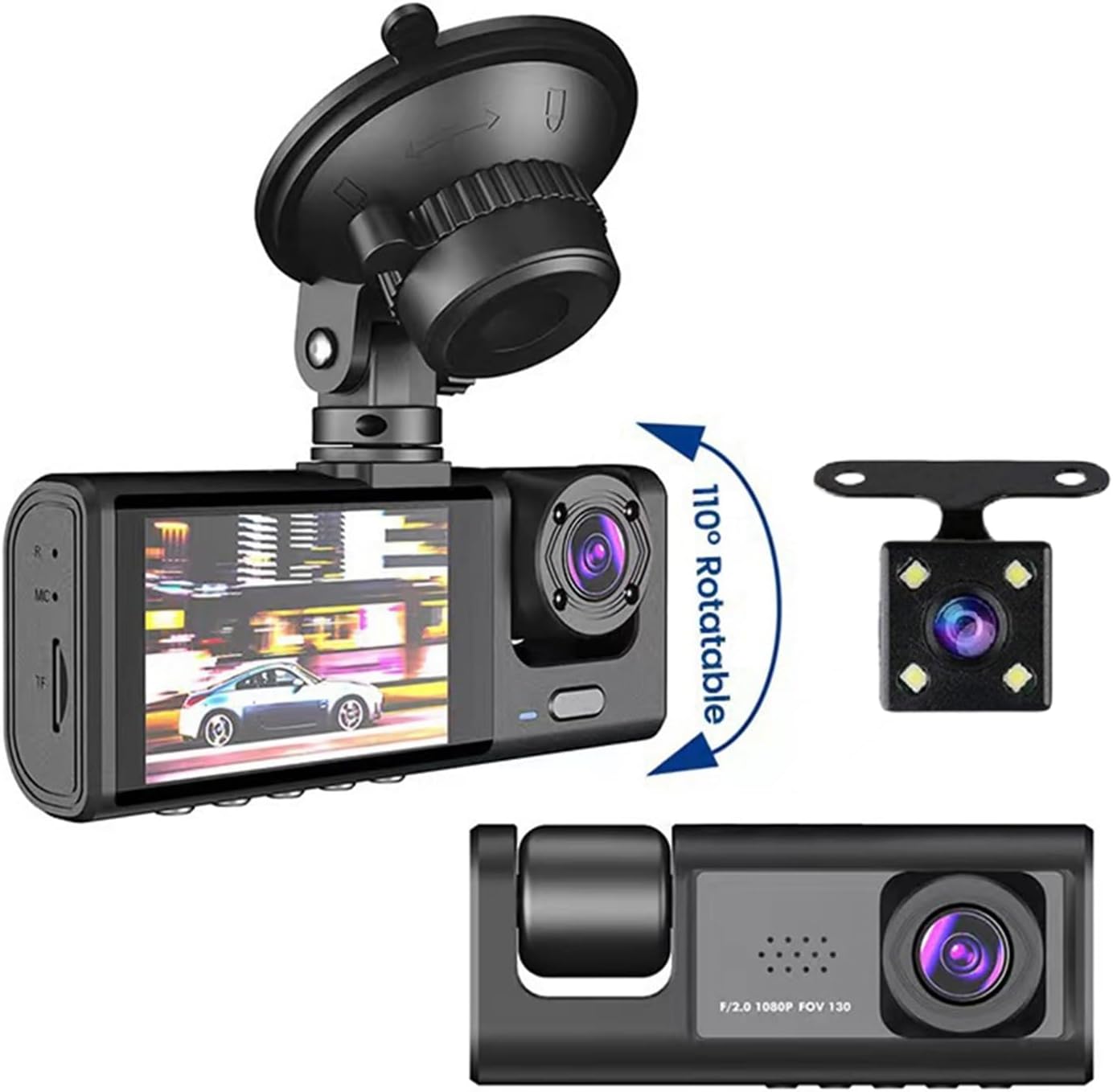
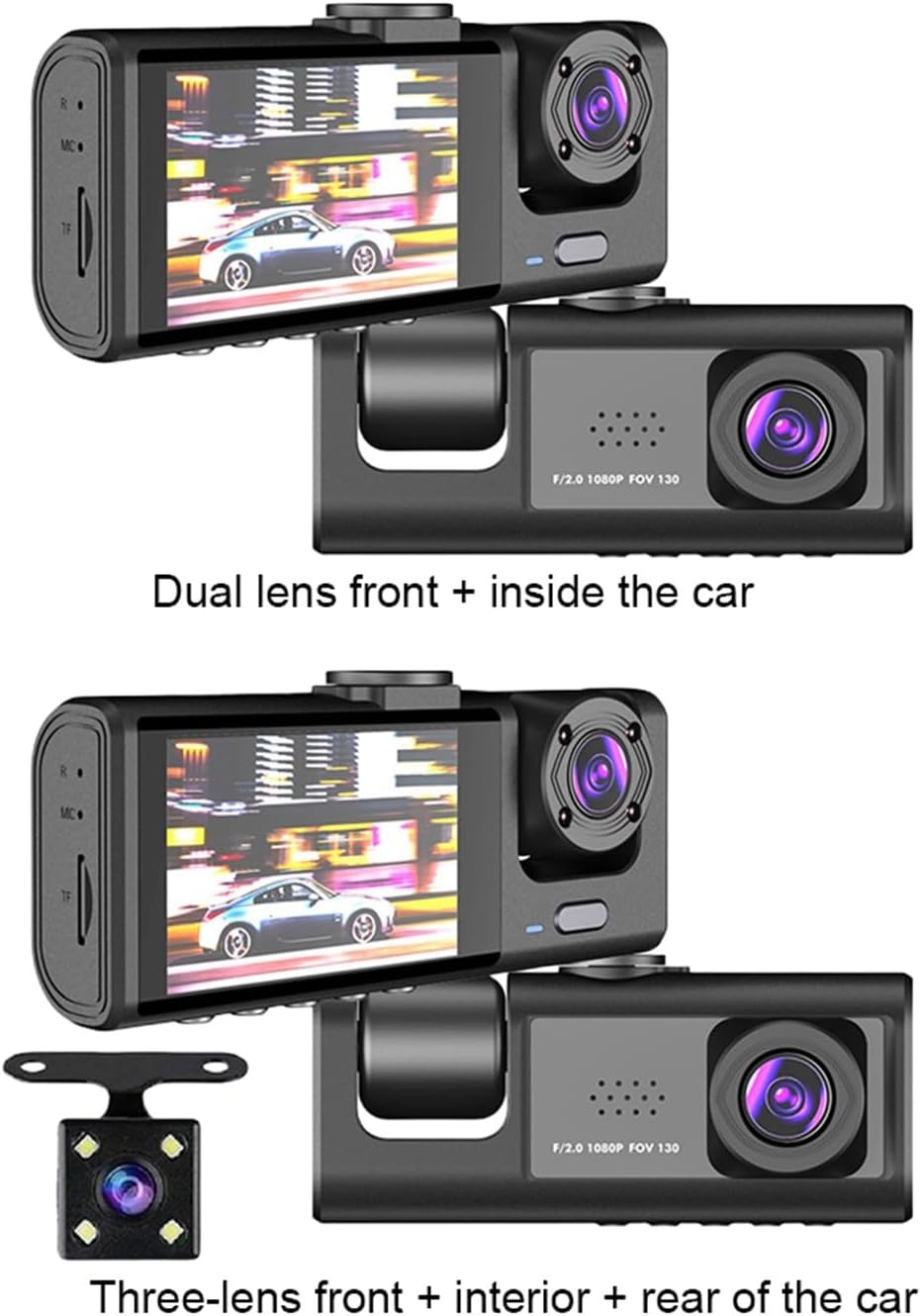

5. Einrichtung
5.1 Montage der Dashcam
- Reinigen Sie den Bereich an Ihrer Windschutzscheibe, an dem Sie die Dashcam anbringen möchten.
- Attach the suction cup mount to the windshield, ensuring it is securely fastened and does not obstruct your view der Straße.
- Securely attach the dash cam unit to the suction cup mount. Adjust the camera angle for optimal front view Abdeckung.
5.2 Stromanschluss
- Schließen Sie das Autoladegerät an den USB-Anschluss der Dashcam an.
- Stecken Sie das andere Ende des Autoladegeräts in die Zigarettenanzünderbuchse Ihres Fahrzeugs.
- Die Dashcam schaltet sich normalerweise automatisch ein, wenn das Fahrzeug gestartet wird, und schaltet sich aus, wenn das Fahrzeug ausgeschaltet wird.
5.3 Einsetzen der Speicherkarte
- Ensure the dash cam is powered off before inserting or removing the memory card.
- Insert a TF (microSD) card (up to 64GB, Class 10 or higher recommended) into the TF card slot until it clicks into place.
- It is highly recommended to format the memory card within the dash cam's settings menu before first use and periodically thereafter to ensure optimal performance and prevent data corruption.
5.4 Initial Settings (Language)
Upon first power-on, you may need to set the language:
- Navigate to the system settings menu on the dash cam's screen.
- Select the 'OSD Language' option.
- Choose your preferred language from the available options: Chinese (Simplified), Chinese (Traditional), German, Russian, French, Korean, Portuguese, Japanese, Spanish, Italian, English.
6. Bedienungsanleitung
6.1 Grundlegende Aufnahme (Schleifenaufnahme)
Once powered on and with a memory card inserted, the dash cam will automatically begin loop recording. This feature ensures continuous recording by overwriting the oldest video files when the memory card reaches its full capacity. You can adjust the loop recording duration (e.g., 1, 3, 5 minutes) in the settings menu.
6.2 Funktionalität des G-Sensors
The built-in G-sensor detects sudden acceleration, braking, or impacts. When a significant event is detected, the current video file is automatically locked and saved to a protected folder, preventing it from being overwritten by loop recording. The sensitivity of the G-sensor can be adjusted in the settings.
6.3 Bewegungserkennung
When enabled in the settings, the dash cam will automatically start recording if it detects movement in front of the vehicle while it is parked. This feature is useful for monitoring your vehicle when you are away.
6.4 Parkmonitor
The parking monitor feature allows the dash cam to automatically record a short video clip if it detects a collision or impact while the vehicle is parked and the engine is off. This provides surveillance even when the car is stationary.
6.5 Rear Camera Operation (if applicable)
If your dash cam includes a rear camera, connect it to the main unit using the provided camera link cable. When the vehicle is put into reverse, the dash cam will automatically switch its display to show the rear view, Unterstützung beim Einparken und Rangieren.
6.6 Videowiedergabe
Zu view aufgezeichnete Videos:
- Stop recording (if currently active).
- Enter the playback mode through the menu options.
- Use the navigation buttons to browse through the recorded files.
- Wählen Sie ein file to play it back on the dash cam's screen.
6.7 Date and Time Watermark
The dash cam supports displaying a floating date and time watermark on all recorded videos. Ensure the date and time settings are accurate in the system menu for correct timestamping Ihrer Aufnahmen.
7. Wartung
7.1 Gerät reinigen
- Wipe the camera lenses and the screen with a soft, dry, lint-free cloth.
- Do not use abrasive cleaners, solvents, or chemical cleaning agents, as these can damage the device's surface or lenses.
7.2 Speicherkartenverwaltung
- Regularly format the TF card (at least once a month) using the dash cam's menu to maintain optimal performance and prevent data corruption.
- If the memory card frequently shows errors or fails to record, consider replacing it with a new, high-quality TF card.
8. Fehlerbehebung
- Gerät lässt sich nicht einschalten: Check the power connection, ensure the car charger is properly inserted, and verify that your vehicle's power outlet is functional. Ensure the internal battery has some charge.
- Aufnahmeprobleme (z. B. keine Aufnahme, beschädigte Aufnahmen) filee): Ensure the TF card is inserted correctly, formatted, and not full. Check loop recording settings. Try using a different TF card.
- Schlechte Videoqualität: Clean the camera lenses. Check the resolution settings in the menu to ensure it is set to the desired quality (e.g., 1080P).
- Bildschirm friert ein oder reagiert nicht: Try resetting the device. If a reset button is available, use a thin object to press it. Otherwise, disconnect and reconnect the power supply.
- Rückkamera zeigt kein Bild an: Ensure the rear camera is properly connected to the main unit via the camera link cable. Check cable for damage.
9. Spezifikationen
| Bilder pro Sekunde | 30 FPS |
| Montagemodus | Tragbarer Rekorder |
| Batterie | Built-in, 150MAH |
| Schnittstelle | USB 2.0 |
| OSD-Sprache | Chinese (Simplified), Chinese (Traditional), German, Russian, French, Korean, Portuguese, Japanese, Spanish, Italian, English |
| Bildschirmgröße | 2-Zoll-IPS-Bildschirm |
| Pixel | Vorderseite 130 W / Mitte 30 W / Rückseite 30 W |
| Anzahl der Linsen | 3 (Front, Interior, Rear options) |
| Maximaler externer Speicher | 64GB (TF card) |
| Besondere Merkmale | G-sensor, Motion Detection, Parking Monitor |
| Videoformat | AVI |
| Kameraauflösung | Front 1280*720P / Middle 640*480P / Rear 640*480P |
| View Winkel | Front 170° / Interior 120° / Rear 140° |
| Bildschirm-Verhältnis | 4:3 |
| Touch-Screen | NEIN |
| Rückfahrkamera | Ja (optional) |
| Nachtaufnahmefunktion | Ja |
| Maximale Videobildrate | 30 FPS |
| Recorded Audio | NEIN |
| Loop-Cycle Recording Function | Ja |
| Eingebauter Bildschirm | Ja |
| Stromquelle | Batterie |
| Eingabe/Ausgabe | USB 2.0 |
| Abmessungen (B x H x T) | 140 x 110 x 70 mm / 5.5 x 4.3 x 2.8 Zoll |
| Gewicht | 290 g |
| Betriebstemperatur | -20°C bis 70°C |
| Öffnung | F2.0 |
| Farbe | Schwarz |
| Material | ABS+PC |
| W-lan | Nicht unterstützt |
10. Garantie und Support
For technical support, warranty inquiries, or any questions regarding your MZZYG Dash Cam, please contact MZZYG customer service through your retailer or the official MZZYG webBitte halten Sie Ihre Modellnummer (1005005686826934) und die Kaufinformationen bereit, wenn Sie sich an den Support wenden.