
1. Einleitung
Vielen Dank für Ihren Einkauf.asing the EMB Home PKL5000 Rechargeable PA Speaker. This powerful and versatile speaker system is designed to deliver high-quality audio for various events, including parties, karaoke, and public announcements. Featuring a 15-inch woofer, Bluetooth connectivity, USB/SD card playback, and a wireless microphone, the PKL5000 offers a comprehensive audio solution. Please read this manual thoroughly before operating the device to ensure proper use and to maximize its performance and longevity.
2. Wichtige Sicherheitshinweise
- Lesen Sie alle Anweisungen, bevor Sie das Produkt verwenden.
- Bewahren Sie dieses Handbuch zum späteren Nachschlagen auf.
- Der Lautsprecher darf weder Wasser, Feuchtigkeit noch extremen Temperaturen ausgesetzt werden.
- Blockieren Sie keine Belüftungsöffnungen.
- Verwenden Sie nur vom Hersteller angegebene Anbaugeräte/Zubehör.
- Bei Gewittern oder längerer Nichtbenutzung sollte der Lautsprecher vom Stromnetz getrennt werden.
- Überlassen Sie alle Wartungsarbeiten qualifiziertem Fachpersonal. Versuchen Sie nicht, das Gerät selbst zu reparieren.
- Stellen Sie sicher, dass die Stromquelle mit der Lautstärke übereinstimmttage Anforderungen an den Sprecher.
- Halten Sie den Lautsprecher von Wärmequellen wie Heizkörpern, Heizlüftern, Öfen oder anderen Geräten fern, die Wärme erzeugen.
3. Packungsinhalt
Überprüfen Sie, ob alle Artikel im Paket vorhanden sind:
- EMB Home PKL5000 PA Speaker
- UHF-Funkmikrofon
- Stativ-Lautsprecherständer
- Fernbedienung
- Netzteil/Ladekabel
- Bedienungsanleitung
4. Produktüberschreitungview: Rear Control Panel
Familiarize yourself with the various controls and ports located on the rear panel of your PKL5000 speaker.

Bild: Detailliert view of the EMB Home PKL5000 speaker's rear control panel, showing inputs, outputs, and adjustment knobs.
- Bedienfeld: Main interface for settings and adjustments.
- Mic in Vol: Regelt die Lautstärke für Mikrofoneingänge.
- Mic in 6.5mm Jack: Eingang für kabelgebundene Mikrofone.
- Mic/Guitar 6.5mm Jack: Dual-purpose input for microphones or guitars.
- Mic/Guitar Switch: Toggles between microphone and guitar input modes.
- XLR Cable Connector: Professional audio input for balanced signals.
- DC12V Battery Input: Port for external 12V DC power source.
- Leistung: Hauptschalter für das Gerät.
- Wechselstromversorgung: Input for the AC power cable to power and charge the speaker.
- Line in Vol: Adjusts the volume for line-level inputs.
- Echo: Steuert den Echoeffekt für Mikrofoneingänge.
- AUX-Eingang: 3.5-mm-Aux-Eingang für externe Audiogeräte.
- RCA-Line-Eingang: Stereo RCA inputs for external audio sources.
- Line Out: Audio output to connect to another speaker or audio system.
5. Installationsanleitung
5.1 Auspacken und Aufstellen
- Entnehmen Sie vorsichtig alle Komponenten aus der Verpackung.
- Place the speaker on a stable, flat surface. For optimal sound projection and stability, use the included tripod stand. Ensure the stand is fully extended and locked before placing the speaker.
5.2 Einschalten und Laden
The PKL5000 speaker can operate on AC power or its internal rechargeable battery.
- Wechselstromversorgung: Connect the supplied power cable to the AC Power input on the rear panel and then to a standard wall outlet.
- Laden: When connected to AC power, the internal battery will automatically begin charging. A full charge takes approximately 4.5 hours.
- Akkulaufzeit: A fully charged battery provides approximately 5 hours of playback time, depending on volume and usage.

Image: The EMB Home PKL5000 speaker with indicators for a charging time of 4.5 hours and a play time of 5 hours.
6. Bedienungsanleitung
6.1 Grundlegende Bedienung
- Turn on the speaker using the 'Power' switch on the rear panel.
- Adjust the main volume knob to a low level before playing audio.
6.2 Bluetooth-Verbindung
So verbinden Sie Ihr Gerät über Bluetooth:
- Stellen Sie sicher, dass der Lautsprecher eingeschaltet ist.
- Drücken Sie die Taste „Modus“ am Bedienfeld oder an der Fernbedienung, bis der Bluetooth-Modus ausgewählt ist. Im Display wird „BLAU“ angezeigt und eine Kopplungsanzeige blinkt.
- Aktivieren Sie auf Ihrem Mobilgerät Bluetooth und suchen Sie nach verfügbaren Geräten.
- Select 'EMB PKL5000' from the list. Once connected, the speaker will emit a confirmation tone, and the pairing indicator will stop flashing.
- Sie können nun Audio von Ihrem Gerät über den Lautsprecher abspielen.

Image: A smartphone displaying the Bluetooth icon, indicating a wireless connection to the EMB Home PKL5000 speaker, with a range of up to 30 feet.
6.3 USB/SD-Karten-Wiedergabe
So spielen Sie Audio von einem USB-Laufwerk oder einer SD-Karte ab:
- Insert a USB drive or SD card into the corresponding slot on the control panel.
- The speaker will automatically switch to USB/SD mode and begin playing compatible audio files. If not, press the 'Mode' button to select USB/SD.
- Use the playback controls (Play/Pause, Next, Previous) on the control panel or remote to manage your music.
6.4 Verwendung des drahtlosen Mikrofons
The included UHF wireless microphone is pre-paired with the speaker.
- Legen Sie die Batterien in das drahtlose Mikrofon ein.
- Schalten Sie das Mikrofon ein.
- Adjust the 'Mic in Vol' knob on the speaker's control panel to control the microphone's volume.
- Use the 'Echo' knob to add an echo effect to the microphone's sound.
6.5 True Wireless Stereo (TWS) Mode
To connect two PKL5000 speakers for a stereo sound experience:
- Ensure both PKL5000 speakers are powered on and in Bluetooth mode.
- On one speaker (this will be your primary speaker), press and hold the 'TWS' button (or a similar pairing button, refer to the speaker's display for 'BT Mode ON' confirmation).
- Der primäre Lautsprecher sucht nach dem sekundären Lautsprecher. Sobald die Verbindung hergestellt ist, geben beide Lautsprecher einen Bestätigungston aus.
- Verbinden Sie nun Ihr Mobilgerät über Bluetooth mit dem Hauptlautsprecher, wie in Abschnitt 6.2 beschrieben. Der Ton wird über beide Lautsprecher in Stereo wiedergegeben.

Image: Two EMB Home PKL5000 speakers positioned apart, illustrating their ability to wirelessly connect up to 30 feet for a stereo sound experience.
6.6 EQ Modes and Party Lights
The PKL5000 features multiple EQ modes to optimize sound for different genres and integrated party lights.
- EQ-Modi: Use the 'EQ' button on the control panel or remote to cycle through preset equalization settings (e.g., Pop, Rock, Jazz, Classic, Flat).
- Partylichter: The speaker features translucent cabinet lighting and 360-degree motion lights. These lights automatically activate when the speaker is powered on. Use the dedicated 'Light' button (if available) or refer to the remote control for light mode adjustments. Note that the LED light mode may reset to flash-color mode upon power cycling.

Image: The EMB Home PKL5000 speaker highlighting its 360-degree surround cabinet party lights, designed to enhance the party atmosphere.

Image: The EMB Home PKL5000 speaker showcasing its dynamic 360-degree motion lights, creating a vibrant visual effect.
7. Wartung
7.1 Reinigung
- Always unplug the speaker from the power source before cleaning.
- Verwenden Sie ein weiches, trockenes Tuch, um die Außenflächen des Lautsprechers abzuwischen.
- Verwenden Sie keine Scheuermittel, Wachse oder Lösungsmittel, da diese die Oberfläche beschädigen können.
- Keep the speaker grille free of dust and debris for optimal sound quality.
7.2 Speicherung
- Bewahren Sie den Lautsprecher an einem kühlen, trockenen Ort fern von direkter Sonneneinstrahlung und extremen Temperaturen auf.
- If storing for an extended period, ensure the battery is partially charged (around 50%) to prolong its lifespan. Recharge the battery every few months to prevent deep discharge.
8. Fehlerbehebung
| Problem | Mögliche Ursache | Lösung |
|---|---|---|
| Kein Strom | Power cable not connected; Battery drained; Power switch off | Ensure power cable is securely connected and plugged in. Charge the battery. Turn the power switch ON. |
| Kein Ton | Lautstärke zu niedrig; Falscher Eingangsmodus; Gerät nicht angeschlossen | Increase master volume and input volume. Select the correct input mode (Bluetooth, USB, AUX). Ensure your device is properly connected. |
| Bluetooth nicht gekoppelt | Lautsprecher nicht im Kopplungsmodus; Gerät zu weit entfernt; Störungen | Ensure speaker is in Bluetooth pairing mode. Move device closer to speaker. Turn off other Bluetooth devices. |
| Mikrofon funktioniert nicht | Microphone off; Batteries low/dead; Mic volume low | Turn on the microphone. Replace batteries. Increase 'Mic in Vol' knob. |
| TWS-Modus verbindet nicht | Incorrect TWS pairing procedure; Speakers too far apart | Ensure both speakers are in Bluetooth mode. Follow TWS pairing steps carefully (Section 6.5). Keep speakers within 30 feet. |
9. Spezifikationen
| Besonderheit | Detail |
|---|---|
| Modell | PKL5000 |
| Leistungsabgabe | 5000 W (Spitze) |
| Tieftönergröße | 15-inch Steel Frame |
| Treiber | 1-Zoll-Titanmembran |
| Konnektivität | Bluetooth, USB, SD Card, AUX (3.5mm), RCA, XLR |
| Drahtloses Mikrofon | UHF |
| Stromquelle | Netzbetrieb, wiederaufladbarer Akku |
| Ladezeit | Ca. 4.5 Stunden |
| Spielzeit | Approx. 5 hours (battery) |
| Abmessungen (ca.) | 72.7cm (Width) x 439cm (Height) x 47.3cm (Depth) - Note: Height value seems unusually large, please verify actual product dimensions. |
| Montagetyp | Pole Mount (with included tripod stand) |
| UPC | 783501154877 |
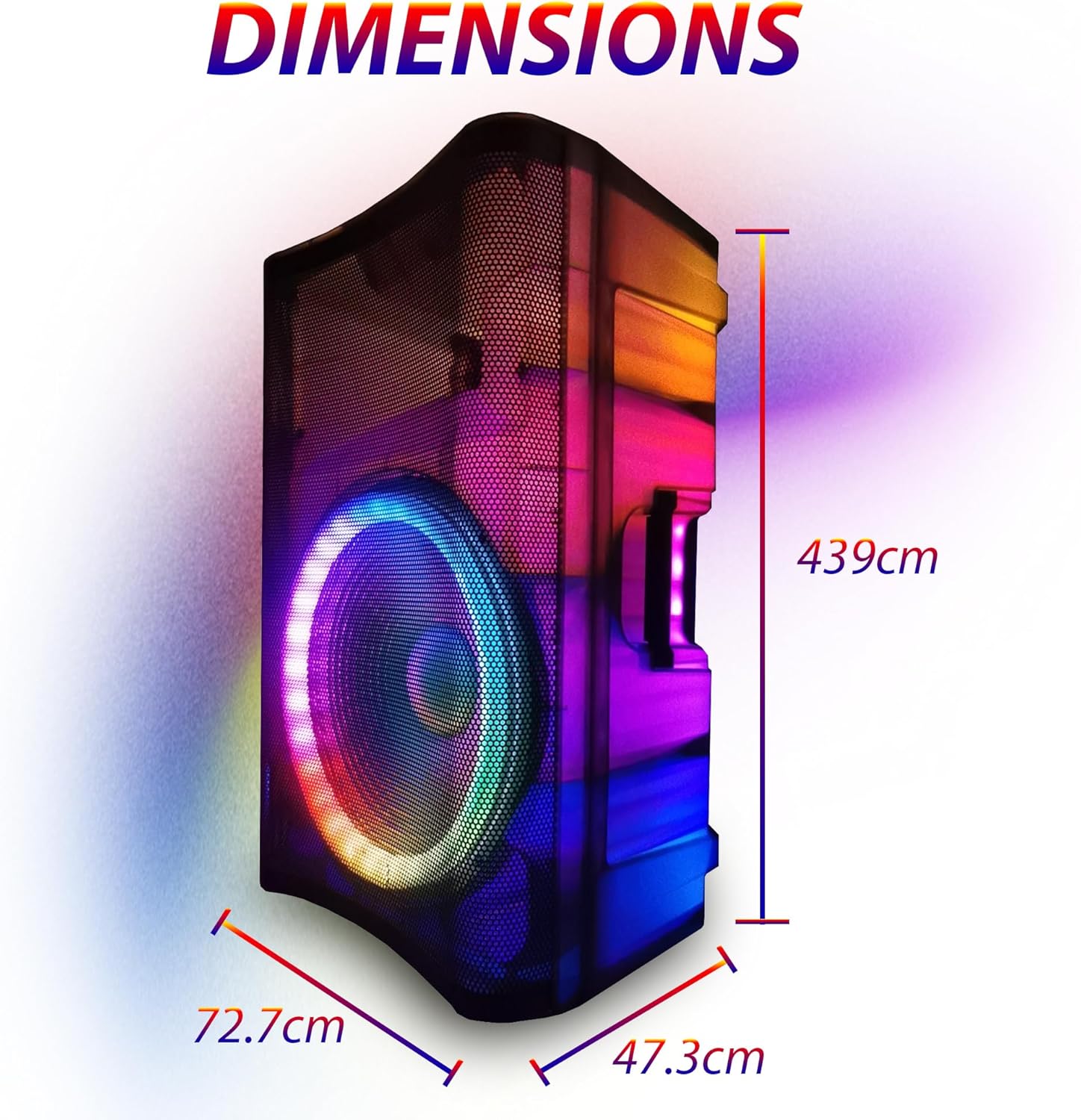
Image: Diagram showing the approximate dimensions of the EMB Home PKL5000 speaker: 72.7cm width, 439cm height, and 47.3cm depth.
10. Garantie und Support
EMB products are designed for reliability and performance. For warranty information, technical support, or service inquiries, please refer to the warranty card included with your product or contact EMB customer support through their official website or the retailer where the product was purchased. Please have your model number (PKL5000) and proof of purchase ready when contacting support.