
1. Einleitung
Thank you for choosing the Riksion Walking Pad Electric Treadmill. This manual provides essential information for the safe and effective use of your new fitness equipment. Please read this manual thoroughly before operation and retain it for future reference.
2. Wichtige Sicherheitshinweise
- Die Laufunterlage sollte immer auf einer ebenen, stabilen Fläche platziert werden.
- Ensure there is adequate clear space (at least 1 meter) around the walking pad during use.
- This walking pad is designed for adult use. Keep children and pets away from the equipment during operation.
- Konsultieren Sie vor Beginn eines neuen Trainingsprogramms einen Arzt, insbesondere wenn Sie bereits Vorerkrankungen haben.
- Bitte tragen Sie während der Benutzung geeignete Sportschuhe.
- The maximum user weight capacity for this device is 120.2 kg (265 lbs). Do not exceed this limit.
- Do not use the walking pad if it is damaged or malfunctioning. Contact customer support for assistance.
- Ziehen Sie den Netzstecker des Laufpads, wenn es nicht benutzt wird oder bevor Sie es reinigen.
3. Packungsinhalt
Your Riksion Walking Pad Electric Treadmill comes fully assembled. Please check the package for the following items:
- Riksion Walking Pad Electric Treadmill (fully assembled)
- Fernbedienung
- Netzkabel
- Bedienungsanleitung

Image: The Riksion Walking Pad Electric Treadmill as it appears in its shipping box, indicating its compact packaging.
4. Einrichtung
The Riksion Walking Pad is designed for immediate use with no assembly required.
- Auspacken: Nehmen Sie die Laufunterlage vorsichtig aus der Verpackung.
- Platzierung: Place the walking pad on a firm, level surface in your desired exercise area. Ensure there is sufficient space around the unit for safe operation.
- Stromanschluss: Plug the power cord into the walking pad and then into a standard electrical outlet.
5. Bedienungsanleitung
5.1. LED Display and Remote Control
The walking pad features an integrated LED display and is controlled via a wireless remote. The display shows key workout metrics.

Bild: Nahaufnahme view of the walking pad's LED display showing speed, time, distance, and calories, alongside the remote control for operation.
5.2. Starten und Stoppen
- Anfangen: Press the 'Start' button on the remote control. The walking pad will begin at a low speed.
- Stoppen: Press the 'Stop' button on the remote control. The walking pad will gradually slow down and come to a complete stop.
5.3. Geschwindigkeit anpassen
- Verwenden Sie die Tasten „+“ und „-“ auf der Fernbedienung, um die Gehgeschwindigkeit zu erhöhen oder zu verringern.
- The speed range is from 1 km/h to 6 km/h. Adjust the speed to a comfortable and safe level for your workout.
5.4. Monitoring Your Workout
Das LED-Display liefert Echtzeit-Feedback zu Ihrem Training:
- Zeit: Dauer Ihrer Trainingseinheit.
- Geschwindigkeit: Aktuelle Gehgeschwindigkeit.
- Distanz: Die während der Trainingseinheit zurückgelegte Gesamtstrecke.
- Kalorien: Geschätzter Kalorienverbrauch.
6. Funktionen
6.1. Kompaktes und tragbares Design
The Riksion Walking Pad is designed for space-saving convenience. Its ultra-thin profile allows for easy storage under furniture like sofas or beds. Integrated transport wheels enable effortless relocation.
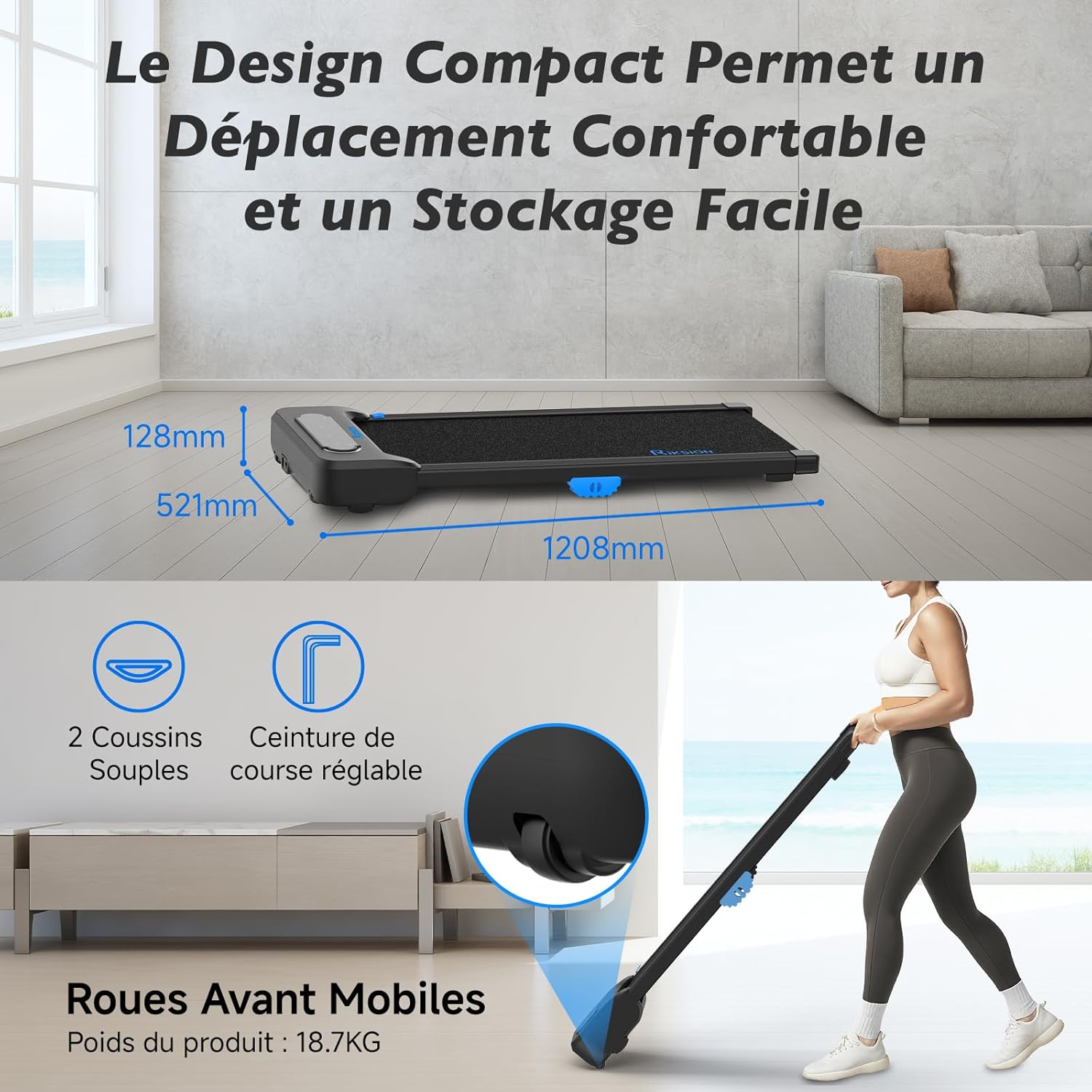
Image: Illustration of the walking pad's compact dimensions (1208mm length, 521mm width, 128mm height) and the front mobile wheels for easy movement.
6.2. Advanced Shock Absorption System
Equipped with a 5-layer running belt and two soft cushions, the dual-layer shock absorption system protects your knees and joints during exercise, providing a comfortable walking experience.

Image: Visual representation of the walking pad's shock absorption technology, highlighting the protection for knees and joints, and an exploded view of the 5-layer running belt construction.
6.3. Silent and Powerful Motor
The walking pad features a silent and powerful 2 HP motor, allowing for quiet operation suitable for home or office environments without disturbing others. It supports speeds from 1 to 6 km/h and a maximum user weight of 120.2 kg.

Image: An internal diagram illustrating the powerful and quiet motor, along with icons indicating the 1-6 km/h speed range, 2 HP motor power, and 120 kg / 265 lbs weight capacity.
6.4. Wide Walking Surface
The 400mm wide running belt provides ample space for comfortable walking or jogging, ensuring a natural stride.

Image: A person using the walking pad, illustrating its use for both active work and exercise, with an overlay showing the 400mm belt width and 1000mm walking length.
7. Wartung
Regelmäßige Wartung gewährleistet die Langlebigkeit und optimale Leistung Ihrer Laufunterlage.
- Reinigung: Wischen Sie die Lauffläche mit einem Tuch ab.amp Nach jedem Gebrauch mit einem Tuch abwischen, um Schweiß und Staub zu entfernen. Keine Scheuermittel verwenden.
- Riemenschmierung: Überprüfen Sie regelmäßig den Laufriemen auf ausreichende Schmierung. Beachten Sie die spezifischen Anweisungen für Ihr Modell hinsichtlich Schmierhäufigkeit und Art des Schmiermittels.
- Lagerung: When not in use, store the walking pad in a dry, cool place, away from direct sunlight and moisture. Utilize its compact design for convenient storage.
- Inspektion: Regularly inspect all parts for wear and tear. Tighten any loose screws or bolts.
8. Fehlerbehebung
If you encounter any issues with your Riksion Walking Pad, please refer to the following common troubleshooting steps:
- Walking Pad Not Turning On:
- Ensure the power cord is securely plugged into both the walking pad and a working electrical outlet.
- Check if the power switch on the walking pad (if present) is in the 'ON' position.
- Überprüfen Sie die Funktionsfähigkeit der Steckdose, indem Sie ein anderes Gerät anschließen.
- Fernbedienung reagiert nicht:
- Überprüfen und ersetzen Sie die Batterien in der Fernbedienung.
- Ensure there are no obstructions between the remote control and the walking pad's receiver.
- Rutschen oder Klemmen des Laufgürtels:
- Der Riemen muss möglicherweise geschmiert werden. Siehe Wartungsabschnitt.
- The belt tension may need adjustment. Consult customer support if you suspect this is the issue.
- Ungewöhnliche Geräusche:
- Stop the walking pad immediately.
- Inspect for any foreign objects caught in the belt or motor area.
- Sollten die Geräusche weiterhin bestehen, stellen Sie die Nutzung ein und kontaktieren Sie den Kundendienst.
If these steps do not resolve the issue, please contact Riksion customer support for further assistance.
9. Spezifikationen
| Besonderheit | Spezifikation |
|---|---|
| Marke | Risiko |
| Modell | JF-H-40J-4 |
| Farbe | Schwarz |
| Produktabmessungen (L x B x H) | 120.8 cm (Breite) x 52.1 cm (Länge) x 12.8 cm (Höhe) |
| Material | Legierter Stahl |
| Höchstgeschwindigkeit | 6 Kilometer pro Stunde |
| Besondere Merkmale | Shock Absorbing, With Wheels, Compact Design, Portable |
| Zielgruppe | Erwachsene |
| Maximale Leistung | 2 PS |
| Montage erforderlich | NEIN |
| Anzeigetyp | LED |
| Laufbandbreite | 400 mm |
| Maximales Benutzergewicht | 120.2 kg |
10. Garantie und Support
For warranty information or technical support, please refer to the documentation included with your purchase or contact Riksion customer service directly. Ensure you have your product model number (JF-H-40J-4) and purchase details available when seeking support.