
1. Einleitung
Thank you for choosing the Hama DR2002BT Digital Radio. This device offers a comprehensive audio experience with FM, DAB/DAB+ digital radio reception, and Bluetooth connectivity. Its user-friendly design, featuring large buttons and a clear 4.3-inch TFT color display, makes it suitable for all users. This manual will guide you through the setup, operation, and maintenance of your new digital radio.
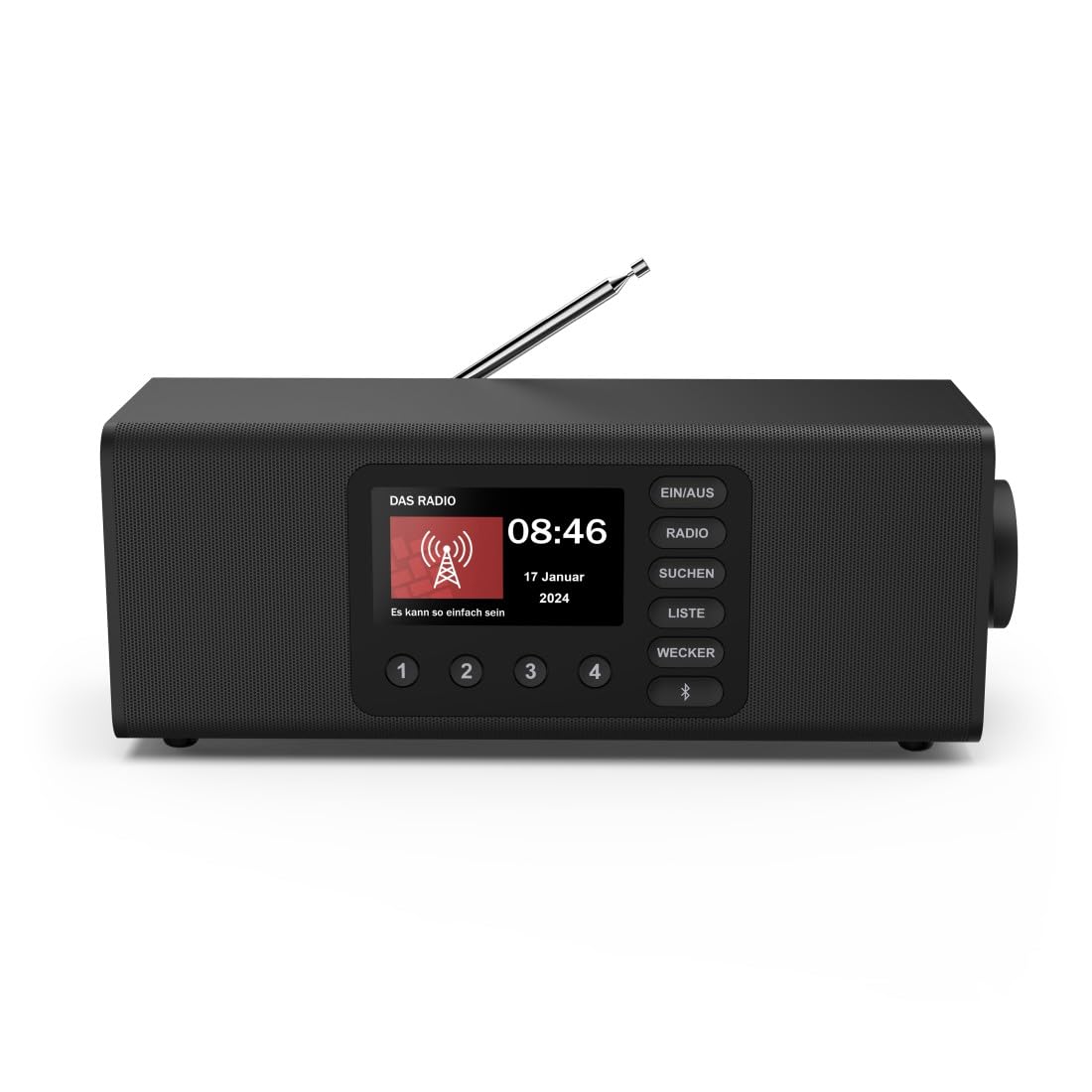
Bild: Vorderseite view of the Hama DR2002BT Digital Radio, showcasing verfügt über sein Display und seine Bedienknöpfe.
2. Sicherheitshinweise
Bitte lesen Sie diese Sicherheitshinweise sorgfältig durch, bevor Sie das Gerät verwenden. Bewahren Sie diese Bedienungsanleitung zum späteren Nachschlagen auf.
- Setzen Sie das Gerät weder Feuchtigkeit, Regen noch extremen Temperaturen aus.
- Vermeiden Sie, das Gerät in der Nähe von Wärmequellen oder in direktem Sonnenlicht aufzustellen.
- Öffnen Sie das Gerät nicht.asing. Reparaturen dürfen nur von qualifiziertem Personal durchgeführt werden.
- Verwenden Sie nur das mitgelieferte Netzteil.
- Sorgen Sie für eine ausreichende Belüftung rund um das Gerät.
3. Packungsinhalt
Prüfen Sie beim Auspacken, ob alle Artikel vorhanden sind:
- Hama DR2002BT Digital Radio
- Netzteil
- Bedienungsanleitung
4. Produktüberschreitungview
4.1 Bedienelemente und Anzeige auf der Vorderseite

Image: Front panel of the radio highlighting the display and control buttons, with icons for Bluetooth, DAB+, and Alarm functions.
The front panel features a 4.3-inch TFT color display, large control buttons, and a rotary knob for easy navigation and selection. Key buttons include:
- EIN/AUS (ON/OFF): Schaltet das Gerät ein oder aus.
- RADIO: Switches between FM and DAB/DAB+ modes.
- SUCHEN (SEARCH): Startet die Sendersuche.
- LISTE (LIST): Ruft die Liste der verfügbaren Stationen auf.
- WECKER (ALARM): Configures alarm settings.
- Bluetooth-Taste: Aktiviert den Bluetooth-Kopplungsmodus.
- Voreingestellte Tasten (1-4): Schneller Zugriff auf gespeicherte Lieblingssender.
- Drehknopf (LAUTSTÄRKE/NAVIGIEREN): Controls volume and navigates menus.
4.2 Anschlüsse auf der Rückseite
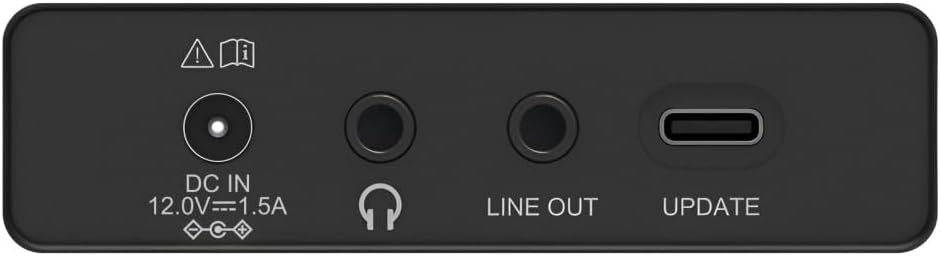
Image: Close-up of the rear panel showing the DC IN, Headphone, Line Out, and UPDATE (USB-C) ports.
Die Rückseite bietet wichtige Anschlussmöglichkeiten:
- DC IN 12.0V --- 1.5A: Power input for the external adapter.
- Kopfhöreranschluss (3.5 mm): Zum privaten Hören.
- LINE-OUT: Audioausgang zum Anschluss externer Geräte ampVerstärker oder Lautsprecher.
- UPDATE (USB-C): Für Firmware-Updates.
- Teleskopantenne: For FM and DAB/DAB+ reception.

Bild: Rückseite view of the Hama DR2002BT Digital Radio with its telescopic antenna extended for optimal signal reception.
5. Einrichtung
5.1 Stromanschluss
- Schließen Sie das mitgelieferte Netzteil an das Gerät an. DC-Eingang Anschluss an der Rückseite des Radios.
- Stecken Sie das Netzteil in eine geeignete Steckdose.
- Das Radio schaltet sich automatisch ein oder wechselt in den Standby-Modus.
5.2 Antennenpositionierung
For optimal FM and DAB/DAB+ reception, fully extend the telescopic antenna. Position the radio near a window if reception is poor.
5.3 Ersteinrichtung (Erstverwendung)
Upon first power-on, the radio may guide you through an initial setup process, including language selection and an automatic DAB station scan. Follow the on-screen prompts.
6. Bedienungsanleitung
6.1 Ein-/Ausschalten
Drücken Sie die EIN/AUS Knopf zum Ein- und Ausschalten des Radios.
6.2 DAB/DAB+ Radiomodus
- Drücken Sie die RADIO Taste, um den DAB-Modus auszuwählen.
- If this is the first time in DAB mode or if you want to rescan, press SUCHEN to perform a full scan for available stations.
- Use the rotary knob to navigate through the station list. Press the knob to select a station.
- Zu view the station list, press the LISTE Taste.
6.3 FM-Radio-Modus
- Drücken Sie die RADIO Taste, um den FM-Modus auszuwählen.
- Drücken SUCHEN to automatically scan for the next available FM station.
- Alternatively, use the rotary knob to manually tune to a frequency.
6.4 Speichern und Abrufen von Voreinstellungen
The radio allows you to store up to 4 favorite stations using the dedicated preset buttons (1-4).
- Tune to the desired station (DAB or FM).
- Press and hold one of the preset buttons (1-4) until the display confirms the station has been saved.
- To recall a preset station, simply press the corresponding preset button (1-4).
6.5 Bluetooth-Betrieb

Bild: Vorderseite view of the radio with Bluetooth and stereo speaker icons, indicating its wireless audio streaming capability.
The Hama DR2002BT can stream audio from your smartphone, tablet, or laptop via Bluetooth 5.0.
- Press the Bluetooth button on the front panel to enter Bluetooth pairing mode. The display will show a pairing indicator.
- On your external device (smartphone, tablet), enable Bluetooth and search for available devices.
- Select "Hama DR2002BT" from the list of devices to pair.
- Once paired, you can play audio from your device, and it will be output through the radio's speakers.
6.6 Weckerfunktion

Image: A person waking up with the Hama DR2002BT Digital Radio placed on a bedside table, illustrating its alarm clock functionality.
The radio features two independent alarm settings.
- Drücken Sie die WECKER Taste zum Aufrufen der Alarmeinstellungen.
- Use the rotary knob to select Alarm 1 or Alarm 2.
- Configure the alarm time, source (buzzer or radio station), and repetition (once, daily, weekdays, weekends, or specific days).
- Press the rotary knob to confirm each setting.
- To quickly activate/deactivate an alarm, press the WECKER button and use the rotary knob to toggle the alarm status.

Image: A person interacting with the Hama DR2002BT Digital Radio, demonstrating its ease of use for setting functions like alarms or tuning stations.
7. Wartung
To ensure the longevity and optimal performance of your Hama DR2002BT Digital Radio, follow these maintenance guidelines:
- Reinigung: Use a soft, dry, lint-free cloth to clean the exterior of the radio. Do not use abrasive cleaners, waxes, or solvents.
- Staub: Regularly dust the device to prevent accumulation in vents and ports.
- Lagerung: Wenn Sie das Radio über einen längeren Zeitraum lagern, trennen Sie es vom Netzteil und bewahren Sie es an einem kühlen, trockenen Ort auf.
- Antenne: Behandeln Sie die Teleskopantenne vorsichtig, um ein Verbiegen oder Brechen zu vermeiden.
8. Fehlerbehebung
Sollten Sie Probleme mit Ihrem Funkgerät haben, beachten Sie bitte die folgenden häufig auftretenden Probleme und Lösungen:
| Problem | Mögliche Ursache | Lösung |
|---|---|---|
| Kein Strom | Netzteil nicht angeschlossen; Steckdose defekt | Check power adapter connection; Try a different power outlet. |
| Schlechter Radioempfang (DAB/FM) | Antenne nicht ausgefahren; Schwaches Signal; Störungen | Fully extend the telescopic antenna; Reposition the radio (e.g., near a window); Perform a new station scan. |
| Die Bluetooth-Kopplung schlägt fehl | Bluetooth not enabled on external device; Radio not in pairing mode; Device too far | Ensure Bluetooth is on and visible on your device; Press the Bluetooth button on the radio; Move devices closer (within 10m). |
| Kein Ton | Lautstärke zu niedrig; Stummschaltung aktiviert; Falsche Quelle ausgewählt | Increase volume using the rotary knob; Check if mute is active; Ensure the correct mode (DAB, FM, Bluetooth) is selected. |
| Alarm ertönt nicht | Alarm not activated; Incorrect alarm time/day set | Verify alarm is enabled in settings; Check alarm time and repetition settings. |
9. Spezifikationen

Image: Diagram showing the dimensions of the Hama DR2002BT Digital Radio: 35 cm (width), 12.5 cm (depth), and 13 cm (height).
| Besonderheit | Detail |
|---|---|
| Modellnummer | DR2002BT (00054298) |
| Rezeption | DAB, DAB+, UKW |
| Bluetooth-Version | 5.0 |
| Ausgangsleistung (RMS) | 10 W (Stereo) |
| Anzeige | 4.3-Zoll-TFT-Farbdisplay |
| Anschlüsse | 3.5mm Jack (Headphone), USB-C (Update), Line Out, DC IN |
| Stromversorgung | Externes Netzteil |
| Abmessungen (B x T x H) | 35 x 12.5 x 13 cm |
| Gewicht | 1788 Gramm |
| Material | Plastik |
| Farbe | Schwarz |
| Zusätzliche Merkmale | Alarm Function (2 alarms), Direct Selection Keys |
10. Garantie und Support
Hama GmbH & Co KG provides a warranty for this product. Please refer to the warranty card included in your package or visit the official Hama webAuf der Webseite finden Sie die detaillierten Garantiebedingungen.
For technical support, troubleshooting assistance, or spare parts, please contact Hama customer service or visit their website. The availability of spare parts in the EU is guaranteed for 7 years.
- Hersteller: Hama GmbH & Co KG
- Ursprungsland: Deutschland
- Verfügbarkeit von Ersatzteilen in der EU: 7 Jahre