
1. Einleitung
This manual provides detailed instructions for the installation, operation, and maintenance of your Mcezdy M7C-2-5-Pin Ebike LCD Display. This display is designed to enhance your electric bike experience by providing essential riding data and control functions. Please read this manual thoroughly before using the product to ensure correct operation and to prevent damage.
2. Sicherheitshinweise
- Always ensure your ebike controller is compatible with the UART No. 2 protocol and the 5-pin connector of this display. Incompatibility can lead to malfunction.
- Do not attempt to disassemble or modify the display. This may void the warranty and cause damage.
- Ensure all connections are secure and waterproof before riding, especially in wet conditions. The display has an IPX65 waterproof rating, but proper connection is crucial.
- Regularly check the display and its mounting for any signs of damage or looseness.
- Vermeiden Sie es, das Display über längere Zeit extremen Temperaturen oder direkter Sonneneinstrahlung auszusetzen.
- Always prioritize road safety. Do not operate display functions that distract you from riding.

Figure 1: Compatibility Reminder. This image highlights the critical need to verify your ebike's compatibility with the UART No. 2 protocol before installation.
3. Packungsinhalt
Bitte überprüfen Sie nach dem Öffnen des Pakets, ob alle folgenden Artikel enthalten sind:
- Mcezdy M7C-2-5-Pin Ebike LCD Display
- Benutzerhandbuch (dieses Dokument)
- Fault Code Description sheet
4. Produktmerkmale
The Mcezdy M7C-2-5-Pin Ebike LCD Display offers a range of features designed for an optimized riding experience:
- Fortschrittliches Farb-LCD-Display: Provides clear, vibrant visuals of riding data.
- Robuste Konstruktion: Crafted with ABS+PC housing, tempered glass screen, and a durable nylon bracket for longevity and scratch resistance.
- Wasserdichtigkeitsklasse IPX65: Offers protection against water splashes and rain.
- UART No. 2 Protocol: Ensures seamless communication with compatible ebike controllers.
- Breites Volumentage Kompatibilität: Supports 24V, 36V, 48V, and 60V ebike battery systems.
- Integrierter USB-Ladeanschluss: Features a 5V/500mA USB port for charging mobile devices.
- Universal Handlebar Fit: Compatible with handlebar diameters of 22.2mm, 25.4mm, and 31.8mm.
- Umfassende Datendarstellung: Shows speed, PAS level, battery status, odometer (ODO), trip distance (TRIP), voltage (VOL), current (CUR), and error codes.
- Anpassbare Parameter: Allows modification of wheel diameter and speed limit settings.
- Zusätzliche Modi: Includes walk-assist mode and cruise control.

Figure 2: Display Features. This image illustrates the advanced color LCD, the control keypad, and the various cable connector types available for the display.
5. Einrichtung und Installation
5.1 Kompatibilitätsprüfung
Before installation, confirm that your ebike controller uses the UART No. 2 protocol and has a compatible 5-poliger Stecker. This display is specifically designed for this protocol and connector type. Refer to your ebike's controller manual for verification.
5.2 Montage des Displays
- Choose a suitable position on your ebike's handlebar. The display's flexible bracket is compatible with handlebar diameters of 22.2mm, 25.4mm, and 31.8mm.
- Loosen the screws on the display bracket.
- Positionieren Sie das Display am Lenker und ziehen Sie die Schrauben fest an. Achten Sie darauf, dass das Display stabil sitzt und sich nicht frei drehen kann.

Figure 3: Handlebar Mounting. This image demonstrates the display mounted on a handlebar, highlighting its adjustable bracket for different handlebar diameters.
5.3 Anschließen der Kabel
- Locate the 5-pin waterproof cable (JL-F-Z509AG) extending from the display. The exposed cable length is approximately 150mm.
- Connect this cable to the corresponding 5-pin connector on your ebike's controller. Ensure the connectors are aligned correctly before pushing them together.
- Secure the connection firmly. If it is a waterproof connector, ensure the seal is properly engaged.
- Route the cable neatly along the ebike frame, securing it with cable ties if necessary, to prevent it from interfering with moving parts or getting damaged.
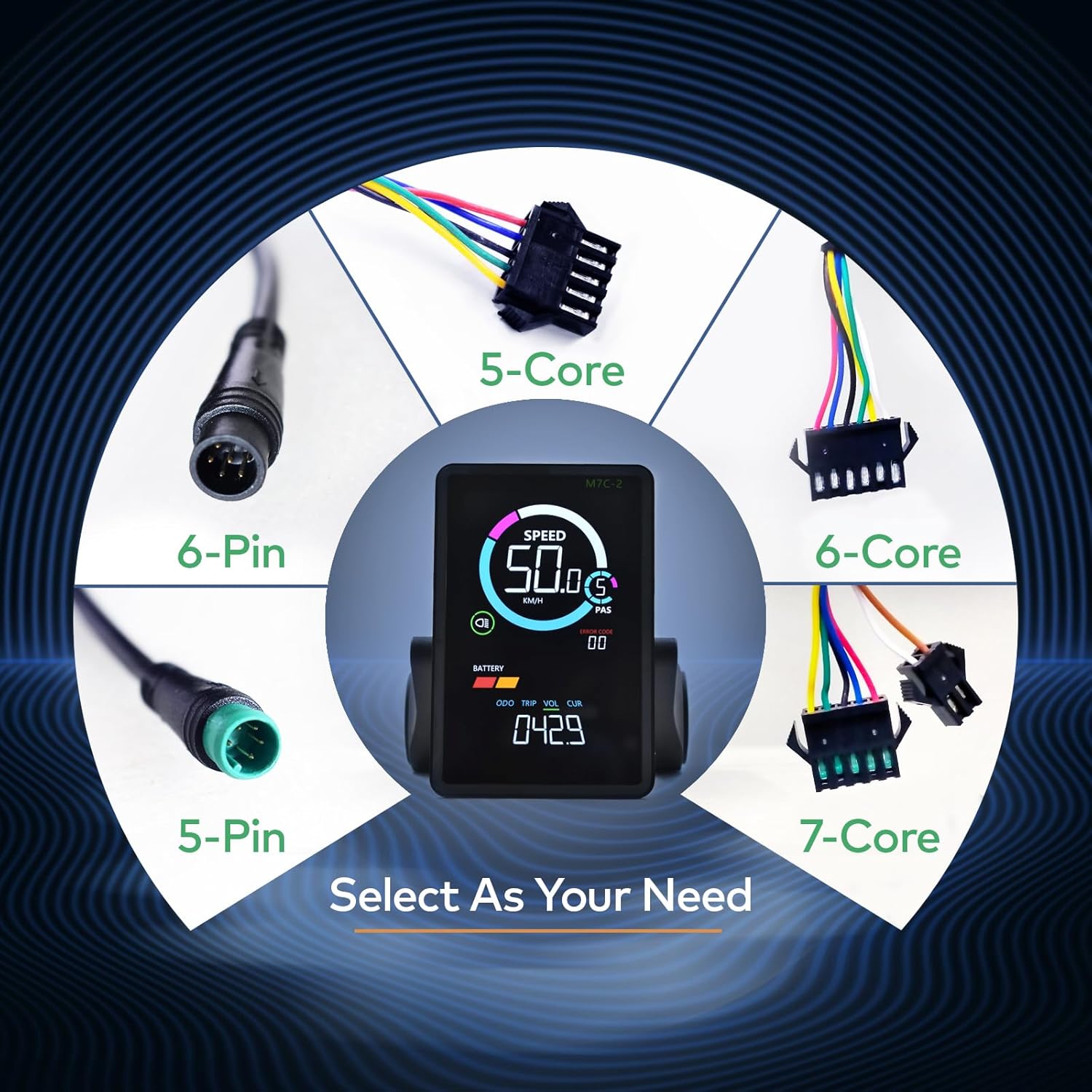
Figure 4: Cable Selection. This image displays different cable types, emphasizing the importance of selecting the correct 5-pin connector for this specific display model.
6. Bedienungsanleitung
6.1 Ein-/Ausschalten
To power on the display, press and hold the power button on the keypad. To power off, press and hold the power button again.
6.2 Anzeigeschnittstelleview

Figure 5: Display Metrics. This image labels the various metrics shown on the display, including speed, PAS level, battery indicator, headlight indicator, error code, odometer, trip distance, voltage und aktuell.
Das Display liefert Echtzeitinformationen über Ihre Fahrt:
- Geschwindigkeit: Aktuelle Fahrgeschwindigkeit (km/h oder mph).
- PAS (Pedal Assist System): Aktuelle Stufe der Tretunterstützung.
- Batterie: Verbleibender Akkuladestand.
- Scheinwerfer-Blinker: Shows if the ebike's headlight is active.
- Fehlercode: Displays numerical codes for system faults. Refer to the included "Fault Code Description" sheet for details.
- Multifunktionaler Anzeigebereich: Cycles through Odometer (ODO), Trip Distance (TRIP), Battery Voltage (VOL), and Motor Current (CUR).
6.3 Navigation in den Einstellungen
Use the keypad buttons (typically +, -, and power/mode) to navigate through display modes and adjust settings. Specific button functions may vary; refer to the detailed instructions in the included User's Manual for precise navigation.
6.4 Parameteränderung
The display allows you to modify key parameters to optimize your ebike's performance:
- Raddurchmesser: Adjust this setting to match your ebike's wheel size for accurate speed and distance readings.
- Geschwindigkeitsbegrenzung: Set the maximum assisted speed according to local regulations or personal preference.
Accessing and modifying these parameters typically involves entering a settings menu by holding specific buttons. Consult the included User's Manual for the exact procedure.
6.5 Spezialmodi
- Geh-Assistenz-Modus: Provides low-speed assistance for pushing the ebike when walking.
- Tempomat: Maintains a set speed without continuous throttle or pedal input.
Activation of these modes is usually done via specific button combinations. Refer to the comprehensive User's Manual for detailed instructions.
6.6 USB-Ladeanschluss
The display includes a 5V/500mA USB port on its side, allowing you to charge mobile devices while riding. Ensure the port cover is securely closed when not in use to maintain its waterproof integrity.
7. Wartung
- Reinigung: Wischen Sie den Bildschirm und das Gehäuse mit einem weichen, fusselfreien Tuch ab.amp cloth. Do not use abrasive cleaners or solvents, as these can damage the screen or housing.
- Gewässerschutz: While the display is IPX65 waterproof, avoid submerging it in water. Ensure the USB port cover is always closed when not in use to prevent water ingress.
- Lagerung: Bei längerer Nichtbenutzung sollten E-Bike und Display an einem trockenen, kühlen Ort ohne direkte Sonneneinstrahlung aufbewahrt werden.
- Verbindungsprüfung: Periodically inspect the cable connections for any signs of wear, corrosion, or looseness.
8. Fehlerbehebung
If you encounter issues with your Mcezdy Ebike LCD Display, consider the following common troubleshooting steps:
- Bildschirm schaltet sich nicht ein:
- Check if the ebike battery is charged and properly connected.
- Stellen Sie sicher, dass alle Displaykabel fest mit dem Controller verbunden sind.
- Verify that the display's power button is being pressed and held correctly.
- Falsche Geschwindigkeits-/Entfernungsanzeigen:
- Check the wheel diameter setting in the display's parameters. Adjust it to match your ebike's actual wheel size.
- Ensure the speed sensor on your ebike is clean and properly aligned.
- Angezeigte Fehlercodes:
If an error code appears on the display, refer to the dedicated "Fault Code Description" sheet included with your product. This sheet provides specific meanings for each code and recommended actions.
- USB-Ladefunktion funktioniert nicht:
- Ensure the ebike is powered on.
- Check the USB cable and the device being charged for proper connection.
Sollten diese Schritte das Problem nicht beheben, wenden Sie sich bitte an den Kundendienst, um weitere Unterstützung zu erhalten.
9. Spezifikationen
| Modellnummer | M7C-2-5-Pin |
| Marke | Mcezdy |
| Anzeigetyp | LCD (Farbe) |
| Konnektivitätstechnologie | UART NO.2 (Wired, 5-Pin Connector) |
| Arbeitsvolumentage | Gleichstrom 24 V, 36 V, 48 V, 60 V |
| Internationale Schutzbewertung | IPX65 |
| Montagetyp | Lenkerhalterung (22.2 mm, 25.4 mm, 31.8 mm) |
| USB-Ladeanschluss | 5 V/500 mA |
| Cable Length Exposed | 150mm (Waterproof Cable) |
| Material | ABS+PC Housing, Tempered Glass Screen, Nylon Bracket |
| Artikelgewicht | 249 g |

Figure 6: Product Dimensions and Electrical Specifications. This image provides key physical dimensions, cable length, compatible product models, and operating voltage range for the display.
10. Garantie und Support
For warranty information and customer support, please refer to the specific warranty card or documentation included with your purchase. You may also contact the retailer or manufacturer directly for assistance with product inquiries, technical support, or warranty claims.
Bitte bewahren Sie Ihren Kaufbeleg für alle Garantieleistungen auf.