
Einführung
This manual provides comprehensive instructions for the ECONTROLLY EUR7729KE0 Replacement Remote Control. This remote is designed to function as a direct replacement for various Panasonic DVD HDD TV Recorders, offering full functionality without the need for complex programming.
Kompatible Modelle:
- UR7729KE0
- EUR7721X10
- DMR-EH50
- DMR-E55K
- DMR-EH50S
- DMR-E55P9
- DMR-E55S
- DMR-ES10
- DMR-EH50P
- DMR-EH60
This replacement remote control covers all functions of the original remote, ensuring a seamless user experience.
Aufstellen
Einlegen der Batterie
The EUR7729KE0 remote control requires two AAA batteries (not included) for operation. Please follow these steps to install the batteries:
- Suchen Sie das Batteriefach auf der Rückseite der Fernbedienung.
- Schieben Sie die Abdeckung des Batteriefachs nach unten und heben Sie sie ab.
- Legen Sie zwei AAA-Batterien ein und achten Sie darauf, dass die Plus- (+) und Minus- (-) Anschlüsse mit den Markierungen im Inneren des Batteriefachs übereinstimmen.
- Setzen Sie die Abdeckung des Batteriefachs wieder ein, indem Sie sie so weit hineinschieben, bis sie sicher einrastet.

Hinteren view of the ECONTROLLY EUR7729KE0 remote control with the battery cover removed, showing the compartment for two AAA batteries.
Notiz: Tauschen Sie immer beide Batterien gleichzeitig gegen neue aus. Verwenden Sie keine alten und neuen Batterien zusammen, und auch keine Batterien unterschiedlicher Typen.
Bedienungsanleitung
To operate the remote control, point it directly at the infrared sensor on your Panasonic DVD HDD TV Recorder. Ensure there are no obstructions between the remote and the device.
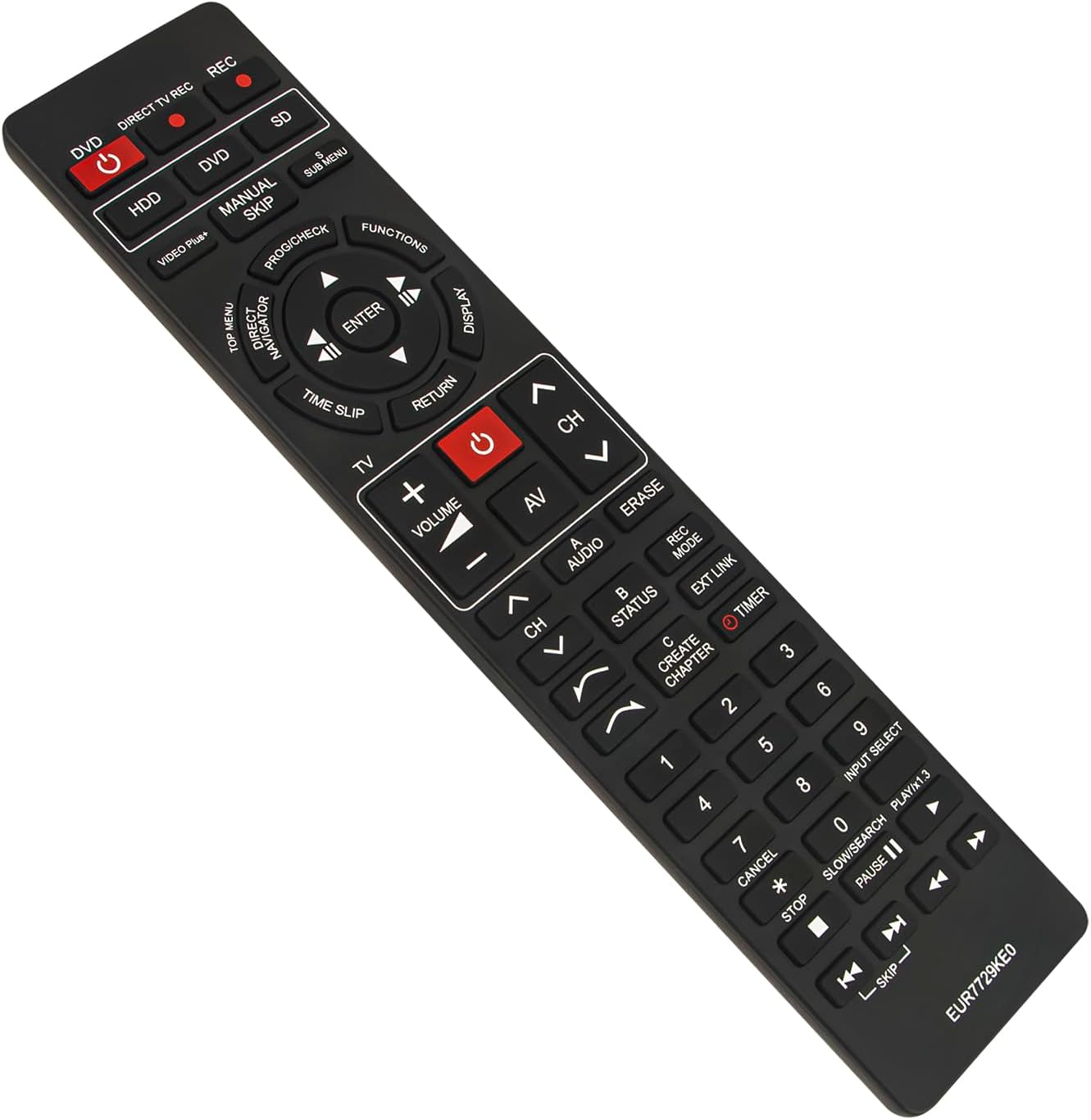
Front view of the ECONTROLLY EUR7729KE0 replacement remote control, showing all buttons and their labels.
Schlüsselfunktionen Überview:
- Power Buttons (DVD, HDD, DIRECT TV REC, REC, SD): Used to power on/off or select specific modes for the respective components.
- Zifferntasten (0-9): For direct channel selection, inputting numbers, or menu navigation.
- Lautstärke (+/-): Regelt die Lautstärke.
- Channel (CH ^/v): Schaltet die Kanäle nach oben oder unten.
- Navigationsfeld (Oben, Unten, Links, Rechts, EINGABE): Dient zur Navigation in Menüs und zur Bestätigung von Auswahlen.
- Playback Controls (PLAY/x1.3, PAUSE, STOP, SKIP, SLOW/SEARCH): Standardsteuerung für die Medienwiedergabe.
- MENU Buttons (TOP MENU, SUB MENU, DIRECT NAVIGATOR): Access various menu options for DVD, HDD, or TV functions.
- Special Function Buttons (PROG/CHECK, FUNCTIONS, DISPLAY, TIME SLIP, RETURN, AV, AUDIO, ERASE, STATUS, REC MODE, EXT LINK, CREATE CHAPTER, TIMER): These buttons provide access to advanced features specific to your Panasonic recorder, such as recording options, chapter creation, and display settings. Refer to your recorder's manual for detailed use of these functions.

Comparison image showing the ECONTROLLY EUR7729KE0 replacement remote control on the left and an original Panasonic remote control on the right, highlighting their similar button layouts.
Wartung
Reinigung
Reinigen Sie die Fernbedienung mit einem weichen, trockenen Tuch. Bei hartnäckigem Schmutz leicht andrücken.ampBefeuchten Sie das Tuch mit Wasser oder einer milden Reinigungslösung. Vermeiden Sie die Verwendung von Scheuermitteln, Alkohol oder Lösungsmitteln, da diese die Oberfläche oder die internen Bauteile der Fernbedienung beschädigen können.
Lagerung
Bewahren Sie die Fernbedienung an einem kühlen, trockenen Ort, geschützt vor direkter Sonneneinstrahlung und extremen Temperaturen, auf. Wenn die Fernbedienung längere Zeit nicht benutzt wird, empfiehlt es sich, die Batterien zu entfernen, um ein Auslaufen und mögliche Schäden zu vermeiden.
Fehlerbehebung
- Fernbedienung reagiert nicht:
- Prüfen Sie, ob die Batterien korrekt mit der richtigen Polarität (+/-) eingelegt sind.
- Ersetzen Sie die Batterien durch neue.
- Stellen Sie sicher, dass sich keine Hindernisse zwischen der Fernbedienung und dem Infrarotsensor des Geräts befinden.
- Make sure you are pointing the remote directly at the device.
- Einige Tasten funktionieren nicht:
- This remote is designed to replicate all functions of the original. If specific buttons are not working, ensure your device is in the correct mode (e.g., DVD mode for DVD functions).
- Clean the remote's surface, as dirt or debris might be interfering with button presses.
If the issue persists after following these steps, please refer to the support section for further assistance.
Technische Daten
| Marke | EKONTROLLIERT |
| Modellname | EUR7729KE0 |
| Farbe | Schwarz |
| Besonderheit | Keine Programmierung erforderlich |
| Kompatible Geräte | DVD HDD TV Recorder (Panasonic DMR-EH50, etc.) |
| Konnektivitätstechnologie | Infrarot |
| Controllertyp | Tastensteuerung |
| Maximale Reichweite | 33 Fuß |
| Artikelgewicht | 1 Unzen |
| Artikelabmessungen (L x B x H) | 5"L x 2"B x 0.6"H (ca. 22.4 cm x 5 cm x 1.5 cm) |

Image displaying the dimensions of the ECONTROLLY EUR7729KE0 remote control: approximately 22.4 cm (8.82 inches) in length and 5 cm (1.97 inches) in width.
Garantie und Support
This ECONTROLLY product has been tested to ensure proper functionality before shipping. As a replacement remote control, it is designed for immediate use without additional setup.
For further assistance, compatibility inquiries, or troubleshooting that is not covered in this manual, please contact ECONTROLLY customer support through the retailer's platform where the product was purchased. Provide your product model number (EUR7729KE0) and a detailed description of your issue for efficient support.