
Einführung
This manual provides comprehensive instructions for the assembly, operation, maintenance, and troubleshooting of your FLEXISPOT 79 x 32 Inch Large Standing Desk. Please read this manual thoroughly before use to ensure proper function and safety. Keep this manual for future reference.

Image: The FLEXISPOT standing desk in an office setting, showcasing its large surface area with multiple monitors and accessories.
Sicherheitshinweise
Always follow assembly instructions carefully. Do not exceed the maximum weight recommendation of 132 pounds to ensure stability and safety. Ensure all connections are secure before operating the desk. Keep children and pets away from the desk during operation.
Packungsinhalt
Verify that all components are present before beginning assembly. Your FLEXISPOT standing desk package typically includes:
- Desktop (79 x 32 inches, may be a splice board design)
- Desk Frame (legs, crossbar, motor)
- Bedienfeld
- Netzteil und Kabel
- Getränkehalter
- Kopfhörerhaken
- Montagezubehör (Schrauben, Werkzeuge)
- Bedienungsanleitung
Note: Due to the size and weight, your desk may arrive in multiple packages that could ship and arrive separately.

Image: Illustration showing two separate boxes for the desktop and desk frame, indicating that components may arrive in multiple shipments.
Einrichtung und Montage
Assembly of the FLEXISPOT standing desk is designed to be straightforward. A power drill may be needed for some steps (not included). Follow the detailed instructions provided in the included assembly guide. Ensure all screws are tightened securely, but do not overtighten.
Montagetipps:
- Legen Sie alle Teile und Hardware vor Beginn bereit.
- Ensure the desktop halves (if applicable) are correctly aligned before securing.
- When installing the transmission rod, ensure it slides smoothly into the motor. Tolerances can be tight.
- It is recommended to have a second person assist when flipping the desk over after assembly.
Bedienungsanleitung
Your FLEXISPOT standing desk features an electric height adjustment system with a multifunctional controller.
Höhenverstellung:
- The desk height can be adjusted smoothly and quietly from 28.9 inches to 46.5 inches.
- Verwenden Sie die UP Und RUNTER Tasten am Bedienfeld zur manuellen Einstellung der Schreibtischhöhe auf die gewünschte Höhe.
Speichervoreinstellungen:
The control panel includes 4 programmable memory presets, allowing you to save and recall your preferred sitting and standing heights with a single touch.
- Stellen Sie die Schreibtischhöhe mithilfe der AUF/AB-Tasten auf die gewünschte Höhe ein.
- Drücken Sie die M button (or similar memory set button) followed by one of the numbered preset buttons (1, 2, 3, or 4) to save the current height.
- Um eine gespeicherte Höhe abzurufen, drücken Sie einfach die entsprechende nummerierte Voreinstellungstaste.
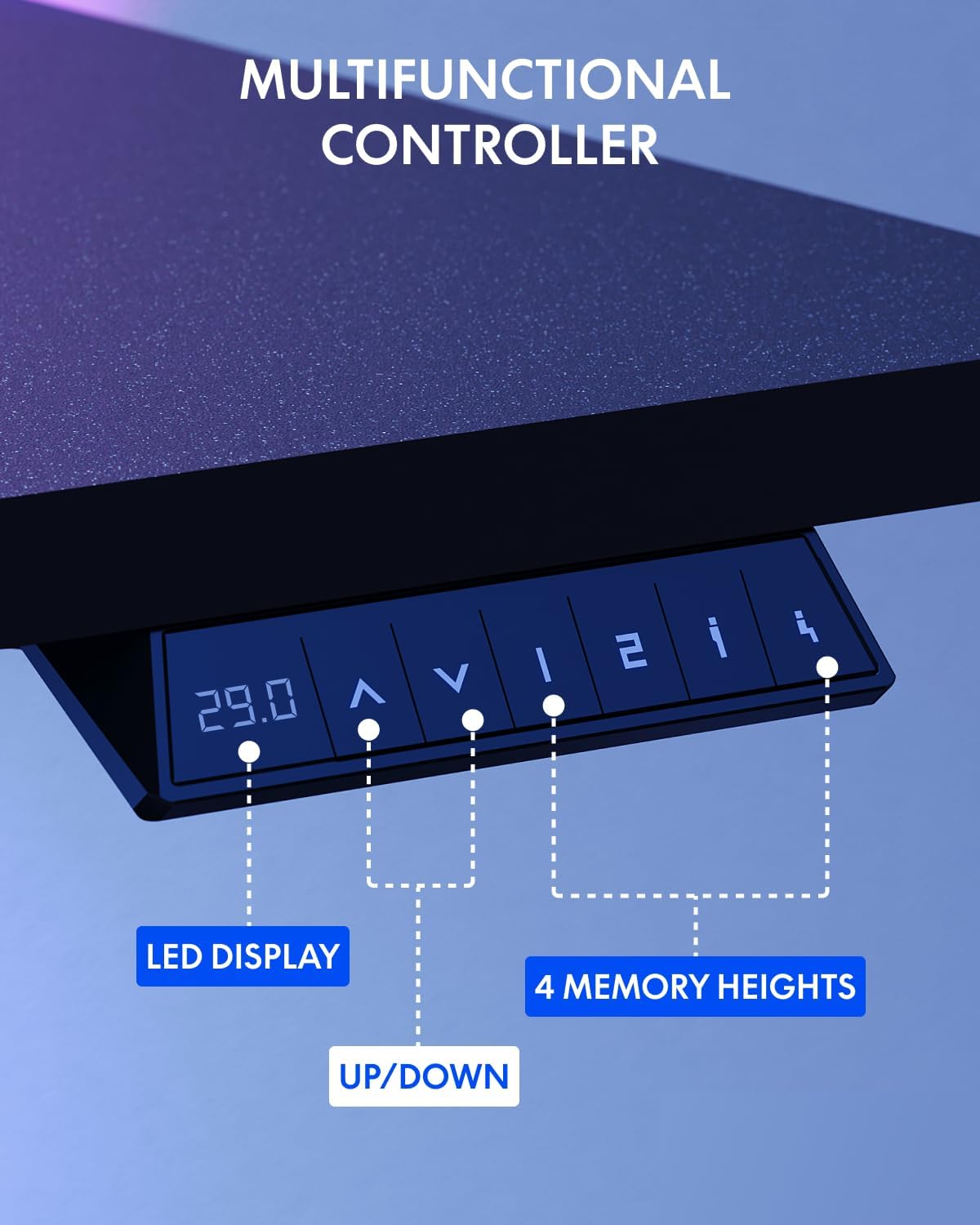
Image: The multifunctional control panel with an LED display and buttons for height adjustment and four memory presets.
Verwendung von Zubehör:
- The included cup holder can be attached to the side of the desk for convenient beverage access.
- The headphone hook provides a dedicated storage spot for your headphones, keeping your workspace tidy.

Image: Details of the integrated cup holder and headphone hook accessories.
Wartung
Regelmäßige Wartung gewährleistet die Langlebigkeit und optimale Leistung Ihres Stehtisches.
- Reinigung: Wischen Sie die Tischplatte und den Rahmen mit einem weichen, fusselfreien Tuch ab.amp Tuch. Vermeiden Sie Scheuermittel oder aggressive Chemikalien.
- Verbindungen prüfen: Überprüfen Sie regelmäßig alle Schrauben und Bolzen, um sicherzustellen, dass sie fest sitzen. Ziehen Sie sie gegebenenfalls nach.
- Kabelmanagement: Organize cables to prevent snagging during height adjustments.
Fehlerbehebung
If you encounter issues with your FLEXISPOT standing desk, refer to the following common solutions:
| Problem | Mögliche Ursache | Lösung |
|---|---|---|
| Der Schreibtisch bewegt sich nicht. | Power cable disconnected, motor error | Check power connections. Unplug and replug the desk. If an error code is displayed, consult customer support. |
| Ungleichmäßige Höheneinstellung | Obstruction, uneven load | Ensure no obstructions are present. Distribute weight evenly on the desktop. Perform a reset if available (refer to specific controller instructions). |
| Schreibtisch wackelt | Loose connections, uneven floor | Tighten all assembly screws. Ensure the desk is on a level surface. Adjust foot pads if necessary. |
For persistent issues or error codes not listed, please contact FLEXISPOT customer support.
Technische Daten
Key specifications for the FLEXISPOT 79 x 32 Inch Large Standing Desk:
- Marke: FLEXISPOT
- Modell: 79 x 32 Inch Large Standing Desk
- Produktabmessungen: 32"D x 79"W x 29"H (at minimum height)
- Farbe: Schwarzer Rahmen + schwarze Oberseite
- Stil: Modern
- Grundmaterial: Legierter Stahl
- Top-Materialtyp: Holzwerkstoff
- Zieltyp: Pulverbeschichtet
- Höhenbereich: 28.9" bis 46.5"
- Maximale Gewicht Empfehlung: 132 Pfund
- Besondere Merkmale: 79" x 32" Large Tabletop, Splice Board, Cup Holder, Headphone Hook, Electric Height Adjustment, 4 Memory Presets
- Montage: Erforderlich
- UPC: 810072869357

Image: Visual representation of the desk's dimensions and adjustable height range.
Garantie und Support
FLEXISPOT provides the following warranty for your standing desk:
- Frame and Mechanical Parts: 5 Jahr eingeschränkte Garantie
- Elektronik: 2 Jahr eingeschränkte Garantie
For warranty claims, technical assistance, or any questions regarding your product, please contact FLEXISPOT customer support. You can find contact information on the official FLEXISPOT webWebsite oder über Ihre Einkaufsplattform.
Visit the official FLEXISPOT Store for more information and products: FLEXISPOT-Filiale