
1. Einleitung
This manual provides detailed instructions for the setup, operation, and maintenance of your Haroar SAM-917 Universal Replacement Remote Control. This remote is designed to function as a direct replacement for various Samsung LCD TV models, offering enhanced features such as backlighting, dedicated NETFLIX access, and 3D functionality control.
Please read this manual thoroughly before using the remote control to ensure proper functionality and to maximize your viewErfahrung.
2. Sicherheitshinweise
- Die Fernbedienung darf keiner direkten Sonneneinstrahlung, Wärmequellen oder extremen Temperaturen ausgesetzt werden.
- Vermeiden Sie es, die Fernbedienung fallen zu lassen oder starken Stößen auszusetzen.
- Die Fernbedienung darf nicht in Wasser oder andere Flüssigkeiten getaucht werden.
- Bewahren Sie Batterien außerhalb der Reichweite von Kindern auf. Bei Verschlucken sofort einen Arzt aufsuchen.
- Entsorgen Sie gebrauchte Batterien gemäß den örtlichen Vorschriften. Batterien dürfen nicht ins Feuer geworfen werden.
- Mischen Sie keine alten und neuen Batterien oder verschiedene Batterietypen.
3. Einrichtung
3.1. Einlegen der Batterie
- Suchen Sie die Batteriefachabdeckung auf der Rückseite der Fernbedienung.
- Schieben Sie den Deckel nach unten oder drücken Sie den Riegel und heben Sie ihn an, um das Fach zu öffnen.
- Legen Sie zwei AAA-Batterien (nicht im Lieferumfang enthalten) ein und achten Sie darauf, dass die positiven (+) und negativen (-) Anschlüsse mit den Abbildungen im Batteriefach übereinstimmen.
- Setzen Sie die Abdeckung des Batteriefachs wieder ein, indem Sie sie so weit hineinschieben, bis sie sicher einrastet.
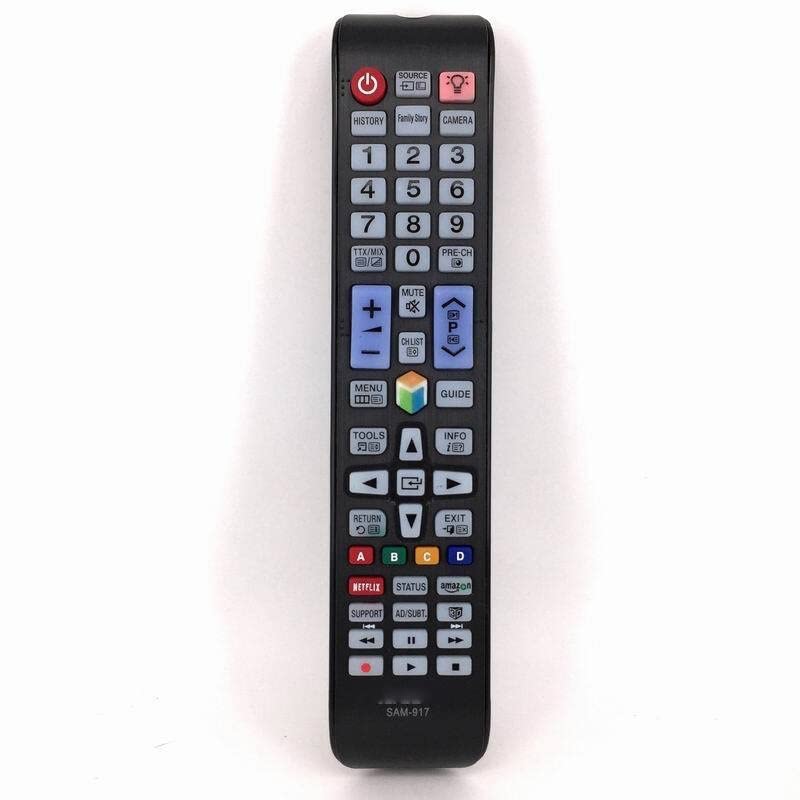
Image 1: Haroar SAM-917 remote control. The back of the remote shows the battery compartment, typically located at the bottom half, which slides open for battery insertion.
3.2. Initial Pairing/Configuration
The Haroar SAM-917 is a universal replacement remote control pre-programmed for Samsung LCD TVs. In most cases, it should work immediately after battery installation without any additional setup. Point the remote towards your Samsung TV and test basic functions like Power, Volume, and Channel.
If the remote does not respond, ensure there are no obstructions between the remote and the TV's infrared receiver. Verify that the batteries are correctly inserted and have sufficient charge.
4. Bedienungsanleitung
This section outlines the primary functions of the buttons on your Haroar SAM-917 remote control.
4.1. Tastenfunktionen
- Leistung (●): Schaltet den Fernseher ein oder aus.
- Quelle: Selects input sources (HDMI, AV, Component, etc.).
- Lautstärke erhöhen/verringern (VOL +/-)Passt die Lautstärke des Fernsehers an.
- Kanal hoch/runter (CH +/-): Wechselt die Fernsehkanäle.
- Stumm: Schaltet den Ton des Fernsehers stumm oder hebt die Stummschaltung auf.
- Nummernblock (0-9): Gibt die Kanalnummern direkt ein.
- Speisekarte: Öffnet das Hauptmenü des Fernsehers.
- Werkzeuge: Opens quick settings or context-sensitive menus.
- InfoZeigt Informationen über das aktuelle Programm oder die Eingabe an.
- Navigationsfeld (Hoch, Runter, Links, Rechts, Eingabe): Navigiert durch Menüs und bestätigt Auswahlen.
- Zurück / Ausstieg: Goes back to the previous menu or exits the current menu.
- Smart Hub/Home: Accesses the TV's Smart Hub or home screen.
- NETFLIX: Direct access button for the Netflix application.
- 3D: Activates or deactivates 3D mode (if supported by your TV and content).
- Taste für Hintergrundbeleuchtung: Activates the remote control's backlight for use in low-light conditions. Press once to turn on, press again to turn off.
- Farbtasten (Rot, Grün, Gelb, Blau): Functionality varies depending on the TV model and current application (e.g., teletext, interactive services).
5. Wartung
5.1. Reinigung der Fernbedienung
Um die Fernbedienung zu reinigen, wischen Sie ihre Oberfläche vorsichtig mit einem weichen, trockenen Tuch ab. Bei hartnäckigem Schmutz leicht andrücken.ampen the cloth with water or a mild, non-abrasive cleaner. Do not use harsh chemicals, alcohol, or abrasive pads, as these can damage the remote's finish or internal components.
5.2. Batteriewechsel
Replace the batteries when the remote control's performance degrades, or if the backlight becomes dim. Refer to section 3.1 for detailed battery installation instructions. Always replace both batteries simultaneously with new AAA batteries of the same type.
6. Fehlerbehebung
| Problem | Mögliche Ursache | Lösung |
|---|---|---|
| Fernbedienung funktioniert nicht. |
|
|
| Einige Schaltflächen reagieren nicht. |
|
|
| Die Hintergrundbeleuchtung ist schwach oder funktioniert nicht. |
|
|
7. Spezifikationen
- Modell: SAM-917
- Marke: Haroar
- Kompatibilität: Universal replacement for Samsung LCD TVs
- Energiequelle: 2 x AAA-Batterien (nicht enthalten)
- Abmessungen (L x B x H): 1 x 1 x 1 cm (ungefähr, basierend auf Produktdaten)
- Gewicht: 50 Gramm (ohne Batterien)
- Besondere Merkmale: Backlight, NETFLIX direct access, 3D function control
- Ursprungsland: China
8. Medieninformationen
Für die Einbettung in dieses Handbuch stehen keine offiziellen Produktvideos zur Verfügung.