
1. Einleitung
Thank you for choosing the YESIDO YSP13 Bluetooth Ear Hook Earphones. This manual provides essential information for the proper setup, operation, and maintenance of your device. Please read it carefully before use to ensure optimal performance and longevity.
The YSP13 features an air conduction design, eliminating the need to insert earbuds directly into the ear canal, which can enhance comfort and ear health. It utilizes Bluetooth 5.3 for stable connectivity and delivers HiFi sound quality, making it suitable for music and sports activities.
2. Packungsinhalt
Bitte prüfen Sie das Paket auf folgende Artikel:
- YESIDO YSP13 Bluetooth Ear Hook Earphones (Left and Right)
- Ladeetui
- Ladekabel
- Bedienungsanleitung
- Aufbewahrungstasche

Image: Contents of the YESIDO YSP13 package, including the earphones, charging case, charging cable, and a small storage pouch.
3. Produktüberschreitungview
The YESIDO YSP13 earphones feature a rotatable ear hook design for a secure and comfortable fit during various activities. The charging case includes a digital display to indicate battery levels.
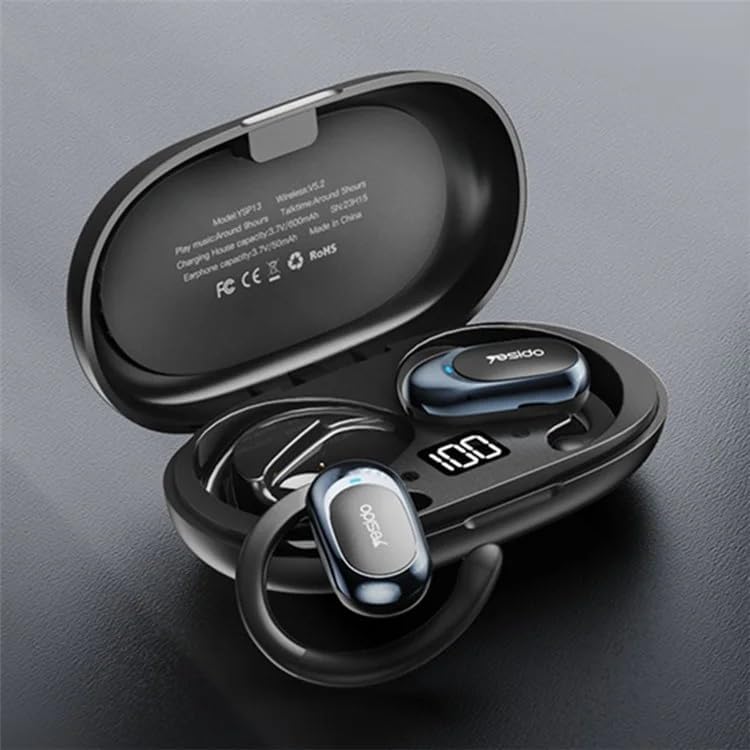
Image: The YESIDO YSP13 earphones resting in their charging case, which features a digital battery level indicator.

Image: A user wearing the YESIDO YSP13 earphone, illustrating how the ear hook design fits securely around the ear.

Image: An exploded diagram of the YESIDO YSP13 earphone, showcasing its internal structure and components responsible for HiFi sound reproduction.
4. Einrichtung
4.1 Aufladen der Kopfhörer und des Ladecase
- Legen Sie die Ohrhörer in das Ladecase. Achten Sie darauf, dass sie richtig sitzen.
- Verbinden Sie das Ladekabel mit dem Ladeanschluss am Gehäuse und mit einer USB-Stromquelle.
- The digital display on the charging case will show the charging status.
- Charging time for earphones is approximately 1 hour. Charging time for the case is approximately 2.5 hours.
- Sobald das Gerät vollständig aufgeladen ist, trennen Sie das Ladekabel.
4.2 Bluetooth-Kopplung
- Stellen Sie sicher, dass die Ohrhörer aufgeladen sind.
- Öffnen Sie das Ladecase. Die Ohrhörer wechseln automatisch in den Kopplungsmodus.
- Aktivieren Sie Bluetooth auf Ihrem Gerät (Smartphone, Tablet usw.).
- Suchen nach available Bluetooth devices and select "YESIDO YSP13" from the list.
- Sobald die Verbindung hergestellt ist, hören Sie einen Bestätigungston, und die Kopfhörer sind einsatzbereit.
- Die Ohrhörer verbinden sich beim Herausnehmen aus dem Ladecase automatisch wieder mit dem zuletzt gekoppelten Gerät, sofern Bluetooth auf dem Gerät aktiviert ist.
5. Bedienungsanleitung
5.1 Tragen der Kopfhörer
Gently place the ear hook over your ear, positioning the earphone speaker near your ear canal. Adjust the rotatable ear hook for a comfortable and secure fit.
5.2 Grundfunktionen
- Einschalten: Open the charging case, earphones power on automatically.
- Ausschalten: Place earphones back into the charging case and close the lid, earphones power off automatically.
- Abspielen/Pause: Single tap on either earphone's touch control area.
- Nächster Titel: Double tap on the right earphone's touch control area.
- Vorheriges Lied: Double tap on the left earphone's touch control area.
- Anruf annehmen/beenden: Single tap on either earphone's touch control area during an incoming call.
- Anruf ablehnen: Press and hold either earphone's touch control area for 2 seconds during an incoming call.
- Sprachassistenten aktivieren: Triple tap on either earphone's touch control area.
Note: Specific touch control functions may vary slightly. Refer to the quick start guide included in your package for detailed diagrams if available.
6. Wartung
- Reinigung: Reinigen Sie die Ohrhörer und das Ladecase mit einem weichen, trockenen und fusselfreien Tuch. Verwenden Sie keine scharfen Chemikalien oder Scheuermittel.
- Wasserbeständigkeit: The earphones are designed to be resistant to splashes. However, they are not waterproof. Do not submerge them in water.
- Lagerung: Bewahren Sie die Ohrhörer bei Nichtgebrauch im Ladecase auf, um sie zu schützen und geladen zu halten.
- Temperatur: Setzen Sie das Gerät keinen extremen Temperaturen (Hitze oder Kälte) oder hoher Luftfeuchtigkeit aus.

Image: The YESIDO YSP13 earphones shown with water splashes, illustrating their resistance to sweat and light rain.
7. Fehlerbehebung
| Problem | Mögliche Lösung |
|---|---|
| Kopfhörer lassen sich nicht koppeln |
|
| Kein Ton |
|
| Ladeetui lädt nicht |
|
| Intermittierende Verbindung |
|
8. Spezifikationen
| Besonderheit | Detail |
|---|---|
| Modellnummer | YSP13 |
| Bluetooth-Version | BT8926B2 V5.3 |
| Batteriekapazität des Kopfhörers | 50mAh x 2 |
| Akkukapazität des Ladegehäuses | 600 mAh |
| Musik/Anrufzeit | Ungefähr 6 Stunden |
| Ladezeit des Kopfhörers | Ungefähr 1 Stunde |
| Ladezeit des Ladegehäuses | Ungefähr 2.5 Stunden |
| Material | PC+ABS+Electroplating UV |
| Konnektivität | Kabellos (Bluetooth) |
| Zusätzliche Merkmale | Microphone Included, Air Conduction Design, Rotatable Ear Hook |
9. Garantie und Support
9.1 Garantieinformationen
Dieses Produkt wird mit einem 6 Monate Garantie from the date of purchase. The warranty covers manufacturing defects and malfunctions under normal use. It does not cover damage caused by misuse, accidents, unauthorized modifications, or normal wear and tear.
Bitte bewahren Sie Ihren Kaufbeleg für Garantieansprüche auf.
9.2 Kundendienst
For technical assistance, warranty claims, or any questions regarding your YESIDO YSP13 earphones, please contact your retailer or the manufacturer's customer support. Refer to the packaging or the retailer's webWebsite für Kontaktdaten.