
1. Einleitung
Vielen Dank für Ihren Einkauf.asing the Deeyaple Portable Bluetooth Speaker A10. This compact and portable speaker is designed for outdoor use, featuring IPX7 waterproofing, Bluetooth 5.3 connectivity, True Wireless Stereo (TWS) pairing, and an RGB pulsating light. This manual provides essential information for setting up, operating, and maintaining your speaker.
2. Sicherheitshinweise
- Wasserbeständigkeit: Der Lautsprecher ist nach IPX7 wasserdicht und kann daher bis zu 30 Minuten lang in bis zu 1 Meter tiefes Wasser eingetaucht werden. Stellen Sie sicher, dass die Abdeckung des Ladeanschlusses vor dem Kontakt mit Wasser fest verschlossen ist. Setzen Sie den Lautsprecher keinem Salzwasser oder anderen Chemikalien aus.
- Temperatur: Avoid exposing the speaker to extreme temperatures (hot or cold) to prevent damage to the battery and internal components.
- Laden: Use only the provided Type-C charging cable. Do not use damaged cables or chargers. Ensure the charging port is dry before charging.
- Reinigung: Reinigen Sie den Lautsprecher mit einem weichenamp Tuch. Keine Scheuer- oder Lösungsmittel verwenden.
- Demontage: Versuchen Sie nicht, den Lautsprecher zu zerlegen, zu reparieren oder zu verändern. Dadurch erlischt die Garantie und es können Schäden oder Verletzungen entstehen.
- Gehörschutz: Vermeiden Sie es, längere Zeit bei hoher Lautstärke zu hören, um Gehörschäden vorzubeugen.
3. Packungsinhalt
Bitte prüfen Sie das Paket auf folgende Artikel:
- Deeyaple Portable Bluetooth Speaker A10
- Type-C Charging Cable (Note: Power adapter not included)
- Bedienungsanleitung
4. Produktüberschreitungview
Machen Sie sich mit den Komponenten und Bedienelementen des Lautsprechers vertraut.

Bild: Deeyaple A10 Portable Bluetooth Speaker with dimensions (10cm height, 8cm diameter) and control panel visible. The control panel includes power, volume down, volume up, and a multi-function button, along with a Type-C charging port at the bottom.
Bedientasten:
- Ein-/Ausschalter (①): Zum Ein-/Ausschalten gedrückt halten. Kurz drücken, um Musik abzuspielen/anzuhalten oder Anrufe anzunehmen/zu beenden.
- Volume Down Button (<): Kurz drücken, um die Lautstärke zu verringern. Lang drücken, um zum vorherigen Titel zu springen.
- Volume Up Button (>): Kurz drücken, um die Lautstärke zu erhöhen. Lang drücken, um zum nächsten Titel zu springen.
- Multi-function Button (∞): Short press to change RGB light mode. Long press to activate voice assistant.
Häfen:
- Typ-C-Ladeanschluss: Wird zum Aufladen des Lautsprechers verwendet.
5. Einrichtung
5.1 Aufladen des Lautsprechers
- Open the protective cover of the Type-C charging port.
- Connect the Type-C charging cable to the speaker's charging port and the other end to a USB power adapter (not included) or a computer's USB port.
- Die LED-Anzeige zeigt den Ladestatus an. Eine vollständige Ladung dauert etwa 3–4 Stunden.
- Once fully charged, disconnect the cable and securely close the protective cover to maintain IPX7 waterproofing.
5.2 Ein-/Ausschalten
- Einschalten: Press and hold the Power Button (①) for 2-3 seconds until you hear an audible prompt and the LED indicator lights up.
- Ausschalten: Press and hold the Power Button (①) for 2-3 seconds until you hear an audible prompt and the LED indicator turns off.
5.3 Bluetooth-Kopplung
The speaker uses Bluetooth 5.3 for a fast and reliable connection.
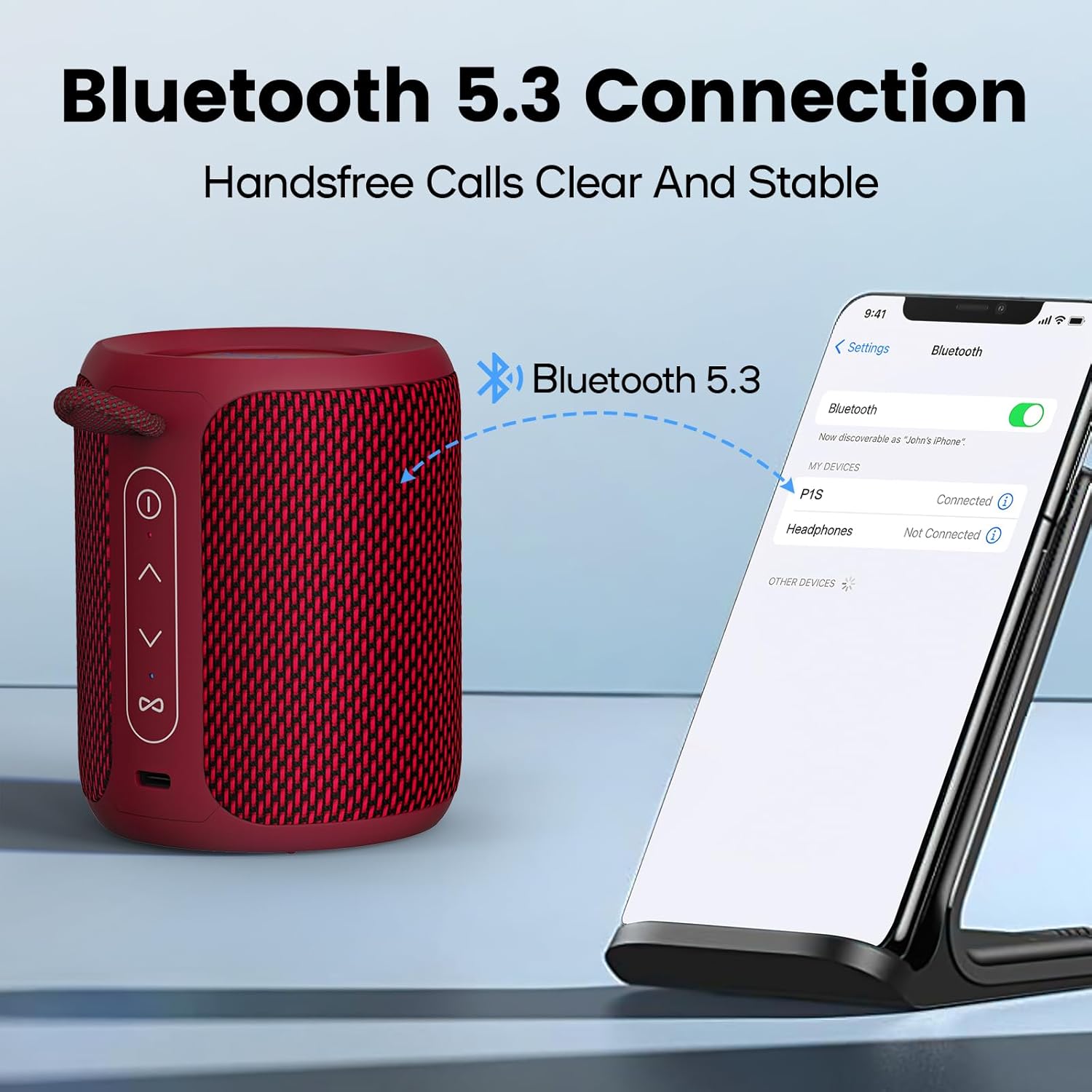
Bild: A Deeyaple A10 speaker shown next to a smartphone displaying its Bluetooth settings. The phone screen shows 'P1S' (an alternative model name) as a discoverable device, indicating a successful Bluetooth connection.
- Stellen Sie sicher, dass der Lautsprecher eingeschaltet und im Bluetooth-Kopplungsmodus ist (die LED-Anzeige blinkt).
- Öffnen Sie auf Ihrem Smartphone oder einem anderen Bluetooth-fähigen Gerät die Bluetooth-Einstellungen.
- Suchen nach available devices and select "Deeyaple A10" (or similar name like "P1S") from the list.
- Sobald die Verbindung hergestellt ist, hören Sie eine akustische Bestätigung, und die LED-Anzeige hört auf zu blinken.
5.4 True Wireless Stereo (TWS) Kopplung
You can pair two Deeyaple A10 speakers together for a 360° surround sound experience.

Bild: Two Deeyaple A10 speakers are positioned on a table, with a dotted line and music note icon indicating their wireless stereo connection. This illustrates the True Wireless Stereo (TWS) pairing feature.
- Ensure both Deeyaple A10 speakers are powered on and not connected to any other Bluetooth device.
- On one of the speakers (this will be the primary speaker), double-press the Power Button (①). The speaker will enter TWS pairing mode.
- Die beiden Lautsprecher suchen und verbinden sich automatisch. Sie hören eine akustische Bestätigung, sobald die TWS-Kopplung erfolgreich war.
- Verbinden Sie nun Ihr Gerät über Bluetooth mit dem Hauptlautsprecher, wie in Abschnitt 5.3 beschrieben. Beide Lautsprecher geben den Ton gleichzeitig wieder.
6. Bedienungsanleitung
6.1 Musikwiedergabe
- Abspielen/Pause: Short press the Power Button (①).
- Lautstärke erhöhen: Short press the Volume Up Button (>).
- Lautstärke runter: Short press the Volume Down Button (<).
- Nächster Titel: Long press the Volume Up Button (>).
- Vorheriges Lied: Long press the Volume Down Button (<).
6.2 Anrufbearbeitung
The built-in HD microphone allows for hands-free calls when connected to your smartphone.
- Anruf annehmen: Short press the Power Button (①) when an incoming call rings.
- Anruf beenden: Short press the Power Button (①) during a call.
- Anruf ablehnen: Long press the Power Button (①) when an incoming call rings.
6.3 RGB-Lichtsteuerung
The speaker features colorful LED lights that pulsate synchronously with music.

Bild: Three Deeyaple A10 speakers are shown with their top LED rings illuminated in green, red, and blue, demonstrating the dynamic RGB light feature. The background features large 'RGB' letters.
- Lichtmodus ändern: Short press the Multi-function Button (∞) to cycle through different light modes or colors.
- Lichter ausschalten: Continue pressing the Multi-function Button (∞) until the lights turn off.
7. Wartung
- Reinigung: Wischen Sie den Lautsprecher mit einem weichen, leicht feucht gehaltenen Tuch ab.amp Stoff. Verwenden Sie keine aggressiven Chemikalien, Lösungsmittel oder starke Reinigungsmittel.
- Lagerung: Bewahren Sie den Lautsprecher bei längerer Nichtbenutzung an einem kühlen, trockenen Ort fern von direkter Sonneneinstrahlung und extremen Temperaturen auf.
- Batteriepflege: To prolong battery life, fully charge the speaker before its first use and recharge it at least once every three months if not used regularly.
- Abdichtung: Always ensure the charging port cover is sealed tightly to maintain the IPX7 waterproof rating.
8. Fehlerbehebung
| Problem | Mögliche Ursache | Lösung |
|---|---|---|
| Der Lautsprecher lässt sich nicht einschalten. | Schwache Batterie. | Laden Sie den Lautsprecher 3-4 Stunden lang auf. |
| Kopplung mit Bluetooth-Gerät nicht möglich. | Der Lautsprecher befindet sich nicht im Kopplungsmodus. Bluetooth ist auf Ihrem Gerät deaktiviert. Der Lautsprecher ist bereits mit einem anderen Gerät verbunden. Zu weit vom Gerät entfernt. | Ensure speaker is powered on and LED is flashing. Schalten Sie Bluetooth auf Ihrem Gerät ein. Trennen Sie die Verbindung zu anderen Geräten oder starten Sie den Lautsprecher neu. Bringen Sie den Lautsprecher näher an Ihr Gerät heran (innerhalb von 10 Metern). |
| Kein Ton oder geringe Lautstärke. | Die Lautstärke am Lautsprecher oder Gerät ist zu niedrig. Speaker not properly connected. | Erhöhen Sie die Lautstärke sowohl am Lautsprecher als auch am angeschlossenen Gerät. Koppeln Sie den Lautsprecher erneut mit Ihrem Gerät. |
| TWS-Kopplung fehlgeschlagen. | Die Lautsprecher stehen zu weit auseinander. One speaker is already connected to a device. | Ensure speakers are close to each other. Trennen Sie beide Lautsprecher von allen Bluetooth-Geräten, bevor Sie die TWS-Kopplung starten. |
| Die RGB-Beleuchtung funktioniert nicht. | Das Licht ist ausgeschaltet. | Short press the Multi-function Button (∞) to cycle through light modes. |
9. Spezifikationen
| Besonderheit | Spezifikation |
|---|---|
| Modellnummer | A10 |
| Bluetooth-Version | 5.3 |
| Wasserdichtigkeit | IPX7 |
| Ausgangsleistung | 15 Watt (maximal 24 Watt) |
| Frequenzgang | 20 KHz |
| Batteriekapazität | 2500 mAh (Lithium-Ionen) |
| Ladezeit | 3-4 Stunden |
| Wiedergabezeit | Ca. 12 Stunden (bei 50 % Lautstärke) |
| Drahtlose Reichweite | Bis zu 10 Meter (33 Fuß) |
| Produktabmessungen (L x B x H) | 9 x 12 x 9 cm (3.54 x 4.72 x 3.54 Zoll) |
| Produktgewicht | 350 Gramm (0.77 Pfund) |
| Audioausgabemodus | Stereo |
| Im Lieferumfang enthaltene Komponenten | Microphone, Type-C Charging Cable |
| Kompatible Geräte | Laptop, Smartphone, Tablet, Fernseher |
| Material | Synthetic (plastic) or similar |
10. Garantie und Support
Deeyaple products are designed and manufactured to the highest quality standards. This product is covered by a limited warranty from the date of purchase. Please refer to the warranty card included in your package for specific terms and conditions.
For technical support, troubleshooting assistance, or warranty claims, please contact our customer service team through the retailer where you purchased the product or visit the official Deeyaple webWebsite für Kontaktinformationen.