
1. Einleitung
The BUSICOM PC-SeaV15c is a 15-inch Windows IoT touch panel PC designed for commercial and industrial applications. This manual provides essential information for the safe and efficient setup, operation, and maintenance of your device. Please read this manual thoroughly before using the product and retain it for future reference.
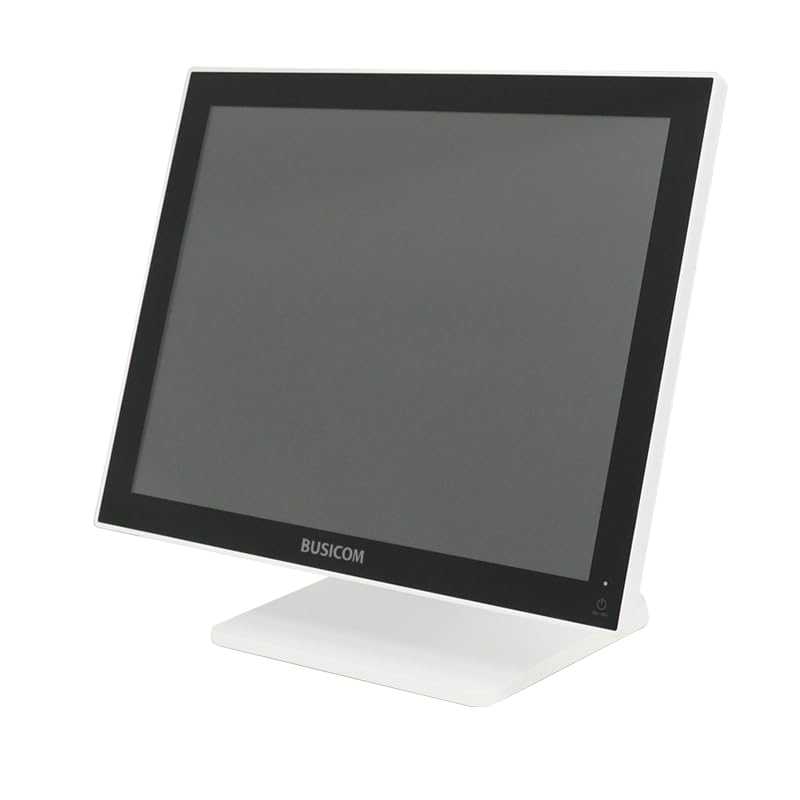
Abbildung 1: Vorderseite view of the BUSICOM PC-SeaV15c Touch Panel PC.
2. Produktüberschreitungview
2.1 Hauptmerkmale
- Erweitertes Design: Features an ultra-thin bezel and a highly durable 7H reinforced display for enhanced aesthetics and protection.
- Überlegene Leistung: Equipped with Microsoft Windows 10 IoT Enterprise, ensuring long-term support and reliable operation.
- Intuitives Touchpanel: Utilizes a capacitive touch method, offering a familiar and responsive touch experience similar to smartphones and tablets.
- Einfache Wartung: Designed for simple RAM and SSD replacement, facilitating upgrades and servicing.
- Versatile Interfaces: Provides a wide range of connectivity options to integrate with various peripherals.
- Effiziente Speicherung: SSD storage ensures fast processing speeds, quiet operation, and excellent shock resistance.
2.2 Komponenten
The package typically includes the BUSICOM PC-SeaV15c unit and a power adapter. Additional accessories may vary.

Figure 2: Front and side profile of the PC-SeaV15c unit.

Abbildung 3: Rückseite view showing access panels for RAM and SSD components.
3. Einrichtungsanweisungen
3.1 Auspacken
- Carefully remove the PC-SeaV15c from its packaging.
- Check for any visible damage. If damaged, contact your vendor immediately.
- Stellen Sie sicher, dass alle aufgeführten Komponenten vorhanden sind.
3.2 Anschließen von Peripheriegeräten
Refer to the interface diagram below for port locations and types.

Figure 4: Detailed diagram of the PC-SeaV15c's rear and bottom interfaces.
- Stromanschluss: Connect the provided power adapter to the DC In port and then to a power outlet.
- USB-Geräte: Use the USB 2.0 (4 ports) and USB 3.0 (2 ports) for connecting keyboards, mice, printers, and other USB peripherals.
- Netzwerkverbindung: Connect an Ethernet cable to the LAN port for wired network access.
- Audioausgang: Connect external speakers or headphones to the Audio Out port.
- Serial Ports (RJ45): Utilize COM1, COM2, COM3, and COM6 for connecting specialized POS peripherals such as barcode scanners or receipt printers.
- Cash Drawer (RJ11): Connect a compatible cash drawer to the RJ11 port.
- Externe Anzeige: If an external monitor is required, connect it to the Mini DisplayPort.
- USB Typ C: Für kompatible Geräte.
3.3 Ein-/Ausschalten
- Einschalten: Press the power button located on the upper right side of the display bezel or the power mark on the rear panel.
- Ausschalten: To safely shut down the system, use the standard Windows shutdown procedure. Avoid direct power disconnection during operation to prevent data loss.
4. Bedienungsanleitung
4.1 Windows 10 IoT Enterprise
The PC-SeaV15c operates on Windows 10 IoT Enterprise 2021. Familiarize yourself with the Windows operating system for basic navigation, application management, and system settings.
4.2 Touch Panel Usage
The capacitive touch screen supports multi-touch gestures.
- Klopfen: Entspricht einem Mausklick.
- Doppeltippen: Entspricht einem Doppelklick.
- Drücken und halten: Entspricht einem Rechtsklick.
- Wischen: For scrolling or navigating.
- Pinch-to-Zoom: Verwenden Sie zwei Finger zum Vergrößern oder Verkleinern.
5. Wartung
5.1 Gerät reinigen
- Vor der Reinigung das Gerät immer ausschalten und vom Stromnetz trennen.
- Mit einem weichen, fusselfreien Tuch leichtampmit Wasser oder einem nicht scheuernden Bildschirmreiniger abspülen.
- Do not spray liquids directly onto the screen or device.
- Vermeiden Sie die Verwendung von aggressiven Chemikalien, Lösungsmitteln oder Schleifmitteln.
5.2 RAM and SSD Replacement
The PC-SeaV15c is designed for easy replacement of RAM and SSD components. Refer to Figure 3 for the access panel location. For detailed instructions on component replacement, consult a qualified technician or the BUSICOM support webWebsite.
6. Fehlerbehebung
Dieser Abschnitt bietet Lösungen für häufig auftretende Probleme.
- Das Gerät lässt sich nicht einschalten:
- Stellen Sie sicher, dass das Netzteil sowohl mit dem Gerät als auch mit einer funktionierenden Steckdose fest verbunden ist.
- Überprüfen Sie die Funktionsfähigkeit der Steckdose, indem Sie ein anderes Gerät anschließen.
- Der Touchscreen reagiert nicht:
- Starten Sie das Gerät neu.
- Stellen Sie sicher, dass der Bildschirm sauber und frei von Verunreinigungen ist.
- Kein Bildschirm:
- Überprüfen Sie, ob das Gerät eingeschaltet ist.
- If an external display is connected, ensure the correct input source is selected on the external display.
- Periphere Signale nicht erkannt:
- Ensure the peripheral is correctly connected to the appropriate port (USB, LAN, COM).
- Versuchen Sie, das Peripheriegerät an einen anderen Port anzuschließen.
- Check the peripheral's own power supply, if applicable.
For further assistance, please contact BUSICOM customer support.
7. Spezifikationen
| Besonderheit | Detail |
|---|---|
| Marke | BUSICOM |
| Modellname | PC-SeaV15c |
| Farbe | Weiß |
| Bildschirmgröße | 15 Zoll |
| Auflösung | 1024 x 768 |
| Betriebssystem | Windows 10 IoT Enterprise 2021 |
| CPU-Marke | Intel |
| Prozessorsockel | Intel® N97 |
| CPU-Geschwindigkeit | 3.6 GHz |
| Speichertyp | DDR4 |
| Installierter RAM | 4 GB |
| Festplattentyp | SSD |
| SSD-Kapazität | 128 GB (gemäß Produktbezeichnung) |
| Grafikkartentyp | Integriert |
| VRAM-Typ | DDR4 SDRAM |
| VRAM-Kapazität | 4 GB |
| USB 2.0-Anschlüsse | 4 |
| USB 3.0-Anschlüsse | 2 |
| Optisches Laufwerk | Keiner |
| Produktgewicht | 6 Kilogramm |
| Höhe (ca.) | 307.5 mm (as per dimension diagram) |

Abbildung 5: Rückseite view of the PC-SeaV15c with approximate height dimension.
8. Garantie und Support
For warranty information and technical support, please refer to the warranty card included with your product or visit the official BUSICOM webBewahren Sie Ihren Kaufbeleg als Kaufnachweis für Garantieansprüche auf.
BUSICOM Official WebWebsite: BUSICOM Store on Amazon.co.jp