
1. Produktüberschreitungview
The VINABTY RH-18A is a replacement infrared remote control designed to operate various Mitsubishi Electric air conditioner models. This remote control requires no programming or pairing; simply insert batteries to begin operation. It provides essential functions for controlling your air conditioning unit.
1.1. Kompatibilität
This remote control is compatible with the following Mitsubishi Electric air conditioner models:
- MSZ-HR25VF-E1, MSZ-HR25VF-E2, MSZ-HR25VF-E6, MSZ-HR25VF-E7, MSZ-HR25VF-ER1, MSZ-HR25VF-ET1
- MSZ-HR35VF, MSZ-HR35VF-E1, MSZ-HR35VF-E2, MSZ-HR35VF-E6, MSZ-HR35VF-E7, MSZ-HR35VF-ER1, MSZ-HR35VF-ET1
- MSZ-HR42VF, MSZ-HR42VF-E1, MSZ-HR42VF-E2, MSZ-HR42VF-E6, MSZ-HR42VF-E7, MSZ-HR42VF-ER1, MSZ-HR42VF-ET1
- MSZ-HR50VF, MSZ-HR50VF-E1, MSZ-HR50VF-E2, MSZ-HR50VF-E6, MSZ-HR50VF-E7, MSZ-HR50VF-ER1, MSZ-HR50VF-ET1
2. Einrichtung
2.1. Einlegen der Batterie
Für die Fernbedienung werden zwei AAA-Batterien benötigt (nicht im Lieferumfang enthalten). Gehen Sie zum Einlegen der Batterien wie folgt vor:
- Suchen Sie die Batteriefachabdeckung auf der Rückseite der Fernbedienung.
- Schieben Sie den Deckel nach unten, um das Fach zu öffnen.
- Legen Sie zwei neue AAA-Batterien ein und achten Sie darauf, dass die positiven (+) und negativen (-) Anschlüsse mit den Abbildungen im Batteriefach übereinstimmen.
- Schieben Sie den Batteriefachdeckel wieder an seinen Platz, bis er sicher einrastet.
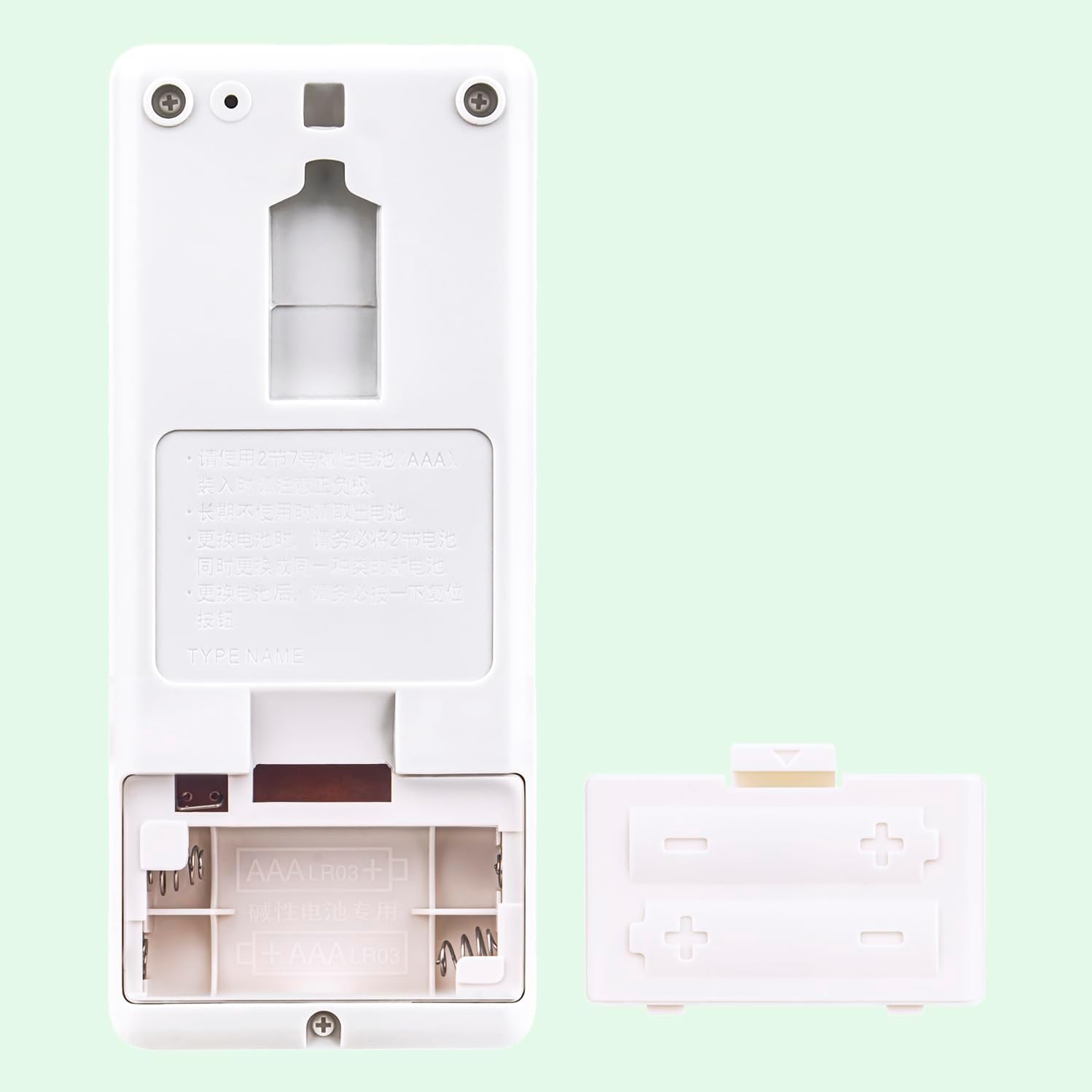
Abbildung 1: Battery compartment with batteries. Ensure correct polarity when inserting batteries.
After installing the batteries, the remote control is ready for use. No further programming is required.
3. Bedienungsanleitung
Point the remote control directly at the indoor unit of your air conditioner. The maximum effective range is approximately 10 meters.

Abbildung 2: Front view of the RH-18A remote control.
3.1. Tastenfunktionen
- AUS AN: Drücken Sie diese Taste, um die Klimaanlage ein- oder auszuschalten.
- ZU WARM / ZU KALT: These buttons are typically used for quick temperature adjustments or comfort settings.
- KÜHL: Aktiviert den Kühlmodus.
- TROCKEN: Aktiviert den Entfeuchtungsmodus.
- VENTILATOR: Aktiviert den reinen Lüftermodus.
- HITZE: Aktiviert den Heizmodus.
- MODUS: Cycles through available operating modes (Cool, Dry, Fan, Heat).
- FAN SPEED (Fan icon): Regelt die Lüftergeschwindigkeit (z. B. Niedrig, Mittel, Hoch, Auto).
- VANE (Vane icon): Controls the direction of the airflow (louvers).
- ECONO COOL: Aktiviert den energiesparenden Kühlbetrieb.
- WÄHLEN: Used for confirming selections in certain settings.
- TIME (Up/Down arrows): Passt die Timer-Einstellungen an.
- ZURÜCKSETZEN: Resets the remote control settings. This may be required after battery replacement or if the remote malfunctions.
4. Fehlerbehebung
If you encounter issues with your remote control, refer to the following table for common problems and solutions.
| Problem | Mögliche Ursache | Lösung |
|---|---|---|
| Fernbedienung reagiert nicht. |
|
|
| Die Klimaanlage reagiert nicht auf bestimmte Befehle. |
|
|
| Das Display der Fernbedienung ist dunkel oder leer. | Niedriger Batteriestand. | Ersetzen Sie die Batterien durch neue AAA-Batterien. |
5. Spezifikationen
- Modell: RH-18A
- Marke: VINABTY
- Konnektivitätstechnologie: Infrarot
- Kompatible Geräte: Mitsubishi Electric Air Conditioners (MSZ-HR series)
- Anzahl Tasten: 15
- Maximale Reichweite: 10 Meter
- Besonderheit: Keine Programmierung erforderlich
- Energiequelle: 2 x AAA-Batterien (nicht enthalten)
- Farbe: Schwarz/Weiß
- Abmessungen: Approximately 13 cm (length) x 5.5 cm (width) x 2.17 cm (thickness)
Abbildung 3: RH-18A Remote Control Dimensions.
6. Pflege und Wartung
- Keep the remote control clean by wiping it with a soft, dry cloth. Do not use liquid cleaners.
- Vermeiden Sie es, die Fernbedienung fallen zu lassen oder starken Stößen auszusetzen.
- Die Fernbedienung darf keiner direkten Sonneneinstrahlung, hohen Temperaturen oder hoher Luftfeuchtigkeit ausgesetzt werden.
- Wenn die Fernbedienung längere Zeit nicht benutzt wird, sollten die Batterien entfernt werden, um ein Auslaufen zu verhindern.
7. Garantie und Support
Specific warranty information for this replacement remote control is not provided in the product details. For any issues or support inquiries, please refer to the seller's return policy or contact the seller directly through your purchase platform.