
Einführung
Thank you for choosing the Devoko L-Shaped Gaming Desk. This manual provides essential information for the safe assembly, operation, and maintenance of your new desk. Please read these instructions carefully before beginning assembly and retain them for future reference.

Image: The Devoko L-shaped gaming desk, showcasing its design with multiple monitors, LED lighting, and a gaming setup.
Hauptmerkmale:
- Verbesserte Konnektivität: Equipped with 2 cable holes, 2 AC outlets, and 2 USB charging ports for convenient device connectivity and a clutter-free setup.
- Anpassbare LED-Beleuchtung: Wireless LED light strips with remote control offer personalized ambiance.
- Ergonomic L-Shaped Design: Maximizes space and accommodates multiple monitors or a monitor and tablet for a comfortable gaming experience.
- Strapazierfähige Oberfläche: High-quality carbon fiber laminate is waterproof, scratch-resistant, and heat-resistant.
- Integriertes Zubehör: Includes headphone hooks and side fabric storage pockets.
- Stabile Struktur: Features right-angled table legs and adjustable feet for stability on uneven surfaces.
Sicherheitshinweise
Bitte beachten Sie die folgenden Sicherheitsvorkehrungen, um Verletzungen oder Schäden am Produkt zu vermeiden:
- Always assemble this desk with zwei Personen to ensure safety and ease of installation.
- Exercise caution when handling electrical components (LED lights, power outlets, USB ports). Ensure the desk is unplugged during assembly or maintenance.
- Do not overload the desk. The maximum recommended weight capacity is 20 kg.
- Bewahren Sie alle Kleinteile und Verpackungsmaterialien außerhalb der Reichweite von Kindern auf.
- Vor Gebrauch sicherstellen, dass alle Schrauben und Befestigungselemente fest angezogen sind. Regelmäßig überprüfen und gegebenenfalls nachziehen.
Einrichtung und Montage
Assembly of this desk requires patience due to numerous parts and fasteners. Follow the instructions provided in the packaging carefully. Two people are recommended for efficient and safe assembly.
Schritte der Generalversammlung:
- Komponenten auspacken: Nehmen Sie alle Teile vorsichtig aus der Verpackung. Prüfen Sie, ob alle in der beiliegenden Teileliste aufgeführten Komponenten vorhanden und unbeschädigt sind.
- Montieren Sie den Rahmen: Begin by assembling the metal frame structure according to the diagrams in your separate assembly guide. Ensure all connections are firm.
- Desktop-Panels anbringen: Secure the L-shaped desktop panels to the assembled frame. Pay attention to alignment for a seamless surface.
- Monitorständer installieren: Attach the elevated monitor stand sections to the desktop.
- Install Power Hub: Integrate the power strip with AC outlets and USB ports into the designated slot on the desk. Ensure it is securely fastened.
- Zubehör anbringen: Install the headphone hooks and fabric storage bag in their respective positions.
- Füße anpassen: Once assembled, adjust the desk's feet to ensure it is level and stable on your floor.
- Installation des LED-Streifens: Carefully attach the LED light strips to the underside of the desk or designated areas. Connect them to the power source as instructed.

Image: Structural diagram highlighting the stable design with right-angled table legs.
Bedienungsanleitung
Power Hub (AC Outlets & USB Ports):
The desk features an integrated power hub with 2 standard AC outlets and 2 USB charging ports. To use, plug the desk's main power cord into a wall outlet. You can then plug in your devices directly to the desk for convenient power access.
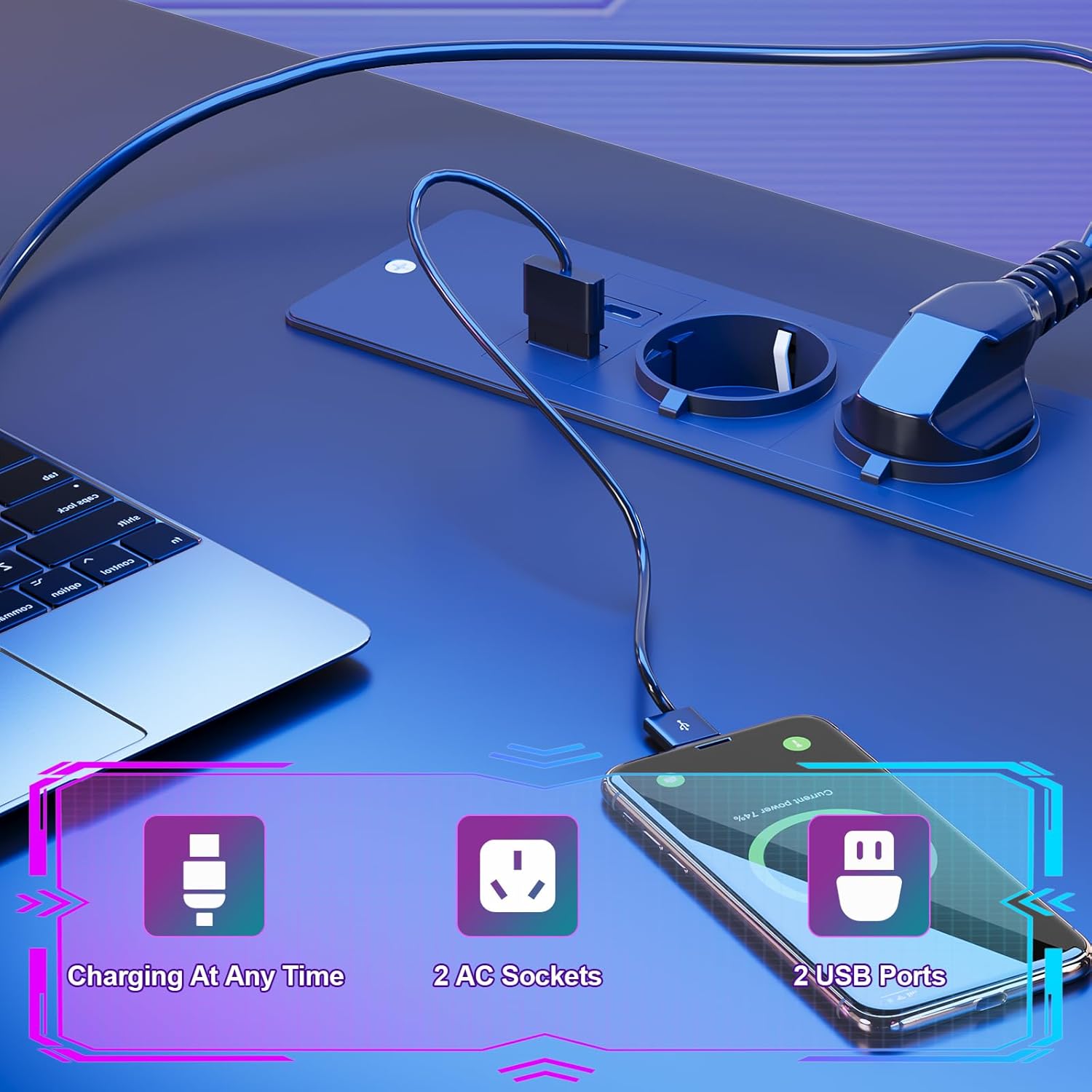
Image: Detail of the integrated power hub, demonstrating charging capabilities for electronic devices.
LED-Beleuchtungssystem:
The LED light strips are controlled by a wireless remote. Ensure the LED strips are properly connected to their power source and the remote has working batteries.
- Ein-/Ausschalten: Verwenden Sie die entsprechende Taste auf der Fernbedienung, um die LED-Leuchten ein- oder auszuschalten.
- Farbvariationen: Select from multiple individual color variations to customize your lighting ambiance.
- Helligkeitsanpassung: Passen Sie die Lichtintensität Ihren Vorlieben an.
- Geschwindigkeitsanpassung: For dynamic lighting modes, adjust the speed of color transitions.

Image: The RGB LED system in operation, highlighting remote control functions for color, brightness, and speed.
Using Desk Accessories:
- Monitorständer: Utilize the elevated monitor stand to position your screens at an ergonomic height, promoting a correct sitting posture and reducing neck strain.
- Kopfhörerhaken: Hang your gaming headset or headphones on the integrated hooks for easy access and to keep your desk tidy.
- Aufbewahrungstasche: Use the side fabric pocket for storing magazines, controllers, or other small items.

Bild: Detailliert views of the headphone hook, monitor stand, storage bag, and adjustable feet.
Wartung
Proper care will extend the life and appearance of your Devoko gaming desk.
Reinigung der Oberfläche:
- The carbon fiber laminate surface is waterproof, scratch-resistant, and heat-resistant.
- Zur allgemeinen Reinigung die Oberfläche mit einem weichen, feuchten Tuch abwischen.amp Tuch.
- Vermeiden Sie die Verwendung von Scheuermitteln, aggressiven Chemikalien oder Lösungsmitteln, da diese die Oberfläche beschädigen können.
- Promptly wipe up any spills to prevent watermarks or stains.
Strukturelle Instandhaltung:
- Überprüfen Sie regelmäßig alle Schrauben und Befestigungselemente, um sicherzustellen, dass sie fest sitzen. Ziehen Sie sie gegebenenfalls nach.
- Ensure the adjustable feet are properly set to maintain desk stability.

Image: The carbon fiber surface, illustrating its durability and suitability for gaming setups.
Fehlerbehebung
If you encounter any issues with your Devoko gaming desk, please refer to the following common solutions:
LED-Leuchten funktionieren nicht:
- Überprüfen Sie den Stromanschluss: Ensure the LED light strips are securely plugged into their power source and that the power source is connected to a working outlet.
- Batterie der Fernbedienung: Replace the battery in the wireless remote control if the lights are unresponsive.
- Remote Signal: Stellen Sie sicher, dass sich keine Hindernisse zwischen der Fernbedienung und dem LED-Empfänger befinden.
Steckdosen/USB-Anschlüsse funktionieren nicht:
- Check Main Power: Vergewissern Sie sich, dass das Netzkabel des Schreibtisches fest in eine funktionierende Wandsteckdose eingesteckt ist.
- Leistungsschalter: If the outlets are part of a surge protector or power strip, check its circuit breaker.
- Überlast: Ensure you are not exceeding the maximum power draw for the integrated outlets.
Der Schreibtisch ist instabil/wackelig:
- Füße anpassen: Verwenden Sie die verstellbaren Füße an der Unterseite der Tischbeine, um den Tisch auf unebenen Böden auszurichten.
- Befestigungselemente festziehen: Alle Montageschrauben und -bolzen erneut prüfen und festziehen.
Technische Daten

Image: Detailed product dimensions of the Devoko L-shaped gaming desk.
| Attribut | Detail |
|---|---|
| Marke | Devoko |
| Modell | L-förmiger Gaming-Schreibtisch |
| Farbe | Schwarz |
| Gesamtabmessungen (L x T x H) | 153 x 153 x 90 cm (ca. 60.2 x 60.2 x 35.4 Zoll) |
| Desktoptiefe | 50 cm (ca. 19.7 Zoll) |
| Material | Carbon Fiber Laminate, Metal Frame |
| Besondere Merkmale | LED Lights, 2 AC Outlets, 2 USB Ports, Monitor Stand, Headphone Hooks, Storage Bag, Adjustable Feet |
| Produktgewicht | 29.3 kg (ca. 64.6 Pfund) |
| Gewichtskapazität | Max. 20 kg (approx. 44 lbs) |
Garantieinformationen
Devoko products are manufactured to high-quality standards. For specific warranty details regarding your L-Shaped Gaming Desk, please refer to the warranty card included in your product packaging or contact Devoko customer support. This warranty typically covers manufacturing defects under normal use.
Kundenservice
If you have any questions, require assistance with assembly, or need to report a missing or damaged part, please contact Devoko customer support. Have your product model number and purchase date ready when contacting support.
Kontaktinformationen:
- WebWebsite: Visit the official Devoko webWebsite mit Support-Ressourcen und Kontaktformularen.
- E-Mail: Refer to your product packaging or the Devoko webWebsite für Kundenservice-E-Mail-Adressen.