
1. Einleitung
Thank you for choosing the Intenso Buds Plus TWS T313AE Wireless Earbuds. These earbuds are designed to provide a superior audio experience with advanced features such as Active Noise Cancellation (ANC), Environmental Noise Cancellation (ENC), and Bluetooth 5.4 connectivity. This manual provides essential information for setting up, operating, and maintaining your earbuds.
2. Packungsinhalt
Bitte prüfen Sie das Paket auf folgende Artikel:
- Intenso Buds Plus TWS Earbuds (Left and Right)
- Ladeetui
- USB-Ladekabel
- Ohrstöpsel in verschiedenen Größen
- Bedienungsanleitung
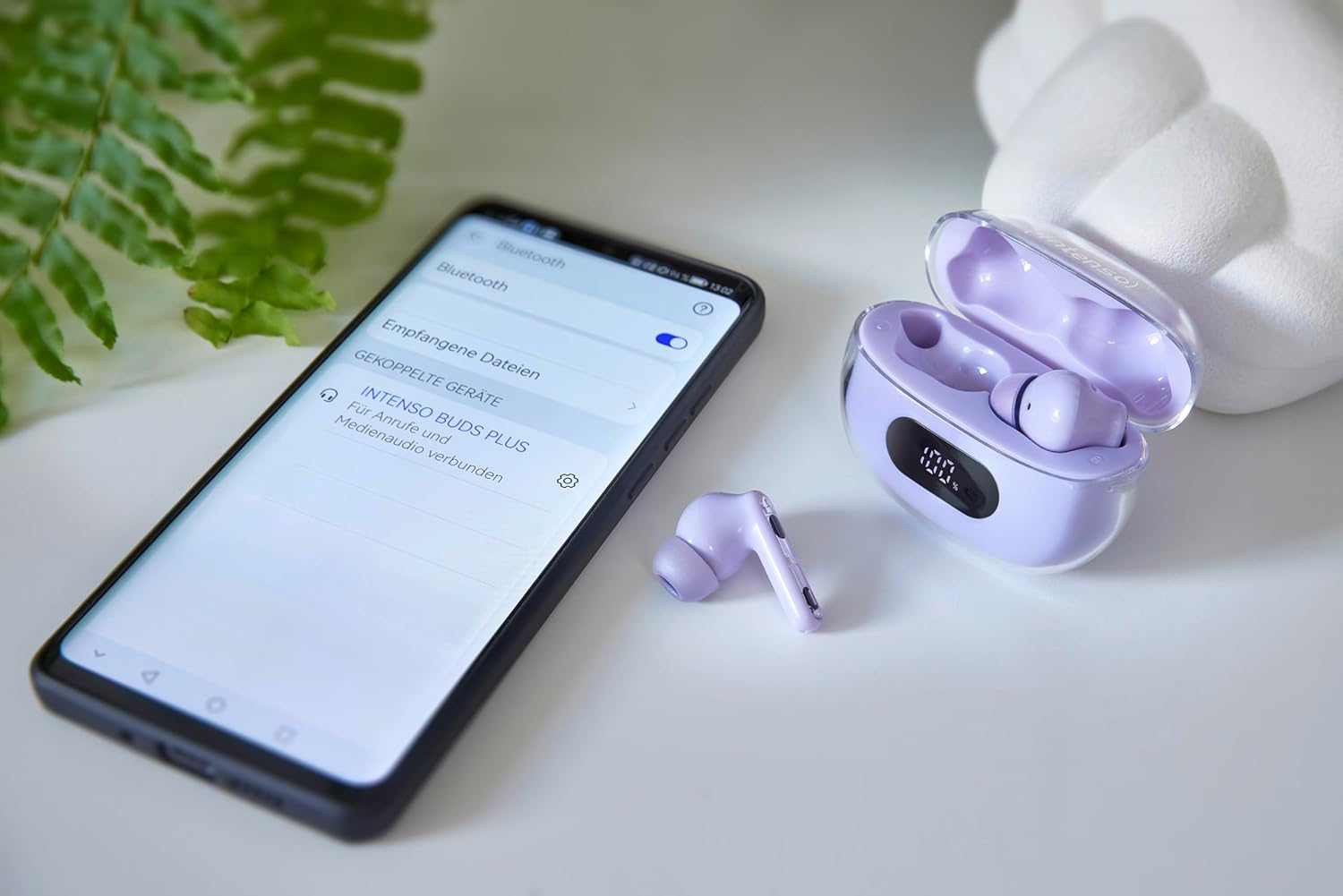
Image: Intenso Buds Plus TWS earbuds, charging case, and a smartphone displaying Bluetooth pairing settings.
3. Produktüberschreitungview
The Intenso Buds Plus TWS earbuds feature a compact design with a transparent charging case. The earbuds are equipped with touch controls and integrated microphones for clear communication.

Image: Earbuds in open charging case with digital display.

Image: Features highlighted: ANC, ENC, and LED display.

Image: Charging case with 100% battery display.

Image: Close-up of individual earbuds.
4. Einrichtung
4.1 Aufladen der Ohrhörer und des Ladecase
Before first use, fully charge the earbuds and the charging case. The charging case features an LED display to indicate the battery level.
- Legen Sie die Ohrhörer in das Ladeetui.
- Verbinden Sie das Ladecase mithilfe des mitgelieferten USB-Kabels mit einer USB-Stromquelle.
- Das LED-Display am Gehäuse zeigt den Ladestatus an.
- A full charge typically takes approximately 1.5 to 2 hours for the case and earbuds.

Image: LED status display on the charging case.
4.2 Bluetooth-Kopplung
The Intenso Buds Plus earbuds utilize Bluetooth 5.4 for a stable and fast connection.
- Stellen Sie sicher, dass die Ohrhörer aufgeladen sind und sich im Ladecase befinden.
- Öffnen Sie das Ladeetui. Die Ohrhörer wechseln automatisch in den Kopplungsmodus.
- Gehen Sie auf Ihrem Gerät (Smartphone, Tablet, Laptop) zu den Bluetooth-Einstellungen.
- Suchen nach available devices and select "Intenso Buds Plus" from the list.
- Sobald die Verbindung hergestellt ist, hören Sie einen Bestätigungston, und die Ohrhörer sind einsatzbereit.

Image: Earbuds and case next to a smartphone.
5. Bedienungsanleitung
5.1 Berührungssteuerung
The earbuds feature intuitive touch controls for managing audio playback, calls, and noise cancellation modes.
- Abspielen/Pause: Tippen Sie einmal auf einen der Ohrhörer.
- Nächster Titel: Doppeltippen Sie auf den rechten Ohrhörer.
- Vorheriges Lied: Doppeltippen Sie auf den linken Ohrhörer.
- Anruf annehmen/beenden: Tippen Sie einmal auf einen der Ohrhörer.
- Anruf ablehnen: Halten Sie einen der Ohrhörer 2 Sekunden lang gedrückt.
- Lautstärke erhöhen: Dreimaliges Tippen auf den rechten Ohrhörer.
- Lautstärke runter: Tippen Sie dreimal auf den linken Ohrhörer.
- Sprachassistenten aktivieren: Drücken und halten Sie einen der Ohrhörer 3 Sekunden lang (wenn Sie nicht telefonieren).
5.2 Noise Cancellation Modes (ANC, ENC, Transparency)
The earbuds offer various modes to control your listening environment:
- Aktive Geräuschunterdrückung (ANC): Reduziert Umgebungsgeräusche, sodass Sie sich auf Ihre Audioinhalte konzentrieren können.
- Umgebungsgeräuschunterdrückung (ENC): Enhances voice clarity during calls by filtering out background noise.
- Transparenzmodus: Ermöglicht es Ihnen, Ihre Umgebung wahrzunehmen und gleichzeitig Ihre Audioinhalte zu genießen – nützlich für die Aufmerksamkeit in belebten Umgebungen.
To switch between ANC, Transparency, and Normal modes, press and hold the touch area on the left earbud for 2 seconds. ENC is automatically active during calls.
5.3 Akkulaufzeit
The earbuds provide up to 7 hours of playback on a single charge. The charging case extends the total playtime to approximately 25 hours, allowing for multiple recharges on the go.

Image: Illustration of battery life with and without charging case.
6. Wartung
To ensure the longevity and optimal performance of your Intenso Buds Plus earbuds, follow these maintenance guidelines:
- Reinigung: Reinigen Sie die Ohrhörer und das Ladecase regelmäßig mit einem weichen, trockenen und fusselfreien Tuch. Verwenden Sie keine Scheuermittel oder Lösungsmittel.
- Ohrtipps: Nehmen Sie die Ohrstöpsel regelmäßig ab und reinigen Sie sie mit Wasser und milder Seife. Stellen Sie sicher, dass sie vollständig trocken sind, bevor Sie sie wieder anbringen.
- Ladekontakte: Keep the charging contacts on both the earbuds and inside the case clean and free of debris to ensure proper charging.
- Lagerung: Bewahren Sie die Ohrhörer bei Nichtgebrauch im Ladecase auf, um sie vor Staub und Beschädigungen zu schützen.
- Wasserbeständigkeit: Die Ohrhörer sind wasserabweisend. Vermeiden Sie es, sie in Wasser einzutauchen oder übermäßiger Feuchtigkeit auszusetzen. Trocknen Sie sie gründlich ab, falls sie nass werden.
7. Fehlerbehebung
Sollten Sie Probleme mit Ihren Ohrhörern haben, beachten Sie bitte die folgenden gängigen Lösungsansätze:
| Problem | Mögliche Ursache | Lösung |
|---|---|---|
| Ohrhörer lassen sich nicht koppeln | Niedriger Batteriestand; Bluetooth deaktiviert; Ohrhörer nicht im Kopplungsmodus; Gerät bereits mit einem anderen Bluetooth-Gerät verbunden. | Charge earbuds and case; Ensure Bluetooth is enabled on your device; Place earbuds in case, close, then open to re-enter pairing mode; Disconnect from other devices. |
| Kein Ton | Lautstärke zu niedrig; Ohrhörer nicht verbunden; Audioquelle pausiert. | Increase volume on earbuds and device; Reconnect earbuds; Check audio playback on your device. |
| Schlechte Tonqualität | Ear tips not properly sealed; Earbuds dirty; Interference. | Try different size ear tips for a better fit; Clean earbuds and ear tips; Move closer to your device or away from sources of interference. |
| Ohrhörer werden nicht aufgeladen | Charging cable faulty; Charging contacts dirty; Power source issue. | Try a different USB cable; Clean charging contacts; Use a different USB port or power adapter. |
8. Spezifikationen
| Modellname | Knospen Plus |
| Modellnummer | 3720313 |
| Marke | Intenso |
| Konnektivitätstechnologie | Kabellos (Bluetooth 5.4) |
| Platzierung des Ohrs | In-Ear |
| Formfaktor | In-Ear |
| Geräuschunterdrückung | Aktive Geräuschunterdrückung (ANC), Umgebungsgeräuschunterdrückung (ENC) |
| Steuerungstyp | Touch-Steuerung |
| Besondere Merkmale | Noise Cancellation, Volume Control, Touch Control, Noise Isolation, Lightweight |
| Batteriezusammensetzung | Lithium-Polymer |
| Wiederaufladbarer Akku | Ja |
| Spielzeit (Ohrstöpsel) | Bis zu 7 Stunden |
| Gesamtspielzeit (mit Hülle) | Bis zu 25 Stunden |
| Wasserbeständigkeit | Wasserfest |
| Material | Plastik |
| Kompatible Geräte | Mobile phone, Tablet, Laptop, Game console, Car audio system |
9. Garantie und Support
Intenso products are designed for reliability and performance. For warranty information, technical support, or customer service inquiries, please refer to the contact details provided on the Intenso official webWebsite oder Ihre Kaufdokumentation.
Bitte bewahren Sie Ihren Kaufbeleg für eventuelle Garantieansprüche auf.