
Einführung
This manual provides essential information for the safe and efficient operation, maintenance, and care of your Golden Technologies GB120 Buzzaround Carry-On Folding Travel Scooter. Please read this manual thoroughly before using your scooter to ensure proper understanding of its features and functions. The GB120 Buzzaround Carry-On is a compact, portable, and stylish mobility scooter designed for ease of transport and convenience, offering a 300 lb weight capacity, an adjustable tiller, and integrated lighting.
Sicherheitshinweise
Ihre Sicherheit hat oberste Priorität. Beachten Sie alle Warnungen und Anweisungen, um Verletzungen oder Schäden zu vermeiden.
- Maximales Benutzergewicht: Do not exceed the maximum user weight of 300 lbs (136 kg). Exceeding this limit can compromise stability and performance.
- Bodenfreiheit: The scooter has a ground clearance of 4 inches (10 cm). Avoid operating on uneven or rough terrain that may cause the scooter to become unstable or stuck.
- Batteriesicherheit: Always follow the battery charging and handling instructions provided. Use only the approved charger and battery pack. Do not expose the battery to extreme temperatures or puncture it. The included 12.5 AH lithium-ion battery is airline-approved.
- Nachtbetrieb: When operating the scooter at night or in low-light conditions, always use the integrated front and rear lights for enhanced visibility to others and to illuminate your path.
- Bremsen: The scooter is equipped with electro-mechanical brakes. Familiarize yourself with their operation before use.
- Demontage/Montage: Exercise caution when disassembling or assembling the scooter. Ensure all components are securely locked in place before operation.
Produkteigenschaften
The Golden Technologies GB120 Buzzaround Carry-On scooter is designed with several features to enhance your mobility and convenience:
- Kompakte Lagerung: Ideal for space-saving storage due to its fold-flat design.
- Faltendes Design: Features a folding tiller and a self-locking seat frame for a compact size, folding to 12 inches tall (without the seat).
- Portabilität: Equipped with four carry handles for easy lifting and transport.
- Gewichtskapazität: Supports users up to 300 lbs (136 kg).
- Adjustable Tiller: Infinitely adjustable tiller for personalized comfort, includes a USB port and a water bottle holder.
- Verbesserte Sichtbarkeit: Full front and rear lights for safety during operation.
- Convenient Armrests: Flip-up armrests for easier access and exit.
- Batterie: Standard 12.5 AH lithium-ion battery pack with easy access, offering an operating range of 14 miles. This battery is airline-approved. An optional long-range 15 AH battery (18-mile range) is available separately.
- Demontage: Easily disassembles into two main pieces for transport.
Aufstellen
- Auspacken: Nehmen Sie alle Komponenten vorsichtig aus der Verpackung. Prüfen Sie sie auf Transportschäden.
- Aufklappen des Rollers:
- Stellen Sie den Roller auf eine ebene, stabile Fläche.
- Release any locking mechanisms that secure the scooter in its folded position.
- Gently unfold the main frame until it locks into the operational position.
- Raise the tiller to its upright position and secure it.
- Attaching the Seat:
- Align the seat post with the receiver on the scooter's frame.
- Insert the seat post firmly until it clicks into place.
- Ensure the seat is stable and does not wobble.
- Batterieeinbau/Laden:
- Locate the battery compartment, typically under the floorboard.
- Insert the 12.5 AH lithium-ion battery pack, ensuring it is properly seated and connected.
- Before first use, fully charge the battery using the provided off-board charger. Refer to the charger's instructions for specific charging times and indicators.
- Pinneneinstellung: Adjust the tiller to a comfortable height and angle using the adjustment lever. Ensure it is securely locked before operating.
- Armlehnenverstellung: The armrests can be flipped up for easier access. Adjust them to your preferred position if they offer height or width adjustments.
Bedienungsanleitung
- Ein-/Ausschalten: Turn the key in the ignition to the "ON" position to power on the scooter. Turn to "OFF" to power off.
- Geschwindigkeitskontrolle: Use the speed adjustment dial or lever on the tiller to set your desired maximum speed. Start at a low speed until you are comfortable with the scooter's handling.
- Fahren:
- To move forward, gently push the throttle lever forward.
- To move backward, gently pull the throttle lever backward.
- Release the throttle lever to engage the automatic electro-mechanical brakes and stop the scooter.
- Lenkung: Use the tiller to steer the front wheels. Turn gradually, especially at higher speeds, to maintain stability.
- Lichter: Activate the front and rear lights using the designated switch on the tiller for improved visibility.
- Horn: Use the horn button on the tiller to alert others when necessary.
- USB-Anschluss: The tiller includes a USB port for charging small electronic devices.
- Freilaufmodus: If equipped, use the freewheel lever (usually located near the rear wheels) to disengage the motor and allow the scooter to be pushed manually. Always ensure the scooter is in drive mode before operating.
Wartung
Regelmäßige Wartung gewährleistet die Langlebigkeit und den sicheren Betrieb Ihres Scooters.
- Reinigung: Reinigen Sie den Roller regelmäßig mit einem Reinigungstuch.amp Mit einem Tuch abwischen. Vermeiden Sie die Verwendung von Scheuermitteln oder direkten Wasserstrahl.
- Batteriepflege:
- Laden Sie den Akku nach jeder Benutzung auf, auch wenn diese nur kurz war.
- If storing the scooter for an extended period, charge the battery fully and then every month to maintain its health.
- Lassen Sie den Akku nicht vollständig entladen.
- Reifeninspektion: Periodically check tire pressure (if applicable) and for any signs of wear or damage.
- Befestigungsmaterial: Stellen Sie sicher, dass alle Muttern, Schrauben und Befestigungselemente fest angezogen sind. Ziehen Sie sie nicht zu fest an.
- Professioneller Service: For any complex repairs or issues, contact an authorized Golden Technologies service center.
Fehlerbehebung
Sollten Sie Probleme mit Ihrem Scooter haben, beachten Sie bitte die folgenden gängigen Schritte zur Fehlerbehebung:
- Der Roller lässt sich nicht einschalten:
- Check if the key is fully inserted and turned to the "ON" position.
- Stellen Sie sicher, dass die Batterie richtig eingesetzt und geladen ist.
- Überprüfen Sie, ob alle elektrischen Verbindungen sicher sind.
- Scooter Moves Slowly or Not at All:
- Check the battery charge level. A low battery will reduce performance.
- Ensure the speed control dial is not set to the lowest setting.
- Verify the freewheel lever is in the "drive" position (motor engaged).
- Ungewöhnliche Geräusche:
- Halten Sie den Roller sofort an.
- Inspect for any loose parts or obstructions.
- Wenn das Geräusch weiterhin besteht, wenden Sie sich bitte an den Kundendienst.
- Lichter funktionieren nicht:
- Check the light switch position.
- Inspect for any visible damage to the light bulbs or wiring.
For issues not covered here, please contact Golden Technologies customer support.
Technische Daten
| Besonderheit | Detail |
|---|---|
| Modellname | Buzzaround CarryOn |
| Herstellerteilenummer | GB120 |
| Maximales Benutzergewicht | 300 kg |
| Höchstgeschwindigkeit | 3.6 Meilen pro Stunde (5.8 km/h) |
| Operating Range (Standard Battery) | 14 Meilen (22.5 km) |
| Akku-Typ | 12.5 AH Lithium-Ion (Airline Approved) |
| Folded Height (without seat) | 12 Zoll (30.5 cm) |
| Bodenfreiheit | 4 Zoll (10 cm) |
| Radius drehen | 48.75 Zoll (123.8 cm) |
| Bremsenausführung | Elektromagnetisch |
| Radtyp | Four-Wheeled |
| Materialtyp | Aluminum, Vinyl (Frame: Alloy Steel) |
| Zusätzliche Merkmale | 50 Amp Controller, Electronic Speed Control, Freewheel Mode, USB Port, Water Bottle Holder |
Visuelle Anleitung
Produktbilder


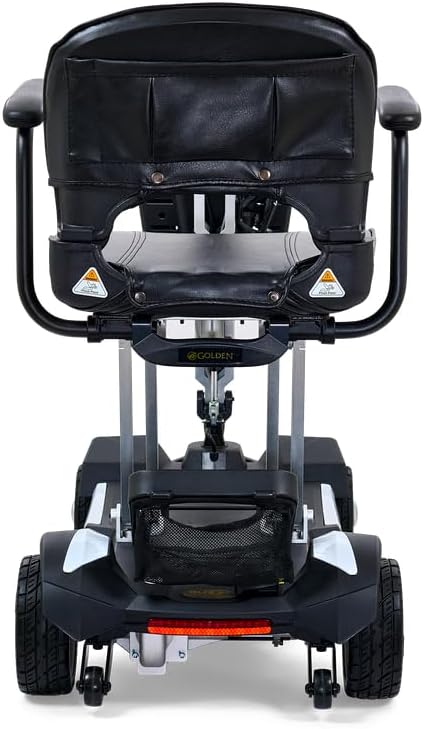


Offizielle Produktvideos
Derzeit stehen keine offiziellen Verkäufervideos zum Einbetten zur Verfügung.
Garantie und Support
For warranty information, please refer to the documentation included with your purchase or visit the official Golden Technologies website. For technical support, spare parts, or service inquiries, please contact Golden Technologies customer service directly. Keep your purchase receipt and model number handy when contacting support.
Kontaktinformationen: Bitte beachten Sie die Kontaktdaten, die auf der Verpackung Ihres Produkts oder auf der offiziellen Website des Herstellers angegeben sind. webWebsite.