
UBeesize UB-XBD10BK
UBeesize 10" Schlüssellicht Bedienungsanleitung
Model: UB-XBD10BK
Produkt überview
The UBeesize 10" Key Light is designed to provide soft, bright, and even illumination for various applications such as video conferencing, streaming, gaming, podcasting, and video recording. It features advanced side-lighting technology to enhance facial contours and reduce glare, along with a stable and flexible adjustable arm for optimal positioning.
Zu den Hauptmerkmalen gehören:
- Side-Lighting Technology: Produces soft, bright illumination, enhancing facial features and reducing glare.
- Stable and Flexible Arm: Multi-position rotation with a control knob for stability and optimal lighting angles.
- Praktische Timerfunktionen: Includes 2-hour, 4-hour, and 8-hour timer options.
- Stable and Space-Saving Design: Metal C-clamp with adjustable stand and non-slip silicone base.
- Vielseitige Anwendung: Suitable for home office, gaming setups, live streams, and commercial photography.
Lieferumfang
Bitte überprüfen Sie den Packungsinhalt, um sicherzustellen, dass alle Artikel vorhanden sind:
- 10'' Light
- Gelenkarm
- Schreibtisch Clamp
- Netzteil
- Bedienungsanleitung
Installationsanweisungen
Follow these steps to set up your UBeesize Key Light:
1. Befestigen Sie die Schreibtischklammer.amp:
Unscrew the locking bolt counter-clockwise on the metal C-clamp. Positionieren Sie die Klamp on your desk (maximum thickness 3 inches) and tighten the screws to secure it firmly. Ensure the non-slip silicone base is in contact with the desk surface to prevent scratches.

Image: The metal C-clamp securely attached to a desk, providing a stable base for the light.
2. Insert the Articulating Arm:
Insert the tripod arm into the desk clamp. Tighten the bolt clockwise to secure the arm in place. The arm's rod length is 13.5 inches, allowing for flexible height adjustments.

Image: The articulating arm being inserted into the desk clamp, ready for the light head attachment.
3. Attach the Light Head:
Richten Sie das lamp's bottom hole to the tripod arm's thread. Tighten the locking screw clockwise to firmly attach the 10" light head to the articulating arm.

Image: The circular light head being screwed onto the top of the articulating arm.
4. Adjust Light Angle and Position:
Passen Sie die lamp to your desired angle using the multi-axis adjustment points on the arm. Tighten the knob clockwise to secure the light head's position. The arm allows for 360° full rotation and various bends for optimal lighting effects.

Image: A diagram illustrating the various articulation points and 360-degree rotation of the light arm.
5. Strom anschließen:
Plug the power adapter into the light and then into a standard electrical outlet. The light is now ready for operation.
Note: To detach the tripod arm, first loosen the locking bolt by turning counter-clockwise.
Bedienungsanleitung
The UBeesize Key Light features intuitive button controls for easy adjustment of light settings.

Image: Close-up of the light's control panel, showing buttons for power, color temperature, brightness, and timer.
- Ein-/Ausschalten: Drücken Sie die Netztaste (usually indicated by a circle with a vertical line) to turn the light on or off.
- Helligkeit anpassen: Verwenden Sie die '+' Und '-' buttons to increase or decrease the light intensity. There are 10 brightness levels available.
- Farbtemperatur ändern: Drücken Sie die Color Conversion button (often indicated by a sun or color palette icon) to cycle through three color modes: Warm Light, Natural Light, and Cold Light.
- Timer einstellen: Drücken Sie die Timer-Taste (indicated by a clock icon or 'H' symbols) to set the light to automatically turn off after 2 hours, 4 hours, or 8 hours.

Image: Visual representation of the three distinct color temperature modes: Warm, Natural, and Cold Light.
Wartung
To ensure the longevity and optimal performance of your UBeesize Key Light, follow these simple maintenance guidelines:
- Reinigung: Gently wipe the light panel and arm with a soft, dry, or slightly damp Mit einem Tuch abwischen. Vermeiden Sie die Verwendung von Scheuermitteln oder Lösungsmitteln, da diese die Oberfläche beschädigen können.
- Lagerung: When not in use, especially for extended periods, store the light in a cool, dry place away from direct sunlight and extreme temperatures. The light can be folded neatly for space-saving convenience.
- Kabelpflege: Do not bend or crimp the power cable excessively. Ensure it is not placed under heavy objects or in areas where it could be tripped over.
- Joints and Knobs: Periodically check the tightness of all knobs and joints on the articulating arm to maintain stability. Do not overtighten.
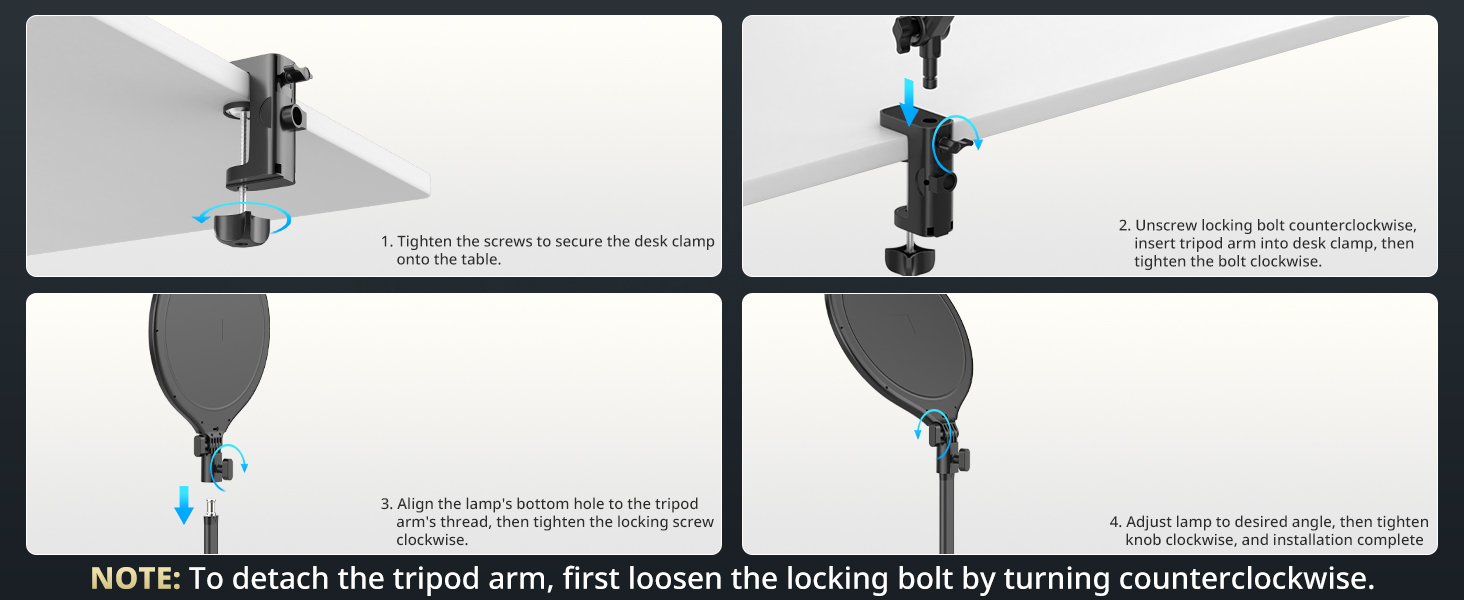
Image: The UBeesize Key Light folded compactly against a desk, demonstrating its space-saving design.
Fehlerbehebung
If you encounter any issues with your UBeesize Key Light, please refer to the following common problems and solutions:
| Problem | Mögliche Ursache | Lösung |
|---|---|---|
| Light does not turn on or blinks when plugged in. |
|
|
| Light is not bright enough or flickers. |
|
|
| Arm is not stable or sags. |
|
|
Troubleshooting Video Exampauf:
Video: A customer demonstrates an issue where the light's power indicator blinks and the light does not turn on, suggesting a potential power or internal fault. (Duration: 1:06)
Technische Daten
| Besonderheit | Detail |
|---|---|
| Technische Daten | 2 x 12 x 39 Zoll |
| Artikelgewicht | 2.55 Pfund |
| Modellnummer | UB-XBD10BK |
| Marke | unterstützt |
| Konnektivitätstechnologie | Bluetooth (for potential future features or accessories, not directly for light control as per current understanding) |
| Beschreibung der Blitzmodi | Dauerhafte Beleuchtung |
| Hardware-Schnittstelle | Bluetooth 4.0 |
| Batterien | 1 Lithium-Metall-Batterie erforderlich (im Lieferumfang enthalten) |
| Datum der ersten Verfügbarkeit | 9. Oktober 2024 |
Garantie und Support
For information regarding product warranty, returns, or technical support, please refer to the official UBeesize webSie können die Website besuchen oder sich direkt an den Kundenservice wenden. Einzelheiten finden Sie in der Regel auf der Produktverpackung oder bei dem Händler, bei dem das Produkt gekauft wurde.
Sie können auch die folgende besuchen: UBeesize Store on Amazon Für weitere Produktinformationen und Supportressourcen.
Ask a question about this manual
Ask about setup, troubleshooting, compatibility, parts, safety, or missing instructions. Manuals+ will review the question and use this page’s manual context to help answer it.