
1. Einleitung
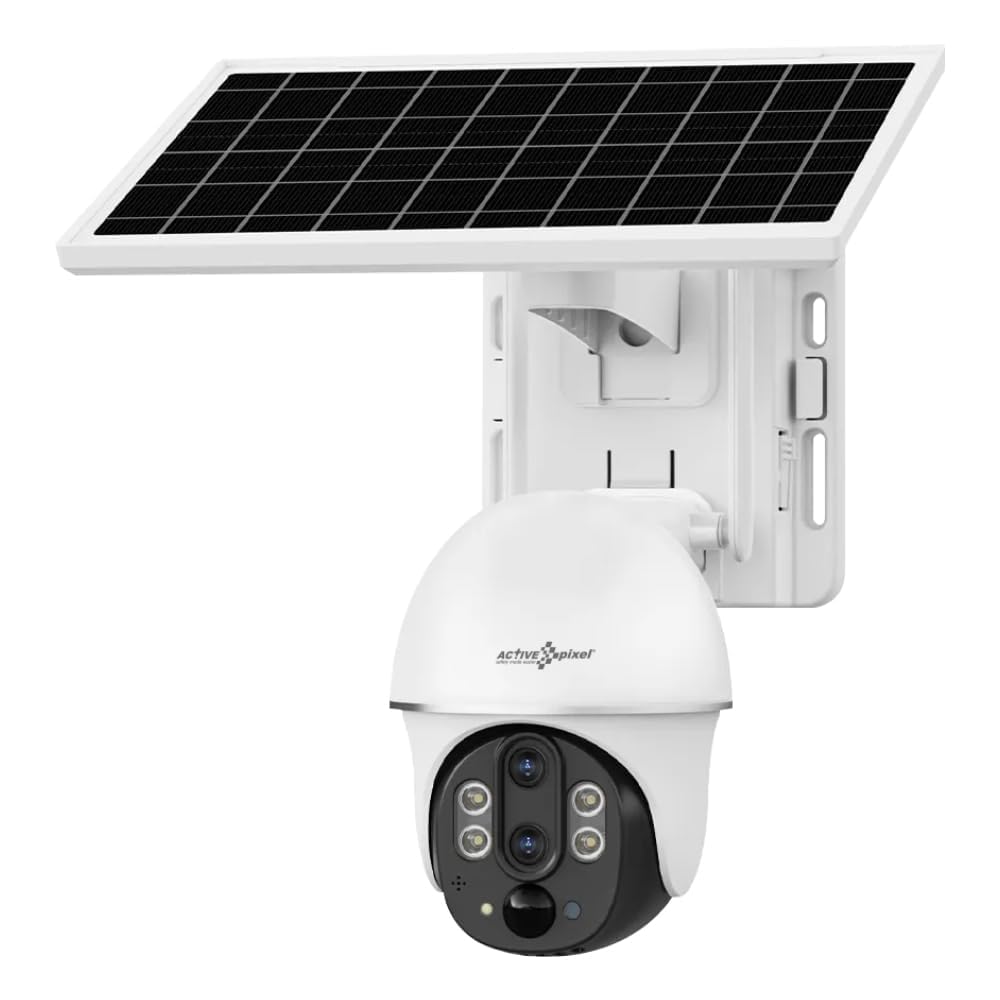
This manual provides detailed instructions for the installation, operation, and maintenance of your Active Pixel 4G Solar Powered Dual Lens Security Camera. Please read this manual thoroughly before using the product to ensure proper function and safety. This camera is designed for outdoor surveillance, featuring 4G connectivity, solar power, dual lenses for 10x zoom, 2-way audio, and motion detection capabilities.
1.1 Packungsinhalt
- 1x 4G Solar Camera (with included battery)
- 1x Benutzerhandbuch
- 1x Screw Kit for installation
- 1x Solar Panel
2. Sicherheitshinweise
Observe the following safety precautions to prevent damage to the product or injury to yourself or others.
- Installation: Stellen Sie sicher, dass die Kamera sicher befestigt ist, um ein Herunterfallen zu verhindern. Vermeiden Sie die Installation in der Nähe von brennbaren oder explosiven Materialien.
- Energiequelle: Use only the provided solar panel and integrated battery. Do not attempt to replace the battery with unapproved alternatives.
- Wasserbeständigkeit: The camera is IP65/IP66 rated for water and dust resistance. However, avoid submerging the camera in water or exposing it to high-pressure water jets.
- Temperatur: Betreiben Sie die Kamera innerhalb des angegebenen Temperaturbereichs von -15°C bis 60°C.
- Demontage: Versuchen Sie nicht, die Kamera zu zerlegen oder zu verändern. Dadurch erlischt die Garantie und es können Schäden oder Verletzungen entstehen.
- Kinder: Bewahren Sie die Kamera und das Zubehör außerhalb der Reichweite von Kindern auf.
3. Produktüberschreitungview
The Active Pixel 4G Solar Powered Dual Lens Security Camera is a robust surveillance solution. Key features include:
- Doppellinsensystem: Provides 10x zoom capability (3x optical + 3.2x digital).
- 4G-Konnektivität: Operates on 4G LTE networks, ideal for locations without Wi-Fi. (Note: 4G Jio Sim Card Not Supported. VI and Airtel SIM recommended.)
- Solarbetrieben: Equipped with a 7W solar panel and 8000mAh battery for continuous operation.
- Hohe Auflösung: 2MP+2MP sensors delivering 1080P Full HD video.
- Schwenk-Neige-Zoom (PTZ): 355° horizontaler Schwenkbereich und 90° vertikale Neigung für eine großflächige Abdeckung.
- Intelligente Erkennung: PIR + Radar dual induction detection for human/animal detection.
- Zweiwege-Audio: Eingebautes Mikrofon und Lautsprecher zur Kommunikation.
- Farbnachtsicht: Clear color night vision up to 50ft.
- Lagerung: Supports local TF card (up to 128GB, not included) and cloud storage.
- Wetterfest: IP65/IP66 rated for outdoor use.
4. Einrichtung
4.1 Installation der SIM-Karte
- Suchen Sie den SIM-Kartensteckplatz am Kameragehäuse.
- Insert a compatible 4G SIM card (VI or Airtel recommended) into the slot. Ensure the SIM card is correctly oriented.
- Close the SIM card slot cover securely to maintain waterproofing.
4.2 App-Installation und Kontoeinrichtung
- Download the "V380 Pro" app from your smartphone's app store (Android or iOS).
- Öffne die App und registriere ein neues Konto oder melde dich an, falls du bereits eines hast.
- Folgen Sie den Anweisungen in der App, um Ihre Kamera hinzuzufügen. Dies erfordert in der Regel das Scannen eines QR-Codes auf der Kamera oder die manuelle Eingabe ihrer ID.
4.3 Montage der Kamera und des Solarpanels
- Wählen Sie einen Standort: Select a location with good 4G signal strength and ample direct sunlight for the solar panel. The camera should be mounted at a height that provides optimal viewing angle and security.
- Montieren Sie die Kamera: Use the provided screw kit to securely mount the camera to a wall or pole. Ensure the mounting surface is stable.
- Montieren Sie das Solarpanel: Mount the solar panel in a position where it receives maximum direct sunlight throughout the day. Adjust its angle for optimal charging efficiency.
- Solarpanel anschließen: Schließen Sie das Kabel des Solarpanels an den Ladeanschluss der Kamera an. Stellen Sie sicher, dass die Verbindung sicher und wasserdicht ist.
5. Bedienungsanleitung
5.1 Live View und PTZ-Steuerung
- Open the V380 Pro app and select your camera from the device list.
- The app will display the live video feed.
- Use the on-screen controls to pan (355° horizontal) and tilt (90° vertical) the camera.
- Pinch to zoom on the live feed to utilize the 10x dual lens zoom.
5.2 Zwei-Wege-Audio
- Während im Leben viewTippen Sie auf das Mikrofonsymbol, um über den Lautsprecher der Kamera zu sprechen.
- Tippen Sie auf das Lautsprechersymbol, um den Ton vom Mikrofon der Kamera zu hören.
5.3 Bewegungserkennung und Benachrichtigungen
- Access the camera settings in the V380 Pro app.
- Enable "Smart Detection" (PIR+Radar dual induction) for human/animal detection.
- Configure alert settings, including push notifications to your mobile phone.
- When motion is detected, the camera will automatically record the event and send an alert.
5.4 Aufnahme und Wiedergabe
- Lokaler Speicher: Insert a TF card (up to 128GB, not included) into the camera's slot for local recording. Recordings can be accessed via the app.
- Cloud-Speicher: Subscribe to the cloud storage service through the V380 Pro app for alarm video storage.
- Zu view aufgenommenes footage, navigate to the playback section in the app and select the desired date and time.
5.5 Nachtsicht
The camera automatically switches to night vision mode in low light conditions using its IR-CUT switch and 4pcs Double Core LEDs. It provides clear color night vision up to 50 feet (15 meters).
6. Wartung
- Reinigung: Reinigen Sie die Kameralinse und das Solarpanel regelmäßig mit einem weichen, fusselfreien Tuch.amp Für klare Sicht und effizientes Laden ein Tuch verwenden. Keine scharfen Chemikalien verwenden.
- Batteriepflege: The integrated battery is designed for long life. Ensure the solar panel is clean and receives adequate sunlight for optimal charging. Avoid prolonged storage in extreme temperatures.
- Firmware-Updates: Check the V380 Pro app periodically for firmware updates. Keeping the firmware updated ensures optimal performance and security.
- TF-Kartenverwaltung: If using a TF card, periodically check its storage capacity and format it if necessary to maintain recording efficiency.
7. Fehlerbehebung
| Problem | Mögliche Ursache | Lösung |
|---|---|---|
| Die Kamera lässt sich nicht einschalten. | Low battery; Solar panel not charging; Faulty connection. | Ensure solar panel is clean and receiving direct sunlight. Check solar panel connection to the camera. Allow time for battery to charge. |
| No 4G signal or offline. | SIM card not inserted correctly; SIM card not activated; Poor network coverage; Incompatible SIM card. | Reinsert SIM card. Verify SIM card is active and has data plan. Move camera to an area with better 4G coverage. Ensure using a compatible SIM (VI/Airtel). |
| Bewegungserkennung funktioniert nicht. | Detection sensitivity too low; Feature disabled in app; Obstructions in detection area. | Check app settings to ensure motion detection is enabled and sensitivity is appropriate. Clear any obstructions. |
| Schlechte Videoqualität. | Dirty lens; Poor network signal; Low light conditions. | Clean the camera lens. Ensure good 4G signal. Video quality may be reduced in very low light, but night vision should activate. |
| Es kann keine Verbindung zur App hergestellt werden. | Incorrect camera ID; App issues; Network problems. | Verify camera ID. Restart the app or your phone. Check your phone's internet connection. Reset the camera if necessary (refer to app for reset procedure). |
8. Spezifikationen
| Besonderheit | Detail |
|---|---|
| Modell | AP-4G-SY2.0MP-DUAL LENS-V-3.6MM |
| Sensor | 1/2.8" Progressive Scan CMOS *2 |
| Objektive | 4mm F1.6 (Horizontal View: 80±5°, Vertical: 90±5°), 12mm F1.6 (Horizontal View: 26±1°, Vertical: 30±1°) |
| Zoom | 10X Conflate Zoom (3X Optical + 3.2X Digital) |
| Videokomprimierung | H.265/15FPS |
| Auflösung | Main stream: 1920*1080P, Sub-stream: 640×360P |
| Netzwerk | 4G LTE (SIM Supported) |
| Nachweismethode | PIR- und Radar-Doppelinduktionserkennung |
| Erkennungsentfernung | 0 – 12 Mio. |
| Erfassungswinkel | 120° |
| Pan-Neigung | Horizontal: 355°, Vertikal: 90° |
| Drehgeschwindigkeit | Horizontal 55°/s, Vertikal 40°/s |
| Nachtsicht | IR-CUT automatic switch, 4pcs Double Core LEDs, effective distance 10M (IR/White LED) |
| Audio | Built-in speaker (3W), Built-in microphone (pickup area ~20M) |
| Lagerung | TF card (Max 128GB), Cloud Storage (Alarm video) |
| Leistung | 7W Solar Panel, 8000mAh Battery (included) |
| Wasserbeständigkeit | IP65, IP66 |
| Betriebstemperatur | -15°C bis 60°C |
| Abmessungen (L x B x H) | 20 x 18 x 16 cm |
| Gewicht | 1.2 kg |
| Kontrollmethode | App (V380 Pro) |
| Kompatibles Betriebssystem | Android, iOS |
9. Garantie und Support
For warranty information and technical support, please refer to the contact details provided at the point of purchase or on the official Active Pixel website. The manufacturer is Glorious Digital Solution Pvt Ltd. For customer care, you may contact 9321367328.
Bitte bewahren Sie Ihren Kaufbeleg für Garantieansprüche auf.