
1. Einleitung
Thank you for choosing the KUIDAMOS P1 OCS-P1 Digital Hanging Crane Scale. This manual provides essential information for the safe and efficient operation, setup, and maintenance of your new weighing tool. This scale is designed for precise measurement in various industrial settings, including warehousing, textile, and metallurgy, with a maximum capacity of 1000KG (2000LB).

Bild 1.1: Vorderseite view of the KUIDAMOS P1 OCS-P1 Digital Hanging Crane Scale, displaying '500.0' on its digital screen, indicating its weighing capability.
2. Sicherheitshinweise
- Always ensure the scale is securely attached before loading any weight.
- Do not exceed the maximum weighing capacity of 1000KG (2000LB).
- Avoid dropping or subjecting the scale to severe impacts, as this may damage the internal sensor.
- Halten Sie die Waage von starken elektromagnetischen Feldern fern, da diese die Genauigkeit beeinträchtigen können.
- Versuchen Sie nicht, die Waage selbst zu zerlegen oder zu reparieren. Wenden Sie sich zur Wartung an qualifiziertes Fachpersonal.
- Sorgen Sie für eine ordnungsgemäße Installation und Entsorgung der Batterien gemäß den örtlichen Vorschriften.
3. Produktkomponenten
The KUIDAMOS P1 OCS-P1 Digital Hanging Crane Scale package includes the following items:
- 1 x Digital Hanging Crane Scale (Main Unit)
- 1 x Fernbedienung
3.1 Scale Features
- Digitaler Bildschirm: Clear LCD screen for weight readings.
- Strong Steel Hook: Durable hook for secure attachment of loads.
- Aluminium Alloy Casing: Robust and lightweight housing.
- Empfindlicher Sensor: Ensures accurate and reliable measurements.
- Bedientasten: Power, HOLD/UNIT, TARE/ZERO.

Abbildung 3.1: Detailansicht view of the high-strength steel hook, designed for secure load handling.
3.2-Fernbedienung
The remote control allows for convenient operation of the scale from a distance of approximately 30 to 50 meters (98.43 to 164.04 feet).
4. Spezifikationen
| Besonderheit | Beschreibung |
|---|---|
| Modell | OCS-P1 |
| Farbe | Orange |
| Material | Aluminiumlegierung, Edelstahl |
| Wägebereich | 1000KG (2000LB) |
| Mindestkapazität | 500g |
| Scale Power Supply | 2 x AA 1.5V Batterien (nicht im Lieferumfang enthalten) |
| Batterie der Fernbedienung | 1 x 23A 12V battery (built-in, 50mAh capacity) |
| Scale Battery Usage Time | ≥ 65 Stunden |
| Reichweite der Fernbedienung | Approx. 30 ~ 50m / 98.43 ~ 164.04ft |
| Anwendungen | Warehousing, Textile, Metallurgy, etc. |
5. Einrichtung
5.1 Battery Installation (Scale)
- Suchen Sie das Batteriefach auf der Rückseite der Waage.
- Öffnen Sie die Batterieabdeckung.
- Legen Sie 2 AA 1.5V Batterien ein und achten Sie dabei auf die richtige Polarität (+/-).
- Schließen Sie die Batterieabdeckung fest.
5.2 Batterie der Fernbedienung
The remote control comes with a built-in 23A 12V battery. No user installation is required for this component.
5.3 Attaching the Scale
Securely attach the top shackle of the crane scale to a suitable, load-bearing lifting mechanism. Ensure the lower hook is free to receive the item to be weighed.
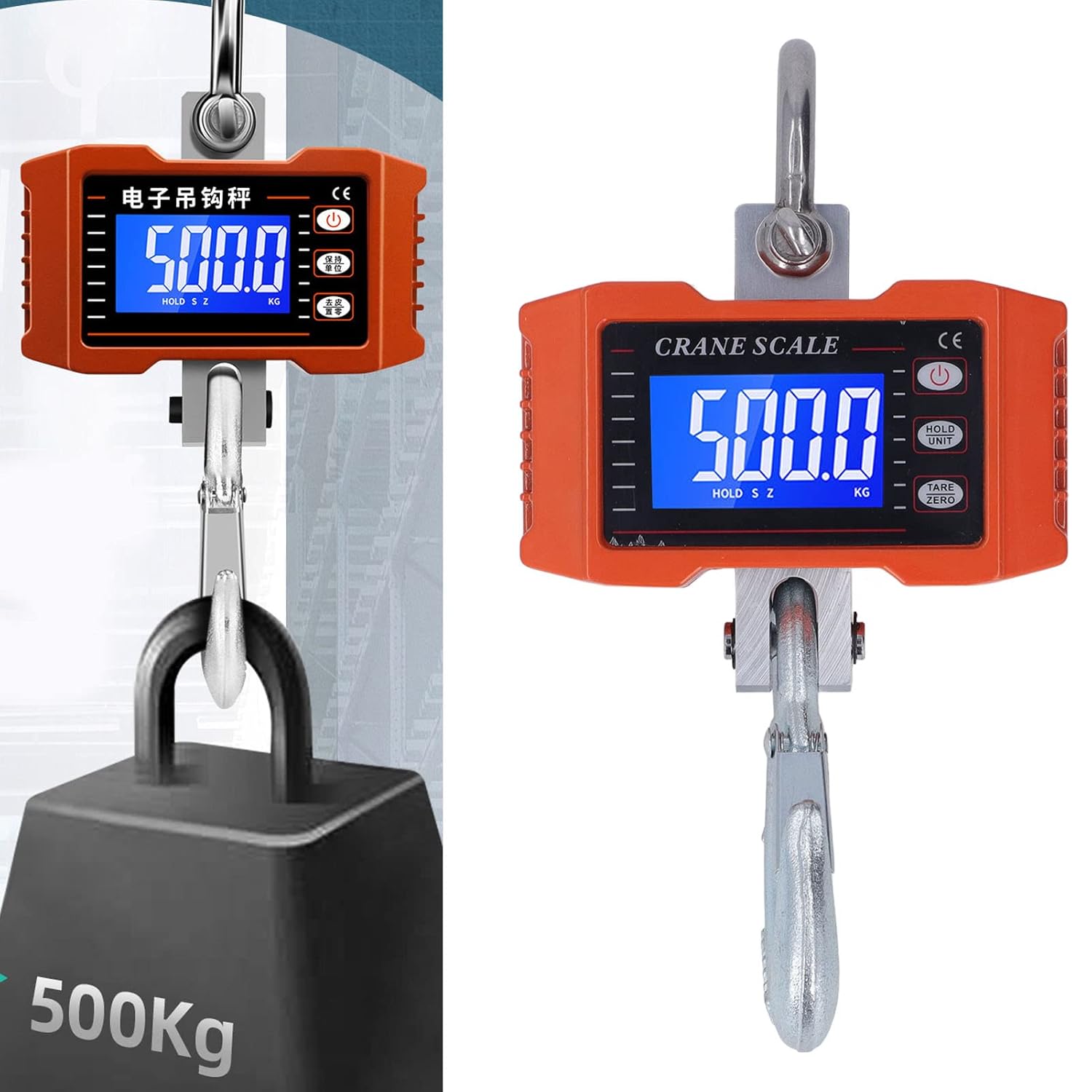
Image 5.1: The crane scale accurately weighing a 500KG load, demonstrating its application.
6. Bedienungsanleitung
6.1 Ein-/Ausschalten
- Einschalten: Drücken Sie die LEISTUNG button on the scale or remote control. The display will light up.
- Ausschalten: Halten Sie die LEISTUNG Die Taste einige Sekunden lang gedrückt halten, bis sich das Display ausschaltet.
6.2 Wiegeverfahren
- Ensure the scale is powered on and shows '0.0' or '0.00'. If not, press TARA/NULL.
- Carefully attach the item to be weighed to the lower hook.
- Wait for the reading on the digital display to stabilize. This is the weight of the item.
6.3 Einheitenumrechnung
To switch between kilograms (KG) and pounds (LB):
- Drücken Sie die HALTEN/EINHEIT button briefly. The unit displayed will change.
6.4 Tara-/Nullpunktfunktion
The Tare function allows you to subtract the weight of a container or previous load:
- With an empty container or previous load on the hook, press the TARA/NULL Drücken Sie die Taste. Die Anzeige wird auf „0.0“ zurückgesetzt.
- Now, add the item you wish to weigh into the container; only the net weight of the item will be displayed.
6.5 Haltefunktion
To hold the current weight reading on the display:
- While an item is being weighed, press and hold the HALTEN/EINHEIT button until 'HOLD' appears on the display. The reading will be locked.
- Drücken HALTEN/EINHEIT again to release the hold function.
6.6 Fernbedienungsbetrieb
The remote control mirrors the functions of the buttons on the scale:
- Use the corresponding buttons on the remote for Power On/Off, Unit Conversion, Tare/Zero, and Hold functions.
- Ensure you are within the effective range of 30-50 meters for reliable operation.
7. Wartung
7.1 Reinigung
- Wischen Sie die Waage mit einem weichen,amp Mit einem Tuch abwischen. Keine Scheuermittel verwenden und die Kalkablagerungen nicht in Wasser einweichen.
- Ensure the display and buttons are free from dust and debris.
7.2 Speicherung
- Store the scale in a dry, cool place, away from direct sunlight and extreme temperatures.
- If storing for an extended period, remove the AA batteries from the scale to prevent leakage.
7.3 Battery Replacement (Scale)
When the display indicates low battery, replace the 2 x AA 1.5V batteries following the installation steps in Section 5.1.
8. Fehlerbehebung
| Problem | Mögliche Ursache | Lösung |
|---|---|---|
| Die Waage lässt sich nicht einschalten. | Defekte oder falsch eingesetzte Batterien. | Tauschen Sie die AA-Batterien aus und achten Sie dabei auf die richtige Polarität. |
| Ungenaue Messwerte. | Scale not zeroed, unstable environment, or overloaded. | Press TARE/ZERO. Ensure stable conditions. Do not exceed capacity. |
| Fernbedienung funktioniert nicht. | Out of range, or remote battery depleted. | Move closer to the scale. The remote control battery is built-in and has a long lifespan; if issues persist, contact support. |
| Display shows 'O-L' or 'ERR'. | Überlast. | Remove the load immediately. Do not exceed 1000KG. |
9. Garantie und Support
KUIDAMOS products are manufactured to high-quality standards. For warranty information, technical support, or service inquiries, please refer to the contact information provided at the point of purchase or visit the official KUIDAMOS webBitte bewahren Sie Ihren Kaufbeleg für Garantieansprüche auf.