
ABIR VC205 Cordless Vacuum Cleaner User Manual
Modell: VC205
1. Einleitung
This manual provides essential instructions for the safe and efficient use of your ABIR VC205 Cordless Vacuum Cleaner. Please read this manual thoroughly before operating the appliance and retain it for future reference. Proper use and maintenance will ensure optimal performance and extend the lifespan of your vacuum cleaner.
2. Produktüberschreitungview
2.1 Komponenten
The ABIR VC205 Cordless Vacuum Cleaner comes with the following components:

Abbildung: Explosionszeichnung view of the ABIR VC205 Cordless Vacuum Cleaner showing its main body, extension wand, floor brush, and various accessories.
- Hauptstaubsauggerät (mit Staubbehälter und Motor)
- LED Floor Brush
- Verlängerungsstab
- Milbenentfernungsbürste
- Fugendüse
- 2-in-1 Soft Brush
- Ladeadapter
- Benutzerhandbuch (dieses Dokument)
2.2 Hauptmerkmale
- Precision Cleaning: Infra-red dust sensing technology automatically adjusts motor speed based on dust detection.
- Intelligent Efficiency: Built-in processor optimizes power usage for extended service life.
- Starke Saugkraft: Provides a maximum of 27,000Pa suction power.
- Smart Touch-Steuerung: Ultra-large touch screen for mode switching, speed monitoring, and battery level display.
- Visual Cleaning Feedback: LED display ring light transitions from red (dust detected) to blue (clean).
- Batteriemanagement: Digital battery energy display assists in effective charging management.
- Erweiterte Filtration: Cyclonic technology and multi-stage E13-grade HEPA filter capture 99.97% of tiny dust particles. The HEPA filter is washable.
- Versatile and Lightweight: Weighs 1.1 kg, with a detachable wind tube for portable cleaning of car seats and sofas.
- Verbesserte Sichtbarkeit: LED floor brush illuminates dark areas to reveal hidden dirt.
- Ergonomisches Design: Slim handle and balanced weight distribution for comfortable handling.
- Geräuscharmer Betrieb: New cyclone design minimizes windflow noise to below 70dB.
3. Einrichtung
3.1 Montage
- Bringen Sie den Verlängerungsstab an: Stecken Sie das Verlängerungsrohr in das Hauptgerät des Staubsaugers, bis es hörbar einrastet.
- Bringen Sie die Bodenbürste an: Connect the LED floor brush to the other end of the extension wand, ensuring it locks firmly.
- Zubehör installieren: For specific cleaning tasks, detach the extension wand and directly attach the mite removal brush, crevice nozzle, or 2-in-1 soft brush to the main vacuum unit.
3.2 Erstaufladung
Before first use, fully charge the vacuum cleaner. Connect the charging adapter to the charging port on the main vacuum unit and plug it into a power outlet. The digital display will indicate the charging status. A full charge typically takes approximately 4-5 hours.
4. Bedienungsanleitung
4.1 Ein-/Ausschalten
Drücken Sie den Ein-/Ausschalter am Griff, um den Staubsauger ein- oder auszuschalten.
4.2 Smart Touch Screen Control
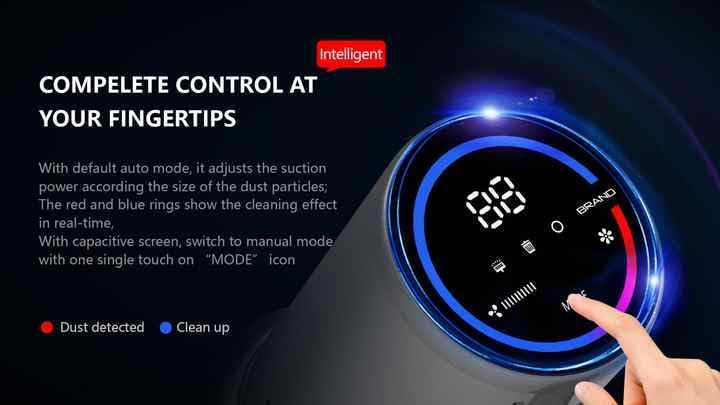
Image: The vacuum's digital touch screen displaying battery level, suction mode, and dust detection feedback.
The ultra-large smart touch screen allows you to:
- Modi wechseln: Tap the 'MODE' icon to cycle through different suction modes (e.g., Auto, Manual).
- Batteriestand überwachen: Die Digitalanzeige zeigt den verbleibenden Akkustand in Prozent an.tage.
- View Sauggeschwindigkeit: Observe the current suction power setting.
- Visual Cleaning Feedback: The LED ring light around the screen indicates cleaning progress. A red light signifies dust detection, while a blue light indicates the area is clean.
4.3 Dust Sensing Technology
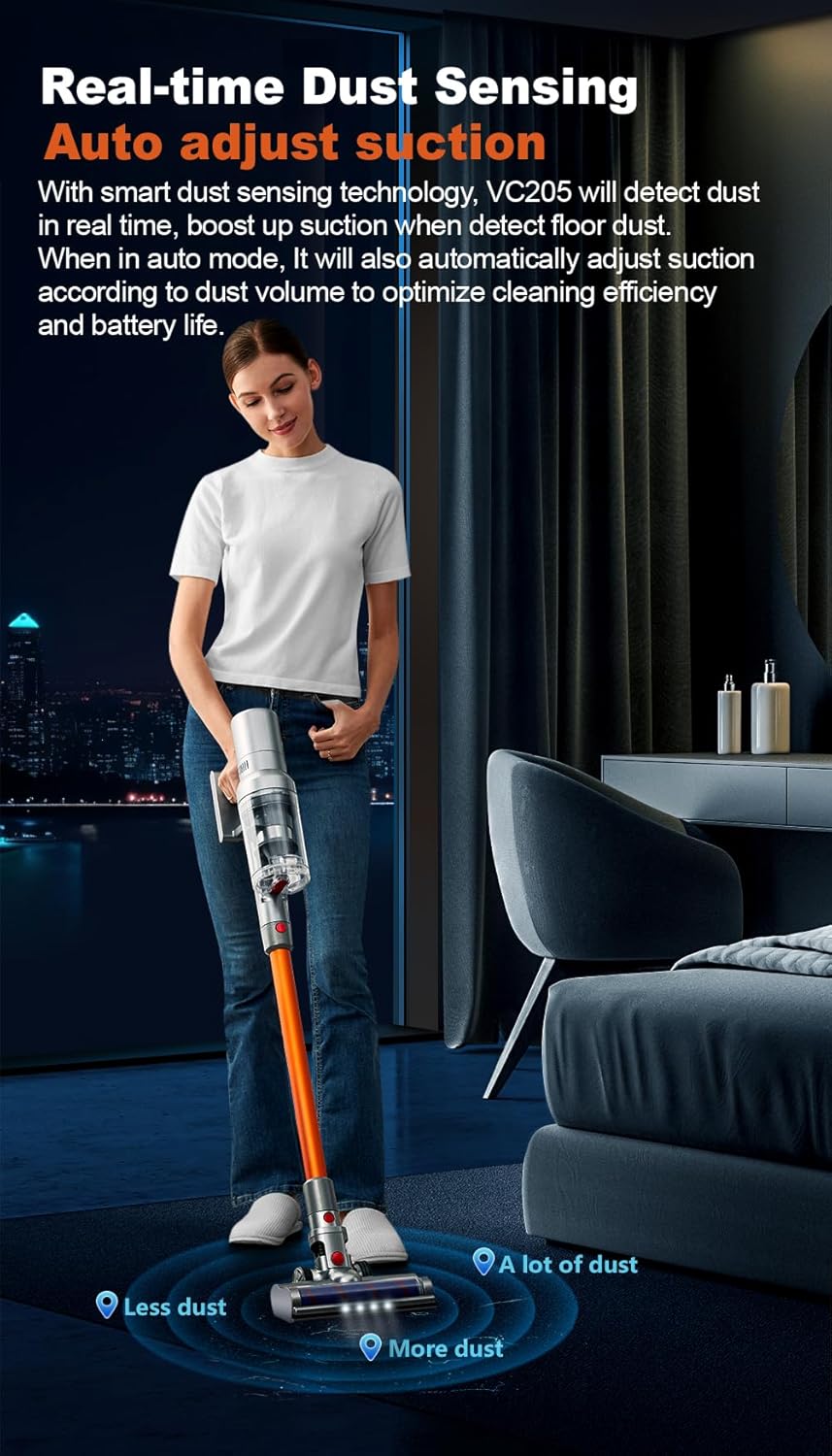
Image: Illustration of the vacuum's real-time dust sensing capability, adjusting suction based on dust volume.
In Auto mode, the vacuum cleaner utilizes infra-red dust sensing technology to detect dust particles. It automatically boosts motor speed when higher dust concentrations are detected, ensuring thorough cleaning and optimizing power consumption.
4.4 Using the LED Floor Brush

Image: The LED floor brush lights up the area in front of the vacuum, making dirt visible in dark spaces.
The integrated LED lights on the floor brush illuminate dark areas under furniture or in dimly lit rooms, making hidden dirt and debris visible for comprehensive cleaning.
4.5 Anhänge verwenden

Image: Demonstrates the versatility of the vacuum with different attachments for whole-house cleaning.
- Milbenentfernungsbürste: Ideal for cleaning mattresses, upholstery, and pet beds to remove dust mites and allergens.
- Spaltdüse: Perfect for reaching narrow gaps, corners, and tight spaces in your home or car.
- 2-in-1 Soft Brush: Suitable for delicate surfaces, curtains, keyboards, and other areas requiring gentle cleaning.
- Tragbare Verwendung: Detach the extension wand to use the main unit with attachments for handheld cleaning.
5. Wartung
5.1 Den Mülleimer leeren
Regularly empty the 0.8-liter dustbin to maintain optimal suction power. Press the dustbin release button and empty the contents into a waste bin. Close the dustbin securely after emptying.
5.2 Filter reinigen
The ABIR VC205 features a multi-stage filtration system with an E13-grade HEPA filter. For best performance, clean the filters regularly:
- Remove the dustbin and locate the filters.
- Trennen Sie den HEPA-Filter von den anderen Filterkomponenten.
- Klopfen Sie losen Schmutz von den Filtern ab.
- Rinse the HEPA filter and other washable components under cold running water until the water runs clear.
- Lassen Sie alle Filterkomponenten vor dem Zusammenbau mindestens 24 Stunden lang vollständig an der Luft trocknen. Verwenden Sie keinen Trockner oder direkte Hitze.
- Reassemble the filters and dustbin into the main unit.
5.3 Reinigung der Bürstenwalze
The LED floor brush features an anti-hair wrap design, but occasional cleaning of the brush roll may be necessary, especially after vacuuming pet hair.
- Schalten Sie den Staubsauger aus und trennen Sie ihn von jeglicher Stromversorgung.
- Die Bodenbürste vom Verlängerungsrohr abnehmen.
- Locate the brush roll access cover (refer to the product diagram if needed).
- Remove any tangled hair or debris from the brush roll using scissors or a cleaning tool.
- Reinstall the brush roll and secure the access cover.
6. Fehlerbehebung
If you encounter issues with your ABIR VC205, please refer to the following common problems and solutions:
| Problem | Mögliche Ursache | Lösung |
|---|---|---|
| Der Staubsauger lässt sich nicht einschalten. | Batterie ist leer. | Laden Sie den Staubsauger vollständig auf. |
| Geringe Saugleistung. | Dustbin is full; Filters are clogged; Brush roll is obstructed. | Empty the dustbin; Clean or replace filters; Remove obstructions from the brush roll. |
| Kurze Laufzeit. | Battery not fully charged; Operating in high power mode. | Ensure battery is fully charged; Use Auto or lower power modes for longer runtime. |
| LED floor brush not lighting up. | Connection issue; LED malfunction. | Ensure the floor brush is securely attached; Contact customer support if issue persists. |
7. Spezifikationen
| Besonderheit | Spezifikation |
|---|---|
| Marke | ABIR |
| Modell | VC205 |
| Farbe | Grau |
| Technische Daten | 24 x 13 x 67 cm |
| Artikelgewicht | 2 Kilogramm |
| Fassungsvermögen des Staubbehälters | 0.8 Liter |
| Leistung / Wattage | 250 Watt |
| Bandtage | 240 V |
| Geräuschpegel | 50 Dezibel |
| Laufzeit | Bis zu 40 Minuten |
| Besondere Merkmale | Anti Hair Wrap, Cordless, Flexible, LED Lights, Lightweight, Smart Touch Screen, Dust Sensing |
| Filtertyp | Cyclone, E13-grade HEPA (washable) |
| Oberflächenempfehlung | Carpet, Car, Hard Floor, Soft Floor, Wooden Floor, Pet Hair Pickup |
| Stromquelle | Batteriebetrieben |
8. Garantie und Support
Your ABIR VC205 Cordless Vacuum Cleaner is covered by a manufacturer's warranty. For specific warranty details, please refer to the warranty card included in your product packaging or contact ABIR customer support. If you require assistance with troubleshooting, parts, or general inquiries, please reach out to our customer service team through the contact information provided on the official ABIR webWebsite oder Ihre Kaufdokumentation.