
1. Einleitung
This user manual provides detailed instructions for the LongPlus Security Cameras Wireless Bundles, Model X83. It covers the installation, operation, and maintenance of your indoor and outdoor WiFi cameras, designed for home security with features such as AI motion detection, two-way talk, and flexible storage options. Please read this manual thoroughly before using the product to ensure proper setup and functionality.

Image 1.1: LongPlus Security Camera Bundle. This image displays the LongPlus security camera bundle, featuring one indoor pan-tilt camera and one outdoor bullet camera, along with their retail packaging and a smartphone screen showing live camera feed.
2. Lieferumfang
Bitte überprüfen Sie, ob alle Komponenten in Ihrem Paket vorhanden sind:
- 2 x Camera with Power Cable
- 2 x Befestigungswinkel
- 2 x Schraubensatz
- 1 x Benutzerhandbuch
3. Produktüberschreitungview
The LongPlus Security Cameras offer advanced features for comprehensive home surveillance:
- Hochauflösendes Video: Capture clear 1080p video and images with a wide-angle view.
- Erweiterte Nachtsicht: Choose between full-color night vision and infrared night vision, with visibility up to 33ft.
- Wire-Free and Rechargeable: Enjoy flexible placement with a rechargeable battery providing 1 to 5 months of use on a single charge.
- Wetterfestes Design: IP65 waterproof rating ensures functionality in various weather conditions.
- KI-Bewegungserkennung: Intelligent analysis and recognition of people, vehicles, pets, and packages, sending real-time notifications.
- Zweiwege-Audio: Built-in microphone and speaker for real-time communication via the Vicohome app.
- Smart Siren & Light: Deter intruders with an integrated siren and flashing white light.
- Flexible Lagerung: Supports both SD card and cloud storage, including free 3-day cycled cloud storage.
- Smart Home Integration: Works with the Vicohome app and Alexa for convenient control and monitoring.

Image 3.1: LongPlus Security Cameras Features. This composite image shows an indoor camera monitoring a baby and an outdoor camera mounted on a wall overlooking a scenic view. Below, a row of icons highlights features like 1080P image quality, wireless networking, two-way audio, activity zones, night vision, phone monitoring, AI recognition, and event cloud storage.
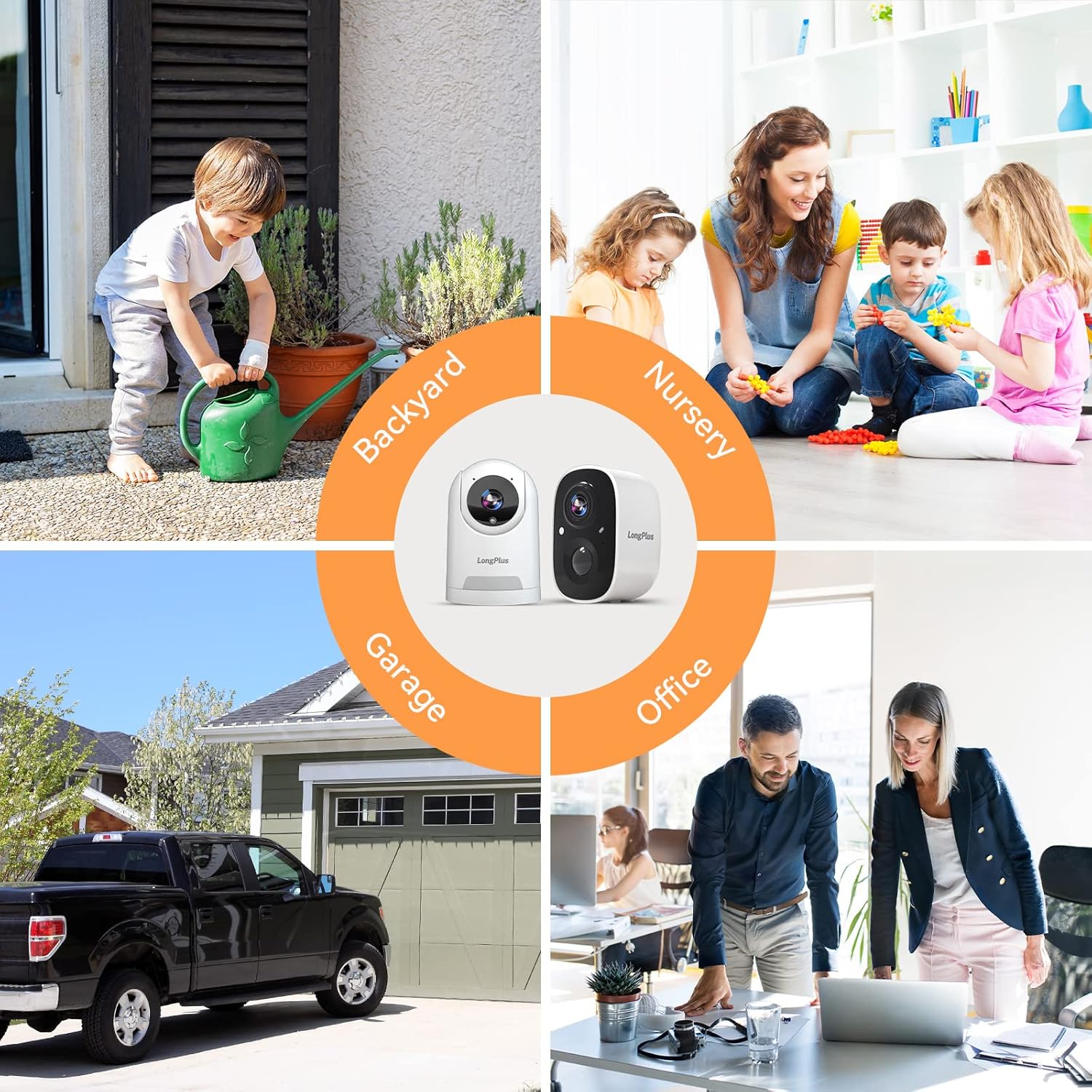
Image 3.2: Versatile Camera Placement. This image illustrates various application scenarios for the LongPlus security cameras, including backyard monitoring, nursery surveillance, garage security, and office monitoring, demonstrating their adaptability for different environments.
4. Einrichtungsanweisungen
Follow these steps to set up your LongPlus Security Cameras:
- Charge the Cameras: Before initial use, fully charge both cameras using the provided power cables.
- Laden Sie die Vicohome-App herunter: Suchen nach "Vicohome" in your smartphone's app store (iOS or Android) and download the application.
- Ein Konto erstellen: Öffnen Sie die Vicohome-App und folgen Sie den Anweisungen auf dem Bildschirm, um ein neues Benutzerkonto zu erstellen.
- Kameras hinzufügen:
- Tippen Sie in der App auf das "+"-Symbol, um ein neues Gerät hinzuzufügen.
- Wählen Sie Ihr Kameramodell aus der Liste aus.
- Follow the app's prompts to connect the camera to your 2.4GHz Wi-Fi network. Ensure your camera is close to your router during the pairing process.
- Scannen Sie den auf Ihrem Telefon angezeigten QR-Code mit der Kameralinse, wenn Sie dazu aufgefordert werden.
- Montieren Sie die Kameras:
- Choose a suitable location for each camera, considering Wi-Fi signal strength and desired viewing-Bereich.
- Use the provided mounting brackets and screw kits to securely attach the cameras to a wall or ceiling.
- Passen Sie den Kamerawinkel für eine optimale Abdeckung an.

Image 4.1: Stable WiFi Connection and Camera Sharing. This image highlights the stable WiFi connection and the ability to share camera access with family members, showing a smartphone displaying camera footage and icons representing shared users.
5. Bedienungsanleitung
Once your cameras are set up, you can utilize their features through the Vicohome app:
- Live View: Open the Vicohome app and select a camera to view its live feed. You can pan and tilt the indoor camera directly from the app.
- Gegenseitiges Gespräch: Während im Leben view, tap the microphone icon to speak through the camera's speaker and listen through its microphone.
- Bewegungserkennungswarnungen: When motion is detected, you will receive instant notifications on your smartphone. Tap the notification to view das aufgezeichnete Ereignis.
- Nachtsichtmodi: In low-light conditions, the camera automatically switches to night vision. You can typically select between infrared (black and white) and full-color night vision in the app settings.
- Siren and Light Activation: In the app, you can manually trigger the siren and flashing white light to deter unwanted visitors.
- Aktivitätszonen: Bestimmte Bereiche innerhalb der Kamera anpassen view for motion detection. This helps reduce false alarms from irrelevant areas.
- Bewegungsverfolgung: For cameras with this feature, enable motion tracking in the app to have the camera automatically follow detected movement.
- Zugriff teilen: You can share camera access with family members or trusted individuals through the app's sharing settings.

Image 5.1: Two-Way Talking. This image depicts the two-way talking functionality, showing a child at a door and a person on a couch interacting via a smartphone app, with speech bubbles indicating communication.

Image 5.2: Human Detection and Tracking. This image demonstrates the human detection and tracking capabilities, showing a person in a balaclava being detected, with an indoor camera tracking movement and an outdoor camera activating a siren alarm.

Image 5.3: 1080P HD Video Quality. This image compares 720P and 1080P video quality, showcasing the superior clarity of 1080P from the LongPlus HD WiFi camera. It also shows a smartphone screen controlling camera pan and tilt.
6. Speicheroptionen
Your LongPlus cameras support two primary storage methods for recorded footage:
- SD-Kartenspeicher: Insert a compatible microSD card (not included) into the camera's designated slot for local storage of recordings. The camera will automatically overwrite older footage, wenn die Karte voll ist.
- Cloud-Speicher: The cameras offer cloud storage options. This includes a free 3-day cycled cloud storage plan, where footage from the last three days is automatically saved and then overwritten. A 30-day free trial of advanced cloud features, including upgraded memory and AI recognition, is also available.

Image 6.1: Cloud and SD Card Storage. This image highlights the flexible storage options, showing icons for cloud and SD card storage, along with a smartphone displaying the LongPlus app download page. It mentions free 3-day rolling cloud storage.
7. Wartung
To ensure optimal performance and longevity of your LongPlus Security Cameras, follow these maintenance guidelines:
- Aufladen der Batterie: Regularly monitor the battery level via the Vicohome app and recharge the cameras as needed. A full charge can last 1 to 5 months depending on usage and settings.
- Reinigung: Periodically clean the camera lenses and housing with a soft, dry cloth to remove dust and smudges. Avoid using harsh chemicals or abrasive materials.
- Firmware-Updates: Keep the Vicohome app and camera firmware updated to benefit from the latest features, security enhancements, and bug fixes. The app will usually notify you of available updates.
- Umweltschutz: While the outdoor camera is IP65 waterproof, extreme weather conditions (e.g., prolonged heavy rain, snow, or direct sunlight) may still impact performance or battery life. Consider additional protective measures if necessary.
8. Fehlerbehebung
If you encounter issues with your LongPlus Security Cameras, refer to the following common problems and solutions:
| Problem | Mögliche Lösung |
|---|---|
| Kamera stellt keine Verbindung zum WLAN her |
|
| Schlechte Videoqualität |
|
| Bewegungserkennung funktioniert nicht oder es gibt zu viele Fehlalarme |
|
| Kurze Akkulaufzeit |
|
| Probleme mit der Zwei-Wege-Audiofunktion |
|

Image 8.1: Instant Mobile Alerts. This image depicts a home security scenario where a LongPlus camera detects an intruder, triggering an instant alert on a smartphone, emphasizing advanced sensor capabilities and immediate action.
9. Spezifikationen
Key technical specifications for the LongPlus Security Cameras (Model X83):
| Besonderheit | Detail |
|---|---|
| Verwendung im Innen- und Außenbereich | Innenbereich, Außenbereich |
| Kompatible Geräte | Smartphone (Vicohome App) |
| Stromquelle | Battery Powered (1 Lithium Ion battery included per camera) |
| Konnektivitätsprotokoll | WLAN (2.4 GHz) |
| Controllertyp | Vicohome-App |
| Montagetyp | Wandhalterung |
| Auflösung der Videoaufnahme | 1080p |
| Farbe | Weiß |
| Anzahl der Artikel | 2 Kameras |
| Technische Daten | 3 x 2 x 2 Zoll (pro Kamera) |
| Artikelgewicht | 1.52 pounds (total for bundle) |
| Videoaufnahmeformat | MP4 |
| Besonderheit | 2-Way Audio, AI Motion Detection, Night Vision, Wireless |
10. Garantie und Support
LongPlus provides a 2-year warranty for this product, ensuring coverage against manufacturing defects. Additionally, lifetime technical support is available to assist you with any inquiries or issues you may encounter during the product's lifespan. For support, please contact LongPlus customer service through the contact information provided on the product packaging or the official LongPlus webWebsite.