
1. Einleitung
Thank you for choosing the Kamon K30 Wireless Earbuds. This manual provides detailed instructions for the proper use, setup, and maintenance of your new earbuds. Please read this manual thoroughly before use to ensure optimal performance and longevity of your device.

Image 1.1: Kamon K30 Wireless Earbuds in their charging case.
The Kamon K30 earbuds feature Bluetooth 5.1 technology for stable connectivity, intuitive touch controls, and a comfortable in-ear design. They are designed to deliver clear stereo sound for various audio activities.
2. Packungsinhalt
Bitte prüfen Sie das Paket auf folgende Artikel:
- 2 x Kamon K30 Wireless Earbuds
- 1 x Kabelloser Ladekoffer
- 1 x USB-C Ladekabel
- 4 x Ohrstöpsel (verschiedene Größen)
- 1 x Benutzerhandbuch
3. Produktüberschreitungview
Familiarize yourself with the components of your Kamon K30 Wireless Earbuds.

Image 3.1: The Kamon K30 earbuds removed from their open charging case, showing the charging contacts.
The earbuds are designed for a secure and comfortable fit. The charging case protects the earbuds and provides additional battery life.
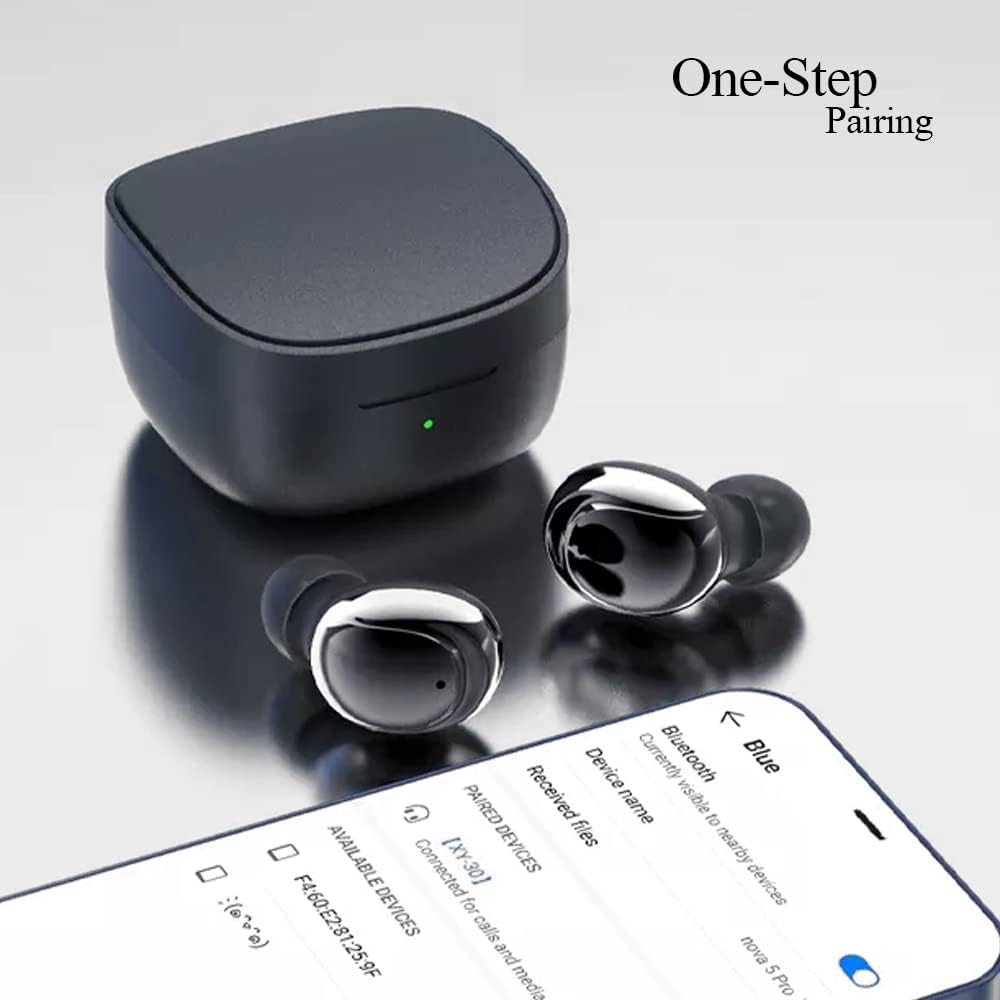
Image 3.2: Internal structure diagram illustrating the components responsible for Hi-Fi stereo sound delivery.
4. Einrichtung
4.1 Aufladen der Ohrhörer und des Ladecase
Vor dem ersten Gebrauch die Ohrhörer und das Ladecase vollständig aufladen.
- Legen Sie die Ohrhörer in das Ladecase. Achten Sie darauf, dass sie richtig sitzen und Kontakt mit den Ladekontakten herstellen.
- Verbinden Sie das USB-C-Ladekabel mit dem Ladeanschluss am Gehäuse und stecken Sie das andere Ende in ein USB-Netzteil (nicht im Lieferumfang enthalten) oder in einen USB-Anschluss Ihres Computers.
- The indicator light on the charging case will show charging status. Once fully charged, the light will change or turn off depending on the model.
- Earbud charging time: Approximately 40 minutes.
- Charging box charging time: Approximately 1 hour.

Image 4.1: The charging case and earbuds, illustrating battery life and charging indicators.
4.2 Koppeln mit einem Gerät
The Kamon K30 earbuds feature one-step auto-pairing for convenience.
- Stellen Sie sicher, dass Bluetooth auf Ihrem Gerät aktiviert ist.
- Öffnen Sie das Ladecase. Die Ohrhörer schalten sich automatisch ein und wechseln in den Kopplungsmodus.
- On your device, search for Bluetooth devices and select "Kamon K30" (or similar name like "XY-30") from the list.
- Sobald die Verbindung hergestellt ist, hören Sie einen Bestätigungston, und die Ohrhörer sind einsatzbereit.

Image 4.2: A smartphone displaying the Bluetooth pairing menu, showing "Kamon K30" as an available device.
The earbuds support Bluetooth 5.1, providing a stable connection up to 33 feet (10 meters) in open outdoor environments.
5. Bedienungsanleitung
5.1 Berührungssteuerung
The Kamon K30 earbuds feature intuitive touch controls on each earbud. Refer to the diagram below for specific functions:

Image 5.1: A visual guide to the touch control functions on the Kamon K30 earbuds.
- Abspielen/Pause: One-click on the left or right earbud.
- Anruf annehmen/auflegen: One-click on the left or right earbud.
- Anruf ablehnen: Long press on the left or right earbud.
- Lautstärke erhöhen: Triple-click the Left earbud.
- Lautstärke runter: Triple-click the Right earbud.
- Vorheriges Lied: Double-click the Left earbud.
- Nächstes Lied: Double-click the Right earbud.
- Sprachassistenten aufrufen: Long press on the left or right earbud for 3 seconds.
Note: The touch sensors are sensitive. Apply a light touch for control. Avoid forceful tapping.
5.2 Einzelohrhörer-Modus
You can use either earbud independently:
- Nehmen Sie einen Ohrhörer aus dem Ladeetui.
- Schließen Sie den Deckel des Ladegehäuses.
- The single earbud will automatically connect to your paired device.
6. Wartung
Durch sachgemäße Pflege wird die Langlebigkeit und optimale Leistung Ihrer Ohrhörer gewährleistet.
- Reinigung: Regularly clean the earbuds and charging case with a soft, dry, lint-free cloth. Do not use harsh chemicals or abrasive materials. Gently clean the charging contacts on both the earbuds and the case to ensure proper charging.
- Lagerung: Bewahren Sie die Ohrhörer bei Nichtgebrauch im Ladecase auf, um sie vor Staub und Beschädigungen zu schützen. Lagern Sie das Case an einem kühlen, trockenen Ort, geschützt vor direkter Sonneneinstrahlung und extremen Temperaturen.
- Wasserbeständigkeit: The earbuds are waterproof (IPX rating not specified, but generally means splash/sweat resistant). Avoid submerging them in water or exposing them to heavy rain. Dry them thoroughly if they get wet.
- Batteriepflege: Um die Akkulaufzeit zu verlängern, vermeiden Sie häufiges vollständiges Entladen der Ohrhörer und des Gehäuses. Laden Sie sie regelmäßig auf, auch wenn Sie sie nicht ständig verwenden.
7. Fehlerbehebung
If you encounter issues with your Kamon K30 Wireless Earbuds, refer to the following common solutions:
| Problem | Lösung |
|---|---|
| Die Ohrhörer lassen sich nicht mit dem Gerät koppeln. |
|
| Nur ein Ohrhörer funktioniert. |
|
| Ohrhörer werden nicht aufgeladen. |
|
| Schlechte Tonqualität oder zeitweise Verbindungsabbrüche. |
|
8. Spezifikationen
Detaillierte technische Spezifikationen für die kabellosen Ohrhörer Kamon K30:
- Modellname: K30 (XY-30)
- Marke: Kamon
- Konnektivität: Kabellos (Bluetooth 5.1)
- Bluetooth Profiles: HSP, HFP, A2DP, AVRCP
- Übertragungsdistanz: Up to 33 feet (10 meters) in open outdoor environments
- Akkukapazität des Kopfhörers: 35 mAh
- Ladekoffer Batteriekapazität: 350 mAh
- Hörzeit: 3-5 Stunden
- Ladezeit für Kopfhörer: Ungefähr 40 Minuten
- Ladezeit der Ladebox: Ungefähr 1 Stunde
- Material der Hupe: Graphene True Copper Ring Horn
- Kontrollmethode: Berühren
- Material: ABS, Electronic Component
- Artikelgewicht: 0.9 Unzen (Ohrhörer und Ladecase zusammen)
- Paketabmessungen: 2.53 x 2.5 x 2 Zoll
- Farbe: Purple (as per this variant)
- Besondere Merkmale: Lightweight, Microphone Included, Rechargeable Battery, Surround Sound, Sweatproof (Waterproof)

Image 8.1: Dimensional drawing of the Kamon K30 earbuds and their charging case.
9. Garantie und Support
For warranty information or technical support, please refer to the contact details provided on the product packaging or the official Kamon webBewahren Sie Ihren Kaufbeleg als Kaufnachweis für eventuelle Garantieansprüche auf.

Image 9.1: A user wearing a Kamon K30 earbud, demonstrating its in-ear fit.