
1. Einleitung
Thank you for choosing the EDYELL A1 Truly Wireless Bluetooth Earbuds. This manual provides essential information for setting up, operating, and maintaining your earbuds to ensure optimal performance and longevity. Please read this manual thoroughly before use.

Image 1.1: EDYELL A1 Earbuds and Charging Case
2. Packungsinhalt
Überprüfen Sie, ob alle Artikel in Ihrem Paket vorhanden sind:
- 1 Pair of EDYELL A1 Earbuds
- 1 Ladekoffer
- 1 Typ-C-Ladekabel
- 2 Pairs of Earplugs (different sizes)
- 1 Benutzerhandbuch
3. Einrichtung
3.1. Aufladen der Ohrhörer und des Ladecase
Before first use, fully charge the earbuds and charging case. Connect the provided Type-C charging cable to the charging port on the case and a compatible USB power source. The LED indicators on the case will show charging status. A full charge provides up to 48 hours of total music playback with the charging case.

Abbildung 3.1: Laden und Akkulaufzeit im Überblickview
3.2. Kopplung mit einem Bluetooth-Gerät
- Stellen Sie sicher, dass die Ohrhörer aufgeladen sind.
- Öffnen Sie das Ladeetui. Die Ohrhörer wechseln automatisch in den Kopplungsmodus.
- Aktivieren Sie Bluetooth auf Ihrem Gerät (Smartphone, Tablet usw.).
- Suchen nach Verfügbare Bluetooth-Geräte und wählen Sie "A1" aus der Liste aus.
- Sobald die Verbindung hergestellt ist, koppeln sich die Ohrhörer beim Herausnehmen aus dem Ladecase automatisch mit dem zuletzt verbundenen Gerät.

Image 3.2: Fast Automatic Pairing Technology
3.3. Einsetzen der Ohrhörer
For optimal sound quality and comfort, choose the correct size earplugs and ensure a secure fit.
- Select the earplug size that best fits your ear canal.
- Führen Sie den Ohrhörer vorsichtig in Ihr Ohr ein.
- Rotate and adjust the earbud until it feels comfortable and snug, creating a good seal.

Image 3.3: Comfortable Fit with 4 Sizes
4. Bedienungsanleitung
4.1. Tippen Sie auf Steuerung
The EDYELL A1 earbuds feature touch controls for various functions. Specific touch gestures may vary; refer to the quick start guide included in your package for detailed control mapping.
- Abspielen/Pause: Tippen Sie einmal auf einen der Ohrhörer.
- Nächster Titel: Doppeltippen Sie auf den rechten Ohrhörer.
- Vorheriges Lied: Doppeltippen Sie auf den linken Ohrhörer.
- Anruf annehmen/beenden: Tippen Sie einmal auf einen der Ohrhörer.
- Anruf ablehnen: Drücken und halten Sie einen der Ohrhörer.
- Sprachassistenten aktivieren: Dreimaliges Tippen auf einen der Ohrhörer.
- ANC/Transparenzmodus: Press and hold the left earbud (typically 2 seconds) to cycle through modes.
4.2. Aktive Geräuschunterdrückung (ANC)
The earbuds feature up to 35dB Active Noise Cancellation to reduce ambient sound. Activate or deactivate ANC using the touch controls as described above. This feature is designed to enhance your listening experience in noisy environments.

Abbildung 4.1: Aktive Geräuschunterdrückung in Aktion
4.3. Funktionen aufrufen
Equipped with 4 built-in microphones and CVC8.0 technology, the earbuds provide clear call quality by reducing background noise and enhancing your voice.
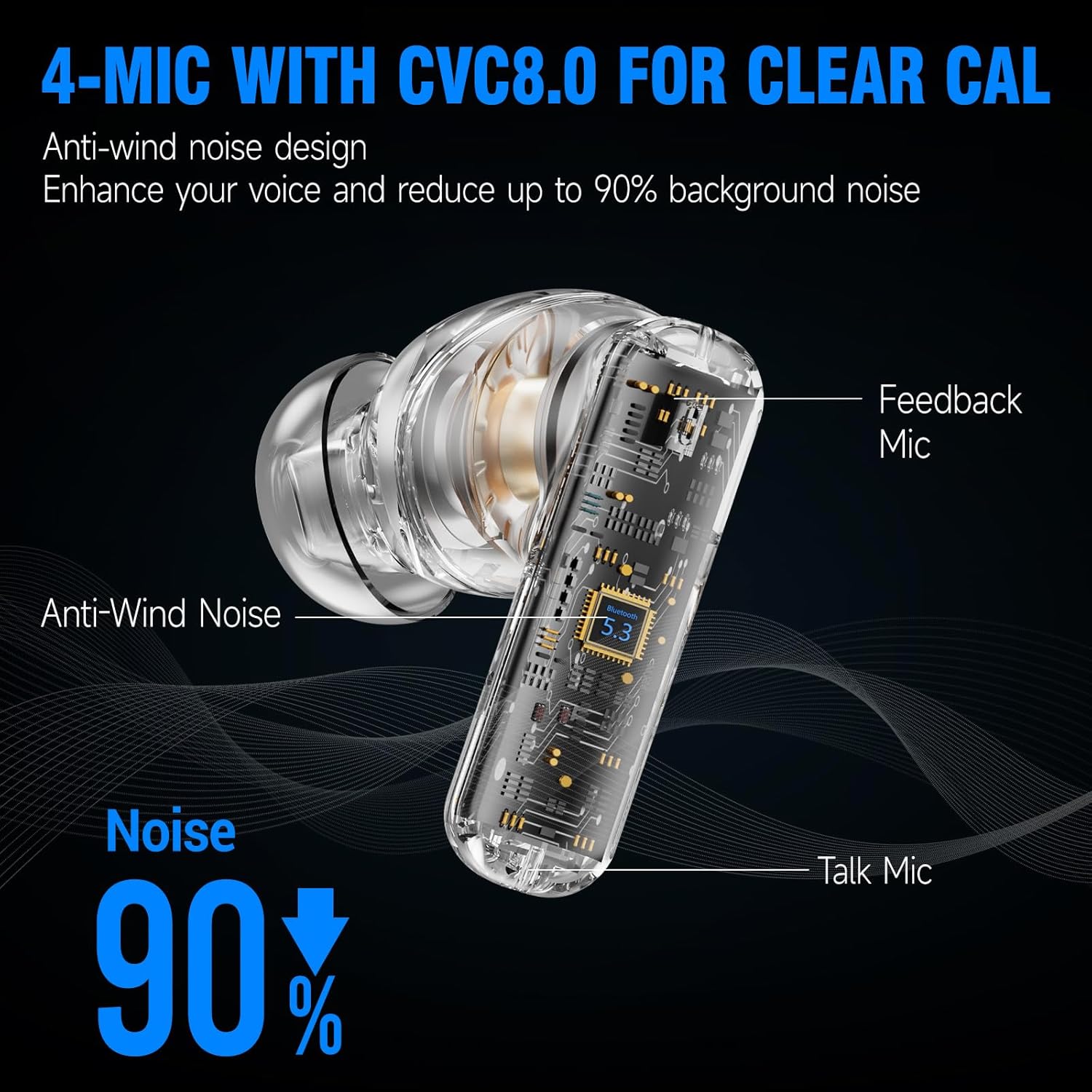
Image 4.2: 4-Mic with CVC8.0 for Clear Calls
4.4. Klangerlebnis
The EDYELL A1 earbuds feature 13mm Titanized Diaphragm Dynamic Drivers, designed to deliver HiFi stereo sound with deep bass and clear treble.

Image 4.3: 13mm Driver Delivers HiFi Stereo Sound
5. Wartung
5.1. Reinigung
Regularly clean your earbuds and charging case to maintain performance and hygiene. Use a soft, dry, lint-free cloth. Do not use abrasive cleaners or solvents. For earplugs, remove them and clean with mild soap and water, then dry thoroughly before reattaching.
5.2. Wasserbeständigkeit
Die Ohrhörer sind nach IPX5 wasserbeständig, das heißt, sie halten Spritzwasser und Schweiß stand. Sie sind jedoch nicht zum Eintauchen in Wasser geeignet. Vermeiden Sie starken Regen und Schwimmen.

Image 5.1: IPX5 Water Resistance
6. Fehlerbehebung
| Ausgabe | Mögliche Lösung |
|---|---|
| Ohrhörer lassen sich nicht koppeln | Stellen Sie sicher, dass Ihre Ohrhörer geladen sind. Schalten Sie Bluetooth auf Ihrem Gerät aus und wieder ein. Entkoppeln Sie das Gerät in den Bluetooth-Einstellungen und koppeln Sie es erneut. |
| Kein Ton oder geringe Lautstärke | Check device volume. Ensure earbuds are properly connected. Clean earbud mesh if blocked. |
| Intermittierende Verbindung | Ensure no obstructions between earbuds and device. Keep device within Bluetooth range (approx. 10 meters). Avoid strong electromagnetic interference. |
| Mikrofon funktioniert nicht | Ensure earbuds are selected as the audio input device. Clean microphone ports. |
| ANC nicht effektiv | Ensure earbuds are properly seated in your ears with a good seal. Verify ANC is activated. |
7. Spezifikationen
| Besonderheit | Detail |
|---|---|
| Modellname | FM-Earbuds-A1 |
| Lärmschutz | Aktive Geräuschunterdrückung (bis zu 35 dB) |
| Konnektivitätstechnologie | Bluetooth 5.3 |
| Audiotreibertyp | 13 mm dynamischer Treiber |
| Akkulaufzeit | Bis zu 48 Stunden (mit Ladeetui) |
| Ladeanschluss | Typ C |
| Mikrofone | 4-built-in microphones with CVC8.0 |
| Wasserbeständigkeit | IPX5 |
| Steuerungstyp | Touch-Steuerung |
| Material | Plastik |
| Artikelgewicht | 100 Gramm |
| Technische Daten | 11 x 11 x 4 cm |
| Zusammensetzung der Batteriezellen | Lithium-Ionen |
| Ursprungsland | China |
8. Garantie und Support
The EDYELL A1 Earbuds come with a 12-month EDYELL India Warranty. For any quality problems or warranty claims, please contact customer support via Amazon or directly using the contact information below.
Kundenservice:
- E-Mail: support@fenman.in
- Telefon: +91 8882786235