
1. Einleitung
Thank you for choosing the Devoko Electric Standing Desk. This manual provides essential information for the safe assembly, operation, and maintenance of your new height-adjustable desk. Please read these instructions carefully before use and retain them for future reference.

Image: Devoko Electric Standing Desk 140x80cm. This image displays the overall design of the black electric standing desk with its spacious desktop and sturdy frame.
2. Sicherheitshinweise
- This desk has a maximum load capacity of 80 kgDieses Gewichtslimit darf nicht überschritten werden.
- For stability, ensure the desk is placed on a level and even surface.
- Avoid overloading the desk, especially on one side, to maintain balance.
- Der Schreibtisch verfügt über Antikollisionstechnologie to prevent accidents. However, always be aware of your surroundings during height adjustments.
- Always supervise children when the desk is in use or being adjusted to prevent accidental touching and potential injuries.
- Keep hands and objects clear of moving parts during height adjustments.
3. Packungsinhalt
Bitte prüfen Sie vor der Montage, ob alle Bauteile vorhanden und unbeschädigt sind. Sollten Teile fehlen oder beschädigt sein, wenden Sie sich bitte an den Kundendienst.
- Desktop (140x80cm)
- Elektrische Hubsäulen (Beine)
- Desk Frame Components
- Bedienfeld mit LED-Anzeige
- Netzteil und Kabel
- 2 x Haken
- 1 x Kabelmanagementfach
- Montagezubehör (Schrauben, Werkzeuge)
- Bedienungsanleitung
4. Montageanleitung
Für dieses Produkt ist eine Montage erforderlich. Es wird empfohlen, dass zwei Personen Führen Sie die Montage so durch, dass Sicherheit und einfache Installation gewährleistet sind.
- Komponenten auspacken: Nehmen Sie alle Teile vorsichtig aus der Verpackung und legen Sie sie auf eine saubere, weiche Unterlage, um Kratzer zu vermeiden.
- Schreibtischgestell zusammenbauen: Attach the crossbars to the lifting columns. Ensure all screws are tightened securely.
- Antriebswelle anschließen: Insert the drive shaft to connect the two lifting columns. Ensure it is properly aligned and secured for synchronized movement.
- Füße anbringen: Secure the stabilizing footrests to the bottom of the lifting columns. The leg width is 80x50mm, and the rounded spacers on the bottom are 8cm in diameter. Silent wheels are also available for replacement if desired.

Image: Sturdy Steel Construction. This image highlights the robust steel frame of the desk, showing the dimensions of the leg (80x50mm) and the base (6cm height, 70cm length), emphasizing stability.
- Desktop einbinden: Setzen Sie die Tischplatte vorsichtig auf den zusammengebauten Rahmen und befestigen Sie sie mit den mitgelieferten Schrauben.
- Zubehör installieren: Attach the 2 hooks and the cable management tray as desired. Utilize the wire collecting hole for cable routing.

Image: Desk Features. This image illustrates the wire collecting hole for cable organization, the two hooks for hanging items, the cable management tray for tidiness, and the integrated USB charging port.
- Systemsteuerung installieren: Connect the control panel to the desk frame. It is recommended to fix the controller at the end of the assembly process to avoid damage during movement.
- Strom anschließen: Plug the power adapter into the desk and then into a wall outlet.
5. Bedienungsanleitung
Your Devoko Electric Standing Desk is equipped with a smart control panel for easy height adjustment and personalized settings.
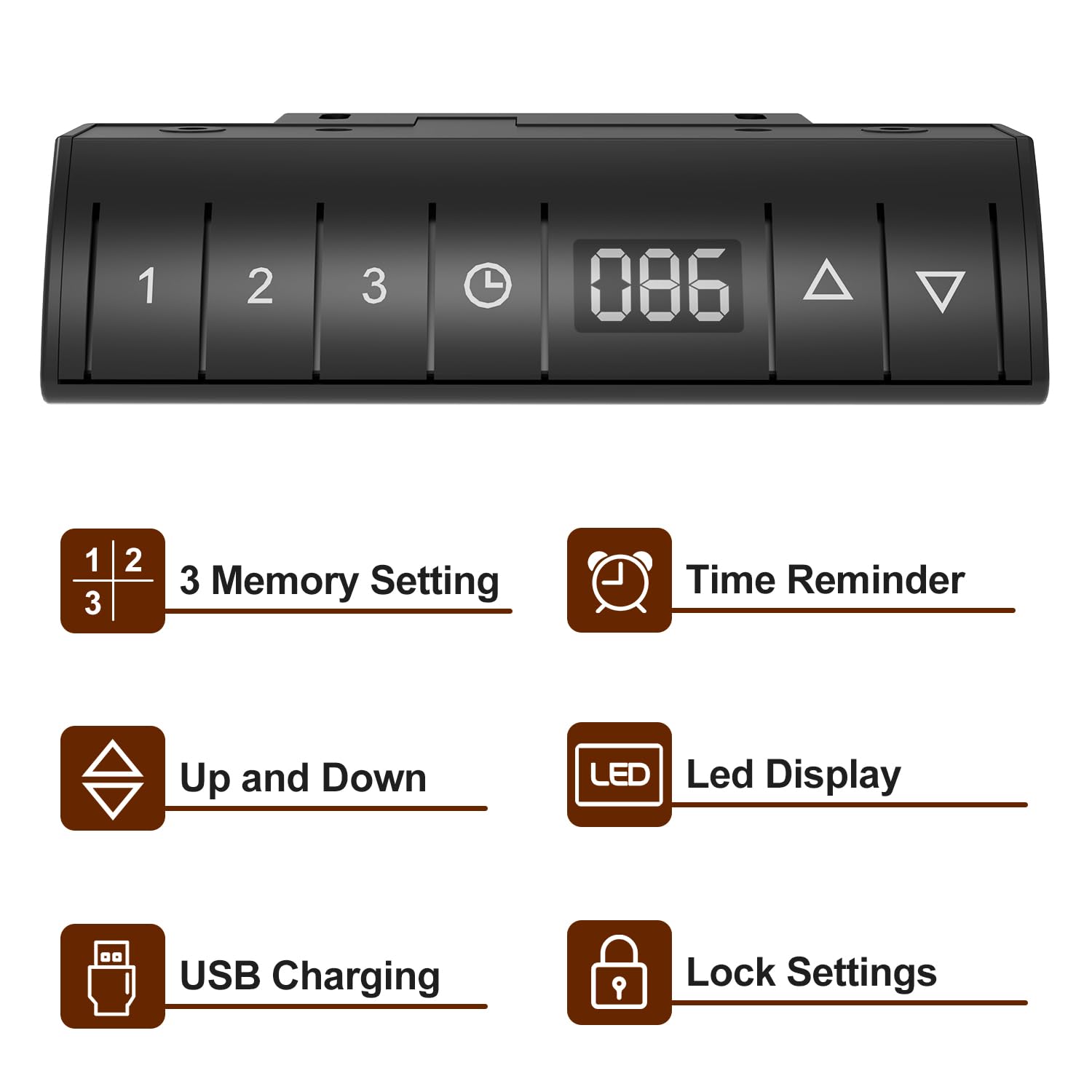
Image: Devoko Desk Control Panel. This image shows the control panel with buttons for 3 memory settings, time reminder, up/down adjustment, LED display, USB charging port, and lock settings.
- Höhenverstellung: Verwenden Sie die Nach oben (▲) Und Runter (▼) buttons on the control panel to adjust the desk to your desired height. The current height will be displayed on the LED-Anzeige.
- Memory Settings (1, 2, 3):
- Adjust the desk to a desired height.
- Drücken Sie die Speicher (M) Drücken Sie dann eine der nummerierten Tasten (1, 2 oder 3) um die aktuelle Höhe zu speichern.
- Um eine gespeicherte Höhe abzurufen, drücken Sie einfach die entsprechende nummerierte Taste.
- Time Reminder: Set reminders for standing or sitting intervals (0.5, 1.0, 1.5, 2.0 hours) to promote healthier work habits. Consult the full manual for specific programming steps.
- USB-Aufladung: The integrated USB port allows convenient charging of your devices.
- Sperreinstellung: Activate the lock function to prevent accidental height adjustments, especially useful in households with children. Consult the full manual for activation/deactivation steps.
- Antikollisionstechnologie: The desk is designed to stop movement if it encounters an obstruction during adjustment.

Image: Anti-collision Technology and Stabilizing Footrests. This image demonstrates the anti-collision feature, where the desk stops if an object is detected, and also shows the design of the stabilizing footrests.
6. Wartung
- Reinigung: Wischen Sie die Schreibtischoberfläche und den Rahmen mit einem weichen, fusselfreien Tuch ab.amp Tuch. Vermeiden Sie aggressive Chemikalien oder Scheuermittel.
- Kabelmanagement: Regularly check and organize cables to prevent tangles and damage. Use the provided cable management tray and stickable storage design to keep cables tidy.
- Befestigungsmaterial: Überprüfen Sie regelmäßig alle Schrauben und Befestigungselemente, um sicherzustellen, dass sie fest sitzen. Ziehen Sie sie gegebenenfalls nach.
- Motorpflege: Do not attempt to open or service the motor or control unit. Refer to qualified personnel for any repairs.
7. Fehlerbehebung
| Problem | Mögliche Ursache | Lösung |
|---|---|---|
| Der Schreibtisch bewegt sich nicht. | Stromkabel getrennt; Überlastung; Motorfehler | Überprüfen Sie die Stromanschlüsse; Reduzieren Sie die Belastung auf dem Schreibtisch; Ziehen Sie den Stecker für 30 Sekunden und stecken Sie ihn wieder ein, um das System zurückzusetzen. |
| Ungleichmäßige Höheneinstellung | Drive shaft not properly connected; Obstruction | Ensure drive shaft is securely installed; Check for obstructions under the desk. |
| Bedienfeld reagiert nicht | Lock function activated; Cable connection issue | Deactivate lock function; Check control panel cable connection. |
| Der Antikollisionsschutz wird häufig aktiviert. | Sensitivity too high; Obstruction | Check for objects near the desk's path; Refer to the full manual for anti-collision sensitivity adjustment. |
8. Spezifikationen
- Marke: Devoko
- Modell: Electric Standing Desk 140x80cm
- Produktabmessungen (T x B x H): 140D x 80W x 116H Centimeters (Maximum Height)
- Mindestgröße: 72 Zentimeter
- Maximale Höhe: 116 Zentimeter
- Maximale Tragfähigkeit: 80 kg
- Grundmaterial: Legierter Stahl
- Obermaterial: Holz (laminierte Oberfläche)
- Farbe: Schwarz
- Hebemechanismus: Elektrisch
- Besondere Merkmale: Adjustable Height, Built-In USB Outlet, Electric, Ergonomic, Hooks, 3 Memory Settings, Time Reminder, LED Display, Lock Setting, Anti-Collision Technology, Cable Management Tray.
- Montage erforderlich: Ja (Empfohlen für 2 Personen)
9. Garantie und Support
This Devoko Electric Standing Desk comes with a Eingeschränkte Garantie. For specific details regarding warranty coverage, terms, and conditions, please refer to the warranty card included with your product or contact Devoko customer support.
For technical assistance, troubleshooting, or to inquire about replacement parts, please contact Devoko customer service through the retailer where the product was purchased or via the official Devoko webWebsite.