
1. Einleitung
The M-VAVE Chocolate-Plus is a compact and versatile wireless MIDI pedal designed to provide musicians with advanced control over their digital audio workstations (DAWs), effects pedals, and amp modelers. This portable device offers seamless integration with Windows, Mac, iOS, and Android platforms, enhancing creative freedom in studio and live performance settings.
Its durable and lightweight design, combined with a long-lasting rechargeable battery, makes it an ideal companion for any musician seeking to streamline their setup and expand their control capabilities without the clutter of cables.

Bild: Ein schräger view of the M-VAVE Chocolate-Plus Wireless MIDI Pedal, showcasing its compact design and footswitches.
2. Produktüberschreitungview
2.1. Packungsinhalt
Prüfen Sie beim Auspacken, ob alle Artikel vorhanden sind:
- M-VAVE Chocolate-Plus Wireless MIDI Pedal
- USB-Kabel Typ C.
- Bedienungsanleitung

Image: M-VAVE Chocolate-Plus package contents, including the pedal, user manual, USB-C cable, and product box.
2.2. Gerätelayout
Familiarize yourself with the main components of the Chocolate-Plus pedal:
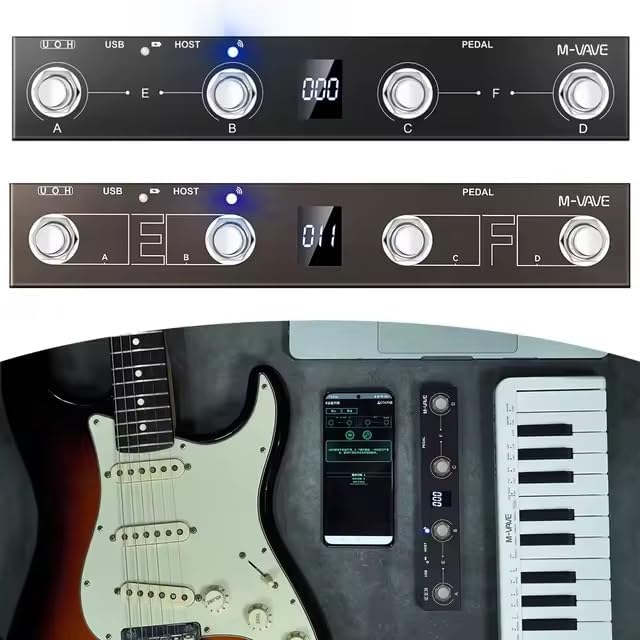
Bild: Oben view of the M-VAVE Chocolate-Plus pedal, highlighting the four footswitches (A, B, C, D), the central digital display, and LED indicators for USB and HOST connections.
- Fußschalter (A, B, C, D): Four programmable footswitches for triggering commands.
- Digitaler Bildschirm: Provides instant visual feedback on current settings, bank numbers, and other operational information.
- USB-Anschluss: For wired connection to computers and charging.
- HOST-Port: For connecting and controlling other MIDI devices.
- Expression-Pedal-Eingang: For connecting an external expression pedal for dynamic control.
- Stromschalter: Zum Ein- und Ausschalten des Geräts.
3. Einrichtung
3.1. Aufladen des Geräts
Before initial use, fully charge the Chocolate-Plus pedal. Connect the provided USB Type-C cable to the pedal's USB port and to a standard USB power adapter (not included) or a computer's USB port.
- Ladeanzeige: The LED indicator will glow Rot während des Ladevorgangs.
- Vollladeanzeige: The LED indicator will turn Blau wenn der Ladevorgang abgeschlossen ist.
- Eine vollständige Aufladung dauert etwa 2.5 Stunden und ermöglicht eine ununterbrochene Nutzung von bis zu 12 Stunden.
3.2. Ein-/Ausschalten
Suchen Sie den Netzschalter an der Seite des Pedals. Schieben Sie ihn in die Position „EIN“, um das Gerät einzuschalten. Schieben Sie ihn in die Position „AUS“, um es auszuschalten.
3.3. App Installation (for Wireless Control)
For wireless control via smartphone or tablet, download the official M-VAVE app from your device's app store (e.g., Apple App Store for iOS, Google Play Store for Android). Follow the in-app instructions for pairing and configuration.
3.4. Verbindung zu Geräten herstellen
3.4.1. Wireless Connection (Bluetooth MIDI)
- Ensure the Chocolate-Plus pedal is powered on.
- Open the M-VAVE app on your iOS/Android device.
- Navigate to the connection or device pairing section within the app.
- Select "Chocolate-Plus" from the list of available devices to establish a Bluetooth MIDI connection.
- The wireless connection LED indicator will blink when searching and become solid when connected.
3.4.2. Wired Connection (USB MIDI)
- Connect the USB Type-C cable from the Chocolate-Plus pedal to a USB port on your Windows or Mac computer.
- The pedal will be recognized as a standard MIDI device.
- Open your DAW or music software and select "M-VAVE Chocolate-Plus" as a MIDI input device in the software's preferences or settings.
3.4.3. MIDI Host Connection
The integrated MIDI host port allows you to connect and control other MIDI-compatible hardware devices directly from the Chocolate-Plus pedal. Refer to the specific MIDI device's manual for connection and configuration details.
4. Operating the Chocolate-Plus
4.1. Funktionen des Fußschalters
The four footswitches (A, B, C, D) are highly customizable. Each can be programmed to send specific MIDI messages or trigger keyboard shortcuts.
- Individual Triggers: Pressing a single footswitch (A, B, C, or D) will activate its assigned function.
- Combination Triggers: Pressing two adjacent footswitches simultaneously (A+B or C+D) can activate a second set of functions, effectively doubling your control options. This is useful for complex actions like activating a looper while changing an effect bank.

Bild: Nahaufnahme view of the M-VAVE Chocolate-Plus pedal's footswitches and digital display, illustrating the control interface.
4.2. Digitalanzeige
The central digital display provides real-time feedback on the pedal's status, including:
- Current bank number.
- Active preset or mode.
- Verbindungsstatus.
4.3. Customization and Bank Switching
The Chocolate-Plus offers extensive customization options through its dedicated app or software interface:
- Advanced Customization Mode: Program each footswitch and combination trigger to send specific MIDI CC messages, Program Change messages, or keyboard shortcuts.
- Bankwechsel: Organize your customized presets and effect configurations into different banks. This allows for quick and organized access to various setups for different songs, sets, or projects.
- Keyboard Shortcut Mapping: Map specific keyboard commands (e.g., for DAW functions) to the footswitches, providing physical control over software actions.
4.4. Expression Pedal Input
Connect an external expression pedal (not included) to the dedicated input jack to gain dynamic, continuous control over parameters such as volume, wah, or other effects within your software or connected MIDI devices.
5. Wartung
To ensure the longevity and optimal performance of your M-VAVE Chocolate-Plus pedal, follow these maintenance guidelines:
- Reinigung: Use a soft, dry cloth to wipe the pedal's surface. Avoid abrasive cleaners, solvents, or excessive moisture.
- Lagerung: Lagern Sie das Gerät an einem kühlen, trockenen Ort, geschützt vor direkter Sonneneinstrahlung, extremen Temperaturen und hoher Luftfeuchtigkeit.
- Batteriepflege:
- Vermeiden Sie häufiges vollständiges Entladen des Akkus.
- Bei längerer Lagerung sollte der Akku alle paar Monate auf etwa 50 % aufgeladen werden.
- Setzen Sie den Akku keiner extremen Hitze oder Kälte aus.
- Vermeiden Sie physischen Schaden: Protect the footswitches and display from heavy impacts.
6. Fehlerbehebung
If you encounter issues with your Chocolate-Plus pedal, refer to the following common problems and solutions:
- Gerät lässt sich nicht einschalten:
- Ensure the battery is charged. Connect the USB-C cable and check the charging indicator.
- Vergewissern Sie sich, dass sich der Netzschalter in der Position „EIN“ befindet.
- Keine drahtlose Verbindung:
- Stellen Sie sicher, dass Bluetooth auf Ihrem Smartphone/Tablet aktiviert ist.
- Ensure the M-VAVE app is open and attempting to connect.
- Restart both the pedal and your mobile device.
- Check if the pedal is already connected to another device.
- No Wired Connection (USB MIDI):
- Ensure the USB-C cable is securely connected to both the pedal and your computer.
- Probieren Sie einen anderen USB-Anschluss an Ihrem Computer aus.
- Verify that the Chocolate-Plus is selected as a MIDI input device in your DAW/software settings.
- Versuchen Sie es mit einem anderen USB-C-Kabel.
- Fußschalter reagieren nicht:
- Check the digital display to ensure the pedal is in the correct operating mode or bank.
- Verify that the footswitches are correctly mapped within the M-VAVE app or your DAW.
- Ensure the pedal is properly connected (wired or wireless) to your control device.
- Difficulty with Configuration:
- Refer to the detailed instructions within the M-VAVE app for advanced customization.
- Consult online resources or the manufacturer's support for specific software integration guides.
7. Spezifikationen
| Marke | M-VAVE |
| Modell | Chocolate-Plus |
| Konnektivitätstechnologie | USB, Wireless (Bluetooth MIDI) |
| Besondere Merkmale | Digital display, Portable, Wireless connection |
| Abmessungen (L x B x H) | 230 mm x 40 mm x 40 mm |
| Gewicht | 250 Gramm |
| Kompatible Geräte | Computer (desktop/laptop), Smartphone, Tablet |
| Compatible Software/OS | Windows, Mac, iOS, Android |
| Steuerungstyp | Buttons and pedal controller |
| Hardware-Schnittstelle | USB, USB 2.0 |
| Kontrollmethode | Anwendung |
| Akkulaufzeit | Bis zu 12 Stunden |
| Ladezeit | Ca. 2.5 Stunden (über USB Typ-C) |
8. Garantie und Support
8.1. Eingeschränkte Garantie
The M-VAVE Chocolate-Plus pedal comes with a limited warranty. Please refer to the manufacturer's official website or the warranty card included in your package for specific terms and conditions regarding warranty coverage and duration.
8.2. Kundendienst
For further assistance, technical support, or inquiries not covered in this manual, please visit the official M-VAVE webSie können die Website besuchen oder sich an den Kundendienst wenden. Die Kontaktdaten finden Sie in der Regel auf der Produktverpackung oder beim Hersteller. webWebsite.