
Einführung
Thank you for choosing the Cuifati Mini Body Camera. This manual provides detailed instructions for the proper use, setup, and maintenance of your device. Please read this manual thoroughly before operating the camera to ensure optimal performance and longevity.
Packungsinhalt
- 1 x Wearable Camera
- 1 x Tragetasche
- 1 x Benutzerhandbuch
- 1 x Schlüsselband.
- 1 x Back Shell Bracket
- 1 x Stativ
- 1 x USB-Kabel
- 1 x Reinigungstuch

Figure 1: Cuifati Mini Body Camera and included accessories.

Abbildung 2: Beispielanwendung mit mehreren Szenarienamples for the body camera.
Produkt überview
Familiarize yourself with the components and controls of your Cuifati Mini Body Camera.
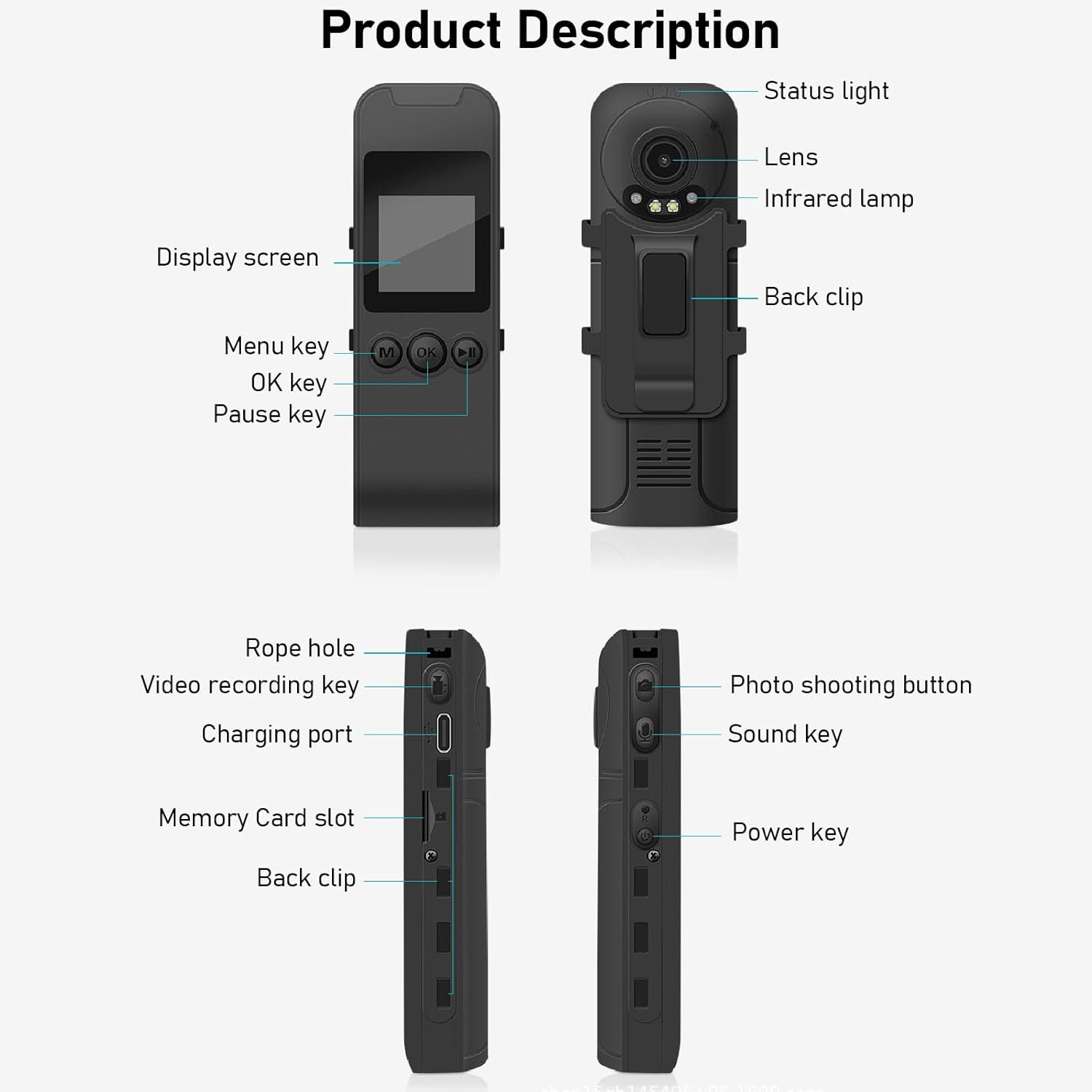
Figure 3: Labeled components of the Cuifati Mini Body Camera.
- Statusleuchte: Indicates device status (e.g., recording, charging).
- Linse: Hauptkameraobjektiv für Video- und Fotoaufnahmen.
- Infrarot Lamp: Sorgt für Beleuchtung bei Nachtsicht.
- Rückenclip: Zum Befestigen der Kamera an Kleidung oder anderen Oberflächen.
- Bildschirm: 1.3-Zoll-LCD für Live-Übertragung view, Wiedergabe und Menünavigation.
- Menütaste (M): Greift auf die Geräteeinstellungen zu.
- OK-Taste: Confirms selections or starts/stops functions.
- Pause-Taste: Unterbricht die Wiedergabe oder Aufnahme.
- Seilloch: Befestigungspunkt für das Schlüsselband.
- Video Recording Key: Startet und beendet die Videoaufnahme.
- Ladeanschluss (Typ C): Zum Aufladen des Geräts und zum Anschluss an einen Computer.
- Speicherkartensteckplatz: Legen Sie eine microSD-Karte zum Speichern ein.
- Photo Shooting Button: Erstellt Standbilder.
- Klangschlüssel: Controls audio recording.
- Kraftschlüssel: Schaltet das Gerät ein oder aus.
Aufstellen
1. Laden des Akkus
Before first use, fully charge the camera's built-in lithium-ion battery. Connect the camera to a power source using the provided Type-C USB cable. The status light will indicate charging status. A full charge provides approximately 20 hours of work time and 10 hours of video recording.
Figure 4: Built-in 1200mAh battery for extended use.
2. Einlegen einer Speicherkarte
The camera supports up to a 256GB memory card (not included). Locate the memory card slot on the side of the camera. Gently insert the microSD card with the gold contacts facing down until it clicks into place. To remove, push the card in slightly until it springs out.

Figure 5: Memory card slot for storage expansion.
Bedienungsanleitung
1. Ein-/Ausschalten
- So schalten Sie das Gerät ein: Press and hold the Power Key until the display screen illuminates.
- So schalten Sie das Gerät aus: Press and hold the Power Key until the device shuts down.
2. Videoaufnahme
The camera records in 1440P HD at 30 frames per second with a 120° wide-angle lens and infrared night vision.
- Aufnahme starten: Press the Video Recording Key. The status light will change, and a recording indicator will appear on the screen.
- So stoppen Sie die Aufnahme: Press the Video Recording Key again.
- Loop-Aufnahme: Die Kamera unterstützt Loop-Aufnahme und überschreibt dabei automatisch die älteste Aufnahme. files wenn die Speicherkarte voll ist.
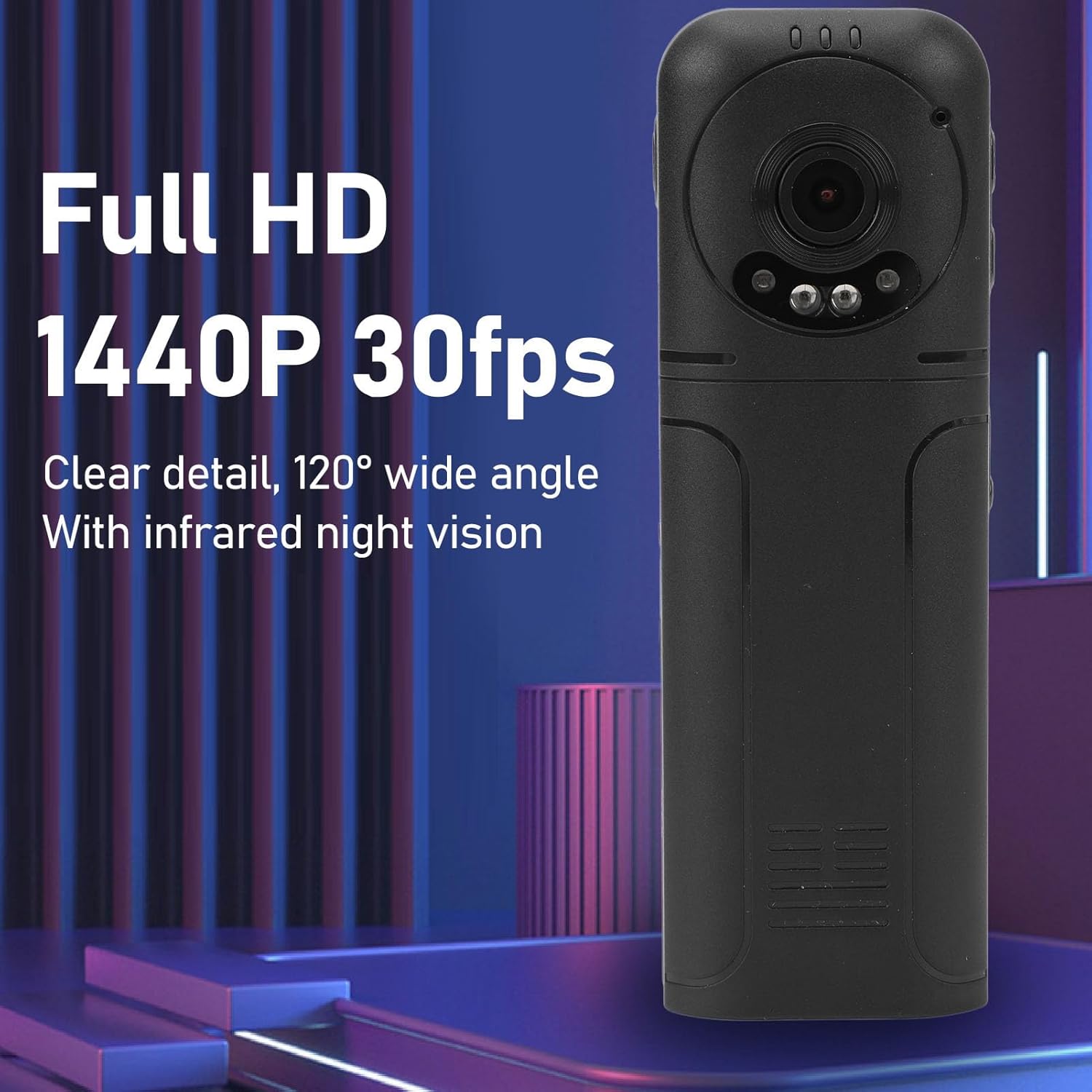
Figure 6: 1440P HD video recording with night vision.
3. Fotografieren
- Ein Foto machen: In standby mode, press the Photo Shooting Button.
4. Audioaufnahme
- To Start Audio Recording: Press the Sound Key.
- To Stop Audio Recording: Press the Sound Key again.

Figure 7: Audio recording functionality.
5. Wiedergabe und File Management
The 1.3-inch LCD screen supports live playback, browsing, and pausing of videos, photos, and recordings directly on the device.

Figure 8: 1.3-inch color screen for on-device playback.
- Wiedergabe auf dem Gerät: Use the Menu, OK, and Pause keys to navigate and play files auf dem Bildschirm.
- Anschließen an den Computer: Connect the camera to a computer via the Type-C USB cable to transfer, view, or delete files.
- OTG-Funktion: If your mobile phone supports OTG, you can connect the camera directly to your phone for playback and file Management.
Wartung
1. Reinigung
- Use the provided cleaning cloth or a soft, dry cloth to wipe the camera body and lens.
- Verwenden Sie keine flüssigen Reinigungs- oder Lösungsmittel, da diese das Gerät beschädigen können.
2. Speicherung
- Bewahren Sie die Kamera an einem kühlen, trockenen Ort fern von direkter Sonneneinstrahlung und extremen Temperaturen auf.
- Remove the memory card if storing for extended periods.
Fehlerbehebung
Sollten Sie Probleme mit Ihrer Kamera haben, beachten Sie bitte die folgenden häufigen Probleme und Lösungen:
| Problem | Lösung |
|---|---|
| Die Kamera lässt sich nicht einschalten. | Stellen Sie sicher, dass der Akku geladen ist. Schließen Sie das Gerät an eine Stromquelle an und versuchen Sie es erneut. |
| Video-/Fotoaufnahmen sind nicht möglich. | Check if a memory card is inserted correctly and has sufficient free space. Format the memory card if necessary (this will erase all data). |
| Speicherkarte nicht erkannt. | Ensure the memory card is inserted correctly. Try a different compatible memory card. Format the card using the camera's menu or a computer. |
| Schlechte Video-/Audioqualität. | Ensure the lens is clean. Check lighting conditions. For audio, ensure the microphone is not obstructed. |
| Das Gerät friert ein oder reagiert nicht mehr. | Zum Erzwingen eines Neustarts die Ein-/Aus-Taste 10-15 Sekunden lang gedrückt halten. |
Technische Daten
Below are the technical specifications for the Cuifati Mini Body Camera (Model CUIFATI2vg0ri8moa):
- Artikeltyp: Wearable Camera
- Material: ABS
- Nachtsicht: 2pcs Night Vision Light Beads
- Videoauflösung: 1440P (Maximum)
- Bildrate: 30FPS
- Akku-Typ: Lithium-Ionen-Akku
- Batteriekapazität: 1200 mAh (eingebaut)
- Speicherunterstützung: Maximum 256GB Memory Card (Not Included)
- Ladeanschluss: Typ C
- APP-Name: For RoadCam (if applicable for advanced features)
- Modellname: CUIFATI2vg0ri8moa
- Hersteller: CUIFATI
Garantie und Support
For warranty information or technical support, please refer to the documentation provided at the time of purchase or contact Cuifati customer service directly. Keep your purchase receipt as proof of purchase.