
Einführung
This instruction manual provides essential information for the safe and effective use of your Sony PXW-Z200 4K XDCAM Camcorder. The PXW-Z200 is designed for professional video production, offering UHD 4K60 HDR footage with advanced features like AI-powered autofocus, 20x optical zoom, and versatile recording formats. Please read this manual thoroughly before operating the camcorder and retain it for future reference.
Aufstellen
1. Auspacken und Inhalt prüfen
Packen Sie alle Artikel vorsichtig aus dem Karton aus. Stellen Sie sicher, dass die folgenden Komponenten vorhanden sind:
- Sony PXW-Z200 4K 1" CMOS Sensor XDCAM Camcorder
- Netzteil
- Netzkabel
- Ladegerät
- BP-U35 Battery Pack (2 included in bundle)
- LCD Hood
- Gegenlichtblende
- Augenmuschel
- Mikrofonhalter
- Cold Shoe Kit
- 64GB-Speicherkarte
- Large Case
- Teleobjektiv
- Speicherkartenlesegerät
- Filter Kit
- Wide Angle Lens Attachment
- Speicherkartenetui
- Objektivdeckelhalter
- Reinigungsset
- HDMI-Kabel
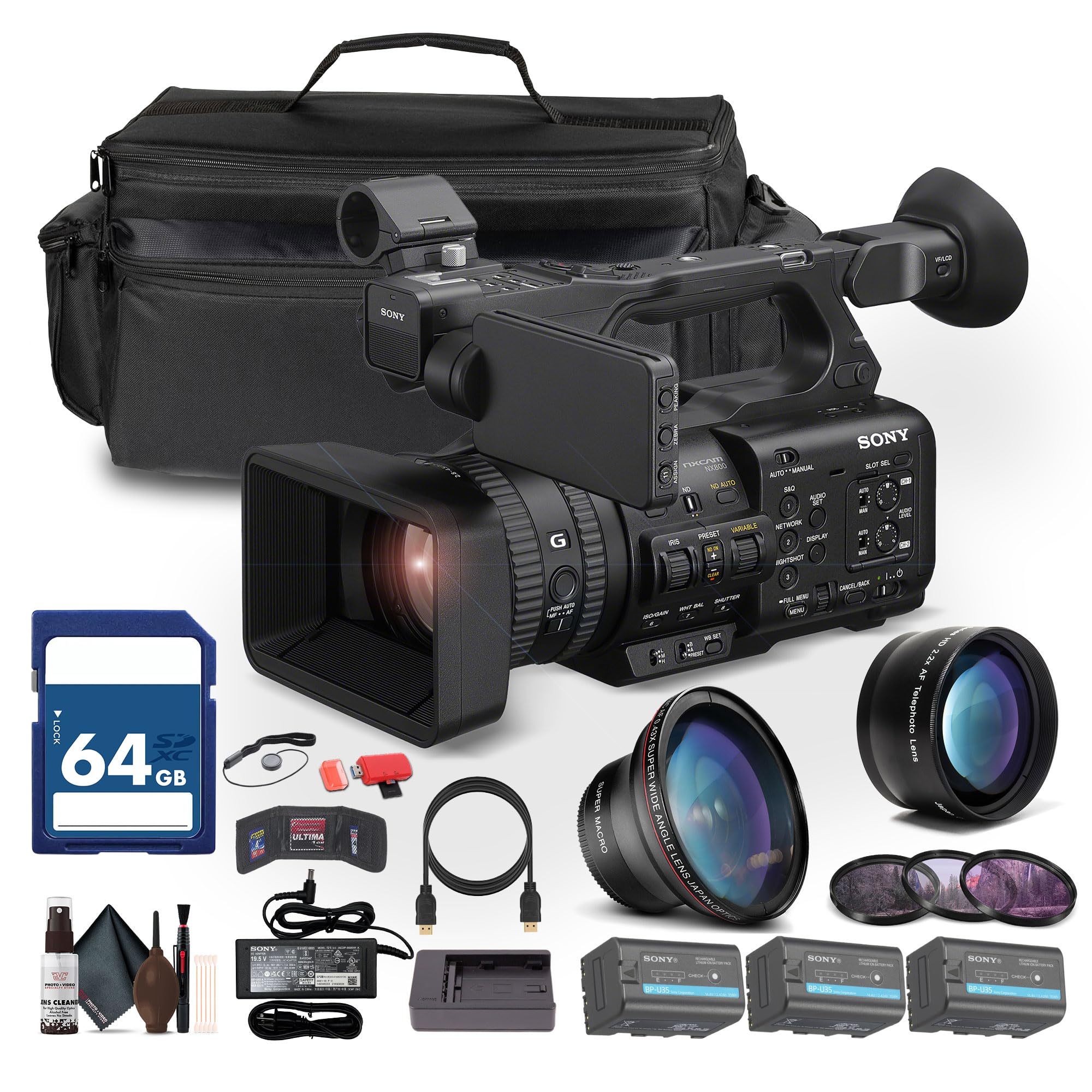
Figure 1: Sony PXW-Z200 4K XDCAM Camcorder (main unit).
2. Attaching the Lens Hood and Eyecup
- Attach the provided lens hood to the front of the camcorder's lens to reduce glare and protect the lens.
- Befestigen Sie die Augenmuschel an der viewFinder für Komfort viewing.
3. Einsetzen und Laden des Akkus
- Insert the BP-U35 battery pack into the battery slot on the rear of the camcorder until it clicks into place.
- Connect the AC adapter to the camcorder's DC IN jack and plug it into a power outlet. The battery will begin charging.
- Alternatively, use the external battery charger to charge the BP-U35 battery packs.
- Stellen Sie vor dem ersten Gebrauch sicher, dass der Akku vollständig aufgeladen ist.
4. Einlegen einer Speicherkarte
The PXW-Z200 supports dual CFexpress Type-A/SD card slots.
- Öffnen Sie die Abdeckung des Speicherkartensteckplatzes.
- Insert a compatible CFexpress Type-A or SD card into the designated slot with the label facing the correct direction until it clicks.
- Schließen Sie die Abdeckung des Speicherkartensteckplatzes.
- Format the memory card in the camcorder's menu before first use to ensure optimal performance.
Bedienung des Camcorders
1. Ein-/Ausschalten
- Zum Einschalten den POWER-Schalter in die Position ON schieben.
- Zum Ausschalten schieben Sie den POWER-Schalter in die Position OFF.
2. Grundlegende Aufnahme
- Recording Start/Stop: Drücken Sie die Taste REC START/STOP, um die Aufnahme zu starten oder zu beenden.
- Aufnahmeformate: The camcorder supports XAVC S-I, HS-L, S-L, and HD/QFHD recording formats. Select your desired format via the menu.
- Bildraten: Capture high frame rate footage at 4K120 and 1080p240 for slow-motion effects.
- HDR: The camcorder supports UHD 4K60 HDR with HLG (Hybrid Log-Gamma) for high dynamic range content.
3. Fokus- und Zoomsteuerung

Figure 2: AUTO/MANUAL switch for focus and exposure control.
- Autofokus: The camcorder features AI-driven autofocus and auto-framing for precise tracking of subjects. Engage AUTO mode using the switch (refer to Figure 2).
- Manueller Fokus: For precise control, switch to MANUAL mode and adjust the focus ring on the lens.
- Optischer Zoom: Utilize the 20x optical zoom for clear magnification.
- Klares Bildzoom: In 4K, the camcorder offers a 30x Clear Image Zoom, extending your reach without significant loss of quality.
4. Audioeinstellungen
The PXW-Z200 includes 4-channel audio input.
- Connect external microphones to the XLR inputs for professional audio capture.
- Adjust audio levels using the dedicated audio controls on the camcorder body or via the menu.
- Überwachen Sie den Ton über Kopfhörer, die an die Kopfhörerbuchse angeschlossen sind.
5. Networking and Streaming
The camcorder supports integrated dual-band 2.4/5 GHz Wi-Fi and Ethernet for live streaming and file Übertragung.
- Connect to a Wi-Fi network or an Ethernet cable.
- Utilize RTMP/RTMPS, SRT, and FTP protocols for direct live streaming and file Überweisungen.
- Configure network settings and streaming parameters through the camcorder's menu.
6. Color Profiles
The PXW-Z200 supports various color profiles for creative flexibility and matching with other Sony Cinema Line cameras.
- Select from S-Cinetone, ITU709, 709tone, and HLG profiles in the menu to achieve your desired look.
7. Using the Sony Monitor & Control App
Download and install the Sony Monitor & Control app on a compatible smartphone or tablet to remotely control and monitor the camcorder.
- Connect your device to the camcorder via Wi-Fi.
- Use the app for remote control of recording, zoom, focus, and other settings, as well as for monitoring live footage.

Figure 3: Sony PXW-Z200 camcorder in a typical usage scenario.
Wartung
1. Reinigung des Camcorders
- Use the provided cleaning kit to gently clean the lens and camcorder body.
- For the lens, use a soft, lint-free cloth and lens cleaning solution. Avoid harsh chemicals.
- For the body, wipe with a dry, soft cloth.
- Verwenden Sie keine Lösungsmittel oder Scheuermittel.
2. Batteriepflege
- Bewahren Sie Batterien an einem kühlen, trockenen Ort auf, wenn Sie sie nicht verwenden.
- Um die Lebensdauer der Batterien zu verlängern, sollten diese nicht häufig vollständig entladen werden.
- Charge batteries using only the specified Sony charger or the camcorder's AC adapter.
3. Speicherung
- When storing the camcorder for extended periods, remove the battery.
- Store the camcorder in a dry, dust-free environment, preferably in the large case provided.
- Vermeiden Sie extreme Temperaturen und hohe Luftfeuchtigkeit.
Fehlerbehebung
If you encounter issues with your Sony PXW-Z200, refer to the following common problems and solutions.
| Problem | Mögliche Ursache | Lösung |
|---|---|---|
| Der Camcorder lässt sich nicht einschalten. | Battery is not charged or not inserted correctly. AC adapter is not connected. | Ensure battery is fully charged and properly inserted. Verify AC adapter connection. |
| Cannot record footage. | Memory card is full, not inserted, or not formatted. Recording mode is incorrect. | Check memory card status, insert/format if necessary. Verify recording settings. |
| Autofocus is not working correctly. | Camcorder is in Manual Focus mode. Subject is too close or lacks contrast. | Switch to AUTO focus mode. Ensure adequate lighting and distance to subject. |
| Es wurde kein Ton aufgezeichnet. | Microphone is disconnected or audio levels are too low. | Check microphone connections. Adjust audio input levels. |
| Cannot connect to Wi-Fi/Stream. | Incorrect network settings. Out of range. | Verify Wi-Fi password and network settings. Move closer to the access point. |
For more detailed troubleshooting, please refer to the official Sony support webWebsite oder wenden Sie sich an den Kundendienst.
Technische Daten
Key technical specifications for the Sony PXW-Z200 4K XDCAM Camcorder:
| Besonderheit | Detail |
|---|---|
| Marke | Sony |
| Modellname | PXW-Z200 |
| Sensortyp | 1" Exmor RS CMOS |
| Auflösung der Videoaufnahme | UHD 4K (3840 Pixels), 720p, 480p |
| Optischer Zoom | 20x |
| Clear Image Zoom (4K) | 30x |
| Maximale Blendenöffnung | f/1.8 |
| Maximale Brennweite | 154.21 mm |
| Videoaufnahmeformat | XAVC S-I, HS-L, S-L, HD/QFHD |
| Unterstütztes Audioformat | Dolby Digital/AC-3 |
| Bildschirmgröße | 1 inch (LCD Hood included) |
| Konnektivitätstechnologie | HDMI, 12G-SDI, Wi-Fi (2.4/5 GHz), Ethernet |
| Besondere Merkmale | AI-Driven Autofocus, Auto-Framing, 4K HDR Capture (HLG), High Frame Rates (4K120, 1080p240), Direct Live Streaming (RTMP/RTMPS, SRT, FTP), S-Cinetone |
| Speichermedien | Dual CFexpress Type-A/SD card slots |
| Artikelgewicht | 4.3 Pfund |
| Wasserbeständigkeit | Nicht wasserfest |
| Bildstabilisierung | NEIN |
Garantie und Support
The Sony PXW-Z200 Camcorder is manufactured by Sony. For detailed warranty information, including terms, conditions, and registration, please refer to the warranty card included with your product or visit the official Sony support webWebsite.
For technical support, service, or to download the latest firmware and software, please visit: Sony-Support WebWebsite.


