
Einführung
Thank you for choosing the Yoidesu Cordless Phone System. This system combines a corded base unit with a cordless handset, offering advanced features such as a digital answering machine, photo dialing, smart call blocking, and an expandable design. This manual will guide you through the setup, operation, and maintenance of your new phone system to ensure optimal performance.
Packungsinhalt
Bitte überprüfen Sie, ob alle unten aufgeführten Artikel in Ihrem Paket enthalten sind. Sollten Artikel fehlen oder beschädigt sein, kontaktieren Sie bitte unseren Kundenservice.
- Kabelgebundene Basisstation mit Mobilteil
- Schnurloses Mobilteil
- Cordless Handset Charging Base
- AC Power Adapters (2)
- Telefonkabel
- Wiederaufladbarer Akku für schnurloses Mobilteil
- Benutzerhandbuch (dieses Dokument)
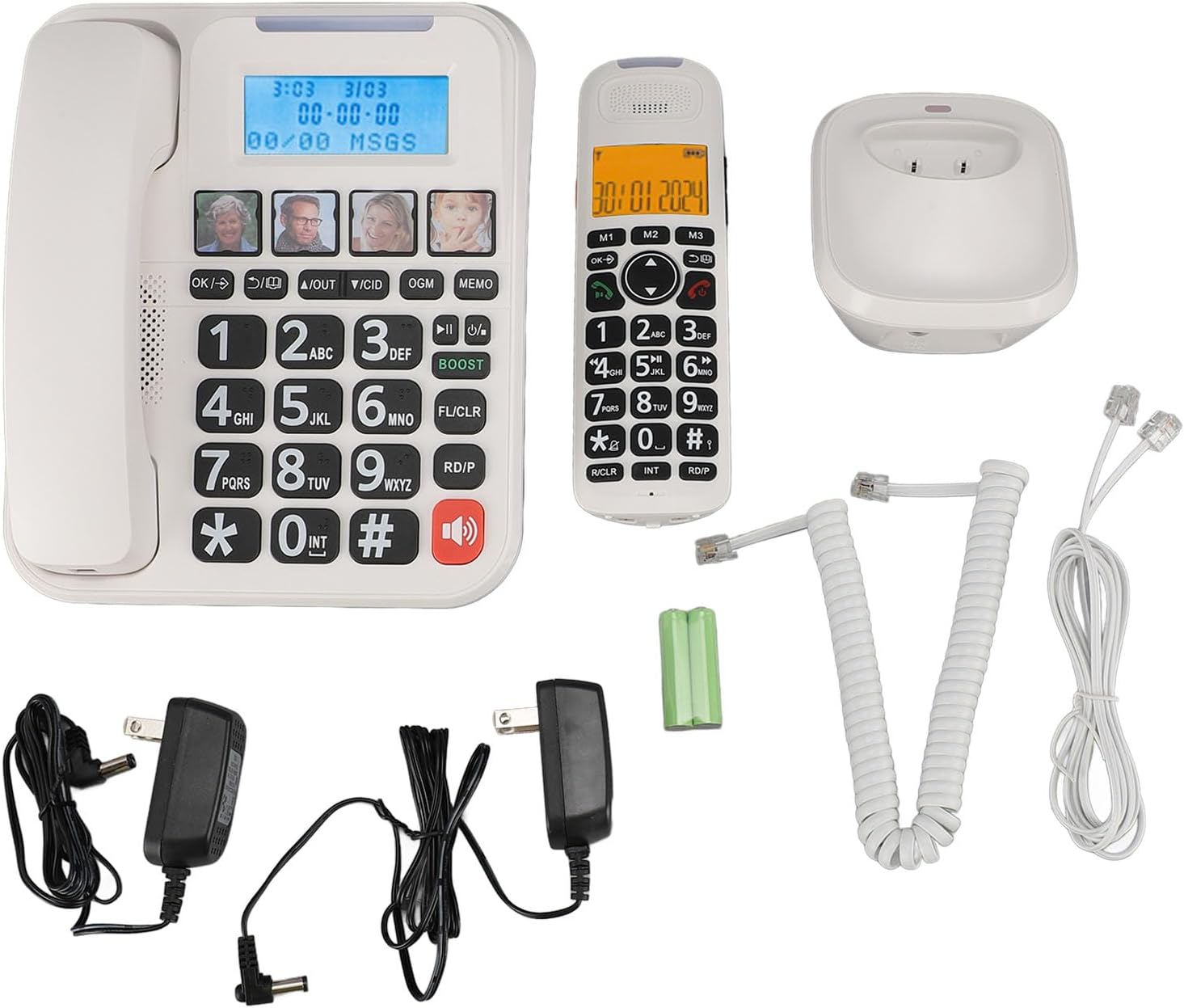
Abbildung 1: Complete package contents of the Yoidesu Cordless Phone System.
Produkt überview
Kabelgebundene Basiseinheit
The base unit serves as the central hub for your phone system, featuring a large display, keypad, and dedicated buttons for answering machine functions and photo dialing.
- Großer 2-Zoll-Bildschirm: Displays caller ID, call history, and answering machine status with high-contrast text.
- Große Tastatur: Oversized buttons for easy dialing, especially in low-light conditions.
- Photo Dialing Buttons: Four customizable buttons for quick access to frequently dialed numbers with associated photos.
- AMP Taste: Enhances call volume by up to 28dB for improved clarity.
- Answering Machine Controls: Play/Stop, Skip, Record, and Memo functions.

Abbildung 2: Front view of the Corded Base Unit.
Schnurloses Mobilteil
The cordless handset provides mobility and convenience, allowing you to make and receive calls away from the base unit.
- Bildschirm: Shows caller information, menu options, and battery status.
- Navigationstasten: Zur Menünavigation und Lautstärkeregelung.
- Talk/End Buttons: To initiate and terminate calls.
- Intercom (INT) Button: For internal calls between handsets or base unit.

Abbildung 3: Front view of the Cordless Handset.
Aufstellen
1. Anschließen der Basiseinheit
- Verbinden Sie ein Ende des Telefonkabels mit der TEL LINE-Buchse auf der Rückseite des Basisgeräts.
- Verbinden Sie das andere Ende des Telefonkabels mit der Telefonbuchse an Ihrer Wand.
- Plug one AC power adapter into the DC IN 6V jack on the back of the base unit.
- Stecken Sie das andere Ende des Netzadapters in eine normale Steckdose.

Abbildung 4: Rear connections of the Base Unit.
2. Einlegen des Mobilteil-Akkus
- Öffnen Sie die Batteriefachabdeckung auf der Rückseite des schnurlosen Mobilteils.
- Insert the supplied rechargeable battery, ensuring correct polarity (+/-).
- Schließen Sie den Batteriefachdeckel.
3. Laden des Mobilteils
- Plug the second AC power adapter into the DC IN 6V jack on the cordless handset charging base.
- Stecken Sie das andere Ende des Netzadapters in eine normale Steckdose.
- Place the cordless handset onto its charging base. The charging indicator on the handset should illuminate.
- Um eine volle Akkukapazität zu gewährleisten, sollte das Mobiltelefon vor der ersten Benutzung mindestens 12 Stunden lang aufgeladen werden.

Abbildung 5: Cordless Handset on Charging Base.
4. Registrierung zusätzlicher Mobilteile (optional)
The system supports up to five handsets. Refer to the specific instructions provided with additional handsets for registration procedures. Typically, this involves placing the base unit in registration mode and then initiating registration from the new handset.
Bedienungsanleitung
Anrufe tätigen und empfangen
- Anrufen: Heben Sie den kabelgebundenen Hörer ab oder drücken Sie die Taste SPRECHEN Drücken Sie die entsprechende Taste am Mobilteil und wählen Sie anschließend die Nummer.
- So erhalten Sie einen Anruf: Heben Sie den kabelgebundenen Hörer ab oder drücken Sie die Taste SPRECHEN Drücken Sie die Taste am schnurlosen Mobilteil, wenn das Telefon klingelt.
- So beenden Sie einen Anruf: Place the corded handset back on the base or press the ENDE Taste am schnurlosen Mobilteil.
Anpassen der Anruflautstärke
Drücken Sie während eines Anrufs die Taste AMP button on the base unit to increase the volume by 28dB. On the cordless handset, use the navigation buttons to adjust the earpiece volume.
Using the Digital Answering Machine
The integrated answering machine can record up to 60 minutes of messages, outgoing announcements, and memos.
- Spielnachrichten: Drücken Sie die Wiedergabe/Stopp Knopf am Basisgerät.
- Ausgehende Nachricht aufzeichnen (OGM): Drücken Sie die Ansage Drücken Sie die Taste und folgen Sie den Sprachanweisungen.
- Record Memo: Drücken Sie die MEMO button and speak after the tone.
Photo Dialing
Set up four frequently dialed numbers with associated photos for quick access.
- Programmieren: Select an empty photo slot on the base unit. Follow the on-screen prompts to enter the contact's name and phone number. You can then insert a printed photo into the designated slot.
- To Dial: Simply press the desired photo button on the base unit.

Abbildung 6: Using the Photo Dialing feature.
Smart Call Blocker and Caller ID
The system can store up to 30 incoming call numbers on handsets and 29 on the base unit. The call block function helps prevent unwanted calls.
- Anrufer-ID: Incoming call numbers are displayed on both the base unit and handset screens.
- Anrufsperre: Access the call block menu to add numbers manually or block numbers from the caller ID history. You can set it to manual or automatic mode, allowing only calls from saved contacts.
Phonebook and Call History
Store up to 50 phonebook entries. Review 10 outgoing call numbers and incoming call numbers (30 on handset, 29 on base).
- Kontakt hinzufügen: Navigate to the phonebook menu and enter the name and number.
- Review Geschichte: Use the navigation buttons to scroll through incoming and outgoing call lists.
Intercom and 3-Way Calling
The expandable system allows for internal communication and conference calls.
- Gegensprechanlage: Drücken Sie die INT button on a handset or base unit to call another registered handset or the base unit.
- 3-Wege-Anruf: Supports conference calls between a landline, a sub-phone (handset), and a third-party phone. Refer to the system menu for initiating this feature.
Wartung
Reinigung
Reinigen Sie das Telefonsystem mit einem weichen, fusselfreien Tuch.amp Mit einem Tuch abwischen. Keine scharfen Chemikalien oder Scheuermittel verwenden. Vor der Reinigung sicherstellen, dass das Gerät vom Stromnetz getrennt ist.
Batteriepflege
To prolong battery life, always return the cordless handset to its charging base when not in use. If the phone will be unused for an extended period, remove the battery from the handset.
Fehlerbehebung
| Problem | Mögliche Ursache | Lösung |
|---|---|---|
| Kein Wählton | Das Telefonkabel ist nicht angeschlossen oder defekt. | Ensure the telephone line cord is securely connected to both the base unit and the wall jack. Test with another phone if possible. |
| Handy lädt nicht | Handset not properly seated on charging base; charging base not powered; faulty battery. | Ensure the handset is correctly placed on the charging base. Check that the charging base's power adapter is plugged in. Replace battery if necessary. |
| Anrufbeantworter nimmt nicht auf | Anrufbeantworter ist ausgeschaltet; Speicher ist voll. | Ensure the answering machine is turned on. Delete old messages to free up memory. |
| Schlechte Gesprächsqualität/Rauschen | Störungen durch andere elektronische Geräte; Mobilteil zu weit von der Basisstation entfernt. | Stellen Sie die Basisstation entfernt von anderen elektronischen Geräten auf. Stellen Sie sicher, dass sich das Mobilteil in Reichweite der Basisstation befindet. |
Technische Daten
- Modellnummer: Yoidesuav12iq6wt4-14
- Aufnahmezeit des Anrufbeantworters: Bis zu 60 Minuten
- Handset Expansion: Up to 5 handsets per base unit
- Klingeltonlautstärke: Bis zu 90dB (einstellbar)
- Call Volume Boost: +28dB über AMP Taste
- Bildschirmgröße: 2 inches (handset and base unit)
- Caller ID Storage: 30 incoming calls (handset), 29 incoming calls (base unit)
- Phonebook Entries: 50
- Speicherung ausgehender Anrufe: 10
- Paketabmessungen: 12.99 x 9.06 x 3.94 Zoll
- Artikelgewicht: 2.84 Pfund
Garantie und Support
For warranty information or technical assistance, please contact Yoidesu customer support. Keep your purchase receipt as proof of purchase for any warranty claims.
Hersteller: Yoidesu
Datum der Erstveröffentlichung: 5. September 2024