
Einführung
This manual provides essential instructions for the setup, operation, and maintenance of your SLuB ZW60 Smartwatch. Please read this guide thoroughly before using your device to ensure proper function and longevity. The SLuB ZW60 features a 1.43-inch touchscreen, Bluetooth 5.3 connectivity, music player capabilities, various sports modes, IP67 dust and water resistance, and comprehensive health monitoring functions.
Wichtiger Hinweis: The health management functions of this smartwatch are for reference only and cannot be used for medical purposes. This product is not a medical device.
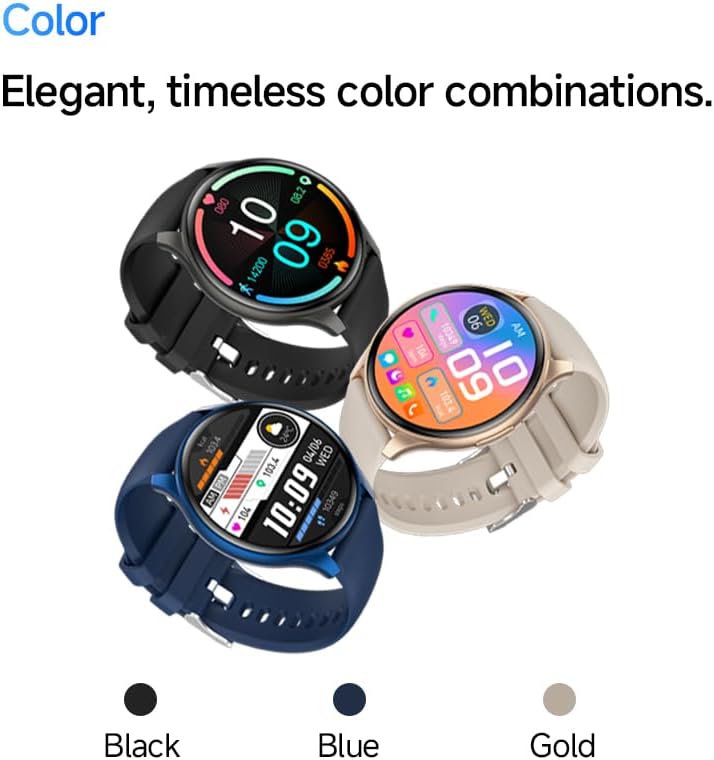
Image: The SLuB ZW60 Smartwatch in various color options (Black, Blue, Gold), highlighting its round display and overall design.
Lieferumfang
Prüfen Sie nach dem Öffnen der Verpackung, ob alle folgenden Artikel vorhanden sind:
- SLuB ZW60 Smartwatch
- Magnetisches Ladekabel
- Benutzerhandbuch (dieses Dokument)

Image: Contents of the SLuB ZW60 Smartwatch package, showing the smartwatch, its magnetic charging cable, and the printed user manual.
Aufstellen
1. Aufladen der Smartwatch
Before initial use, fully charge your SLuB ZW60 Smartwatch. Connect the magnetic charging cable to the charging contacts on the back of the watch and plug the USB end into a standard USB power adapter (not included) or a computer's USB port. The watch display will indicate charging status. A full charge typically takes approximately 2 hours.
2. App Installation: H Band
To unlock the full functionality of your smartwatch, download and install the dedicated "H Band" application on your smartphone. Suchen nach "H Band" in your device's app store (Google Play Store for Android or Apple App Store for iOS).

Image: The smartwatch screen showing a grid of colorful application icons, illustrating the "H Band" app integration and multi-menu screen options.
3. Bluetooth-Kopplung
- Stellen Sie sicher, dass Ihre Smartwatch aufgeladen und eingeschaltet ist.
- Aktivieren Sie Bluetooth auf Ihrem Smartphone.
- Öffnen Sie die App „H Band“.
- Follow the in-app instructions to search for and connect to your SLuB ZW60 Smartwatch. The app will guide you through the pairing process.
- Bestätigen Sie die Kopplungsanfrage gegebenenfalls sowohl auf Ihrem Smartphone als auch auf der Smartwatch.
Once paired, the smartwatch will synchronize data with the app and enable features like call notifications and message alerts.
Bedienungsanleitung
Grundlegende Navigation
- Touch-Screen: Wischen Sie nach links, rechts, oben oder unten, um durch Menüs und Bildschirme zu navigieren. Tippen Sie, um ein Element auszuwählen.
- Seitentaste: Typically used to wake the screen, return to the home screen, or access the app menu. Refer to the on-screen prompts for specific functions.
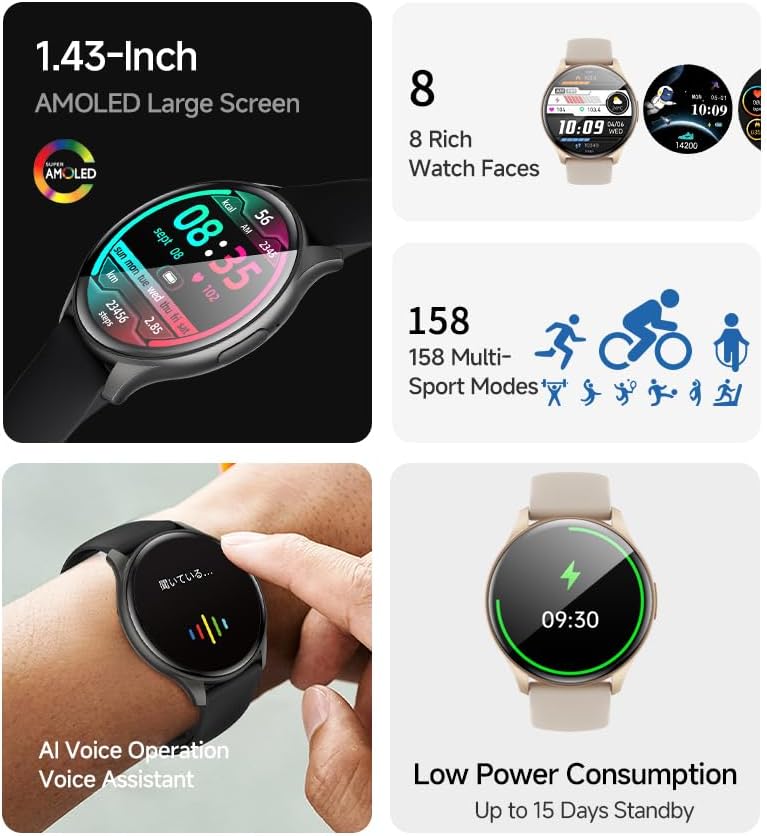
Bild: Die Smartwatch-Showasing its 1.43-inch AMOLED display with a customizable watch face, and visual cues for its 158 multi-sport modes, AI voice operation, and low power consumption.
Funktion aufrufen
With the smartwatch connected to your smartphone via Bluetooth, you can make and receive calls directly from your wrist. The built-in speaker and microphone allow for hands-free communication.
- Anrufe tätigen: Access the dial pad or contacts list on your smartwatch to initiate a call.
- Anrufe entgegennehmen: Bei einem eingehenden Anruf zeigt die Smartwatch die Anrufer-ID an. Tippen Sie auf das grüne Symbol, um den Anruf anzunehmen, oder auf das rote Symbol, um ihn abzulehnen.
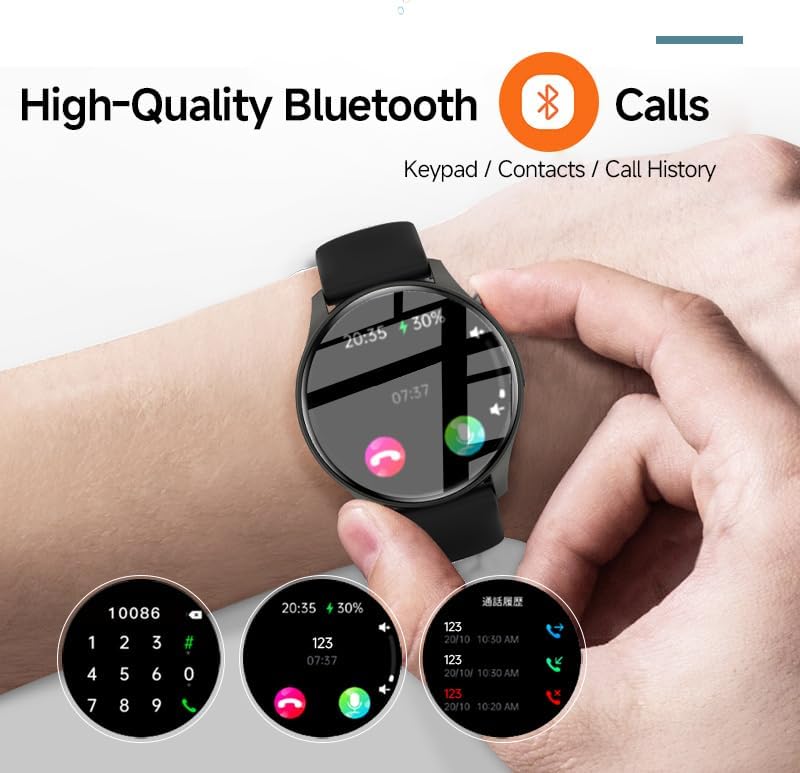
Image: The smartwatch screen showing the Bluetooth calling feature, including a numeric keypad for dialing, recent call history, and contact access.
Nachrichtenbenachrichtigungen
Once paired with your smartphone, the smartwatch can display notifications from various apps, including emails, social media, and messaging services. This allows you to stay informed without needing to check your phone constantly.
- Ensure app notifications are enabled in your smartphone's settings and within the "H Band" app.
- Streichen Sie auf dem Zifferblatt nach unten, um view Aktuelle Benachrichtigungen.

Image: The smartwatch showing a message notification, indicating its ability to sync alerts from popular communication applications like WeChat, LINE, and others.
Health Management Functions
The SLuB ZW60 Smartwatch is equipped with multiple sensors to monitor various health metrics. Access these features through the watch menu or the "H Band" app.
- Herzfrequenz-Überwachung: Continuously or periodically measures your heart rate.
- Schlafüberwachung: Erfasst Ihre Schlafmuster, einschließlich Tiefschlaf, Leichtschlaf und Wachzeiten.
- Kalorienverbrauch: Estimates calories burned based on activity levels.
- Trainingsdaten: Records steps, distance, and other activity metrics.
Disclaimer: The data provided by these functions is for general wellness and fitness purposes only and should not be used for medical diagnosis or treatment.

Image: The smartwatch illustrating its 24-hour health management capabilities, including heart rate, body temperature, and sleep quality monitoring.
Sportmodi
The smartwatch supports over 150 sports modes, allowing you to accurately track your workouts. Common modes include running, cycling, badminton, basketball, and football.
- Wählen Sie die gewünschte Sportart im Sportmenü der Uhr aus.
- The watch will record duration, calories burned, and other relevant metrics for your activity.
- Review detailed statistics in the "H Band" app after your workout.
Musik-Player-Steuerung
Steuern Sie die Musikwiedergabe auf Ihrem verbundenen Smartphone direkt von Ihrer Smartwatch aus. Sie können die Musikwiedergabe starten, pausieren, Titel überspringen und die Lautstärke anpassen.
AI Voice Assistant
Utilize the integrated AI Voice Assistant for quick commands and information retrieval. Activate the assistant via the watch interface and speak your commands.
Anpassbare Zifferblätter
Choose from a variety of pre-installed watch faces or customize your own through the "H Band" app to match your style and display preferred information.
Wartung
Reinigung Ihrer Smartwatch
Regelmäßige Reinigung trägt dazu bei, das Aussehen und die Funktionalität Ihres Geräts zu erhalten.
- Wischen Sie Bildschirm und Gehäuse mit einem weichen, fusselfreien Tuch ab.
- Bei hartnäckigen Verschmutzungen leicht dampBefeuchten Sie das Tuch mit Wasser. Vermeiden Sie die Verwendung von scharfen Chemikalien oder scheuernden Materialien.
- Vor dem Laden sicherstellen, dass die Ladekontakte sauber und trocken sind.
Wasserbeständigkeit (IP67)
The SLuB ZW60 Smartwatch is rated IP67, meaning it is dust-tight and can withstand immersion in water up to 1 meter (3.3 feet) for up to 30 minutes. This makes it suitable for daily use, such as washing hands or light rain exposure.
- Nicht use the watch for swimming, diving, or showering with hot water.
- Vermeiden exposing the watch to high-pressure water or steam.
- Falls die Uhr nass wird, trocknen Sie sie gründlich ab, bevor Sie sie aufladen oder in Betrieb nehmen.
Tipps zur Akkulaufzeit
- Reduzieren Sie die Bildschirmhelligkeit.
- Unnötige Benachrichtigungen deaktivieren.
- Die kontinuierliche Herzfrequenzüberwachung sollte nur dann erfolgen, wenn sie erforderlich ist.
- Ensure the "H Band" app is running efficiently in the background on your phone.
Fehlerbehebung
| Problem | Mögliche Lösung |
|---|---|
| Die Uhr lässt sich nicht einschalten. | Stellen Sie sicher, dass die Uhr vollständig aufgeladen ist. Schließen Sie sie für mindestens 30 Minuten an das Ladegerät an. |
| Kopplung mit Smartphone nicht möglich. |
|
| Es werden keine Benachrichtigungen empfangen. |
|
| Ungenaue Gesundheitsdaten. |
|
| Der Bildschirm reagiert nicht. | Versuchen Sie, die Uhr neu zu starten, indem Sie die Seitentaste gedrückt halten, bis sie sich ausschaltet, und schalten Sie sie dann wieder ein. |
Technische Daten
| Besonderheit | Detail |
|---|---|
| Modellname | ZW60 |
| Marke | SLuB |
| Bildschirmgröße | 1.43 Zoll |
| Anzeigetyp | AMOLED |
| Konnektivität | Bluetooth 5.3 |
| Wasserbeständigkeit | IP67 (staub- und wasserbeständig) |
| Technische Daten | 1.77 x 0.43 x 1.97 Zoll |
| Artikelgewicht | 3.23 Unzen (91.5 Gramm) |
| Akkulaufzeit | Up to 15 Days Standby |
| Kompatible App | H-Band |
| Hersteller | SLuB |
Garantie und Support
For warranty information and technical support, please refer to the documentation included with your purchase or contact SLuB customer service. Contact details can typically be found on the manufacturer's official website or within the "H Band" application.
Online-Ressourcen: For the latest updates, FAQs, and additional support, visit the official SLuB webWebsite.