
1. Einleitung
The IMIKI FRAME LITE ST2 is a versatile smartwatch designed for daily use, offering a blend of style and functionality. It features a 1.96-inch IPS display, Bluetooth connectivity, and various health monitoring capabilities. This manual provides essential information for operating and maintaining your device.
2. Packungsinhalt
Bitte überprüfen Sie, ob alle Artikel in Ihrem Paket vorhanden sind:
- IMIKI FRAME LITE ST2 Smartwatch
- Magnetisches Ladekabel
- Bedienungsanleitung
3. Gerät überview
Machen Sie sich mit den Hauptkomponenten Ihrer Smartwatch vertraut.
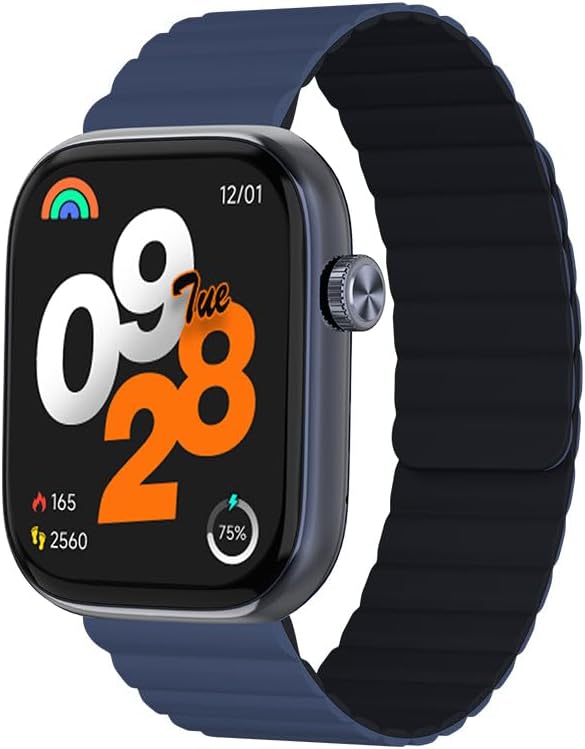
Bild 1: Front view of the IMIKI FRAME LITE ST2 Smartwatch, displaying the time, date, and activity metrics on its 1.96-inch IPS screen. The watch features a blue case and a blue magnetic strap.

Bild 2: Seite view of the IMIKI FRAME LITE ST2 Smartwatch, highlighting its slim profile and the integrated crown button for navigation and control.
4. Einrichtung
4.1 Aufladen der Smartwatch
Before initial use, fully charge your IMIKI FRAME LITE ST2 Smartwatch.
- Verbinden Sie das magnetische Ladekabel mit den Ladekontakten auf der Rückseite der Smartwatch.
- Stecken Sie das USB-Ende des Kabels in ein Standard-USB-Netzteil (nicht im Lieferumfang enthalten) oder in einen USB-Anschluss Ihres Computers.
- Das Display der Uhr zeigt den Ladestatus an. Eine vollständige Aufladung dauert etwa 2 Stunden.
A fully charged 250 mAh battery provides up to 15 days of typical use or 5 days of intensive use.
4.2 Installation der Begleit-App
To unlock the full features of your smartwatch, download and install the companion application on your smartphone.
- Scan the QR code provided in the quick start guide or search for the official IMIKI app in the Apple App Store (for iOS) or Google Play Store (for Android).
- Installieren Sie die App auf Ihrem Smartphone.
- Folgen Sie den Anweisungen auf dem Bildschirm, um ein Konto zu erstellen und Ihr Pro-Konto einzurichten.file.
4.3 Koppeln mit Ihrem Smartphone
Ensure Bluetooth is enabled on your smartphone and the smartwatch is sufficiently charged.
- Open the IMIKI companion app on your smartphone.
- Navigieren Sie in der App zum Abschnitt „Gerät“ oder „Gerät hinzufügen“.
- The app will search for available devices. Select 'IMIKI FRAME LITE ST2' from the list.
- Bestätigen Sie die Kopplungsanfrage gegebenenfalls sowohl auf Ihrem Smartphone als auch auf der Smartwatch.
- Nach der Kopplung synchronisiert die Smartwatch die Daten mit Ihrem Telefon.
5. Bedienung der Smartwatch
5.1 Grundlegende Navigation
- Touch-Screen: Wischen Sie nach links, rechts, oben oder unten, um durch Menüs und Benachrichtigungen zu navigieren. Tippen Sie, um Elemente auszuwählen.
- Seitlicher Knopf/Krone: Press to wake the screen, return to the home screen, or access the app list. Rotate (if applicable) to scroll through lists.
5.2 Anrufmanagement
With Bluetooth 5.3 connectivity, you can manage calls directly from your smartwatch when paired with your smartphone.
- Anrufe entgegennehmen: Tippen Sie auf das grüne Symbol auf dem Bildschirm Ihrer Uhr, wenn ein eingehender Anruf angezeigt wird.
- Anrufe ablehnen: Tippen Sie auf das rote Symbol, um einen eingehenden Anruf abzulehnen.
- Sprachassistent: Access your smartphone's voice assistant directly from the watch for hands-free commands.
5.3 Gesundheits- und Fitnessüberwachung
The IMIKI FRAME LITE ST2 is equipped with sensors to track your health and fitness activities.
- Herzfrequenz-Überwachung: Der optische Sensor überwacht kontinuierlich Ihre Herzfrequenz. View Echtzeitdaten auf der Uhr oder in der App.
- Blutsauerstoffmessung (SpO2): Measure your blood oxygen saturation levels. Ensure the watch is worn snugly on your wrist for accurate readings.
- Trainingsmodi: Choose from 105 supported workout modes to track specific activities. The watch records statistics such as duration, calories burned, and heart rate during exercise.
- Schlaf-Tracking: Monitor your sleep patterns, including deep sleep, light sleep, and wake times.
5.4-Anpassung
Personalize your smartwatch experience through the companion app.
- Gesichter ansehen: Select from a variety of watch faces or create custom ones using the app.
- Benachrichtigungseinstellungen: Manage which app notifications appear on your smartwatch.
6. Wartung
6.1 Reinigung
Regular cleaning helps maintain the smartwatch's appearance and functionality.
- Reinigen Sie den Bildschirm und das Uhrengehäuse mit einem weichen, fusselfreien Tuch.
- Bei hartnäckigen Verschmutzungen leicht dampBefeuchten Sie das Tuch mit Wasser. Vermeiden Sie die Verwendung von scharfen Chemikalien oder scheuernden Materialien.
- Reinigen Sie die Ladekontakte regelmäßig, um ein ordnungsgemäßes Laden zu gewährleisten.
6.2 Wasserbeständigkeit
The IMIKI FRAME LITE ST2 has an IP68 water resistance rating, meaning it is protected against dust ingress and can withstand immersion in water up to 1.5 meters for 30 minutes. It is suitable for daily use, such as hand washing or light rain. However, it is not recommended for swimming, diving, or exposure to high-pressure water.
6.3 Speicherung
Bewahren Sie die Smartwatch bei längerer Nichtbenutzung an einem kühlen, trockenen Ort auf. Achten Sie darauf, dass sie etwas geladen ist, um eine Tiefentladung des Akkus zu vermeiden.
7. Fehlerbehebung
Sollten Sie Probleme mit Ihrer Smartwatch haben, beachten Sie bitte die folgenden gängigen Lösungsansätze:
- Uhr schaltet sich nicht ein: Stellen Sie sicher, dass die Uhr vollständig aufgeladen ist. Schließen Sie sie für mindestens 10 Minuten an das Ladegerät an.
- Kopplung mit Smartphone nicht möglich:
- Stellen Sie sicher, dass Bluetooth auf Ihrem Telefon aktiviert ist.
- Stellen Sie sicher, dass sich die Uhr in Reichweite Ihres Telefons befindet.
- Starten Sie sowohl die Smartwatch als auch Ihr Smartphone neu.
- Löschen Sie gegebenenfalls den Bluetooth-Cache Ihres Telefons.
- Ungenaue Gesundheitsdaten: Achten Sie darauf, dass die Uhr eng am Handgelenk sitzt, weder zu eng noch zu locker. Reinigen Sie den Sensor auf der Rückseite der Uhr.
- Benachrichtigungen werden nicht angezeigt: Check notification settings in the companion app and on your smartphone. Ensure the app is running in the background.
- Bildschirm reagiert nicht: Try restarting the smartwatch by pressing and holding the side button for several seconds.
8. Spezifikationen
| Besonderheit | Spezifikation |
|---|---|
| Marke | IMIKI |
| Modellname | IMIKI FRAME LITE ST2 |
| Bildschirmgröße | 1.96 Zoll |
| Anzeigetyp | IPS |
| Konnektivitätstechnologie | Bluetooth 5.3 |
| Kompatible Geräte | Smartphone (Android & iOS) |
| Batteriekapazität | 250 mAh |
| Akkulaufzeit bei typischer Nutzung | Bis zu 15 Tage |
| Intensive Usage Battery Life | Bis zu 5 Tage |
| Ladezeit | Ungefähr 2 Stunden |
| Wasserbeständigkeit | IP68 |
| Gesundheitsüberwachung | Blood Oxygen, Heart Rate |
| Trainingsmodi | 105 |
| Armbandtyp | Magnetisch |
9. Garantie und Support
For warranty information and customer support, please refer to the warranty card included in your product packaging or visit the official IMIKI webBewahren Sie Ihren Kaufbeleg als Kaufnachweis auf.
If you require further assistance or have questions not covered in this manual, please contact IMIKI customer service through their official channels.