
1. Einleitung
Thank you for choosing the MZZYG FJ3362G Touchscreen Weather Station. This device provides comprehensive environmental monitoring, including indoor and outdoor temperature and humidity, weather forecasting, time, date, alarm functions, and more. Please read this manual carefully to ensure proper setup and operation.
2. Packungsinhalt
Bitte überprüfen Sie beim Auspacken, ob alle unten aufgeführten Artikel vorhanden und in gutem Zustand sind:
- 1 x MZZYG FJ3362G Weather Station (Main Unit)
- 1 x Drahtloser Außensensor
- 1 x Benutzerhandbuch (dieses Dokument)
- Power Adapter (DC5V/1.2A) - (Note: 2 x LR6 AA batteries for main unit and 2 x LR6 AA batteries for outdoor sensor are not included)

Image 1: MZZYG FJ3362G Weather Station main unit and wireless outdoor sensor.
3. Produktmerkmale
The MZZYG FJ3362G Weather Station offers a range of functionalities designed for comprehensive environmental monitoring and convenience:
- Großes Touchscreen-Display: Backlit display for clear visibility of time, date, calendar, temperature, humidity, air pressure, moon phases, tides, sunrise/sunset times, and more.
- Clock Functionality: 12/24-hour time format, two daily alarms, and an automatic snooze function (adjustable from 5 to 60 minutes or OFF). Perpetual calendar up to the year 2099.
- Thermo-Hygrometer Function: Zeigt Innen- und Außentemperatur sowie Luftfeuchtigkeit an.
- Indoor Humidity Range: 20% ~ 95% RH
- Outdoor Humidity Range: 20% ~ 95% RH
- Indoor Temperature Range: -9.9°C ~ 50°C (15°F ~ 122°F)
- Outdoor Temperature Range: -40°C ~ 70°C (-40°F ~ 158°F)
- Minimum/Maximum humidity and air temperature display.
- Temperature/humidity trend indication.
- Weather Station Function: Weather forecast, sunrise and sunset times (city selectable), moon phases and tides, outdoor temperature upper and lower limit alarms, frost warning, indoor comfort display, and mold risk indication.
- Drahtloser Außensensor: Wall-mountable or table-standing sensor with 433.92 MHz RF transmission frequency. Transmission range up to 60 meters in open areas. Supports connection of up to 3 wireless outdoor sensors (one included).
- Barometric Pressure Function: Measurement range of 600 ~ 1100 hPa/mb (17.72 ~ 32.50 inHg). Histogram displays 24-hour historical barometric pressure trends.
- Datenprotokollierung: Records data for trend analysis.
- Geringer Stromverbrauch: Designed for energy efficiency, high stability, and accuracy.

Bild 2: Überview of the main functions displayed on the weather station screen.
4. Einrichtung
4.1 Stromversorgung der Haupteinheit
- Insert 2 x LR6 AA batteries into the battery compartment on the back of the main unit, observing correct polarity (+/-).
- Alternatively, connect the DC5V/1.2A power adapter to the main unit and plug it into a power outlet.
- The display will light up, and the unit will begin initialization.
4.2 Stromversorgung des drahtlosen Außensensors
- Öffnen Sie das Batteriefach des drahtlosen Außensensors.
- Insert 2 x LR6 AA batteries, ensuring correct polarity.
- Verschließen Sie das Batteriefach fest.
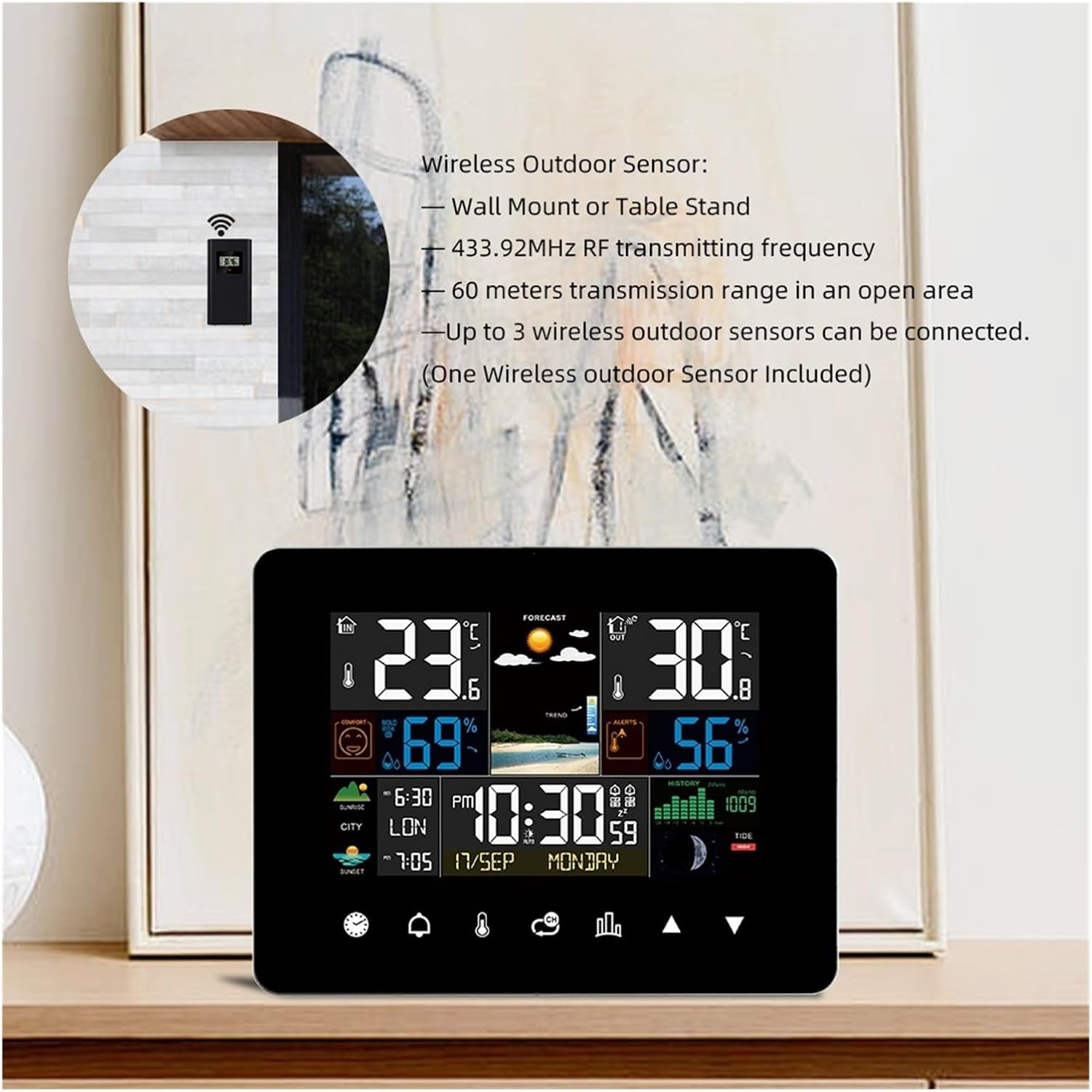
Image 3: Wireless outdoor sensor, showing wall mount and table stand options. It operates on 433.92MHz RF frequency with a 60-meter range.
4.3 Pairing the Outdoor Sensor with the Main Unit
The main unit will automatically attempt to connect with the outdoor sensor upon initial power-up.
- Platzieren Sie den Außensensor während des ersten Kopplungsvorgangs innerhalb von 3 Metern Entfernung zur Haupteinheit.
- Sobald die Verbindung hergestellt ist, werden die Außentemperatur und die Luftfeuchtigkeit auf dem Display des Hauptgeräts angezeigt.
- If the connection is not established, press and hold the "Sensor" button on the main unit to initiate a manual search.
4.4 Placement of the Outdoor Sensor
- Choose a shaded location to avoid direct sunlight, which can affect temperature readings.
- Ensure the sensor is protected from direct rain or snow.
- Mount the sensor vertically to allow for proper drainage.
- Keep the sensor within the 60-meter transmission range of the main unit, minimizing obstructions like thick walls or metal structures.
5. Bedienungsanleitung
The MZZYG FJ3362G features a touchscreen interface for easy navigation and setting adjustments.

Image 4: Touchscreen diagram illustrating various touch-sensitive areas for interaction.
5.1 Basic Settings (Time, Date, Unit)
- Zugriffseinstellungen: Tap the "SET" icon (often represented by a gear or similar symbol) on the touchscreen.
- Zeitformat: Select 12-hour or 24-hour format.
- Zeiteinstellung: Use the UP/DOWN arrows to set the hour and minute. Tap "SET" to confirm and move to the next setting.
- Datumsanpassung: Set the year, month, and day using the UP/DOWN arrows.
- Temperatureinheit: Wählen Sie zwischen Celsius (°C) und Fahrenheit (°F).
- Druckeinheit: Select between hPa/mb and inHg.
5.2 Weckerfunktion
- Wecker stellen: Tap the "ALARM" icon. Use UP/DOWN arrows to set Alarm 1 and Alarm 2 times.
- Alarm aktivieren: Tap the alarm icon again to toggle the alarm ON/OFF. An alarm symbol will appear on the display when active.
- Schlummerfunktion: When the alarm sounds, tap any button (except "ALARM OFF") to activate snooze. The snooze duration can be set in the settings (5-60 minutes).
- Alarm ausschalten: Tap the "ALARM OFF" area on the screen when the alarm sounds to stop it for the day.
5.3 Wettervorhersage
The weather station predicts weather conditions for the next 12-24 hours based on barometric pressure changes. The forecast icons (sunny, partly cloudy, cloudy, rainy, snowy) are displayed prominently.
5.4 Sonnenaufgangs- und Sonnenuntergangszeiten
This feature displays sunrise and sunset times for 251 pre-programmed cities.
- Select City: In the settings menu, navigate to the city selection option.
- Enter City Code: Use the UP/DOWN arrows to select the appropriate city code from the provided list in the full manual (if available).
- The display will update with the sunrise and sunset times for the selected city.

Image 5: Display showing sunrise and sunset times for a selected city.
5.5 Temperatur- und Feuchtigkeitswarnungen
You can set upper and lower temperature limits for the outdoor sensor. If the temperature goes outside these limits, an alarm will sound.
- Benachrichtigungen festlegen: Tap the "ALERT" icon.
- Grenzen anpassen: Use UP/DOWN arrows to set the desired upper and lower temperature thresholds for outdoor readings.
- Activate Alert: Toggle the alert ON/OFF.
6. Wartung
- Reinigung: Wischen Sie die Display- und Geräteoberflächen mit einem weichen, fusselfreien Tuch ab.amp Tuch. Keine Scheuer- oder Lösungsmittel verwenden.
- Batteriewechsel: Tauschen Sie die Batterien sowohl im Hauptgerät als auch im Außensensor aus, sobald die Anzeige für niedrigen Batteriestand erscheint. Achten Sie auf die richtige Polarität.
- Lagerung: Wenn Sie das Gerät über einen längeren Zeitraum lagern, entfernen Sie alle Batterien, um ein Auslaufen zu verhindern.
- Umweltschutz: Keep the main unit away from direct sunlight, extreme temperatures, and moisture. Ensure the outdoor sensor is protected from direct weather elements.
7. Fehlerbehebung
| Problem | Mögliche Ursache | Lösung |
|---|---|---|
| Kein Display am Hauptgerät | Die Batterien sind leer oder falsch eingelegt; das Netzteil ist nicht angeschlossen oder defekt. | Check battery polarity and replace if necessary. Ensure power adapter is securely connected and functional. |
| Außentemperatur/Luftfeuchtigkeit werden nicht angezeigt | Outdoor sensor batteries are dead; sensor out of range; interference; sensor not paired. | Replace sensor batteries. Move sensor closer to the main unit. Reduce interference sources. Manually re-pair the sensor (refer to Section 4.3). |
| Ungenaue Messwerte | Sensor exposed to direct sunlight or moisture; unit placed near heat sources. | Relocate the sensor to a shaded, protected area. Move the main unit away from direct heat or cold sources. |
| Die Wettervorhersage scheint fehlerhaft zu sein. | Weather forecasts are predictions based on barometric pressure and may not always be 100% accurate. | This is normal. The forecast is an estimation for the next 12-24 hours. |
8. Spezifikationen
| Besonderheit | Detail |
|---|---|
| Modell | FJ3362G |
| Marke | MZZYG |
| Luftfeuchtigkeitsbereich in Innenräumen | 20 % bis 95 % relative Luftfeuchtigkeit |
| Luftfeuchtigkeitsbereich im Freien | 20 % bis 95 % relative Luftfeuchtigkeit |
| Innentemperaturbereich | -9.9 ° C ~ 50 ° C (15 ° F ~ 122 ° F) |
| Außentemperaturbereich | -40°C bis 70°C (-40°F bis 158°F) |
| Temperaturgenauigkeit | ±1 °C |
| Barometrischer Druckbereich | 600 ~ 1100 hPa/mb (17.72 ~ 32.50 inHg) |
| Drahtlose Übertragungsfrequenz | 433.92 MHz |
| Drahtlose Übertragungsreichweite | Bis zu 60 Meter (freier Bereich) |
| Stromversorgung (Haupteinheit) | 2 x LR6 AA batteries or DC5V/1.2A power adapter |
| Stromversorgung (Außensensor) | 2 x LR6 AA Batterien |
| Abmessungen der Haupteinheit | 167 x 128 x 30 mm (6.57 x 5.04 x 1.18 Zoll) |
| Sensorabmessungen | 97 x 50 x 30 mm (3.82 x 1.97 x 1.18 Zoll) |
| Produktgewicht | Main Unit: 260 g / Sensor: 10 g |
9. Garantie und Support
For warranty information and technical support, please refer to the retailer's policy or contact MZZYG customer service through their official channels. Keep your purchase receipt as proof of purchase.