
Einführung
This manual provides essential information for the safe and effective use of your DOSS Extreme Boom Pro D100 Bluetooth Speaker. Please read it thoroughly before operating the device and retain it for future reference.
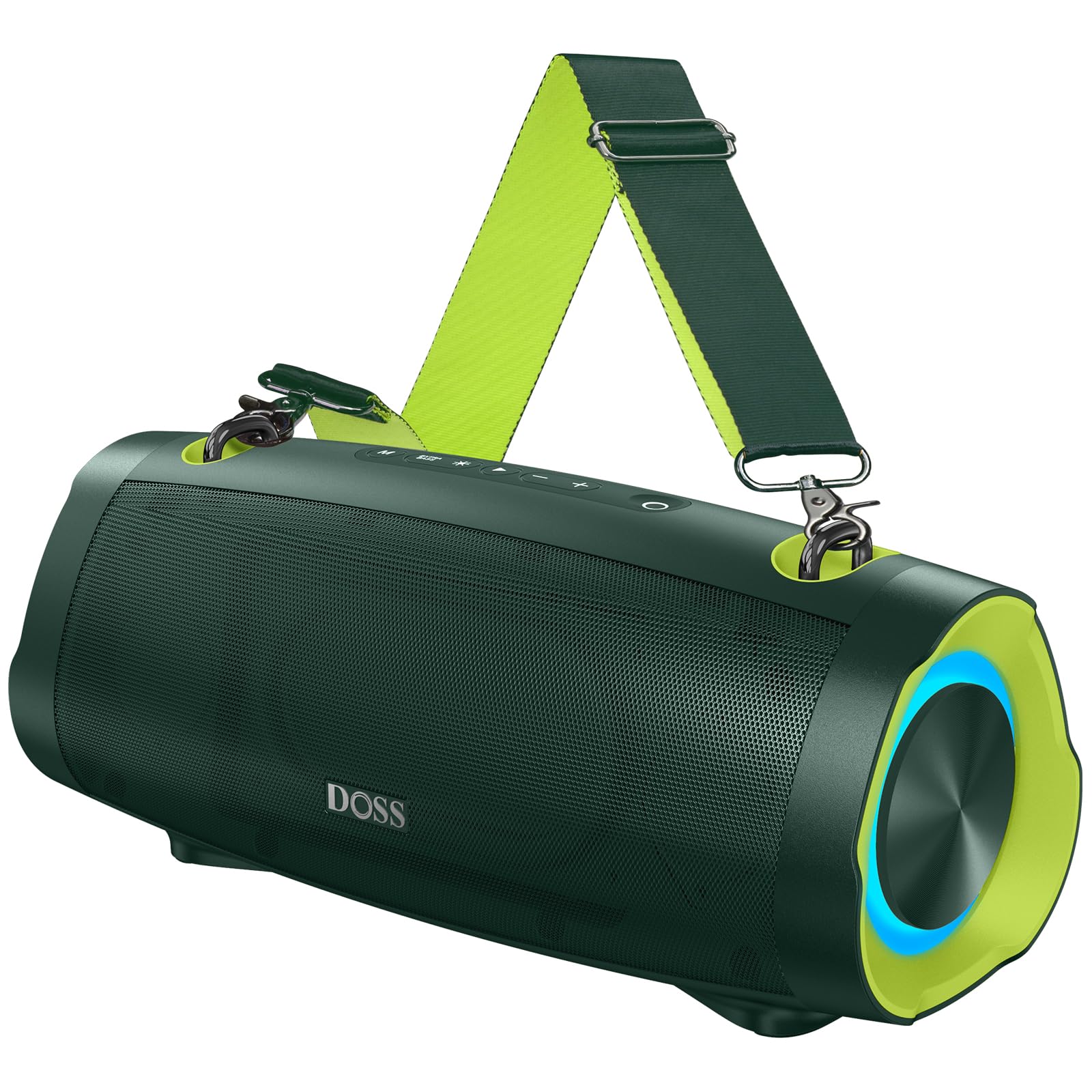
Abbildung: Der DOSS Extreme Boom Pro D100 Bluetooth-Lautsprecher, gezeigtasing dank seiner robusten Konstruktion.
Produkteigenschaften
- Kraftvoller Klang: Experience 70W of bold sound (140W Peak) with a 40W full-range driver and two 15W tweeters, enhanced by three advanced DSP technologies.
- Verbesserter Bass: Dual passive radiators provide deeper bass with a dedicated Extra Bass button.
- Tragbares Design: Features a durable, adjustable, and detachable shoulder strap for easy transport.
- Echtes drahtloses Stereo (TWS): Connect two speakers wirelessly for an immersive stereo sound experience.
- Erweiterte Spielzeit: Bis zu 24 Stunden Batterielebensdauer.
- Eingebaute Powerbank: Charge your devices directly from the speaker.
- IPX6 Wasserdicht: Designed to withstand water splashes and jets.
- Dynamische Lichtshow: Integrated lights synchronize with music rhythm.
Lieferumfang
Bitte überprüfen Sie den Inhalt Ihres Pakets:
- DOSS Extreme Boom Pro D100 Bluetooth-Lautsprecher
- USB-C-Ladekabel
- Zusätzliches Audiokabel
- Abnehmbarer Schultergurt
- Bedienungsanleitung
Produkt überview
Machen Sie sich mit den Bedienelementen und Anschlüssen des Lautsprechers vertraut.

Image: Top panel controls including Power, Volume, Play/Pause, Mode, Extra Bass, and Light buttons.

Bild: Eine explodierte view illustrating the internal speaker components, including the full-range driver and tweeters.
Einrichtung und Bedienung
1. Ein-/Ausschalten
Halten Sie die Ein-/Aus-Taste (OHalten Sie 2 Sekunden lang gedrückt, um den Lautsprecher ein- oder auszuschalten.
2. Bluetooth-Kopplung
To connect your DOSS Extreme Boom Pro D100 to a Bluetooth device:
- Schalten Sie den Lautsprecher ein. Er wechselt automatisch in den Bluetooth-Kopplungsmodus, was durch eine blinkende blaue LED angezeigt wird.
- Aktivieren Sie auf Ihrem Gerät (Smartphone, Tablet usw.) Bluetooth und suchen Sie nach verfügbaren Geräten.
- Select "Extreme Boom Pro D100" from the list. A confirmation sound indicates successful pairing.
Video: Demonstrates how to power on the speaker and connect it via Bluetooth to a mobile device.
3. True Wireless Stereo (TWS)-Kopplung
For an enhanced stereo experience, you can pair two DOSS Extreme Boom Pro D100 speakers:
- Stellen Sie sicher, dass beide Lautsprecher eingeschaltet und nicht mit einem Bluetooth-Gerät verbunden sind.
- On one speaker (this will be your main speaker), press and hold the 'Extra Bass' button until you hear a prompt. The LED on the main speaker will flash slowly.
- On the second speaker, press and hold the 'Extra Bass' button. The LED on the second speaker will flash quickly.
- The speakers will automatically connect to each other. A confirmation sound will indicate successful TWS pairing. The main speaker's LED will flash slowly, and the second speaker's LED will be solid.
- Connect your device to the main speaker via Bluetooth as described in the Bluetooth Pairing section.
Video: Illustrates the steps for pairing two DOSS Extreme Boom Pro D100 speakers for True Wireless Stereo sound.

Image: Two DOSS Extreme Boom Pro D100 speakers positioned for a True Wireless Stereo setup.
4. Lautstärkeregelung
Drücken Sie die Taste „+“, um die Lautstärke zu erhöhen, und die Taste „-“, um die Lautstärke zu verringern.
5. Extra Bass Function
Press the 'Extra Bass' button to activate or deactivate the enhanced bass mode.
Video: Shows how to activate the Extra Bass feature on the speaker.
6. Dynamische Lichtshow
Drücken Sie die Lichttaste (※) to cycle through different light modes or turn the lights off.
Video: Demonstrates how to change the dynamic light modes on the speaker.

Image: The speaker displaying its dynamic light show in an outdoor setting.
7. Auto-Power Off Function
The speaker has an auto-power off feature to conserve battery. You can activate or deactivate this function:
- Press and hold the 'M' (Mode) button and the 'Power' button simultaneously.
- If the LED flashes red, auto-power off is removed (deactivated).
- If the LED flashes green, auto-power off is activated.
Video: Explains how to remove or activate the auto-power off feature on the speaker.
8. Reset-Funktion
If you encounter issues, you can reset the speaker:
- Press and hold the 'Power' button and the 'Volume Down (-)' button simultaneously.
- A confirmation sound will indicate a successful reset.
Video: Demonstrates the process of resetting the speaker.
Lade- und Powerbank-Funktion
The DOSS Extreme Boom Pro D100 features a built-in power bank to charge your external devices.
- Aufladen des Lautsprechers: Connect the provided USB-C cable to the speaker's charging port and a suitable USB power adapter (not included). The charging indicator will show the charging status.
- Verwendung als Powerbank: Connect your device's charging cable to the speaker's USB-A output port. The speaker will begin charging your device.

Image: The speaker being used to charge a smartphone in an outdoor setting, highlighting its power bank capability.
Technische Daten
| Marke | DOSS |
| Modellnummer | Extreme Boom Pro D100 |
| Maximale Lautsprecherausgangsleistung | 140 Watt (Spitze) / 70 Watt (RMS) |
| Konnektivitätstechnologie | Bluetooth |
| Audioausgabemodus | Stereo |
| Lautsprechertyp | Im Freien |
| Zusätzliche Merkmale | Bass Boost, Dynamic Light Show, Power Bank |
| Farbe | Green (variant shown in product images) |
| Durchschnittliche Batterielebensdauer | 24 Stunden |
| Wasserdichtigkeit | IPX6 |
| Kontrollmethode | Berühren |
| Artikelabmessungen (T x B x H) | 12.17"T x 5.39"B x 5.43"H |
| Artikelgewicht | 2 Kilogramm |
| Kompatible Geräte | Laptop, MP3 Player, Projector, Smartphone, Tablet, Television |
| Batteriekapazität | 10400 Milliamp Std |
| Akkuladezeit | 5 Stunden |
Fehlerbehebung
If you encounter issues with your speaker, please refer to the following common solutions:
- Kein Strom: Stellen Sie sicher, dass der Lautsprecher vollständig aufgeladen ist. Schließen Sie ihn an eine Stromquelle an und lassen Sie ihn mindestens 30 Minuten lang aufladen, bevor Sie versuchen, ihn einzuschalten.
- Probleme mit der Bluetooth-Verbindung:
- Stellen Sie sicher, dass sich der Lautsprecher im Kopplungsmodus befindet (blinkende blaue LED).
- Stellen Sie sicher, dass Bluetooth auf Ihrem Gerät aktiviert ist und sich in Reichweite befindet (bis zu 10 Meter).
- Entfernen Sie den Lautsprecher aus der Bluetooth-Liste Ihres Geräts und versuchen Sie, ihn erneut zu koppeln.
- Try resetting the speaker as described in the Setup and Operation section.
- Kein Ton:
- Überprüfen Sie die Lautstärke sowohl am Lautsprecher als auch an Ihrem angeschlossenen Gerät.
- Ensure the speaker is correctly paired via Bluetooth or connected via the auxiliary cable.
- TWS-Kopplungsfehler: Ensure both speakers are not connected to any other Bluetooth device before attempting TWS pairing. Follow the TWS pairing steps carefully.
- Wassereinwirkung: While the speaker is IPX6 waterproof, prolonged submersion is not recommended. If exposed to water, ensure all ports are dry before charging.
Bei anhaltenden Problemen wenden Sie sich bitte an den Kundendienst.
Wartung
To ensure the longevity and optimal performance of your DOSS Extreme Boom Pro D100 speaker:
- Reinigung: Reinigen Sie die Außenseite des Lautsprechers mit einem weichen, trockenen Tuch. Verwenden Sie keine Scheuermittel oder Lösungsmittel.
- Lagerung: Bewahren Sie den Lautsprecher an einem kühlen, trockenen Ort fern von direkter Sonneneinstrahlung und extremen Temperaturen auf.
- Batteriepflege: To maintain battery health, charge the speaker fully at least once every three months if not in regular use.
- Gewässerschutz: Always ensure the charging port cover is securely closed when near water to maintain IPX6 water resistance.
Garantie und Support
Your DOSS Extreme Boom Pro D100 Bluetooth Speaker comes with a 1 Jahr Herstellergarantie, covering quality-related concerns from the date of purchase.
For any product issues or support inquiries, please contact us:

Image: A customer support representative with contact details.
Telefon: 1-833-275-3677
E-Mail: support@dossav.com
We are committed to providing 24-hour prompt assistance and support.